It is currently Tue Nov 24, 2026 3:55 pm


All times are UTC - 5 hours [ DST ]


Post new topic Reply to topic  [ 37 posts ]  Go to page 1, 2  Next
Author Message
 Post subject: Toolbox problem (SOLVED)
PostPosted: Fri Nov 22, 2013 10:29 pm  (#1) 
Offline
GimpChat Member
User avatar

Joined: Nov 21, 2013
Posts: 33
GIMP Version: 2.8.4
Operating System: Windows
GIMP Experience: Beginner Level


Howdy - just started as a Gimp user, and within 30 seconds, did something wrong !

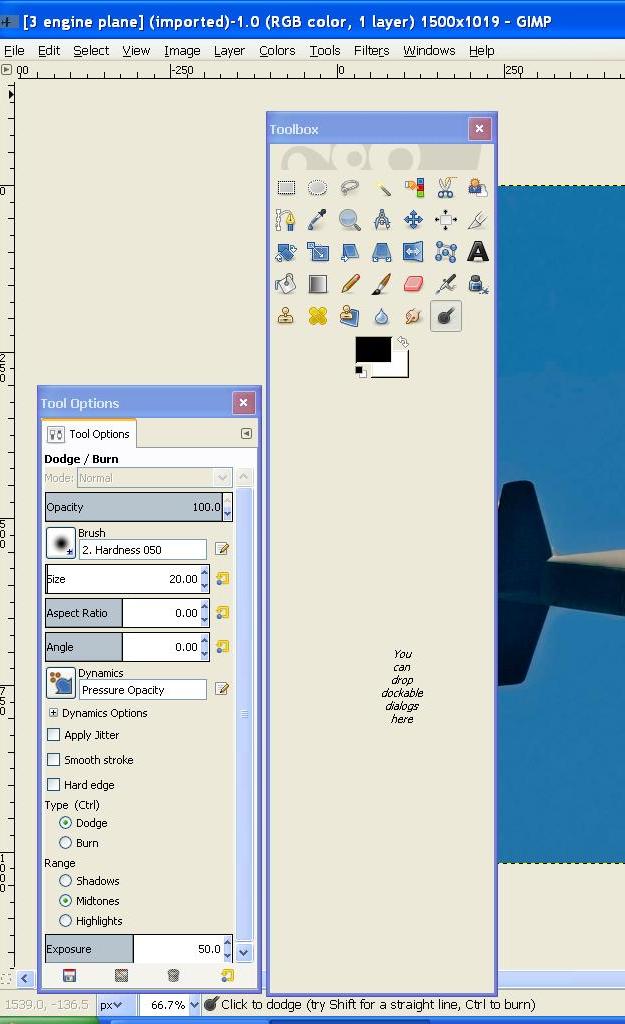
While trying to edit a file, and clicking on a tool, the toolbox for that changed from being inside the bigger box, to being under it. So now i have to click and drag the bigger box out of the way, to see the toolbox below, whereas before, it opened in the same palette as the bigger box , and i;d like to get that to be as it was , so any tips ?

Also, i'm used to only working with NEF raw files, and i wonder if i can make Gimp open a NEF file, some how ?

Thanks !

Image


Share on Facebook Share on Twitter Share on Orkut Share on Digg Share on MySpace Share on Delicious Share on Technorati
Top
 Post subject: Re: Toolbox problem
PostPosted: Fri Nov 22, 2013 10:38 pm  (#2) 
Hi, in the Tool Options window, click and drag the 'Tool Options Tab' by the tab itself (just above the word 'Burn' in the picture you posted) and drag it back to the Toolbox window.

As for opening RAW files, under the main banner click on search. Type in Raw, I recall seeing other posts in the past about opening RAW files.


Top
 Post subject: Re: Toolbox problem
PostPosted: Fri Nov 22, 2013 10:53 pm  (#3) 
Offline
GimpChat Member
User avatar

Joined: Nov 21, 2013
Posts: 33
Tried that fluff, but the next time i go into Gimp, the choice i make ( say a different tool ) doesnt open in the main palette like it does on the right hand side palette. I just end up with a big blank space, as in the photo above where it says ' you can drop dockable dialogues here ' I never saw that message in there before, because whatever tool i chose, the palette for the tool would automatically sit in that space. I dont know if i'm making myself clear

Thanks for the tip on the search for RAW - i'll give that a whirl


Last edited by fatbass on Fri Nov 22, 2013 11:00 pm, edited 1 time in total.

Top
 Post subject: Re: Toolbox problem
PostPosted: Fri Nov 22, 2013 11:00 pm  (#4) 
Offline
GimpChat Member
User avatar

Joined: Jul 17, 2012
Posts: 2769
Hi fatbass !

As fluffy already explained you can drag and then dock the tool options window into the toolbox.

If its not there again after restarting, go to Windows -> Dockable Dialogues -> Toolbox Options, then dock it again into the Toolbox.

That worked for me.


Top
 Post subject: Re: Toolbox problem
PostPosted: Fri Nov 22, 2013 11:05 pm  (#5) 
Offline
GimpChat Member
User avatar

Joined: Nov 21, 2013
Posts: 33
Yes i did that, and then i hit the eraser tool, and so that box hid under the toolbox, so i had to drag that out to use it. I want any tool tool i choose , to open in the toolbox and stay there - why do they keep disappearing ? Have i got to keep clicking toolbox options and dock any tool everytime i use it ? It never started off this way


Top
 Post subject: Re: Toolbox problem
PostPosted: Fri Nov 22, 2013 11:06 pm  (#6) 
Try esper's suggestion if that works :bigthup
If not, can you do a full screen snapshot and post it here so I can confirm something please.

As for your RAW question, it is not something I have ever used, but there are some plugins available to do it and some very recent requests about it. (That's why I suggested you search rather than me) you probably know more about RAW than I do. Looks as though DCRAW from samj's post is a stand alone command line program that will do what you want though.


Top
 Post subject: Re: Toolbox problem
PostPosted: Fri Nov 22, 2013 11:11 pm  (#7) 
Offline
GimpChat Member
User avatar

Joined: Jul 17, 2012
Posts: 2769
thats strange, it should not keep disappearing

what you could also try is going to Edit -> Preferences -> Tool Options
and then click Reset Saved Tool Option To Default Values


Top
 Post subject: Re: Toolbox problem
PostPosted: Sat Nov 23, 2013 4:44 am  (#8) 
Offline
Global Moderator
User avatar

Joined: Apr 01, 2012
Posts: 8511
Location: On the other side of your screen
This might help you
viewtopic.php?f=8&t=8838

_________________
Image
Free Fun Photo Editing & resources
Poems from the Lord
Gimp Newby
Gimp version 3.2.8 and GMIC-Qt 4.0.2 OS :- Windows 10 Home 64


Top
 Post subject: Re: Toolbox problem
PostPosted: Sat Nov 23, 2013 6:53 am  (#9) 
Offline
Global Moderator
User avatar

Joined: May 16, 2010
Posts: 16309
Hi Fatbass and welcome to Gimp Chat.
Have you tried docking the tool options dialog to the bottom of the toolbox dialog? Shorten the toolbox dialog and drag the tool options window to connect it to the bottom of the toolbox window. You should see a connection border highlight.

_________________
Image


Top
 Post subject: Re: Toolbox problem
PostPosted: Sat Nov 23, 2013 10:05 am  (#10) 
Offline
GimpChat Member
User avatar

Joined: Nov 21, 2013
Posts: 33
Thanks for the advice people ! Have read the RAW advice and I think ACR ( i've used this for many years ) would be the answer but i no longer have it, and it appears now that its not available to download from anywhere. It was always free software - strange

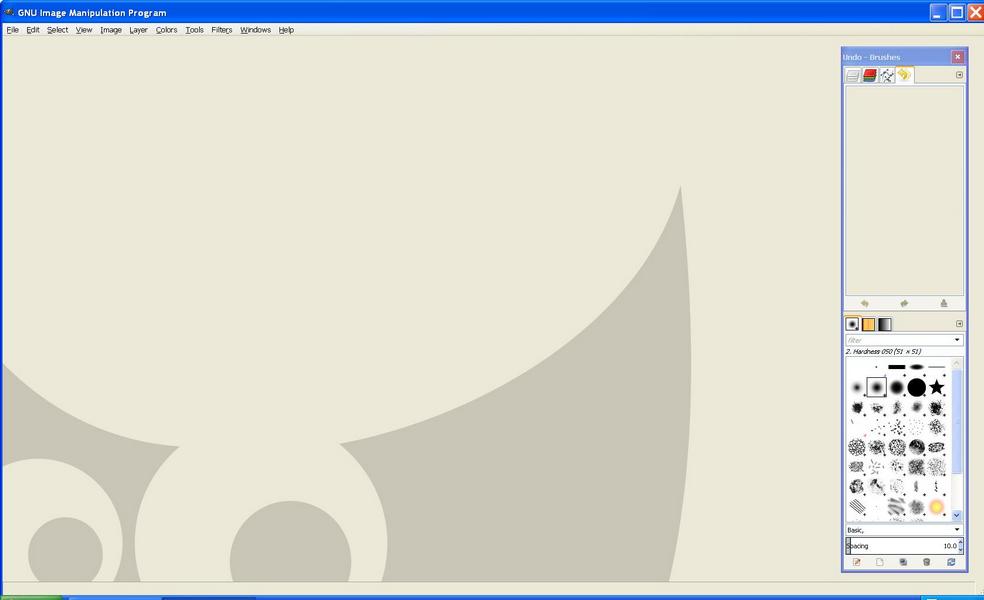
Ok, update .. reset tool options to default in prefs. and the screen shots are as follows :

Screen1. Gimp looks like this after opening
Screen2. I've clicked file > open > choose file from PC ( a European Mantis macro )
Screen3. On top bar I've clicked Tools > Transform Tools > Dodge n Burn

And nothing came up except the tool itself attached to my pointer, no palette underneath the main Toolbox palette
this time.

Image


Last edited by fatbass on Sat Nov 23, 2013 10:08 am, edited 1 time in total.

Top
 Post subject: Re: Toolbox problem
PostPosted: Sat Nov 23, 2013 10:07 am  (#11) 
Offline
GimpChat Member
User avatar

Joined: Nov 21, 2013
Posts: 33
Hmm... couldnt add 3 files to the same post

Image


Top
 Post subject: Re: Toolbox problem
PostPosted: Sat Nov 23, 2013 10:07 am  (#12) 
Offline
GimpChat Member
User avatar

Joined: Nov 21, 2013
Posts: 33
Image


Top
 Post subject: Re: Toolbox problem
PostPosted: Sat Nov 23, 2013 10:10 am  (#13) 
Offline
GimpChat Member
User avatar

Joined: Nov 21, 2013
Posts: 33
So rod - i couldn't drag anything anywhere this time, as the dodge n burn palette didnt even appear, like it did before


Top
 Post subject: Re: Toolbox problem
PostPosted: Sat Nov 23, 2013 10:18 am  (#14) 
Offline
GimpChat Member
User avatar

Joined: Apr 07, 2010
Posts: 14182
@fatbass, did you try uploading your files with this button? Image

_________________
Image


Top
 Post subject: Re: Toolbox problem
PostPosted: Sat Nov 23, 2013 10:29 am  (#15) 
Offline
GimpChat Member
User avatar

Joined: Nov 21, 2013
Posts: 33
I sure did molly. I tried to add 3 files and it i got a message saying ' you've already uploaded this file ' when i tried adding file number 2 and 3. I then couldnt add them separately, even in anew post as the same message appeared. I gave up and used Tinypic uploader instead
Try adding them one at a time, before you check submit.


Top
 Post subject: Re: Toolbox problem
PostPosted: Sat Nov 23, 2013 10:32 am  (#16) 
Offline
GimpChat Member
User avatar

Joined: Apr 07, 2010
Posts: 14182
If you upload a file once, you can't upload it again as the same name. Change the name, or put a number beside it like file.jpg change to file1.jpg, something like that and it will upload.

_________________
Image


Top
 Post subject: Re: Toolbox problem
PostPosted: Sat Nov 23, 2013 10:34 am  (#17) 
Offline
GimpChat Member
User avatar

Joined: Aug 30, 2012
Posts: 2174
To view any of the dockable dialogues as they are called you can go Windows>Dockable Dialogues>Tool Options.

_________________
Image


Top
 Post subject: Re: Toolbox problem
PostPosted: Sat Nov 23, 2013 10:38 am  (#18) 
Offline
GimpChat Member
User avatar

Joined: Aug 30, 2012
Posts: 2174
molly wrote:
If you upload a file once, you can't upload it again as the same name. Change the name, or put a number beside it like file.jpg change to file1.jpg, something like that and it will upload.


Just tried it but so long as I open files up via the file menu I can open up as many version of the same image as I like. This includes opening as a new image or as a new layer for jpg/png Files.

_________________
Image


Top
 Post subject: Re: Toolbox problem
PostPosted: Sat Nov 23, 2013 10:54 am  (#19) 
Offline
GimpChat Member
User avatar

Joined: Apr 07, 2010
Posts: 14182
I was referring to uploading his images into his posts. If you try uploading the file once it has already been uloaded, it won't let you unless you change the name. Maybe I am the one that is confused, he then said he had to use tinypic to upload which we don't recommend third party uploads.

_________________
Image


Top
 Post subject: Re: Toolbox problem
PostPosted: Sat Nov 23, 2013 11:03 am  (#20) 
Offline
GimpChat Member
User avatar

Joined: Aug 30, 2012
Posts: 2174
molly wrote:
I was referring to uploading his images into his posts. If you try uploading the file once it has already been uloaded, it won't let you unless you change the name. Maybe I am the one that is confused, he then said he had to use tinypic to upload which we don't recommend third party uploads.


:oops:

_________________
Image


Top
Post new topic Reply to topic  [ 37 posts ]  Go to page 1, 2  Next

All times are UTC - 5 hours [ DST ]


* Login  


Powered by phpBB3 © phpBB Group