It is currently Wed Jun 03, 2026 6:26 pm


All times are UTC - 5 hours [ DST ]


Post new topic Reply to topic  [ 24 posts ]  Go to page 1, 2  Next
Author Message
 Post subject: My feeble atempt at a transparent splash screen.
PostPosted: Sun Dec 15, 2013 5:39 am  (#1) 
Offline
Global Moderator
User avatar

Joined: May 16, 2010
Posts: 16008
Image

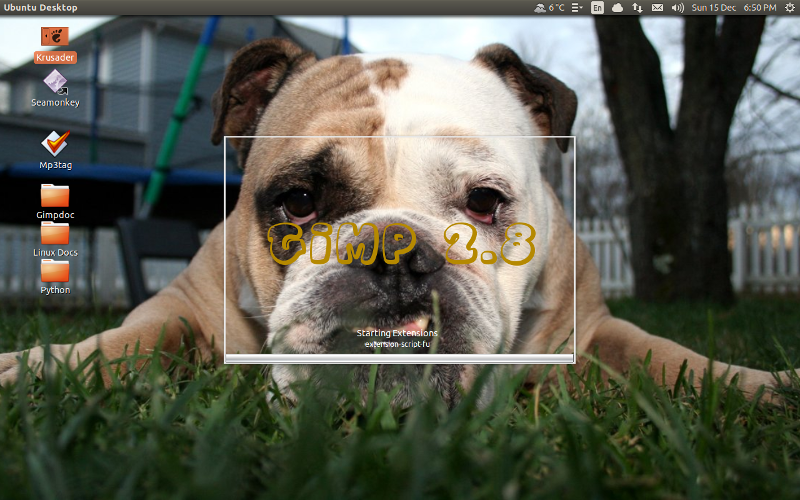
This splash should open over the desktop wallpaper exactly aligned as to look like only the green 3D Gimp-2.8 is loading. :) :bigthup

A test... I am a little off but i can live with that. The rest i can fix with the clone tool. :)
If you have this wallpaper on XP feel free to use the splash if you want.

Image

_________________
Image


Share on Facebook Share on Twitter Share on Orkut Share on Digg Share on MySpace Share on Delicious Share on Technorati
Top
 Post subject: Re: My feeble atempt at a transparent splash screen.
PostPosted: Sun Dec 15, 2013 6:15 am  (#2) 
Offline
Script Coder
User avatar

Joined: Oct 25, 2010
Posts: 4812
Cool idea..

_________________
Image


Top
 Post subject: Re: My feeble atempt at a transparent splash screen.
PostPosted: Sun Dec 15, 2013 6:21 am  (#3) 
Offline
Global Moderator
User avatar

Joined: May 16, 2010
Posts: 16008
ofnuts wrote:
Cool idea..

Thanks Ofnuts. I think i can probably use the Iwarp tool to fix the discrepancies. :)

_________________
Image


Top
 Post subject: Re: My feeble atempt at a transparent splash screen.
PostPosted: Sun Dec 15, 2013 7:05 am  (#4) 
Offline
Global Moderator
User avatar

Joined: May 16, 2010
Posts: 16008
Now i just need a transparent Windows XP theme. :)

Image

_________________
Image


Top
 Post subject: Re: My feeble atempt at a transparent splash screen.
PostPosted: Sun Dec 15, 2013 8:01 am  (#5) 
Offline
GimpChat Founder
User avatar

Joined: May 22, 2008
Posts: 5241
Location: Gimpville
Nice! :bigthup

_________________
“If you reach for the stars, you just might land on a decently sized hill.” - Stuart Hill


Top
 Post subject: Re: My feeble atempt at a transparent splash screen.
PostPosted: Sun Dec 15, 2013 8:43 am  (#6) 
Offline
GimpChat Member
User avatar

Joined: Aug 16, 2012
Posts: 4271
Location: Göteborg, Sweden
rod: that's a really cool idea :)! i change wallpaper all the time, but maybe i could make a neutral sort of transparent gimp splash screen that would go with all of them? it's worth a try!

_________________


Top
 Post subject: Re: My feeble atempt at a transparent splash screen.
PostPosted: Sun Dec 15, 2013 11:53 am  (#7) 
Offline
GimpChat Member
User avatar

Joined: Nov 16, 2011
Posts: 5127
Location: Metro Vancouver, BC
Great idea Rod!

_________________
Image
Gimp 2.8.18, Linux, median user
Gimp Chat Tutorials Index
Spirit Bear (Kermode)


Top
 Post subject: Re: My feeble atempt at a transparent splash screen.
PostPosted: Sun Dec 15, 2013 12:45 pm  (#8) 
Offline
Global Moderator
User avatar

Joined: May 16, 2010
Posts: 16008
The tricky part is getting the correct area to copy on your screen. :)

_________________
Image


Top
 Post subject: Re: My feeble atempt at a transparent splash screen.
PostPosted: Sun Dec 15, 2013 1:29 pm  (#9) 
Offline
Administrator
User avatar

Joined: Aug 10, 2012
Posts: 14011
Location: Native to NYC living in Arizona, Gimp 2.8 - 3.0, Win 11 PC.
:wh
I thought that Gimp didn't support transparent backgrounds on it's splash screens. I've tried this before, and Gimp has always filled in the transparent areas with black.
I must be wrong about this , because obviously you've made it happen. ;)
How did you manage to get the background to remain transparent when opening Gimp? I've been wanting to do this for ages.
There's something fishy going on here... :hoh

_________________
Image
"A wise man learns more from a foolish question than a fool can learn from a wise answer"
Image


Last edited by Wallace on Sun Dec 15, 2013 8:10 pm, edited 5 times in total.

Top
 Post subject: Re: My feeble atempt at a transparent splash screen.
PostPosted: Sun Dec 15, 2013 1:32 pm  (#10) 
Offline
GimpChat Member
User avatar

Joined: Aug 30, 2012
Posts: 2174
Great Idea Rod.

_________________
Image


Top
 Post subject: Re: My feeble atempt at a transparent splash screen.
PostPosted: Sun Dec 15, 2013 3:28 pm  (#11) 
Offline
Administrator
User avatar

Joined: Aug 10, 2012
Posts: 14011
Location: Native to NYC living in Arizona, Gimp 2.8 - 3.0, Win 11 PC.
I know how you did it Rod... :mrgreen:
Image
Attachment:
Gimp Splash Psychobilly.png
Gimp Splash Psychobilly.png [ 132.82 KiB | Viewed 2996 times ]

_________________
Image
"A wise man learns more from a foolish question than a fool can learn from a wise answer"
Image


Last edited by Wallace on Sun Dec 15, 2013 8:11 pm, edited 1 time in total.

Top
 Post subject: Re: My feeble atempt at a transparent splash screen.
PostPosted: Sun Dec 15, 2013 4:14 pm  (#12) 
Offline
GimpChat Member
User avatar

Joined: Nov 16, 2011
Posts: 5127
Location: Metro Vancouver, BC
Wallace wrote:
I know how you did it... :mrgreen:
Opacity of the background layer?

_________________
Image
Gimp 2.8.18, Linux, median user
Gimp Chat Tutorials Index
Spirit Bear (Kermode)


Top
 Post subject: Re: My feeble atempt at a transparent splash screen.
PostPosted: Sun Dec 15, 2013 7:57 pm  (#13) 
Offline
Administrator
User avatar

Joined: Aug 10, 2012
Posts: 14011
Location: Native to NYC living in Arizona, Gimp 2.8 - 3.0, Win 11 PC.
Odinbc wrote:
Wallace wrote:
I know how you did it... :mrgreen:
Opacity of the background layer?

Like I mentioned... Gimp doesn't support the transparency of PNG images used as a splash. Gimp will turn any transparent areas in a PNG splash image to, #000000.
So how do you think it was done? :mrgreen:

_________________
Image
"A wise man learns more from a foolish question than a fool can learn from a wise answer"
Image


Last edited by Wallace on Sun Dec 15, 2013 8:03 pm, edited 1 time in total.

Top
 Post subject: Re: My feeble atempt at a transparent splash screen.
PostPosted: Sun Dec 15, 2013 8:01 pm  (#14) 
Offline
GimpChat Member
User avatar

Joined: Mar 23, 2012
Posts: 7388
Location: Göteborg at last!
Does it involve a masking colour?


Top
 Post subject: Re: My feeble atempt at a transparent splash screen.
PostPosted: Sun Dec 15, 2013 8:12 pm  (#15) 
Offline
Administrator
User avatar

Joined: Aug 10, 2012
Posts: 14011
Location: Native to NYC living in Arizona, Gimp 2.8 - 3.0, Win 11 PC.
Erisian wrote:
Does it involve a masking colour?

In a way yes, but not really. :hehe

_________________
Image
"A wise man learns more from a foolish question than a fool can learn from a wise answer"
Image


Top
 Post subject: Re: My feeble atempt at a transparent splash screen.
PostPosted: Sun Dec 15, 2013 8:14 pm  (#16) 
Offline
GimpChat Member
User avatar

Joined: Nov 16, 2011
Posts: 5127
Location: Metro Vancouver, BC
1. Take a screenshot of the desktop background.
2. Take a screenshot of the Gimp splashscreen loading, for reference.
3. Make Gimp splash screen using hidden desktop area.

_________________
Image
Gimp 2.8.18, Linux, median user
Gimp Chat Tutorials Index
Spirit Bear (Kermode)


Top
 Post subject: Re: My feeble atempt at a transparent splash screen.
PostPosted: Sun Dec 15, 2013 8:17 pm  (#17) 
Offline
Script Coder
User avatar

Joined: Feb 18, 2011
Posts: 4826
Location: Bendigo Vic. Australia
I think you would have to amend the GTK file as well

_________________
Image
No matter how much you push the envelope, it'll still be stationery.


Top
 Post subject: Re: My feeble atempt at a transparent splash screen.
PostPosted: Sun Dec 15, 2013 8:28 pm  (#18) 
Offline
Administrator
User avatar

Joined: Aug 10, 2012
Posts: 14011
Location: Native to NYC living in Arizona, Gimp 2.8 - 3.0, Win 11 PC.
Graechan wrote:
I think you would have to amend the GTK file as well

Nope...

Odinbc wrote:
1. Take a screenshot of the desktop background.
2. Take a screenshot of the Gimp splashscreen loading, for reference.
3. Make Gimp splash screen using hidden desktop area.


Exactly!
Your the big wiener, I mean winner Odin! :hehe
PS... There really wasn't anything to be won.

_________________
Image
"A wise man learns more from a foolish question than a fool can learn from a wise answer"
Image


Top
 Post subject: Re: My feeble atempt at a transparent splash screen.
PostPosted: Sun Dec 15, 2013 9:38 pm  (#19) 
Offline
Global Moderator
User avatar

Joined: May 16, 2010
Posts: 16008
Wallace and Odin figured it out. :)
But i did it the hard way. :lol

I used folders on my desktop as corner references for a snapshot area.
Using FastStone capture i selected that area and created the splash screen then added the 3D with "The GrassyVine PhotoFont" and 3D-Extrude. Of course i had to fix mine a wee bit to match but it works. I was really surprised my area was that close when it opened on my desktop the first time.

Pretty cool.

_________________
Image


Top
 Post subject: Re: My feeble atempt at a transparent splash screen.
PostPosted: Sun Dec 15, 2013 9:58 pm  (#20) 
Offline
GimpChat Member
User avatar

Joined: Nov 16, 2011
Posts: 5127
Location: Metro Vancouver, BC
Image
No, it's not my dog.
Image

_________________
Image
Gimp 2.8.18, Linux, median user
Gimp Chat Tutorials Index
Spirit Bear (Kermode)


Top
Post new topic Reply to topic  [ 24 posts ]  Go to page 1, 2  Next

All times are UTC - 5 hours [ DST ]


* Login  


Powered by phpBB3 © phpBB Group