It is currently Sun Aug 16, 2026 8:44 pm


All times are UTC - 5 hours [ DST ]


Post new topic Reply to topic  [ 31 posts ]  Go to page Previous  1, 2
Author Message
 Post subject: Re: Some more op-art
PostPosted: Thu Dec 19, 2013 12:42 pm  (#21) 
Offline
GimpChat Member
User avatar

Joined: Jan 03, 2011
Posts: 1656
I've also added an option in the G'MIC Patterns/Op art filter to allow an user to add its own custom shapes defined in top layers over the image. The entry 'Custom shapes' must be selected for the parameter 'Shape', like I did in the screenshot below :

Attachment:
gmic_opart.png
gmic_opart.png [ 127.81 KiB | Viewed 1440 times ]


It's a bit similar to the way the Pack sprites works.
You can still have a control on the minimal and maximal size of your shapes with the sliders.
Finally, you get something like this (added a black background to get rid of the transparency) :

Attachment:
gmic_custom_opart.jpg
gmic_custom_opart.jpg [ 563.85 KiB | Viewed 1440 times ]


There are still some minor problems with the preview, but I hope I can fix them soon.
Hope you will enjoy it.


Top
 Post subject: Re: Some more op-art
PostPosted: Thu Dec 19, 2013 1:04 pm  (#22) 
Offline
GimpChat Member
User avatar

Joined: Jan 03, 2011
Posts: 1656
Another example, with sprites I took from the Gauntlet arcade game.

Attachment:
gmic_gauntlet.jpg
gmic_gauntlet.jpg [ 2.71 MiB | Viewed 1435 times ]


And with another image :

Attachment:
gmic_gauntlet2.jpg
gmic_gauntlet2.jpg [ 1.76 MiB | Viewed 1435 times ]


Top
 Post subject: Re: Some more op-art
PostPosted: Thu Dec 19, 2013 3:29 pm  (#23) 
Offline
GimpChat Member
User avatar

Joined: Sep 24, 2010
Posts: 12831
Ronounours wrote:
I've also added an option in the G'MIC Patterns/Op art filter to allow an user to add its own custom shapes defined in top layers over the image. The entry 'Custom shapes' must be selected for the parameter 'Shape', like I did in the screenshot below :

Attachment:
gmic_opart.png


It's a bit similar to the way the Pack sprites works.
You can still have a control on the minimal and maximal size of your shapes with the sliders.
Finally, you get something like this (added a black background to get rid of the transparency) :

Attachment:
gmic_custom_opart.jpg


Awesome David; was waiting for the G'MIC equivalent. Would be close to packed sprites except that you don't pack them; just align them. lol

:)

There are still some minor problems with the preview, but I hope I can fix them soon.
Hope you will enjoy it.

_________________
Lyle

Psalm 109:8

Image


Top
 Post subject: Re: Some more op-art
PostPosted: Thu Dec 19, 2013 5:47 pm  (#24) 
Offline
GimpChat Member
User avatar

Joined: Jul 17, 2012
Posts: 2769
good stuff :bigthup


Top
 Post subject: Re: Some more op-art
PostPosted: Thu Dec 19, 2013 6:40 pm  (#25) 
Offline
GimpChat Member
User avatar

Joined: Sep 24, 2010
Posts: 12831
G'MIC appears to give you a better dynamic w.r.t. the truchet set anyway. Again, thanks a heap David. I would post this at Flickr, but, Flickr's down for the count right now. :)


Attachments:
caricature.png
caricature.png [ 91.35 KiB | Viewed 1412 times ]

_________________
Lyle

Psalm 109:8

Image
Top
 Post subject: Re: Some more op-art
PostPosted: Thu Dec 19, 2013 6:54 pm  (#26) 
Offline
GimpChat Member
User avatar

Joined: Oct 06, 2010
Posts: 4050
I will probably add the bottlecap library and a new shades of coffee cups to this and see what it does.

_________________
"In order to attain the impossible, one must attempt the absurd."
~ Miguel de Cervantes


Top
 Post subject: Re: Some more op-art
PostPosted: Thu Dec 19, 2013 7:21 pm  (#27) 
Offline
GimpChat Member
User avatar

Joined: Sep 24, 2010
Posts: 12831
Cool to see that you are able to post some mahvin; where's your avatar? Look forward to seeing your result with the coffee cups. lol

:)

_________________
Lyle

Psalm 109:8

Image


Top
 Post subject: Re: Some more op-art
PostPosted: Thu Dec 19, 2013 7:45 pm  (#28) 
Offline
GimpChat Member
User avatar

Joined: Sep 24, 2010
Posts: 12831
Why not another one. The trick is to bend the result frame strategically to add dimension. lolol

Added Fencepost Chrome to the mix by the way. :)

ref: http://www.fontplay.com/freephotos/sixt ... 06-016.jpg

http://www.flickr.com/photos/34520999@N ... otostream/

Image

_________________
Lyle

Psalm 109:8

Image


Top
 Post subject: Re: Some more op-art
PostPosted: Sat Dec 21, 2013 2:02 pm  (#29) 
Offline
GimpChat Member

Joined: Apr 12, 2010
Posts: 5870
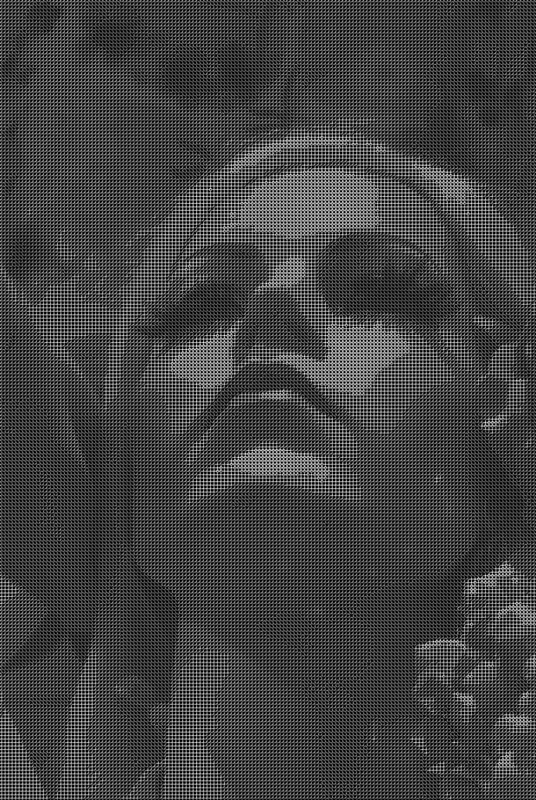
@ L
what the secret of your self portrait , how you modify the pattern along the edges intersecting that sort of Trochet ?

really nice effect , i like the last also the last less surprising but neat .

I will remove the most bright light spot on the right cheek , i mean the little spot in a dark area , i found it distracting .

Cool images anyway and cool filters

_________________
My 3D Gallery on Deviantart http://photocomix2.deviantart.com/
Main gallery http://www.flickriver.com/photos/photocomix-mandala/
Mandala and simmetry http://www.flickriver.com/photos/photocomix_mandala/

Image

Mrs Wilbress


Top
 Post subject: Re: Some more op-art
PostPosted: Sat Dec 21, 2013 5:09 pm  (#30) 
Offline
GimpChat Member
User avatar

Joined: Sep 24, 2010
Posts: 12831
Used my standard dup wavelet denoise (1000,80) set to Grain Extract and merged down, then ran G'MIC's Anisotrophic filter on that result before setting it to Grain Merge (only applied to the Trucet render; click here for details which includes the target pattern as an xcf). :)

_________________
Lyle

Psalm 109:8

Image


Top
 Post subject: Re: Some more op-art
PostPosted: Tue Dec 24, 2013 4:07 am  (#31) 
Offline
GimpChat Member
User avatar

Joined: Sep 24, 2010
Posts: 12831
Still on this mini-binge (thanks again David; errrrrrr. lol). If you look hard enough you might see a word in the pipes. ;)

For, what it's worth, this one's seamless too. :)

http://www.flickr.com/photos/34520999@N ... otostream/

Image

_________________
Lyle

Psalm 109:8

Image


Top
Post new topic Reply to topic  [ 31 posts ]  Go to page Previous  1, 2

All times are UTC - 5 hours [ DST ]


* Login  


Powered by phpBB3 © phpBB Group