It is currently Wed Nov 25, 2026 4:18 pm


All times are UTC - 5 hours [ DST ]


Post new topic Reply to topic  [ 58 posts ]  Go to page Previous  1, 2, 3  Next
Author Message
 Post subject: Re: Why has this suddenly started to appear?
PostPosted: Tue Dec 31, 2013 8:04 pm  (#21) 
Offline
GimpChat Member
User avatar

Joined: Sep 22, 2012
Posts: 2089
Location: US
The same thing's happening in 2.6 or 2.8, doesn't matter, when you have a document with NO layers.

Look at the screenshot, the image information bar (under the menu bar) It says, [FileName] - (imported) 1.0 (RGB.....) and so on.
There is 0 layers. Zero. Of course, you can't apply a tool (any tool) on nothing.
To reproduce this situation, create a new image, select the only layer and delete it.
You'll get an empty document.

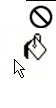
About the restriction sign next to the tool-tip/cursor. Maybe I'm missing something here, but it always appears for the Bucket fill tool
(and some other tools too)when the cursor's outside the selection, outside canvas area, etc. It's just the way it's supposed to be.


Last edited by K1TesseraEna on Tue Dec 31, 2013 8:09 pm, edited 1 time in total.

Top
 Post subject: Re: Why has this suddenly started to appear?
PostPosted: Tue Dec 31, 2013 8:08 pm  (#22) 
Offline
Administrator
User avatar

Joined: Aug 10, 2012
Posts: 14284
Location: Native to NYC living in Arizona, Gimp 2.8 - 3.0, Win 11 PC.
K1TesseraEna wrote:
The same thing's happening in 2.6 or 2.8, doesn't matter, when you have a document with NO layers.

Look at the screenshot, the image information bar (under the menu bar) It says, [FileName] - (imported) 1.0 (RGB.....) and so on.
There is 0 layers. Zero. Of course, you can't apply a tool (any tool) on nothing.
To reproduce this situation, create a new image, select the only layer and delete it.
You'll get an empty document.

About the restriction sign next to the tool-tip/cursor. Maybe I'm missing something here, but it always appears for Bucket fill tool
(and some other tolls too)when the cursor's outside the selection, outside canvas area, etc. It's just the way it's supposed to be.

I beg to differ... This icon does not occur in Gimp 2.6. and I've never seen this anomaly before, and can not reproduce it in Gimp 2.6 or my portable 2.8.
Please reproduce this effect and show us that it is a normal occurrence that Gimp provides, I assure you that you will not be able to reproduce this anomaly within the normal functioning of any Gimp installation.

_________________
Image
"A wise man learns more from a foolish question than a fool can learn from a wise answer"
Image


Top
 Post subject: Re: Why has this suddenly started to appear?
PostPosted: Tue Dec 31, 2013 8:17 pm  (#23) 
Offline
GimpChat Member
User avatar

Joined: Sep 22, 2012
Posts: 2089
Location: US
Wallace wrote:
I beg to differ... This icon does not occur in Gimp 2.6. and I've never seen this anomaly before, and can not reproduce it in Gimp 2.6 or my portable 2.8.

I checked it on my laptop's gimp 2.6.11 just before posting here. And 2.8 of course.
You've never seen this slashed circle next to the tool-tip?

Image

What are your mouse pointer settings in gimp Preferences>Image Window?


Top
 Post subject: Re: Why has this suddenly started to appear?
PostPosted: Tue Dec 31, 2013 8:26 pm  (#24) 
Offline
Administrator
User avatar

Joined: Aug 10, 2012
Posts: 14284
Location: Native to NYC living in Arizona, Gimp 2.8 - 3.0, Win 11 PC.
K1TesseraEna wrote:
Wallace wrote:
I beg to differ... This icon does not occur in Gimp 2.6. and I've never seen this anomaly before, and can not reproduce it in Gimp 2.6 or my portable 2.8.

I checked it on my laptop's gimp 2.6.11 just before posting here. And 2.8 of course.
You've never seen this slashed circle next to the tool-tip?

[ Image ]

What are your mouse pointer settings in gimp Preferences>Image Window?

That's a good question!
Although I haven't changed any of my preferences in rearguards to this issue ever. I don't see it as something that should occur, unless you want it to. That would mean that I've changed my preferences to be able to display this annoying icon.
This is something I think that no one would do to there interface. There's either a corrupt dll causing this or possibly a duplicate dill, but then again I don't know how Mac handles it's dll files and can't be 100% sure that this is the cause.
Thus far, no one has been able to reproduce this same effect, as it's being presented.

_________________
Image
"A wise man learns more from a foolish question than a fool can learn from a wise answer"
Image


Top
 Post subject: Re: Why has this suddenly started to appear?
PostPosted: Tue Dec 31, 2013 8:33 pm  (#25) 
Offline
GimpChat Member
User avatar

Joined: Sep 22, 2012
Posts: 2089
Location: US
I see what you mean Wallace.
The only reason I keep 2.6 is to have a virgin version of a program. I don't change anything there,
install no plugins, scripts, whatsoever. Pure academic interest, when I can compare 2.6 and 2.8.
I may forget about some changes I made to 2.8 but my 2.6 is as untouched as Joan of Arc.


Top
 Post subject: Re: Why has this suddenly started to appear?
PostPosted: Tue Dec 31, 2013 8:41 pm  (#26) 
Offline
Administrator
User avatar

Joined: Aug 10, 2012
Posts: 14284
Location: Native to NYC living in Arizona, Gimp 2.8 - 3.0, Win 11 PC.
K1TesseraEna wrote:
I see what you mean Wallace.
The only reason I keep 2.6 is to have a virgin version of a program. I don't change anything there,
install no plugins, scripts, whatsoever. Pure academic interest, when I can compare 2.6 and 2.8.
I may forget about some changes I made to 2.8 but my 2.6 is as untouched as Joan of Arc.

:wow I'd like to have a copy of that!

Nonetheless, can you reproduce this anomaly to reflect what has occurred in his video?

_________________
Image
"A wise man learns more from a foolish question than a fool can learn from a wise answer"
Image


Top
 Post subject: Re: Why has this suddenly started to appear?
PostPosted: Tue Dec 31, 2013 8:45 pm  (#27) 
Offline
Global Moderator
User avatar

Joined: May 16, 2010
Posts: 16314
:ninja
Same here. I have 2.6.12 with no resources so i can use just gimps default filters. Loads much better too. :) That and for making scripts compatible. Though i think Saulgoode fixed that with just a few lines of code.

Back on subject-
It could possibly be that a selection was present in the other open document.
That could cause GIMP to focus on that window.But didn't he say he restarted GIMP once before?

_________________
Image


Top
 Post subject: Re: Why has this suddenly started to appear?
PostPosted: Tue Dec 31, 2013 8:53 pm  (#28) 
Offline
Administrator
User avatar

Joined: Aug 10, 2012
Posts: 14284
Location: Native to NYC living in Arizona, Gimp 2.8 - 3.0, Win 11 PC.
Rod wrote:
:ninja
Same here. I have 2.6.12 with no resources so i can use just gimps default filters. Loads much better too. :) That and for making scripts compatible. Though i think Saulgoode fixed that with just a few lines of code.
Back on subject-
It could possibly be that a selection was present in the other open document.
That could cause GIMP to focus on that window.But didn't he say he restarted GIMP once before?

Yes Rod, it just occurs. With layer, no layer or whatever. I've tried to reproduce this many times and failed.

_________________
Image
"A wise man learns more from a foolish question than a fool can learn from a wise answer"
Image


Top
 Post subject: Re: Why has this suddenly started to appear?
PostPosted: Tue Dec 31, 2013 9:08 pm  (#29) 
Offline
Global Moderator
User avatar

Joined: May 16, 2010
Posts: 16314
I wonder if removing the gimprc file and restarting GIMP to make a new one would fix this?

_________________
Image


Top
 Post subject: Re: Why has this suddenly started to appear?
PostPosted: Tue Dec 31, 2013 9:09 pm  (#30) 
Offline
GimpChat Member
User avatar

Joined: Sep 22, 2012
Posts: 2089
Location: US
Wallace wrote:
Nonetheless, can you reproduce this anomaly to reflect what has occurred in his video?


here's my video, not a great quality (for the smallest size sake but good enuf to see what's going on)
Attaching it here - takes less time than upload on youtube or vimeo


Attachment:
capture-1.zip [2.37 MiB]
Downloaded 74 times


Top
 Post subject: Re: Why has this suddenly started to appear?
PostPosted: Tue Dec 31, 2013 9:14 pm  (#31) 
Offline
Administrator
User avatar

Joined: Aug 10, 2012
Posts: 14284
Location: Native to NYC living in Arizona, Gimp 2.8 - 3.0, Win 11 PC.
K1TesseraEna wrote:
Wallace wrote:
Nonetheless, can you reproduce this anomaly to reflect what has occurred in his video?


here's my video, not a great quality (for the smallest size sake but good enuf to see what's going on)
Attaching it here - takes less time than upload on youtube or vimeo


Attachment:
capture-1.zip

Even without viewing your video, are you saying that this is a normal function of Gimp? Because I've failed to reproduce this anomaly whatsoever in the normal functioning of Gimp in any of the versions of Gimp that I have installed?

I've watched your video, and this does not occur from the beginning, but does occurs after you've created a layer. Which is normal, even though this does not occur in 2.6...
I still have never seen this icon displayed in 2.6 or the 2.8 portable Partha build, with or without a layer
being present.

In the start of his video, there is no layer, yet this anomaly still appears. In your video I don't see this until you've created a layer.
??? It's still a mystery, if you ask me.

_________________
Image
"A wise man learns more from a foolish question than a fool can learn from a wise answer"
Image


Top
 Post subject: Re: Why has this suddenly started to appear?
PostPosted: Tue Dec 31, 2013 9:49 pm  (#32) 
Offline
GimpChat Member
User avatar

Joined: Sep 22, 2012
Posts: 2089
Location: US
Wallace wrote:
Even without viewing your video, are you saying that this is a normal function of Gimp? Because I've failed to reproduce this anomaly whatsoever in the normal functioning of Gimp in any of the versions of Gimp that I have installed?

I've watched your video, and this does not occur from the beginning, but does occurs after you've created a layer. Which is normal, even though this does not occur in 2.6...
I still have never seen this icon displayed in 2.6 or the 2.8 portable Partha build, with or without a layer being present.


You didn't happen to watch my video backward Wallace, did you? LOL
I've created the new doc (layer) in the very beginning and there is an icon whenever the cursor is outside
the selection or canvas area. After I deleted the layer, icon appears all the time.
This is not an anomaly, all versions of gimp I ever had had this feature, similar icon appears in many other programs, e.g. in Photoshop when
you try to apply a tool on locked layer, etc.


Top
 Post subject: Re: Why has this suddenly started to appear?
PostPosted: Tue Dec 31, 2013 10:33 pm  (#33) 
Offline
Administrator
User avatar

Joined: Aug 10, 2012
Posts: 14284
Location: Native to NYC living in Arizona, Gimp 2.8 - 3.0, Win 11 PC.
K1TesseraEna wrote:
Wallace wrote:
Even without viewing your video, are you saying that this is a normal function of Gimp? Because I've failed to reproduce this anomaly whatsoever in the normal functioning of Gimp in any of the versions of Gimp that I have installed?

I've watched your video, and this does not occur from the beginning, but does occurs after you've created a layer. Which is normal, even though this does not occur in 2.6...
I still have never seen this icon displayed in 2.6 or the 2.8 portable Partha build, with or without a layer being present.


You didn't happen to watch my video backward Wallace, did you? LOL
I've created the new doc (layer) in the very beginning and there is an icon whenever the cursor is outside
the selection or canvas area. After I deleted the layer, icon appears all the time.
This is not an anomaly, all versions of gimp I ever had had this feature, similar icon appears in many other programs, e.g. in Photoshop when
you try to apply a tool on locked layer, etc.

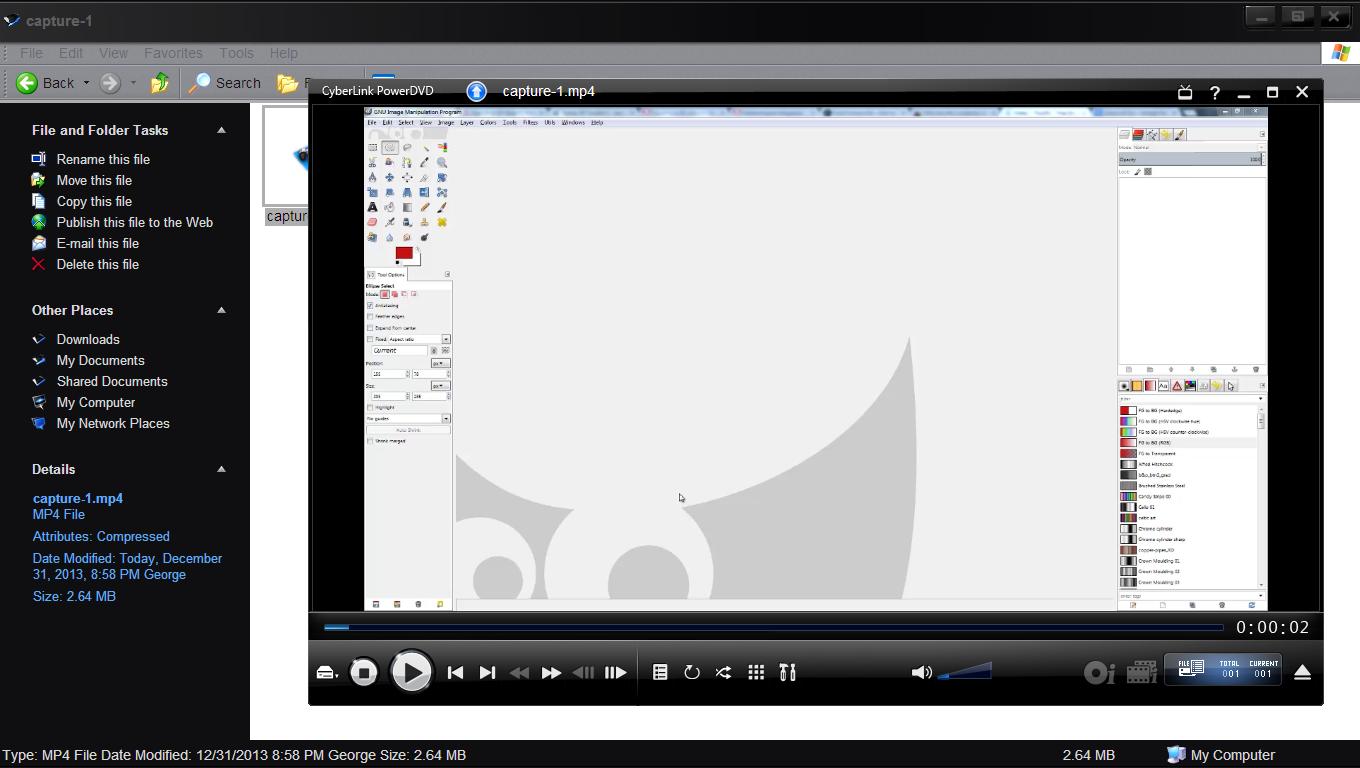
Here is a screenshot of your own video...
Image
Do you see the circle/cross anywhere? This is the beginning of your video.

_________________
Image
"A wise man learns more from a foolish question than a fool can learn from a wise answer"
Image


Top
 Post subject: Re: Why has this suddenly started to appear?
PostPosted: Wed Jan 01, 2014 12:23 am  (#34) 
Offline
GimpChat Member

Joined: Dec 29, 2013
Posts: 159
Ok i'm back and the pad is cleaned up (a little more at least :hehe ) more importantly I've got a fresh new clean install on the laptop! I'm ready to conquer in 2014!

So let me just make a little disclaimer before I go any further.
I'm not as slow as this vid may appear HONESTLY the circle thingy was MUCH worst.

Not sure what was (or is still for that matter...) going on. I do know many others have reported the same issue.

So with out further a due.... I present to you my screencast ladies and gents

View My Video


Top
 Post subject: Re: Why has this suddenly started to appear?
PostPosted: Wed Jan 01, 2014 1:00 am  (#35) 
Offline
GimpChat Member
User avatar

Joined: Sep 22, 2012
Posts: 2089
Location: US
Wallace wrote:
Here is a screenshot of your own video...
[ Image ]
Do you see the circle/cross anywhere? This is the beginning of your video.


Don't you see the difference between the GIMP interface with no open documents
and the gimp with an open but empty document?
The otherwhirl's video starts with a document already open but empty (no layers) - the situation I created in the END of my video.
And the behavior in both our videos is the same. The way it supposed to be. THIS IS NOT AN ANOMALY!

Read my first post in this thread again.

Once again: create a new document, select the only layer, delete it and you'll get what the otherwhirl's video starts with.
This IS an open document. My video starts with no documents whatsoever (thanks for the screenshot, it confirms it) until I created one.


Top
 Post subject: Re: Why has this suddenly started to appear?
PostPosted: Wed Jan 01, 2014 1:18 am  (#36) 
Offline
GimpChat Member

Joined: Dec 29, 2013
Posts: 159
hmmmm... so in plain English. The circle icon is nothing to be concerned about?
you say this is merely an issue of documents vs. no documents being open?

it didn't matter if i opened it from a .xcf file or not it was still acting problematic for me.

As I mentioned before , the screencast really does no justice (and I really should not have uploaded it now that I think about it, as it really does not capture what I experienced prior to the clean install.)

what I kept experiencing was whenever the small circle appeared (and it would stay not go away when the cursor moved from the pallette...) was not being able to move layers around as well as the constant circle , when i KNOW for a fact i had never seen it that much (and certainly not on every single tool...)

K1TesseraEna wrote:
Wallace wrote:
Here is a screenshot of your own video...
[ Image ]
Do you see the circle/cross anywhere? This is the beginning of your video.


Don't you see the difference between the GIMP interface with no open documents
and the gimp with an open but empty document?
The otherwhirl's video starts with a document already open but empty (no layers) - the situation I created in the END of my video.
And the behavior in both our videos is the same. The way it supposed to be. THIS IS NOT AN ANOMALY!

Read my first post in this thread again.

Once again: create a new document, select the only layer, delete it and you'll get what the otherwhirl's video starts with.
This IS an open document. My video starts with no documents whatsoever (thanks for the screenshot, it confirms it) until I created one.


Top
 Post subject: Re: Why has this suddenly started to appear?
PostPosted: Wed Jan 01, 2014 1:39 am  (#37) 
Offline
GimpChat Member
User avatar

Joined: Sep 22, 2012
Posts: 2089
Location: US
otherwhirl wrote:
hmmmm... so in plain English. The circle icon is nothing to be concerned about?
you say this merely an issue of documents vs. no documents being open?

it didn't matter if i opened it from a .xcf file or not it was still acting problematic for me.

As I mentioned before , the screencast really does no justice (and I really should not have uploaded it now that I think about it, as it really does not capture what I experienced prior to the clean install.)

what I kept experiencing was the whenever the small circle appeared (and it would stay not go away when the cursor moved from the pallette...) was me not being able to move layers around as well as the constant circle , when i KNOW for a fact i had never seen it that much (and certainly not on every single tool...)


If the restriction icon stays in one place when you move the cursor away this is certainly not a normal behavior
but this issue has never been brought up until now (or wasn't properly described). It certainly does not show in your screencast.
The icon moves along with the tool tip whenever the cursor is over the canvas or the padding area, which is supposed to be happening.

Issue with layers too? Have you tried Partha's McGimp build for Mac users? http://www.partha.com/


Top
 Post subject: Re: Why has this suddenly started to appear?
PostPosted: Wed Jan 01, 2014 1:56 am  (#38) 
Offline
GimpChat Member

Joined: Dec 29, 2013
Posts: 159
As i mentioned before the screencast does not actually capture the issue
(if you google the issue you will see i'm not the only person who has experienced this...)

I have not tried Partha's build, I may try it.

First I am going to see how Gimp acts after the fresh install.


Thanks for your input.


K1TesseraEna wrote:
otherwhirl wrote:
hmmmm... so in plain English. The circle icon is nothing to be concerned about?
you say this merely an issue of documents vs. no documents being open?

it didn't matter if i opened it from a .xcf file or not it was still acting problematic for me.

As I mentioned before , the screencast really does no justice (and I really should not have uploaded it now that I think about it, as it really does not capture what I experienced prior to the clean install.)

what I kept experiencing was the whenever the small circle appeared (and it would stay not go away when the cursor moved from the pallette...) was me not being able to move layers around as well as the constant circle , when i KNOW for a fact i had never seen it that much (and certainly not on every single tool...)


If the restriction icon stays in one place when you move the cursor away this is certainly not a normal behavior
but this issue has never been brought up until now (or wasn't properly described). It certainly does not show in your screencast.
The icon moves along with the tool tip whenever the cursor is over the canvas or the padding area, which is supposed to be happening.

Issue with layers too? Have you tried Partha's McGimp build for Mac users? http://www.partha.com/


Top
 Post subject: Re: Why has this suddenly started to appear?
PostPosted: Wed Jan 01, 2014 2:04 am  (#39) 
Offline
GimpChat Member
User avatar

Joined: Sep 22, 2012
Posts: 2089
Location: US
otherwhirl wrote:
As i mentioned before the screencast does not actually capture the issue
(if you google the issue you will see i'm not the only person who has experienced this...)

I have not tried Partha's build, I may try it.

First I am going to see how Gimp acts after the fresh install.


Thanks for your input.


You're welcome.
I'm not a Mac user but a lot of people around here are and using Partha's builds.
Partha is a Gimp Chat member, his builds are robust and trustworthy, besides, if you have any questions you can PM him


Top
 Post subject: Re: Why has this suddenly started to appear?
PostPosted: Wed Jan 01, 2014 2:18 am  (#40) 
Offline
GimpChat Member

Joined: Dec 29, 2013
Posts: 159
Excellent :bigthup

K1TesseraEna wrote:
otherwhirl wrote:
As i mentioned before the screencast does not actually capture the issue
(if you google the issue you will see i'm not the only person who has experienced this...)

I have not tried Partha's build, I may try it.

First I am going to see how Gimp acts after the fresh install.


Thanks for your input.


You're welcome.
I'm not a Mac user but a lot of people around here are and using Partha's builds.
Partha is a Gimp Chat member, his builds are robust and trustworthy, besides, if you have any questions you can PM him


Top
Post new topic Reply to topic  [ 58 posts ]  Go to page Previous  1, 2, 3  Next

All times are UTC - 5 hours [ DST ]


* Login  


Powered by phpBB3 © phpBB Group