It is currently Mon Sep 07, 2026 2:01 am


All times are UTC - 5 hours [ DST ]


Post new topic Reply to topic  [ 14 posts ] 
Author Message
 Post subject: Firefox looks funny
PostPosted: Wed Feb 09, 2011 9:41 am  (#1) 
Offline
Global Moderator
User avatar

Joined: May 16, 2010
Posts: 16169
Is it just me or does everyone's tabs in fire-fox look like Old English text?

Image

It is only my browser doing this too.
First it wouldn't launch kept saying it crashed about 5 times - then i launched it from the actual program directory instead of the shortcut and it updated all the plugins (i think , im not sure because the text was hard to read)
Then it launched mozilla looking like this.

Everything is normal except the font type.

very strange!
Even the addresses in the submit field are Old English text.. :lol
Should i un-install and re-install a fresh Firefox browser program?

Internet Explorer looks fine.

_________________
Image


Share on Facebook Share on Twitter Share on Orkut Share on Digg Share on MySpace Share on Delicious Share on Technorati
Top
 Post subject: Re: Firefox looks funny
PostPosted: Wed Feb 09, 2011 9:47 am  (#2) 
Offline
Retired Staff
User avatar

Joined: May 22, 2008
Posts: 6946
Location: Somewhere in GIMP
Check in your Firefox Preferences and look at what fonts are selected.

Image

_________________
Image
World War IV will be fought with sticks and stones. - Albert Einstein


Top
 Post subject: Re: Firefox looks funny
PostPosted: Wed Feb 09, 2011 10:14 am  (#3) 
Offline
Global Moderator
User avatar

Joined: May 16, 2010
Posts: 16169
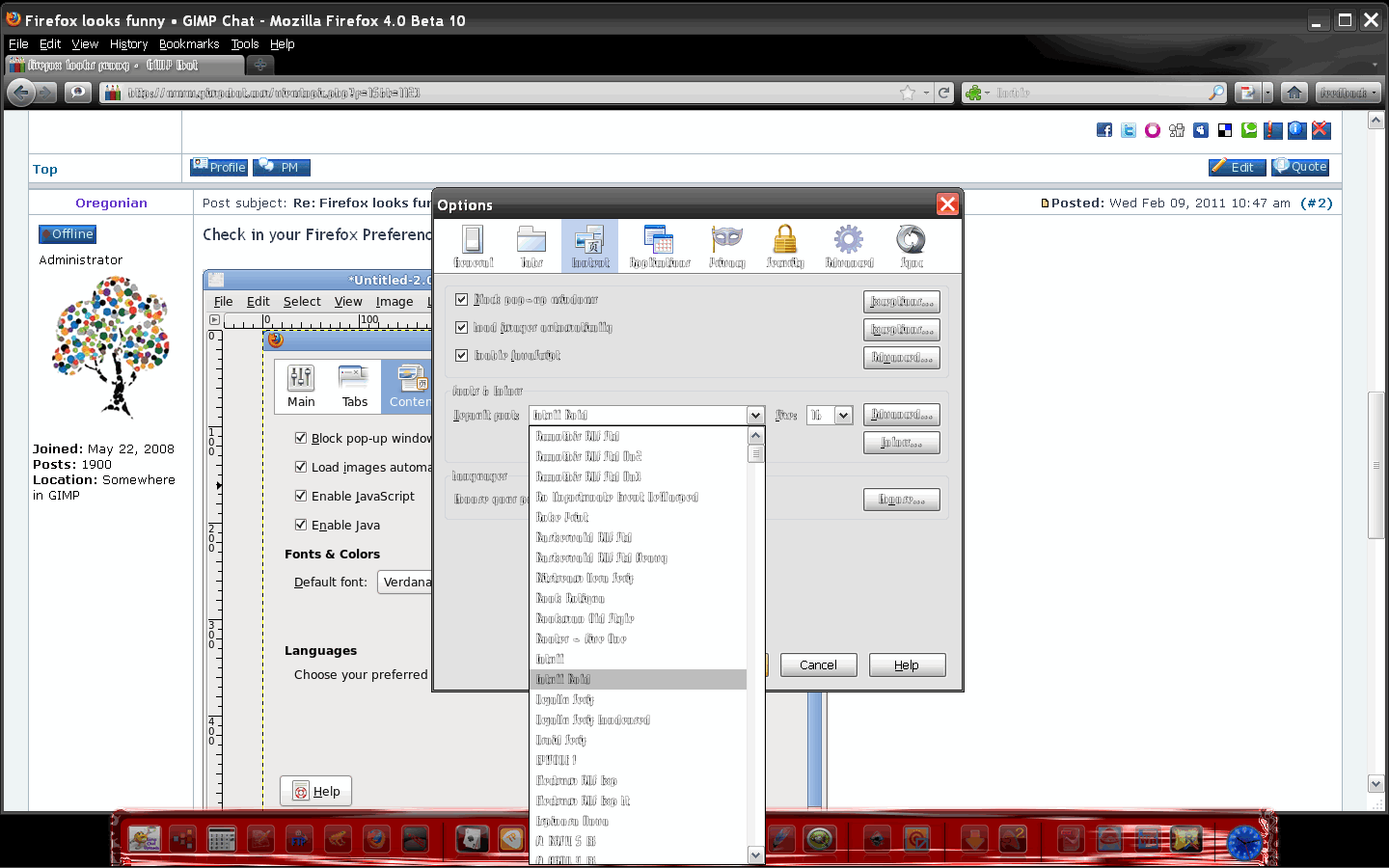
this is what my options looks like
Image

even my font list is old english - wth :lol

_________________
Image


Top
 Post subject: Re: Firefox looks funny
PostPosted: Wed Feb 09, 2011 10:18 am  (#4) 
Offline
Retired Staff
User avatar

Joined: May 22, 2008
Posts: 6946
Location: Somewhere in GIMP
Can you not change the font to Verdana or something like Verdana?

http://support.mozilla.com/en-US/search?q=fonts+in+Firefox

What about your Windows fonts? Are they OK?

_________________
Image
World War IV will be fought with sticks and stones. - Albert Einstein


Top
 Post subject: Re: Firefox looks funny
PostPosted: Wed Feb 09, 2011 10:47 am  (#5) 
Offline
GimpChat Member
User avatar

Joined: Oct 29, 2010
Posts: 711
Location: Netherlands
In FF Preferences you can only change the font in rendered text.
The font in the toolbar is not in Preferences.
In Linux I use this program: gtk-chtheme.
With it you can change the toolbar fonts and the looks.
What is available for Windows I don't know since I don't have it.
Gerard.

_________________
Gentoo Linux always up-to-date.
Kernel-3.17.4 Python-2.7.8/3.3.5
Gimp-2.8.14

I use Linux only.
And Virtualbox with Win 7


Top
 Post subject: Re: Firefox looks funny
PostPosted: Wed Feb 09, 2011 10:56 am  (#6) 
Offline
Global Moderator
User avatar

Joined: May 16, 2010
Posts: 16169
i found a little tidbit on changing font type and size here
like this:

- First type in the firefox url bar: about:config
- search layout.css.dpi and change value -1 to 0. Close firefox
- Activate Show hidden files.
- Navigate to inside .mozilla/firefox/xxxxxxxx.default/
- here, open a konsole with CTRL+T
- type kate userChrome.css. You will see:

* {
font-family: sans-serif !important;

Yes my system fonts are fine, nothing a miss just FF.
font-size: 10pt !important;
}

or rubbish if rubbish change to those values

I have no idea what happened it just suddenly started doing this. :\

_________________
Image


Top
 Post subject: Re: Firefox looks funny
PostPosted: Wed Feb 09, 2011 11:01 am  (#7) 
Offline
Global Moderator
User avatar

Joined: May 16, 2010
Posts: 16169
It seems like its running a font outline and thats what makes it so hard to read.
I have gotten no where with those directions by the way. =\

oh well i guess i am stuck running IE for now.

_________________
Image


Top
 Post subject: Re: Firefox looks funny
PostPosted: Wed Feb 09, 2011 11:06 am  (#8) 
Offline
Retired Staff
User avatar

Joined: May 22, 2008
Posts: 6946
Location: Somewhere in GIMP
I've put in a query at the Mozilla Firefox newsgroup.

_________________
Image
World War IV will be fought with sticks and stones. - Albert Einstein


Top
 Post subject: Re: Firefox looks funny
PostPosted: Wed Feb 09, 2011 11:09 am  (#9) 
Offline
GimpChat Member
User avatar

Joined: Apr 07, 2010
Posts: 14182
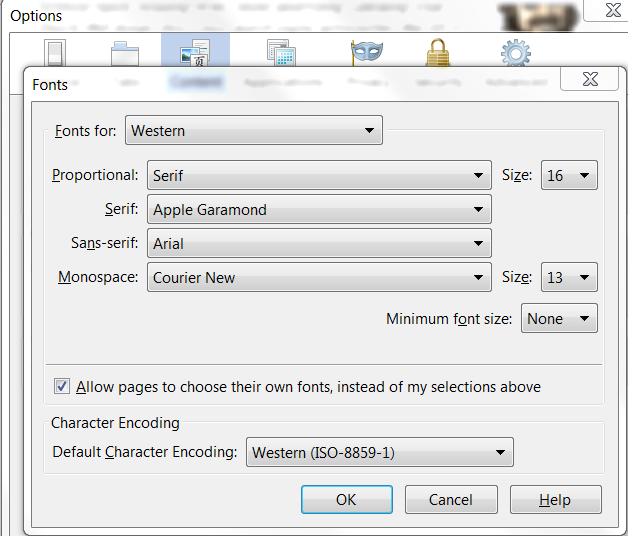
Rod did you click the advanced button beside default font then on the fonts page make sure it is set at Western and select the font you want to use, You can click or unclick the button below that says allow pages to allow their own fonts. You could try this if you haven't already..
Image

_________________
Image


Top
 Post subject: Re: Firefox looks funny
PostPosted: Wed Feb 09, 2011 11:26 am  (#10) 
Offline
Global Moderator
User avatar

Joined: May 16, 2010
Posts: 16169
Yeah but its so hard to read i can not figure out what says what. =)
I know its set to western.

I even went into advanced font settings and everything has that default font so its hard to make out what the settings even read.

I think i am going to un-install everything including my personal settings and history, bookmarks and all that entirely and then re-install it.

I have been making a habit of backing up my favorites for about a year now so ill have my stuff back im sure.
Ahh well wish me luck here gos! :)

_________________
Image


Top
 Post subject: Re: Firefox looks funny
PostPosted: Wed Feb 09, 2011 11:40 am  (#11) 
Offline
Global Moderator
User avatar

Joined: May 16, 2010
Posts: 16169
Fixed it! - :wh :yes :clap
Image
Here is what i did (i was even able to change the font to comic sans ms :hehe )
in my hidden folder - C:\Documents and Settings\Compaq_Owner.FAMILY-ROOM\Application Data\Mozilla\Firefox\Profiles\rqk999mf.default\chrome - is an example css file
i re edited it and saved it as userChrome.css in the same folder.

/*
* Edit this file and copy it as userChrome.css into the above directory
*/

/*
* This file can be used to customize the look of Mozilla's user interface
* You should consider using !important on rules which you want to
* override default settings.
*/

/*
* Do not remove the @namespace line -- it's required for correct functioning
*/
@namespace url("http://www.mozilla.org/keymaster/gatekeeper/there.is.only.xul"); /* set default namespace to XUL */


/*
* Some possible accessibility enhancements:
*/
*
* Make all the default font sizes 10 pt:

  {
   font-size: 10pt !important
  }
*
* Make menu items in particular 10 pt instead of the default size:

  menupopup > * {
    font-size: 10pt !important
  }

*
* Give the Location url Bar a fixed-width font

  #urlbar {
     font-family: monospace !important;
  }

*
  {
    font-family: comic sans ms !important;
    font-size: 10pt !important;
}


Check this out though - the Gimp Chat / uploader still shows the derelict font!
Image

How weird is that!?? :lol :rofl

_________________
Image


Top
 Post subject: Re: Firefox looks funny
PostPosted: Wed Feb 09, 2011 3:57 pm  (#12) 
Offline
GimpChat Member
User avatar

Joined: Oct 06, 2010
Posts: 4050
Sounds like the remnants of someone's theme layout. But that would mean you or someone using your computer tried a theme out and forgot to change it back. Which doesn't sound like that was the case here.

_________________
"In order to attain the impossible, one must attempt the absurd."
~ Miguel de Cervantes


Top
 Post subject: Re: Firefox looks funny
PostPosted: Wed Feb 09, 2011 5:34 pm  (#13) 
Offline
Global Moderator
User avatar

Joined: May 16, 2010
Posts: 16169
It still has some funny remnants too, like submit buttons and text areas still show the other font type.
Just really strange stuff.I have never, ever seen this before.

Maybe i need to edit the css file some more. :)

_________________
Image


Top
 Post subject: Re: Firefox looks funny
PostPosted: Wed Feb 09, 2011 6:10 pm  (#14) 
Offline
Retired Staff
User avatar

Joined: May 22, 2008
Posts: 6946
Location: Somewhere in GIMP
Looks like you've made some good progress there anyway, Rod.

_________________
Image
World War IV will be fought with sticks and stones. - Albert Einstein


Top
Post new topic Reply to topic  [ 14 posts ] 

All times are UTC - 5 hours [ DST ]


* Login  


Powered by phpBB3 © phpBB Group