It is currently Tue Nov 17, 2026 1:21 am


All times are UTC - 5 hours [ DST ]


Post new topic Reply to topic  [ 123 posts ]  Go to page Previous  1, 2, 3, 4, 5, 6, 7  Next
Author Message
 Post subject: Re: "Interlacing Text" Tutorial
PostPosted: Thu Apr 03, 2014 9:07 am  (#61) 
Offline
GimpChat Member
User avatar

Joined: Jun 02, 2013
Posts: 2090
Thanks everyone, appreciate it. Nice work Mackenzieh, and Issabella!

_________________
Image


Top
 Post subject: Re: "Interlacing Text" Tutorial
PostPosted: Thu Apr 03, 2014 9:19 am  (#62) 
Offline
GimpChat Member
User avatar

Joined: Apr 08, 2010
Posts: 5420
Location: Northwest Ohio
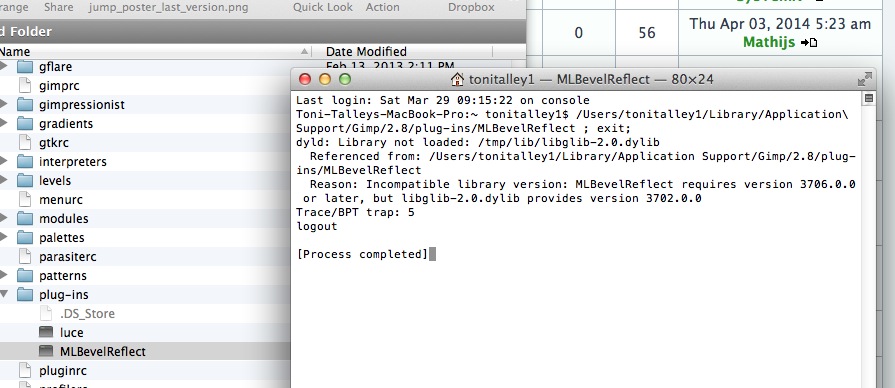
Drat, looks like I will have to wait for a mac compile for the ml bevel reflect plug in, too. Not that I can't walk over 4 steps to the pc, lol, but I just prefer to work on the mac and not have to send files back and forth from computer to computer.
Image


Top
 Post subject: Re: "Interlacing Text" Tutorial
PostPosted: Thu Apr 03, 2014 11:10 am  (#63) 
Offline
GimpChat Member
User avatar

Joined: Jun 02, 2013
Posts: 2090
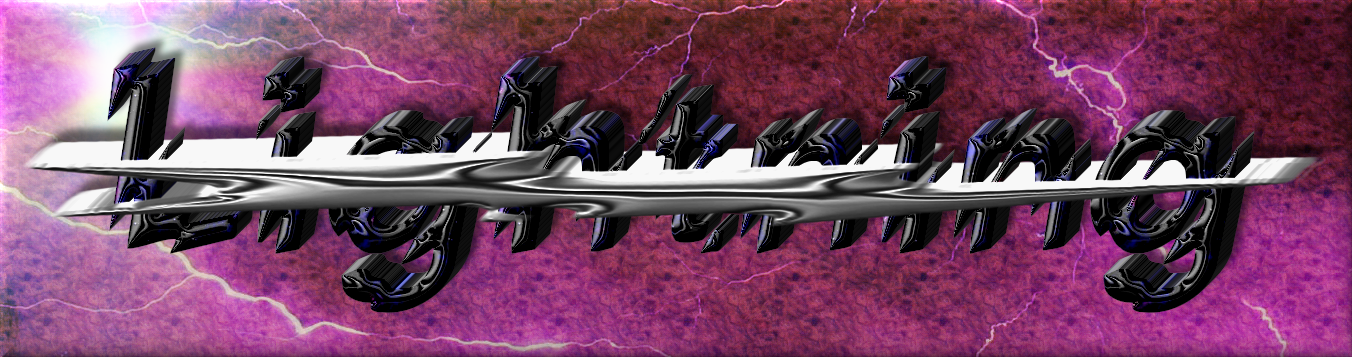
Something a little different yet. The word is more "inside" the lightning.

Image

_________________
Image


Top
 Post subject: Re: "Interlacing Text" Tutorial
PostPosted: Thu Apr 03, 2014 11:43 am  (#64) 
Offline
GimpChat Member
User avatar

Joined: Apr 07, 2010
Posts: 14182
2-ton, I thought I saw somewhere in the past week that Partha already compiled that script for Mac, or was I dreaming.

_________________
Image


Top
 Post subject: Re: "Interlacing Text" Tutorial
PostPosted: Thu Apr 03, 2014 12:31 pm  (#65) 
Offline
GimpChat Member
User avatar

Joined: May 27, 2011
Posts: 707
The Warrior

here's 2 results.
One with the word layer"Peace" In my case Hannah visible
and the other with the layer "peace" hidden

Image

Image


Top
 Post subject: Re: "Interlacing Text" Tutorial
PostPosted: Thu Apr 03, 2014 12:50 pm  (#66) 
Offline
GimpChat Member
User avatar

Joined: Jun 02, 2013
Posts: 2090
pirate541 wrote:
The Warrior

here's 2 results.
One with the word layer"Peace" In my case Hannah visible
and the other with the layer "peace" hidden

[ Image ]

[ Image ]

Nice work! :hi5 Fun, huh.

_________________
Image


Top
 Post subject: Re: "Interlacing Text" Tutorial
PostPosted: Thu Apr 03, 2014 12:56 pm  (#67) 
Offline
GimpChat Member
User avatar

Joined: May 27, 2011
Posts: 707
Lots of fun
Thank You :)


Top
 Post subject: Re: "Interlacing Text" Tutorial
PostPosted: Thu Apr 03, 2014 7:45 pm  (#68) 
Offline
GimpChat Member
User avatar

Joined: Jun 02, 2013
Posts: 2090
pirate541 wrote:
Lots of fun
Thank You :)

You're welcome.

_________________
Image


Top
 Post subject: Re: "Interlacing Text" Tutorial
PostPosted: Thu Apr 03, 2014 8:35 pm  (#69) 
Offline
GimpChat Member
User avatar

Joined: Dec 10, 2013
Posts: 1004
2-ton wrote:
Drat, looks like I will have to wait for a mac compile for the ml bevel reflect plug in, too. Not that I can't walk over 4 steps to the pc, lol, but I just prefer to work on the mac and not have to send files back and forth from computer to computer.


Same here 2-ton.

Warrior, Wow! Really like the tutorial and your results; all of them.

Everyone, too many to name individually but wanted to say great results on yours.

_________________
Image
Macbook Air - MacOS Sierra 10.12
McGimp 2.8.14
G'mic 1.6.5


Top
 Post subject: Re: "Interlacing Text" Tutorial
PostPosted: Thu Apr 03, 2014 10:04 pm  (#70) 
Offline
GimpChat Member
User avatar

Joined: Apr 08, 2010
Posts: 5420
Location: Northwest Ohio
Molly, I will go check Partha's Place and see if that plug in is there.


Top
 Post subject: Re: "Interlacing Text" Tutorial
PostPosted: Thu Apr 03, 2014 10:33 pm  (#71) 
Offline
GimpChat Member
User avatar

Joined: Jun 02, 2013
Posts: 2090
Dalia wrote:
Warrior, Wow! Really like the tutorial and your results; all of them.

Thanks Dalia, appreciate it.

_________________
Image


Top
 Post subject: Re: "Interlacing Text" Tutorial
PostPosted: Thu Apr 03, 2014 10:36 pm  (#72) 
Offline
GimpChat Member
User avatar

Joined: Jun 02, 2013
Posts: 2090
2-ton wrote:
Molly, I will go check Partha's Place and see if that plug in is there.

There's a script for ML Bevel Reflect for MAC, but not sure about the Bevel Reflect Logo: http://gimpchat.com/viewtopic.php?f=9&t=9968

http://gimpscripts.com/2014/01/ml-bevel-reflect/

_________________
Image


Top
 Post subject: Re: "Interlacing Text" Tutorial
PostPosted: Fri Apr 04, 2014 8:34 am  (#73) 
Offline
Administrator
User avatar

Joined: Aug 10, 2012
Posts: 14275
Location: Native to NYC living in Arizona, Gimp 2.8 - 3.0, Win 11 PC.
Carlos Diniz wrote:
molly wrote:
Very nice guys. Wallace, I love you text and colors but I can't read what it says.
Mathijs, your colors blend beautifully

Wallace, I agree with Molly.

Yes, I may have to try this tutorial again.

_________________
Image
"A wise man learns more from a foolish question than a fool can learn from a wise answer"
Image


Top
 Post subject: Re: "Interlacing Text" Tutorial
PostPosted: Fri Apr 04, 2014 10:40 am  (#74) 
Offline
Administrator
User avatar

Joined: Aug 10, 2012
Posts: 14275
Location: Native to NYC living in Arizona, Gimp 2.8 - 3.0, Win 11 PC.
Wallace wrote:
Yes, I may have to try this tutorial again.

Here's my second go at it.
Image

_________________
Image
"A wise man learns more from a foolish question than a fool can learn from a wise answer"
Image


Top
 Post subject: Re: "Interlacing Text" Tutorial
PostPosted: Fri Apr 04, 2014 11:15 am  (#75) 
Offline
GimpChat Member
User avatar

Joined: Jan 20, 2013
Posts: 590
Now it's readable. Nice work, Wallace.

_________________
Image


Top
 Post subject: Re: "Interlacing Text" Tutorial
PostPosted: Fri Apr 04, 2014 11:19 am  (#76) 
Offline
Administrator
User avatar

Joined: Aug 10, 2012
Posts: 14275
Location: Native to NYC living in Arizona, Gimp 2.8 - 3.0, Win 11 PC.
Carlos Diniz wrote:
Now it's readable. Nice work, Wallace.

Thank you Carlos. ;)

_________________
Image
"A wise man learns more from a foolish question than a fool can learn from a wise answer"
Image


Top
 Post subject: Re: "Interlacing Text" Tutorial
PostPosted: Fri Apr 04, 2014 11:33 am  (#77) 
Offline
GimpChat Member
User avatar

Joined: Apr 07, 2010
Posts: 14182
Hee hee, nice spaghetti.

_________________
Image


Top
 Post subject: Re: "Interlacing Text" Tutorial
PostPosted: Fri Apr 04, 2014 11:47 am  (#78) 
Offline
GimpChat Member
User avatar

Joined: Apr 08, 2010
Posts: 5420
Location: Northwest Ohio
THanks warrior…I have the BR logo script, so will go get that ML Reflect that you linked to, and try that one.

*nope, that is the one I had, and even though I replaced it, it still throws same error when I try the bevel reflect logo script. Sigh, still must use the pc to use that. Luckily, the logo toolbox works great, so I can still make fancy text.


Top
 Post subject: Re: "Interlacing Text" Tutorial
PostPosted: Fri Apr 04, 2014 2:19 pm  (#79) 
Offline
GimpChat Member
User avatar

Joined: Mar 01, 2014
Posts: 14245
Location: Spain, Aragón
Wallace good job! I like your Western Spaghetty text. :clap

_________________
Image

Gimp 2.10.36 (samj) portable _ OS Windows 10 Home_ 64bits
Don’t be afraid to start over. It’s a new chance to rebuild what you want.


Top
 Post subject: Re: "Interlacing Text" Tutorial
PostPosted: Fri Apr 04, 2014 2:21 pm  (#80) 
Offline
GimpChat Member
User avatar

Joined: Mar 01, 2014
Posts: 14245
Location: Spain, Aragón
Conbagui, your outcome is outstanding like always! :clap

_________________
Image

Gimp 2.10.36 (samj) portable _ OS Windows 10 Home_ 64bits
Don’t be afraid to start over. It’s a new chance to rebuild what you want.


Top
Post new topic Reply to topic  [ 123 posts ]  Go to page Previous  1, 2, 3, 4, 5, 6, 7  Next

All times are UTC - 5 hours [ DST ]


* Login  


Powered by phpBB3 © phpBB Group