It is currently Mon Nov 16, 2026 10:39 pm


All times are UTC - 5 hours [ DST ]


Post new topic Reply to topic  [ 43 posts ]  Go to page Previous  1, 2, 3  Next
Author Message
 Post subject: Re: Another Clock for ClocX
PostPosted: Fri Apr 04, 2014 10:30 am  (#21) 
Offline
GimpChat Member

Joined: Jan 25, 2014
Posts: 78
Carlos Diniz, you could also install Linux in the same machine with XP. Then use only Linux in internet. I do have it so because I want learn how to use Linux and so I can do it, when I have time or want try some Linux program.


Top
 Post subject: Re: Another Clock for ClocX
PostPosted: Fri Apr 04, 2014 11:13 am  (#22) 
Offline
GimpChat Member
User avatar

Joined: Jan 20, 2013
Posts: 590
himppu wrote:
Carlos Diniz, you could also install Linux in the same machine with XP. Then use only Linux in internet. I do have it so because I want learn how to use Linux and so I can do it, when I have time or want try some Linux program.

Would you, please, teach me how to install linux? I would also like to know a link to get it.

_________________
Image


Top
 Post subject: Re: Another Clock for ClocX
PostPosted: Fri Apr 04, 2014 11:29 am  (#23) 
Offline
GimpChat Member
User avatar

Joined: Jan 20, 2013
Posts: 590
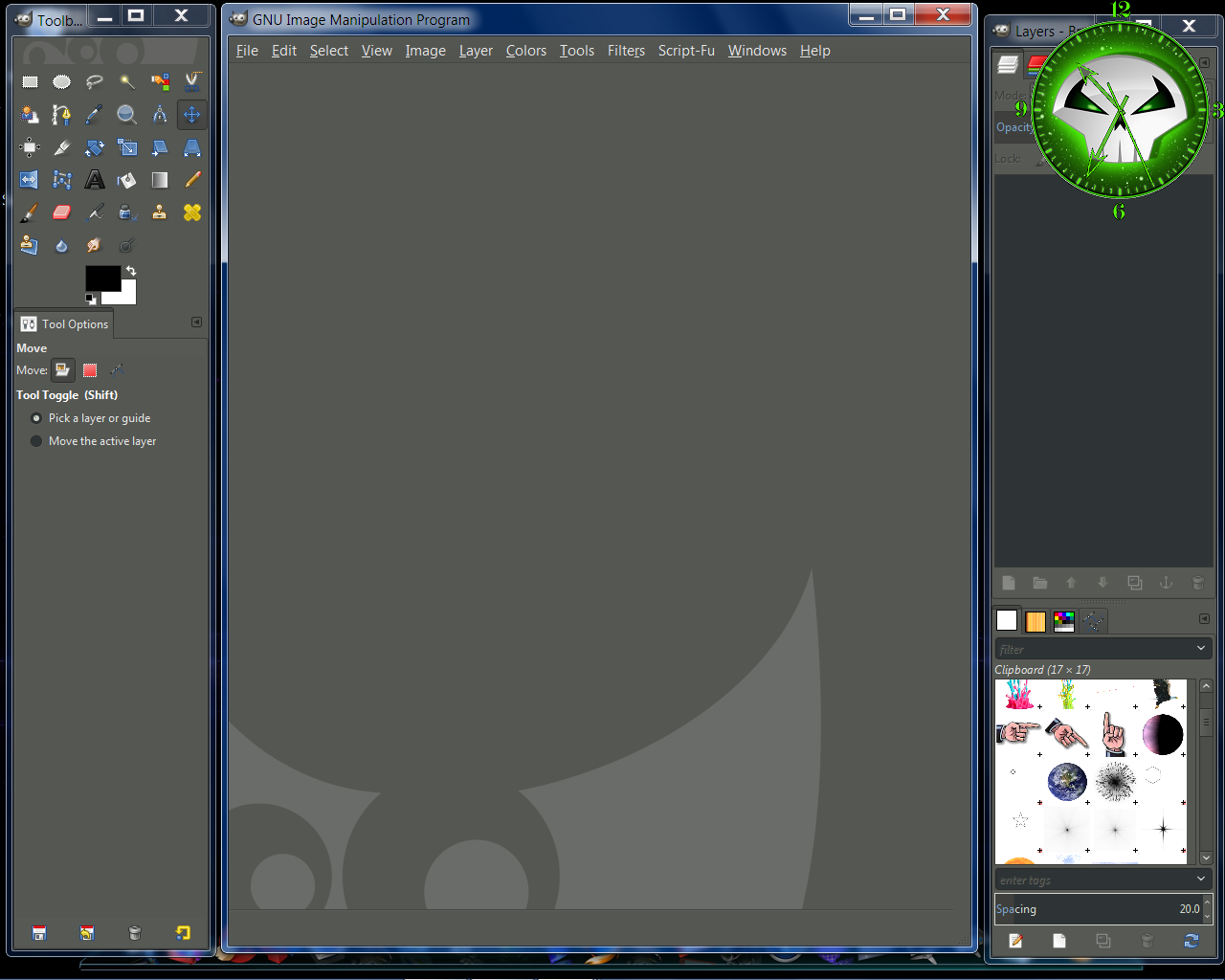
Wallace, I installed your Spawn clock at my desktop. I want to make a screenshot to show you, but when I take a screenshot of the full screen with Gimp the clock is not shown. It is transparent?

_________________
Image


Top
 Post subject: Re: Another Clock for ClocX
PostPosted: Fri Apr 04, 2014 11:31 am  (#24) 
Offline
GimpChat Member
User avatar

Joined: Apr 07, 2010
Posts: 14182
Wow that is strange, maybe it is a ghost clock.

_________________
Image


Top
 Post subject: Re: Another Clock for ClocX
PostPosted: Fri Apr 04, 2014 12:37 pm  (#25) 
Offline
Administrator
User avatar

Joined: Aug 10, 2012
Posts: 14275
Location: Native to NYC living in Arizona, Gimp 2.8 - 3.0, Win 11 PC.
Carlos Diniz wrote:
Wallace, I installed your Spawn clock at my desktop. I want to make a screenshot to show you, but when I take a screenshot of the full screen with Gimp the clock is not shown. It is transparent?

You could to use the "Print Screen" key. Then past it into "MS Pain" and save as whatever you like.
I took a screenshot with Gimp and it worked for me, look
...
Image

molly wrote:
Wow that is strange, maybe it is a ghost clock.

:hehe

BTW... I made another style of Spawn clock.
Image

_________________
Image
"A wise man learns more from a foolish question than a fool can learn from a wise answer"
Image


Top
 Post subject: Re: Another Clock for ClocX
PostPosted: Fri Apr 04, 2014 12:56 pm  (#26) 
Offline
GimpChat Member
User avatar

Joined: Apr 08, 2010
Posts: 5420
Location: Northwest Ohio
Linux is very popular, but Windoze XP was a great system, I wish our PC still had it. For some reason, it just seemed to easy to use it and to find things. It rarely gave us problems, either. I think the other windows version I liked was Windows 3.1


Top
 Post subject: Re: Another Clock for ClocX
PostPosted: Fri Apr 04, 2014 1:11 pm  (#27) 
Offline
Administrator
User avatar

Joined: Aug 10, 2012
Posts: 14275
Location: Native to NYC living in Arizona, Gimp 2.8 - 3.0, Win 11 PC.
Here's the new "Spawn" clock...
Image
This clock uses the same hands as the other Spawn clock. The "Spawn" hands folder is nonetheless included in the attached zip folder. If you have that other clock installed, there's no need to install a duplicate copy of the folder with the Spawn hands.


Attachments:
Spawn II Clock.zip [181.1 KiB]
Downloaded 91 times

_________________
Image
"A wise man learns more from a foolish question than a fool can learn from a wise answer"
Image
Top
 Post subject: Re: Another Clock for ClocX
PostPosted: Sat Apr 05, 2014 6:36 am  (#28) 
Offline
GimpChat Member
User avatar

Joined: Jan 20, 2013
Posts: 590
Wallace, I used ALT+PrtScr and now the Spawn clock is shown. Thanks.


Attachments:
Spawn clock.png
Spawn clock.png [ 90.12 KiB | Viewed 2021 times ]

_________________
Image


Last edited by Carlos Diniz on Sat Apr 05, 2014 7:33 am, edited 1 time in total.
Top
 Post subject: Re: Another Clock for ClocX
PostPosted: Sat Apr 05, 2014 7:27 am  (#29) 
Offline
GimpChat Member
User avatar

Joined: Apr 07, 2010
Posts: 14182
Glad you have your new clock working Carlos.

_________________
Image


Top
 Post subject: Re: Another Clock for ClocX
PostPosted: Sat Apr 05, 2014 9:28 am  (#30) 
Offline
Administrator
User avatar

Joined: Aug 10, 2012
Posts: 14275
Location: Native to NYC living in Arizona, Gimp 2.8 - 3.0, Win 11 PC.
Carlos Diniz wrote:
Wallace, I used ALT+PrtScr and now the Spawn clock is shown. Thanks.

Yes I see it Carlos and it look great, if I may say so. Have you seen my second "Spawn" clock?
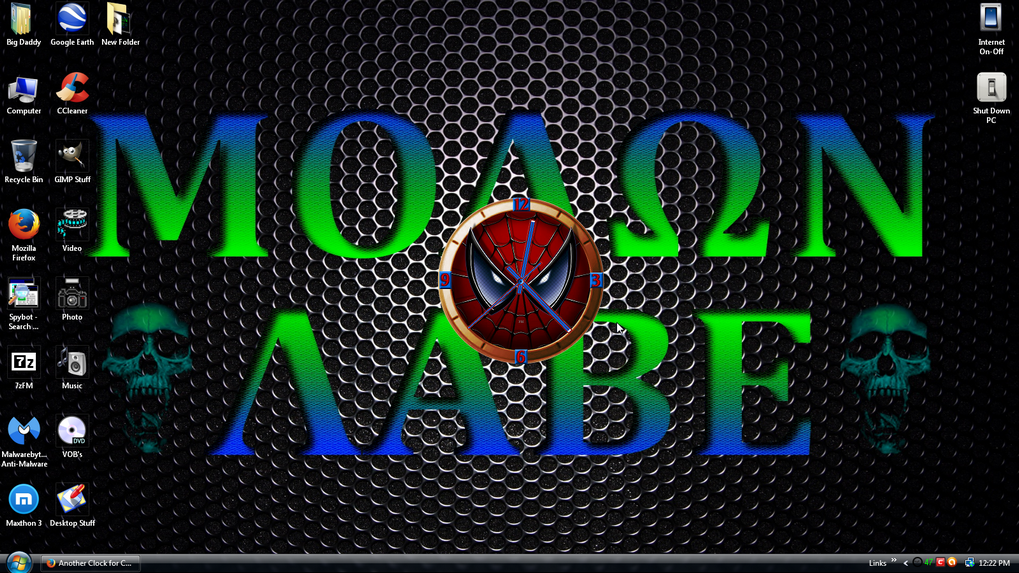
I also made a "Spiderman" clock...
Image
Image
Image
Image


Attachments:
Spiderman Clock Files.zip [379.28 KiB]
Downloaded 89 times

_________________
Image
"A wise man learns more from a foolish question than a fool can learn from a wise answer"
Image


Last edited by Wallace on Sat Apr 05, 2014 9:48 am, edited 2 times in total.
Top
 Post subject: Re: Another Clock for ClocX
PostPosted: Sat Apr 05, 2014 9:32 am  (#31) 
Offline
GimpChat Member
User avatar

Joined: Jun 02, 2013
Posts: 2090
Very cool Wallace.

_________________
Image


Top
 Post subject: Re: Another Clock for ClocX
PostPosted: Sat Apr 05, 2014 9:58 am  (#32) 
Offline
Administrator
User avatar

Joined: Aug 10, 2012
Posts: 14275
Location: Native to NYC living in Arizona, Gimp 2.8 - 3.0, Win 11 PC.
The Warrior wrote:
Very cool Wallace.

Thanks Warrior.
I've made a few "Batman" clocks too, (I'm a Batman fan) but I can't remember if I posted them.
I think I may have posted one of them. All-together I've made four Batman clocks.
Not many people are interested these clocks, so I don't think I'll be posting all the Batman clocks.
Unless someone asks or is interested in them I will.

_________________
Image
"A wise man learns more from a foolish question than a fool can learn from a wise answer"
Image


Top
 Post subject: Re: Another Clock for ClocX
PostPosted: Sat Apr 05, 2014 10:02 am  (#33) 
Offline
GimpChat Member
User avatar

Joined: Apr 07, 2010
Posts: 14182
Wallace, I think your clocks are very nice. I would post them if I were you, maybe there aren't too many batman fans out there. They are very interested in your clocks on the whole.

_________________
Image


Top
 Post subject: Re: Another Clock for ClocX
PostPosted: Sat Apr 05, 2014 10:03 am  (#34) 
Offline
GimpChat Member
User avatar

Joined: Jun 02, 2013
Posts: 2090
I'd love to see the Batman clocks.

_________________
Image


Top
 Post subject: Re: Another Clock for ClocX
PostPosted: Sat Apr 05, 2014 11:18 am  (#35) 
Offline
GimpChat Member
User avatar

Joined: Jan 20, 2013
Posts: 590
Wallace, could you elaborate a tutorial to teach us how to make these beautiful clocks?

_________________
Image


Top
 Post subject: Re: Another Clock for ClocX
PostPosted: Sat Apr 05, 2014 12:01 pm  (#36) 
Offline
Administrator
User avatar

Joined: Aug 10, 2012
Posts: 14275
Location: Native to NYC living in Arizona, Gimp 2.8 - 3.0, Win 11 PC.
Carlos Diniz wrote:
Wallace, could you elaborate a tutorial to teach us how to make these beautiful clocks?

I will see what I can do about that.
I do have another idea for a new clock, So I may use that to put a tutorial together on how to make a clock for ClocX.
The clock faces and hands are easy to make.
The hard part is getting the hands into the proper position, and editing the .ini file to make it all work correctly. But, there are ways around editing the .ini files that make it not such a difficult thing to do.
Believe me... If I can do it, so can anyone else, I think. :hehe

_________________
Image
"A wise man learns more from a foolish question than a fool can learn from a wise answer"
Image


Top
 Post subject: Re: Another Clock for ClocX
PostPosted: Sat Apr 05, 2014 12:11 pm  (#37) 
Offline
GimpChat Member
User avatar

Joined: Apr 07, 2010
Posts: 14182
Even me :teeth

_________________
Image


Top
 Post subject: Re: Another Clock for ClocX
PostPosted: Sat Apr 05, 2014 12:24 pm  (#38) 
Offline
GimpChat Member
User avatar

Joined: Jun 02, 2013
Posts: 2090
Love the Spiderman clock Wallace.

Image

_________________
Image


Top
 Post subject: Re: Another Clock for ClocX
PostPosted: Sat Apr 05, 2014 12:34 pm  (#39) 
Offline
Administrator
User avatar

Joined: Aug 10, 2012
Posts: 14275
Location: Native to NYC living in Arizona, Gimp 2.8 - 3.0, Win 11 PC.
molly wrote:
Even me :teeth

Aaaa... I take that back. Maybe not "everyone". :hehe
The Warrior wrote:
Love the Spiderman clock Wallace.

Image

Looking good! :bigthup
I tried to make the mesh covering his eyes to look convex, but everything I tried looked strange due to the size of the eyes.
Any ideas on how to improve this?

_________________
Image
"A wise man learns more from a foolish question than a fool can learn from a wise answer"
Image


Top
 Post subject: Re: Another Clock for ClocX
PostPosted: Sat Apr 05, 2014 12:44 pm  (#40) 
Offline
GimpChat Member
User avatar

Joined: Nov 16, 2011
Posts: 5127
Location: Metro Vancouver, BC
Carlos Diniz wrote:
Would you, please, teach me how to install linux? I would also like to know a link to get it.
Linux is very easy to test and/or install. To test all you have to do is download an .iso version of Linux, burn to DVD and boot from the disk. I use Ubuntu which is very well supported, but there are many choices.
4 Best Linux OS To Replace Windows XP
Making Linux A Genuine Windows Replacement
3 easy Linux alternatives for Windows XP refugees who don't want a new PC

_________________
Image
Gimp 2.8.18, Linux, median user
Gimp Chat Tutorials Index
Spirit Bear (Kermode)


Top
Post new topic Reply to topic  [ 43 posts ]  Go to page Previous  1, 2, 3  Next

All times are UTC - 5 hours [ DST ]


* Login  


Powered by phpBB3 © phpBB Group