It is currently Thu Nov 05, 2026 5:45 pm


All times are UTC - 5 hours [ DST ]


Post new topic Reply to topic  [ 111 posts ]  Go to page Previous  1, 2, 3, 4, 5, 6  Next
Author Message
 Post subject: Re: Metal Mesh Script
PostPosted: Sat May 17, 2014 6:20 pm  (#21) 
Offline
GimpChat Member
User avatar

Joined: Nov 16, 2011
Posts: 5127
Location: Metro Vancouver, BC
I love the mesh images Molly.

_________________
Image
Gimp 2.8.18, Linux, median user
Gimp Chat Tutorials Index
Spirit Bear (Kermode)


Top
 Post subject: Re: Metal Mesh Script
PostPosted: Sat May 17, 2014 6:30 pm  (#22) 
Offline
GimpChat Member
User avatar

Joined: Apr 07, 2010
Posts: 14182
Thanks Odin but thank Graechan, he is the man.

_________________
Image


Top
 Post subject: Re: Metal Mesh Script
PostPosted: Sat May 17, 2014 8:11 pm  (#23) 
Offline
Script Coder
User avatar

Joined: Feb 18, 2011
Posts: 4826
Location: Bendigo Vic. Australia
Image
It was inside my copy of 'Metal Mesh' but had the menu-register e.t.c. disabled

_________________
Image
No matter how much you push the envelope, it'll still be stationery.


Top
 Post subject: Re: Metal Mesh Script
PostPosted: Sat May 17, 2014 8:45 pm  (#24) 
Offline
GimpChat Member
User avatar

Joined: Apr 07, 2010
Posts: 14182
Didn't I post the right one Graechan? How the heck many are there?

_________________
Image


Top
 Post subject: Re: Metal Mesh Script
PostPosted: Sun May 18, 2014 1:23 am  (#25) 
Offline
Script Coder
User avatar

Joined: Feb 18, 2011
Posts: 4826
Location: Bendigo Vic. Australia
Molly there is only 1, but mine was Rel2 that I have never posted
would you like it?
Image

_________________
Image
No matter how much you push the envelope, it'll still be stationery.


Top
 Post subject: Re: Metal Mesh Script Rel2 [Added Logo Script]
PostPosted: Sun May 18, 2014 2:14 am  (#26) 
Offline
Script Coder
User avatar

Joined: Feb 18, 2011
Posts: 4826
Location: Bendigo Vic. Australia
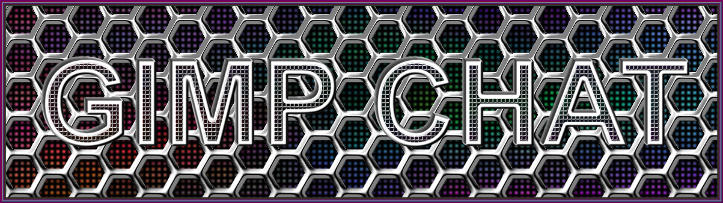
'Metal Mesh'Rel2 has been uploaded, please see initial post
Image

_________________
Image
No matter how much you push the envelope, it'll still be stationery.


Top
 Post subject: Re: Metal Mesh Script Rel2 [Added Logo Script]
PostPosted: Sun May 18, 2014 4:58 am  (#27) 
Offline
GimpChat Member
User avatar

Joined: Apr 07, 2010
Posts: 14182
Yes I would and thanks, I thought for sure the one I had was the right one but anyway, now I have no shortage. :teeth

_________________
Image


Top
 Post subject: Re: Metal Mesh Script Rel2 [Added Logo Script]
PostPosted: Sun May 18, 2014 6:45 am  (#28) 
Offline
Global Moderator
User avatar

Joined: Apr 01, 2012
Posts: 8498
Location: On the other side of your screen
Thanks for the updated script.
This is with the default settings
Image

I think I finally have it.

_________________
Image
Free Fun Photo Editing & resources
Poems from the Lord
Gimp Newby
Gimp version 3.2.6 and GMIC-Qt 4.0.2 OS :- Windows 10 Home 64


Last edited by sallyanne on Sun May 18, 2014 8:37 am, edited 2 times in total.

Top
 Post subject: Re: Metal Mesh Script Rel2 [Added Logo Script]
PostPosted: Sun May 18, 2014 6:54 am  (#29) 
Offline
GimpChat Member
User avatar

Joined: Apr 07, 2010
Posts: 14182
strange, I changed the font and the default and didn't get the error.
silly question, did you remove the old script before you installed the new one. I know you probably did. just checking.
the change log in the new one says "added logo" so the logo script is under script-fu logos and the other is under Render > Patterns

_________________
Image


Top
 Post subject: Re: Metal Mesh Script Rel2 [Added Logo Script]
PostPosted: Sun May 18, 2014 6:59 am  (#30) 
Offline
Global Moderator
User avatar

Joined: Apr 01, 2012
Posts: 8498
Location: On the other side of your screen
molly wrote:
strange, I changed the font and the default and didn't get the error.
silly question, did you remove the old script before you installed the new one. I know you probably did. just checking.
the change log in the new one says "added logo" so the logo script is under script-fu logos and the other is under Render > Patterns

I actually didn't remove it before. When I added it got 'replaced'.

Windows 7 gives 3 option when adding a similar file. add and replace, add and keep both or do nothing.

_________________
Image
Free Fun Photo Editing & resources
Poems from the Lord
Gimp Newby
Gimp version 3.2.6 and GMIC-Qt 4.0.2 OS :- Windows 10 Home 64


Top
 Post subject: Re: Metal Mesh Script Rel2 [Added Logo Script]
PostPosted: Sun May 18, 2014 7:02 am  (#31) 
Offline
GimpChat Member
User avatar

Joined: Apr 07, 2010
Posts: 14182
o, okay, I guess Graechan will be able to come to your rescue, Since they both say the same thing it is hard to tell which one you have unless you open the script with notepad and check.

_________________
Image


Top
 Post subject: Re: Metal Mesh Script Rel2 [Added Logo Script]
PostPosted: Sun May 18, 2014 7:15 am  (#32) 
Offline
Global Moderator
User avatar

Joined: Apr 01, 2012
Posts: 8498
Location: On the other side of your screen
It is the release 2. I have also got the Metal Mesh background pattern script too as well.
But I checked the script in notepad and it says release 2.

_________________
Image
Free Fun Photo Editing & resources
Poems from the Lord
Gimp Newby
Gimp version 3.2.6 and GMIC-Qt 4.0.2 OS :- Windows 10 Home 64


Top
 Post subject: Re: Metal Mesh Script Rel2 [Added Logo Script]
PostPosted: Sun May 18, 2014 7:25 am  (#33) 
Offline
GimpChat Member
User avatar

Joined: Apr 07, 2010
Posts: 14182
Well, our man is probably in a deep slumber right now, he usually turns up around 6 or 7 pm my time, I see you are probably in the same time zone as him.

_________________
Image


Top
 Post subject: Re: Metal Mesh Script Rel2 [Added Logo Script]
PostPosted: Sun May 18, 2014 5:36 pm  (#34) 
Offline
GimpChat Member
User avatar

Joined: Mar 10, 2014
Posts: 845
Image
playing with this nice script. Thank Graechan


Top
 Post subject: Re: Metal Mesh Script Rel2 [Added Logo Script]
PostPosted: Sun May 18, 2014 5:51 pm  (#35) 
Offline
GimpChat Member
User avatar

Joined: Apr 07, 2010
Posts: 14182
I think this is going to be a very popular script, very nice Marcello.

_________________
Image


Top
 Post subject: Re: Metal Mesh Script Rel2 [Added Logo Script]
PostPosted: Sun May 18, 2014 6:02 pm  (#36) 
Offline
Script Coder
User avatar

Joined: Feb 18, 2011
Posts: 4826
Location: Bendigo Vic. Australia
As usual with my updates you should replace the old script with the new one

Please make sure you have deleted 'Metal Mesh' Rel1

_________________
Image
No matter how much you push the envelope, it'll still be stationery.


Top
 Post subject: Re: Metal Mesh Script Rel3 [Bugfix for text size]
PostPosted: Sun May 18, 2014 6:59 pm  (#37) 
Offline
Script Coder
User avatar

Joined: Feb 18, 2011
Posts: 4826
Location: Bendigo Vic. Australia
'Metal Mesh' Rel 3 has been uploaded, please see initial post

; Rel 0.03 - Bugfix for text size

_________________
Image
No matter how much you push the envelope, it'll still be stationery.


Top
 Post subject: Re: Metal Mesh Script Rel3 [Bugfix for text size]
PostPosted: Sun May 18, 2014 7:01 pm  (#38) 
Offline
GimpChat Member
User avatar

Joined: Jun 02, 2013
Posts: 2090
Coupled this with "Globe View":

Image

_________________
Image


Top
 Post subject: Re: Metal Mesh Script Rel3 [Bugfix for text size]
PostPosted: Sun May 18, 2014 7:14 pm  (#39) 
Offline
GimpChat Member
User avatar

Joined: Apr 07, 2010
Posts: 14182
Thank you Graecan. Is that it? :teeth

_________________
Image


Top
 Post subject: Re: Metal Mesh Script Rel3 [Bugfix for text size]
PostPosted: Sun May 18, 2014 7:31 pm  (#40) 
Offline
Script Coder
User avatar

Joined: Feb 18, 2011
Posts: 4826
Location: Bendigo Vic. Australia
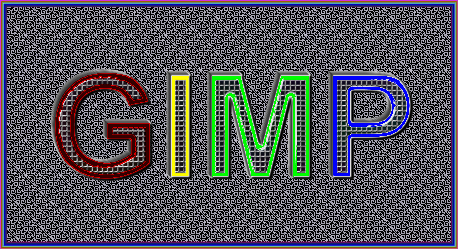
Molly your a hard taskmaster in rel3 I shifted the text outline to the outside (as well as code improvements)
Image

_________________
Image
No matter how much you push the envelope, it'll still be stationery.


Top
Post new topic Reply to topic  [ 111 posts ]  Go to page Previous  1, 2, 3, 4, 5, 6  Next

All times are UTC - 5 hours [ DST ]


* Login  


Powered by phpBB3 © phpBB Group