It is currently Thu Jun 04, 2026 1:06 am


All times are UTC - 5 hours [ DST ]


Post new topic Reply to topic  [ 148 posts ]  Go to page Previous  1 ... 3, 4, 5, 6, 7, 8  Next
Author Message
 Post subject: Re: Polygon Art (link to Triangulator app on p.2)
PostPosted: Sat Jun 07, 2014 9:44 am  (#101) 
Offline
GimpChat Member
User avatar

Joined: Apr 08, 2010
Posts: 5420
Location: Northwest Ohio
ARGH, I just did your tutorial and dammit, I lost it. I didn't remember how to save it properly and accidentally closed the page. GRRR. But trust me, it came out pretty good, much better than automatic programs.


Top
 Post subject: Re: Polygon Art (link to Triangulator app on p.2)
PostPosted: Sat Jun 07, 2014 11:45 am  (#102) 
Offline
Script Coder
User avatar

Joined: May 07, 2014
Posts: 4469
Location: Canada
that's too bad I was keen on seeing some art.
You can click on the link to export to .svg and then a link will appear and click on that link and save page as .svg file.
When I didn't know about Chrome browser, i used firefox and it was slow after about 20 polygons i would save the unfinished art and then combine it with my original reference image in GIMP then do some more polygons on that one and so on in portions until the art was finished.

_________________
TinT
My GIMP 2.10 plug-in writer Fiverr Gig
Plaid Community Forum
Imageplaid-patterns.com


Top
 Post subject: Re: Polygon Art (link to Triangulator app on p.2)
PostPosted: Sat Jun 07, 2014 3:58 pm  (#103) 
Offline
GimpChat Member
User avatar

Joined: Apr 08, 2010
Posts: 5420
Location: Northwest Ohio
I use safari and had no slowdown...but I also found that occasionally it would not fill in the polygon. All I had to do was remove the points and continue on and it was fine. I also turn off the points when doing detail as the block my view. I will redo it when I get time. I know I have saved before and not as svg.


Top
 Post subject: Re: Polygon Art (link to Triangulator app on p.2)
PostPosted: Sat Jun 07, 2014 4:03 pm  (#104) 
Offline
Script Coder
User avatar

Joined: May 07, 2014
Posts: 4469
Location: Canada
the occasion where it does not fill in the polygon (i have never had that happen) maybe your mouse click is not registering, try going around clicking on created points one more time until it fills.

not as .svg? how, triangulator and polygon(izer) only exports as .svg file

_________________
TinT
My GIMP 2.10 plug-in writer Fiverr Gig
Plaid Community Forum
Imageplaid-patterns.com


Top
 Post subject: Re: Polygon Art (link to Triangulator app on p.2)
PostPosted: Sun Jun 08, 2014 9:16 pm  (#105) 
Offline
GimpChat Member
User avatar

Joined: Apr 08, 2010
Posts: 5420
Location: Northwest Ohio
It might have been triangulator, I have tried all 3 programs, and forget which was which. when I save as SVG, will it load into gimp?


Top
 Post subject: Re: Polygon Art (link to Triangulator app on p.2)
PostPosted: Sun Jun 08, 2014 9:34 pm  (#106) 
Offline
Script Coder
User avatar

Joined: May 07, 2014
Posts: 4469
Location: Canada
Yeah Gimp opens .svg files

_________________
TinT
My GIMP 2.10 plug-in writer Fiverr Gig
Plaid Community Forum
Imageplaid-patterns.com


Top
 Post subject: Re: Polygon Art (link to Triangulator app on p.2)
PostPosted: Wed Jun 11, 2014 1:09 pm  (#107) 
Offline
GimpChat Member
User avatar

Joined: Apr 08, 2010
Posts: 5420
Location: Northwest Ohio
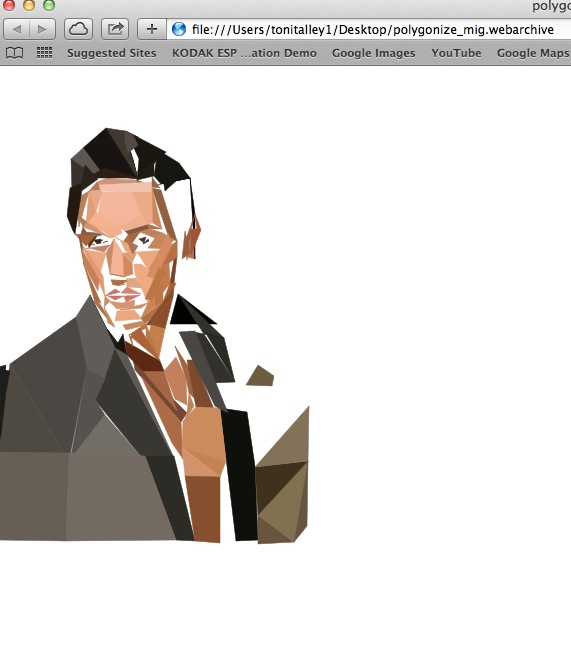
Yikes...so…how do I get the results from Polygonize to save in a useable way? I clicked SVG save, then save the file, and the screenshot shows what I get. The large area is what I get when I click on the icon that is on the lower left area of the screen shot. I tried to open the web archive file in gimp but it won't open in anything, not even in polygonize. What have I done wrong and what happened to the rest of the photo, I know that I polygonized all those white areas on the body and face.
Image


Top
 Post subject: Re: Polygon Art (link to Triangulator app on p.2)
PostPosted: Wed Jun 11, 2014 1:58 pm  (#108) 
Offline
Script Coder
User avatar

Joined: May 07, 2014
Posts: 4469
Location: Canada
well according to your screen shot it doesn't look finished.

Maybe you want to open that .svg in Gimp and merge it with your original reference image and save that as a new file.
Then open up the new file in polygon(izer) and finish it off.

I have no idea why you're getting an unfinished picture if you say you've finished it.

What i do is instead of clicking on the link that shows up when you click export in polygon(izer) I ctrl-click it so it opens up in a new browser tab, that way i don't lose my working on the polygon(izer).

Maybe what happened was you did some of the art and then clicked on Export to SVG and "save this link as file" appears, then you did some more work and then you clicked on "this link" so it's not refreshed. If so you have to click on Export to SVG again so that it refreshes the "this link" and so you'd have your finished image.

here's one of a shark for fun (ref. image found here)
Attachment:
shark.jpg
shark.jpg [ 136.57 KiB | Viewed 2068 times ]

_________________
TinT
My GIMP 2.10 plug-in writer Fiverr Gig
Plaid Community Forum
Imageplaid-patterns.com


Top
 Post subject: Re: Polygon Art (link to Triangulator app on p.2)
PostPosted: Wed Jun 11, 2014 11:19 pm  (#109) 
Offline
GimpChat Member
User avatar

Joined: Apr 08, 2010
Posts: 5420
Location: Northwest Ohio
What I did was completely finish the picture, then click save as svg, then save this link as file. I didn't go back to do more in-between, and this is how it saved. Maybe it has something to do with using a mac?


Top
 Post subject: Re: Polygon Art (link to Triangulator app on p.2)
PostPosted: Thu Jun 12, 2014 12:06 am  (#110) 
Offline
Script Coder
User avatar

Joined: May 07, 2014
Posts: 4469
Location: Canada
do you have this version? http://gimpchat.com/viewtopic.php?f=11&t=8227&start=60#p136915
I use that version, earlier versions might be buggy since i was trying to figure out how to allow user to move the points once they're created.

_________________
TinT
My GIMP 2.10 plug-in writer Fiverr Gig
Plaid Community Forum
Imageplaid-patterns.com


Top
 Post subject: Re: Polygon Art (link to Triangulator app on p.2)
PostPosted: Thu Jun 12, 2014 12:30 am  (#111) 
Offline
GimpChat Member
User avatar

Joined: Apr 08, 2010
Posts: 5420
Location: Northwest Ohio
I should have some time to try that out, I am not sure what version I have, I'll just the one I have and put this one in, just to be sure.


Top
 Post subject: Re: Polygon Art (link to Triangulator app on p.2)
PostPosted: Thu Jun 12, 2014 11:26 am  (#112) 
Offline
GimpChat Member
User avatar

Joined: Apr 08, 2010
Posts: 5420
Location: Northwest Ohio
I forgot to control click on save this link as file, grrr. But I did take screen shots to show what I had.
First is the screen shot of the finished picture, second is a screen shot of what got saved as web link…and I have not figured out how to get the picture file other than screen shot.
Image
Image


Top
 Post subject: Re: Polygon Art (link to Triangulator app on p.2)
PostPosted: Thu Jun 12, 2014 12:45 pm  (#113) 
Offline
Script Coder
User avatar

Joined: May 07, 2014
Posts: 4469
Location: Canada
from the screen shot i can tell you haven't finished your picture because i can still see his hair texture on the right side.
I try to do it in one go without deleting vertices so that i can see where i have done and the vertices are there so you can click on to reuse them. Clicking on deleting vertices is okay but you have to be careful to remember where you've done up to.

If you think your picture is complete and like the way it looks then you can just put your .svg as a layer over top of your reference image in gimp (that way it's the same resolution as the original image and not have take a screen shot).

_________________
TinT
My GIMP 2.10 plug-in writer Fiverr Gig
Plaid Community Forum
Imageplaid-patterns.com


Top
 Post subject: Re: Polygon Art (link to Triangulator app on p.2)
PostPosted: Thu Jun 12, 2014 4:55 pm  (#114) 
Offline
GimpChat Member
User avatar

Joined: Apr 08, 2010
Posts: 5420
Location: Northwest Ohio
the screen shots are from a different try, but I know that all those white spaces were not unfinished, most were actually done, but yeah, I was going to use gimp. The problem is, how do I get that online file into gimp? It will not let me take that pic any way but a screen shot. another question is, how can I make the polygons leaving the vertices in place, because when you get near one, they pop up big and cover part of the picture and you cannot place a new one anywhere but onto the old one. That makes it hard to do small details, such as eyes.


Top
 Post subject: Re: Polygon Art (link to Triangulator app on p.2)
PostPosted: Thu Jun 12, 2014 5:04 pm  (#115) 
Offline
Script Coder
User avatar

Joined: May 07, 2014
Posts: 4469
Location: Canada
you can try scaling your reference image up in GIMP and try using that larger version of the reference image in polygon(izer).

_________________
TinT
My GIMP 2.10 plug-in writer Fiverr Gig
Plaid Community Forum
Imageplaid-patterns.com


Top
 Post subject: Re: Polygon Art (link to Triangulator app on p.2)
PostPosted: Thu Jun 12, 2014 5:38 pm  (#116) 
Offline
GimpChat Member
User avatar

Joined: Apr 08, 2010
Posts: 5420
Location: Northwest Ohio
Ok, I am learning little tricks here and there. I remembered to use the control, and managed to save it as a png. I see that there are lots of 'blank' spaces even thought I tried to use the same dots on adjoining polygons, but it still has lots of empty areas, and so it needed to be put over the original to hide that. I scaled up as much as I could, but when I try to load a high res pic, yikes! Only a small portion shows and I do not know how to move the pic around to be able to work on it, I can't seem to scroll around when the picture is too big. Is there a move tool or a finite size that can be used?


Top
 Post subject: Re: Polygon Art (link to Triangulator app on p.2)
PostPosted: Thu Jun 12, 2014 6:13 pm  (#117) 
Offline
Script Coder
User avatar

Joined: May 07, 2014
Posts: 4469
Location: Canada
can't you just scroll around using the scroll bars? it works just like a regular web page

_________________
TinT
My GIMP 2.10 plug-in writer Fiverr Gig
Plaid Community Forum
Imageplaid-patterns.com


Top
 Post subject: Re: Polygon Art (link to Triangulator app on p.2)
PostPosted: Thu Jun 12, 2014 6:46 pm  (#118) 
Offline
GimpChat Member
User avatar

Joined: Apr 08, 2010
Posts: 5420
Location: Northwest Ohio
Nope, there are no scroll bars. But I have now learned how to save and open in Gimp, thanks for all the help! I still get some blank spaces but just slap it on top of the original and that disguises it. Here is a friends dog I did.
Image


Top
 Post subject: Re: Polygon Art (link to Triangulator app on p.2)
PostPosted: Thu Jun 12, 2014 10:00 pm  (#119) 
Offline
Script Coder
User avatar

Joined: May 07, 2014
Posts: 4469
Location: Canada
nice shaping around the nose

_________________
TinT
My GIMP 2.10 plug-in writer Fiverr Gig
Plaid Community Forum
Imageplaid-patterns.com


Top
 Post subject: Re: Polygon Art (link to Triangulator app on p.2)
PostPosted: Thu Jun 12, 2014 10:04 pm  (#120) 
Offline
GimpChat Member
User avatar

Joined: Apr 08, 2010
Posts: 5420
Location: Northwest Ohio
thanks for the script fixes and all the help. It is harder than I thought it would be, but the more I use it, the easier it gets.


Top
Post new topic Reply to topic  [ 148 posts ]  Go to page Previous  1 ... 3, 4, 5, 6, 7, 8  Next

All times are UTC - 5 hours [ DST ]


* Login  


Powered by phpBB3 © phpBB Group