It is currently Mon Aug 03, 2026 1:30 pm


All times are UTC - 5 hours [ DST ]


Post new topic Reply to topic  [ 63 posts ]  Go to page 1, 2, 3, 4  Next
Author Message
 Post subject: GIMP "Teal Appeal" Theme Release
PostPosted: Sun Jun 08, 2014 3:54 pm  (#1) 
Offline
GimpChat Member
User avatar

Joined: Jun 02, 2013
Posts: 2090
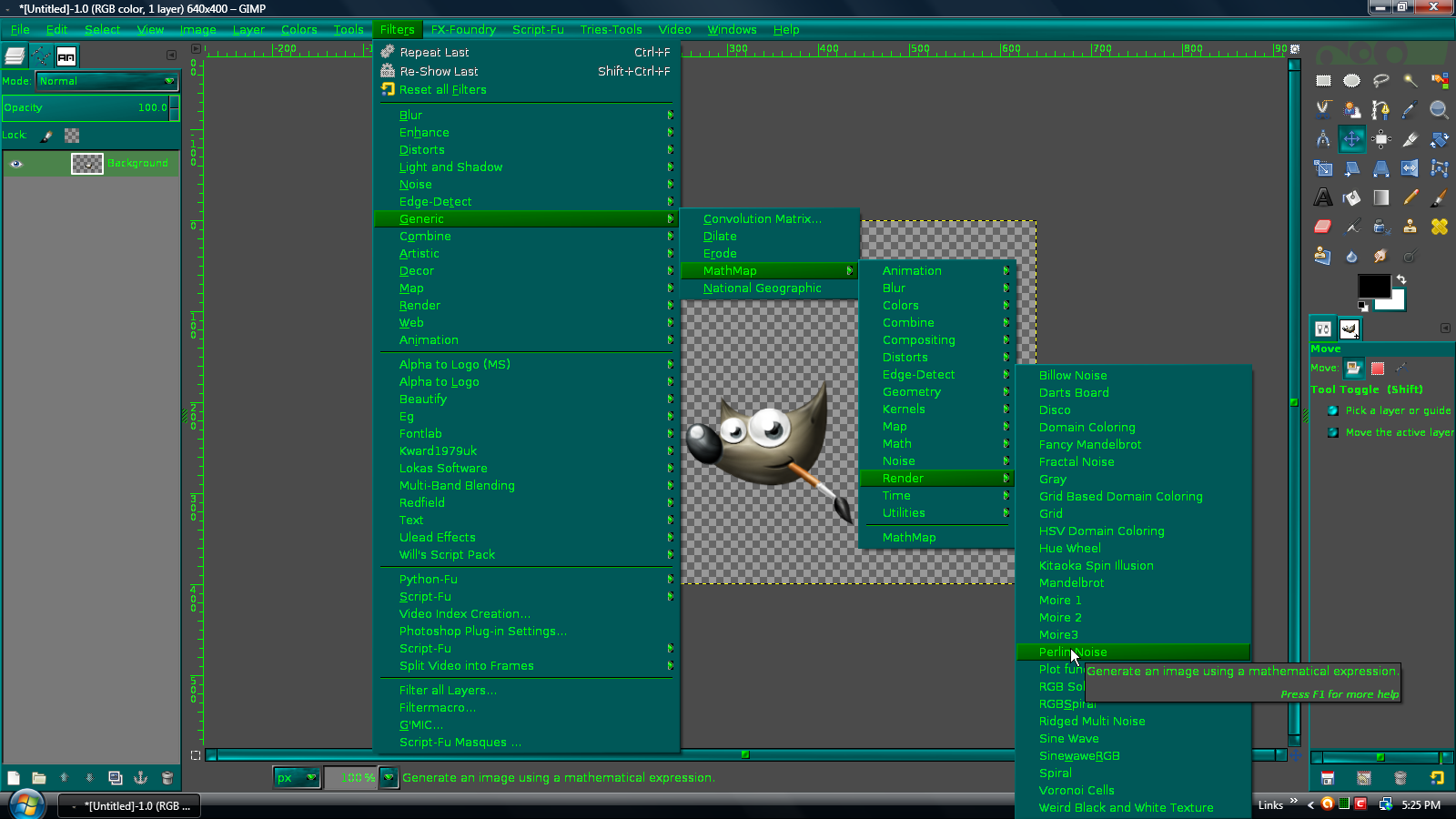
Gonna go ahead and release my new theme, called "Teal Appeal". There are 3 files in the zip file . Teal Appeal Patterned, which of course has the patterned background like so:

Image

Teal Appeal Plain, which obviously has the plain background:

Image

I also threw in a splash screen, that looks like this when loading:

Image

Add themes to your user>.gimp-2.8>themes folder. Splash to user>.gimp-2.8>splashes folder.

# "Teal Appeal" theme for GTK+ 2.x by The Warrior from "Gimp Chat" based on Brandon Brown's GreenHeart Theme

# "GreenHeart" theme for GTK+ 2.x by Brandon Brown .

# From the BlueHeart gtkrc file:

# "BlueHeart" theme for GTK+ 2.x by Jean-Paul Bizet .

# Most graphics are from Claudiu Christian Fofiu, the author of the original BlueHeart theme for GTK 1.x, E, XMMS ...

# Part of this file comes from the GlossyP theme and from other themes.

Feedback appreciated. Hope you enjoy it. Thanks for looking.


Attachments:
Teal Appeal Themes.7z [359.51 KiB]
Downloaded 279 times

_________________
Image


Last edited by The Warrior on Sun Jun 08, 2014 8:19 pm, edited 2 times in total.
Share on Facebook Share on Twitter Share on Orkut Share on Digg Share on MySpace Share on Delicious Share on Technorati
Top
 Post subject: Re: "Teal Appeal" Theme Release
PostPosted: Sun Jun 08, 2014 4:12 pm  (#2) 
Offline
GimpChat Member
User avatar

Joined: Apr 07, 2010
Posts: 14182
Thank you very much Warrior,
I will look forward to installing it. I have used a lot of themes and always ended up going back to the default because of a lot of the tabs were unreadable to see what they said. Yours is nice and clear.
KUDO's nice job

_________________
Image


Top
 Post subject: Re: "Teal Appeal" Theme Release
PostPosted: Sun Jun 08, 2014 4:14 pm  (#3) 
Offline
GimpChat Member
User avatar

Joined: Jun 02, 2013
Posts: 2090
molly wrote:
Thank you very much Warrior,
I will look forward to installing it. I have used a lot of themes and always ended up going back to the default because of a lot of the tabs were unreadable to see what they said. Yours is nice and clear.
KUDO's nice job

Thanks you so much Molly, I really appreciate that. Lot of work there. I'm already contemplating my next theme, haha.

_________________
Image


Top
 Post subject: Re: "Teal Appeal" Theme Release
PostPosted: Sun Jun 08, 2014 4:15 pm  (#4) 
Offline
GimpChat Member
User avatar

Joined: Apr 07, 2010
Posts: 14182
What about pinks and purples. :teeth

_________________
Image


Top
 Post subject: Re: "Teal Appeal" Theme Release
PostPosted: Sun Jun 08, 2014 4:16 pm  (#5) 
Offline
GimpChat Member
User avatar

Joined: Jun 02, 2013
Posts: 2090
molly wrote:
What about pinks and purples. :teeth

I was thinking about that, in all honesty, but I had something else in mind as well. I'm a blue freak, if that tells you anything, haha.

_________________
Image


Top
 Post subject: Re: "Teal Appeal" Theme Release
PostPosted: Sun Jun 08, 2014 4:52 pm  (#6) 
Offline
GimpChat Member
User avatar

Joined: Apr 07, 2010
Posts: 14182
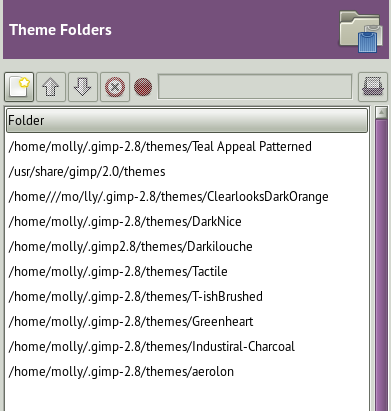
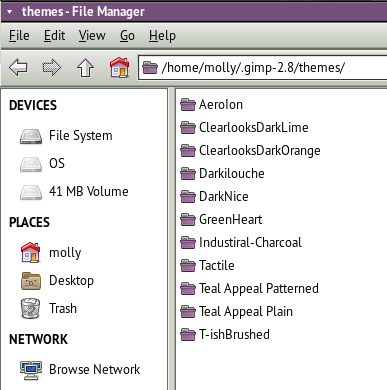
I am having a hard time getting them where they are supposed to go. In my themes folder, it shows all the themes in there but in the Theme folder, I don't know how to get anything in that one.
Image

Image

_________________
Image


Top
 Post subject: Re: "Teal Appeal" Theme Release
PostPosted: Sun Jun 08, 2014 4:55 pm  (#7) 
Offline
GimpChat Member
User avatar

Joined: Jun 02, 2013
Posts: 2090
Not sure Molly. I put them in the path I stated above for Windows.

_________________
Image


Top
 Post subject: Re: "Teal Appeal" Theme Release
PostPosted: Sun Jun 08, 2014 5:00 pm  (#8) 
Offline
GimpChat Member
User avatar

Joined: Apr 07, 2010
Posts: 14182
Maybe a Linux person will come along. Gosh I knew how to do it before and not it won't work.

_________________
Image


Top
 Post subject: Re: "Teal Appeal" Theme Release
PostPosted: Sun Jun 08, 2014 5:02 pm  (#9) 
Offline
GimpChat Member
User avatar

Joined: Jun 02, 2013
Posts: 2090
molly wrote:
Gosh I knew how to do it before and not it won't work.

I have that problem too. I forget how to do stuff, if it's been awhile. I know nothing about Linux.

_________________
Image


Top
 Post subject: Re: "Teal Appeal" Theme Release
PostPosted: Sun Jun 08, 2014 5:40 pm  (#10) 
Offline
GimpChat Member
User avatar

Joined: Nov 16, 2011
Posts: 5127
Location: Metro Vancouver, BC
molly wrote:
Maybe a Linux person will come along. Gosh I knew how to do it before and not it won't work.
Molly, I'm not sure I understand? Can you not browse to the user themes folder?

Image

I only have seven, two I have customized. Some themes are more complicated than other. The key to starting to customizing your own is find a fairly basic theme that close to what you like other than color. Then you can change to your favourite colors in the gtkrc file.
Here's an example, How to Change Gimp Theme Font Color

_________________
Image
Gimp 2.8.18, Linux, median user
Gimp Chat Tutorials Index
Spirit Bear (Kermode)


Top
 Post subject: Re: "Teal Appeal" Theme Release
PostPosted: Sun Jun 08, 2014 5:47 pm  (#11) 
Offline
GimpChat Member
User avatar

Joined: Apr 07, 2010
Posts: 14182
Yes Odin, I have them in that folder and then I put it in my preferences Themes folder and it won't work
Image

_________________
Image


Top
 Post subject: Re: "Teal Appeal" Theme Release
PostPosted: Sun Jun 08, 2014 5:53 pm  (#12) 
Offline
GimpChat Member
User avatar

Joined: Nov 16, 2011
Posts: 5127
Location: Metro Vancouver, BC
Gimp is not recognizing the new theme? Maybe there is something wrong with the theme. Did you try a restart of Gimp?

_________________
Image
Gimp 2.8.18, Linux, median user
Gimp Chat Tutorials Index
Spirit Bear (Kermode)


Top
 Post subject: Re: "Teal Appeal" Theme Release
PostPosted: Sun Jun 08, 2014 5:54 pm  (#13) 
Offline
GimpChat Member
User avatar

Joined: Jun 02, 2013
Posts: 2090
I tried both in mine before posting. Both worked in mine, but I have Windows, not Linux. Not sure what the dealio is.

Odin, can you try to see if they work in yours?

_________________
Image


Top
 Post subject: Re: "Teal Appeal" Theme Release
PostPosted: Sun Jun 08, 2014 5:59 pm  (#14) 
Offline
GimpChat Member
User avatar

Joined: Jun 02, 2013
Posts: 2090
molly wrote:
Yes Odin, I have them in that folder and then I put it in my preferences Themes folder and it won't work
[ Image ]

Am I understanding that you're placing them in 2 different folders? I don't understand Linux.

_________________
Image


Top
 Post subject: Re: "Teal Appeal" Theme Release
PostPosted: Sun Jun 08, 2014 6:06 pm  (#15) 
Offline
GimpChat Member
User avatar

Joined: Apr 07, 2010
Posts: 14182
I put them in my user theme folder, and they are supposed to show up in the gimp themes but they won't work.

_________________
Image


Top
 Post subject: Re: "Teal Appeal" Theme Release
PostPosted: Sun Jun 08, 2014 6:09 pm  (#16) 
Offline
GimpChat Member
User avatar

Joined: Jun 02, 2013
Posts: 2090
molly wrote:
I put them in my user theme folder, and they are supposed to show up in the gimp themes but they won't work.

Have no idea why. They both work fine in mine. Strange.

_________________
Image


Top
 Post subject: Re: "Teal Appeal" Theme Release
PostPosted: Sun Jun 08, 2014 6:12 pm  (#17) 
Offline
GimpChat Member
User avatar

Joined: Apr 07, 2010
Posts: 14182
I haven't seen any feedback yet from anyone else so it might be just mine that won't work. Just have to wait and see. I don't use my Windows on the other hard drive, but I will try setting them up tomorrow in Windows to see what happens, too tired to try tonight.

_________________
Image


Top
 Post subject: Re: "Teal Appeal" Theme Release
PostPosted: Sun Jun 08, 2014 6:13 pm  (#18) 
Offline
GimpChat Member
User avatar

Joined: Jun 02, 2013
Posts: 2090
I downloaded them from the OP, just to make sure, and they both worked. Not sure at all what it could be Molly.

_________________
Image


Top
 Post subject: Re: "Teal Appeal" Theme Release
PostPosted: Sun Jun 08, 2014 6:42 pm  (#19) 
Offline
GimpChat Member
User avatar

Joined: Apr 07, 2010
Posts: 14182
I am probably the only one.

_________________
Image


Top
 Post subject: Re: "Teal Appeal" Theme Release
PostPosted: Sun Jun 08, 2014 6:47 pm  (#20) 
Offline
GimpChat Founder
User avatar

Joined: May 22, 2008
Posts: 5241
Location: Gimpville
Nice Work Warrior. The neon green text is very visible.

Molly, the themes seem to work for me in Fedora Linux. I extracted the folders Teal Appeal Patterned & Teal Appeal Plain into my themes folder (.gimp-2.8/themes). I was then able to select one of those under Preferences/Themes.

_________________
“If you reach for the stars, you just might land on a decently sized hill.” - Stuart Hill


Top
Post new topic Reply to topic  [ 63 posts ]  Go to page 1, 2, 3, 4  Next

All times are UTC - 5 hours [ DST ]


* Login  


Powered by phpBB3 © phpBB Group