It is currently Tue Aug 04, 2026 5:23 pm


All times are UTC - 5 hours [ DST ]


Post new topic Reply to topic  [ 63 posts ]  Go to page Previous  1, 2, 3, 4  Next
Author Message
 Post subject: Re: "Teal Appeal" Theme Release
PostPosted: Sun Jun 08, 2014 6:52 pm  (#21) 
Offline
GimpChat Member
User avatar

Joined: Apr 07, 2010
Posts: 14182
Thats where I have them Tux. I can't understand it cuz they worked before, then I quit using the themes due to not being able to see the tabs unless they were hi-lited. I went back to the default Gimp theme.

_________________
Image


Top
 Post subject: Re: "Teal Appeal" Theme Release
PostPosted: Sun Jun 08, 2014 7:02 pm  (#22) 
Offline
GimpChat Founder
User avatar

Joined: May 22, 2008
Posts: 5241
Location: Gimpville
Are you saying that none of the themes you have installed are working?

If so, perhaps something is hung & you need to restart your machine. Other than that, I haven't a clue.

I've never used custom themes. None of them seem have enough contrast difference for me. My old eyes prefer the default. I suppose I could make some slight tweaks to the default or design one that had the kind of contrast differences I prefer, but I've never made the effort to look into it.

_________________
“If you reach for the stars, you just might land on a decently sized hill.” - Stuart Hill


Top
 Post subject: Re: "Teal Appeal" Theme Release
PostPosted: Sun Jun 08, 2014 7:14 pm  (#23) 
Offline
GimpChat Member
User avatar

Joined: Apr 07, 2010
Posts: 14182
No none of them work, I took them all out except the two new ones, rebooted gimp and rebooted Fedora, several times. :gaah :hoh


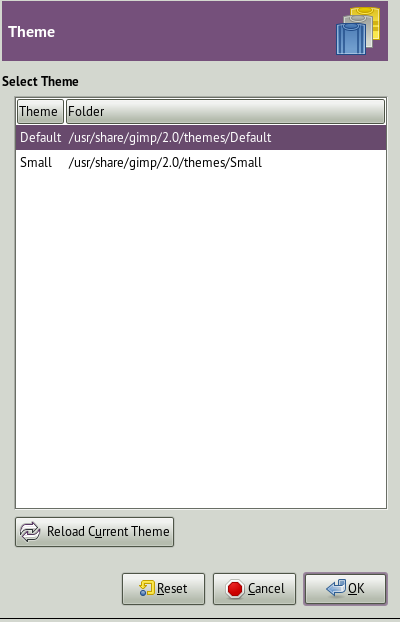
Am I supposed to do anything with this window? if so, how
Image

_________________
Image


Top
 Post subject: Re: "Teal Appeal" Theme Release
PostPosted: Sun Jun 08, 2014 7:23 pm  (#24) 
Offline
GimpChat Member
User avatar

Joined: Jun 02, 2013
Posts: 2090
GnuTux wrote:
Nice Work Warrior. The neon green text is very visible.

Molly, the themes seem to work for me in Fedora Linux. I extracted the folders Teal Appeal Patterned & Teal Appeal Plain into my themes folder (.gimp-2.8/themes). I was then able to select one of those under Preferences/Themes.

Thanks, I appreciate it.

Very odd Molly.

_________________
Image


Top
 Post subject: Re: "Teal Appeal" Theme Release
PostPosted: Sun Jun 08, 2014 7:33 pm  (#25) 
Offline
GimpChat Founder
User avatar

Joined: May 22, 2008
Posts: 5241
Location: Gimpville
molly wrote:
Am I supposed to do anything with this window? if so, how
[ Image ]

This is the dialog that displays all the installed themes and allows you to select the current theme to use.

Maybe another plug-in has hijacked your themes? :cool

_________________
“If you reach for the stars, you just might land on a decently sized hill.” - Stuart Hill


Top
 Post subject: Re: "Teal Appeal" Theme Release
PostPosted: Sun Jun 08, 2014 8:06 pm  (#26) 
Offline
GimpChat Member
User avatar

Joined: Apr 07, 2010
Posts: 14182
Yah, probably starts with E :jumpclap

_________________
Image


Top
 Post subject: Re: "Teal Appeal" Theme Release
PostPosted: Sun Jun 08, 2014 8:12 pm  (#27) 
Offline
Administrator
User avatar

Joined: Aug 10, 2012
Posts: 14144
Location: Native to NYC living in Arizona, Gimp 2.8 - 3.0, Win 11 PC.
Nice! :bigthup
I'd love to see all the colors changed to hues of purple. I suppose I could do this my self though.

Love it Warrior! ;)

_________________
Image
"A wise man learns more from a foolish question than a fool can learn from a wise answer"
Image


Top
 Post subject: Re: "Teal Appeal" Theme Release
PostPosted: Sun Jun 08, 2014 8:14 pm  (#28) 
Offline
GimpChat Member
User avatar

Joined: Jun 02, 2013
Posts: 2090
Wallace wrote:
Nice! :bigthup
I'd love to see all the colors changed to hues of purple. I suppose I could do this my self though.

Love it Warrior! ;)

Thanks Wallace, appreciate it. It wouldn't be too hard to do.

_________________
Image


Top
 Post subject: Re: "Teal Appeal" Theme Release
PostPosted: Sun Jun 08, 2014 8:16 pm  (#29) 
Offline
GimpChat Member
User avatar

Joined: Apr 07, 2010
Posts: 14182
Wallace, refer back to post number 4.

_________________
Image


Top
 Post subject: Re: "Teal Appeal" Theme Release
PostPosted: Sun Jun 08, 2014 8:24 pm  (#30) 
Offline
GimpChat Member
User avatar

Joined: Nov 16, 2011
Posts: 5127
Location: Metro Vancouver, BC
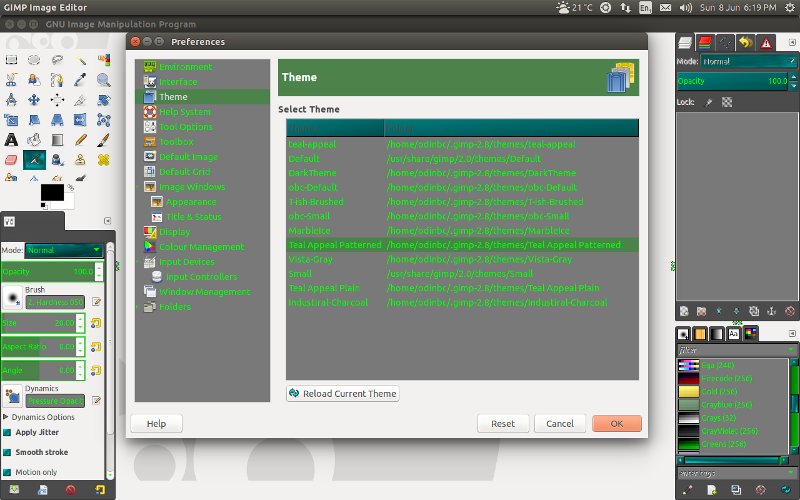
Here's what I got. Both seem to work in their own folders under user themes, although they appear alike.

Image

_________________
Image
Gimp 2.8.18, Linux, median user
Gimp Chat Tutorials Index
Spirit Bear (Kermode)


Top
 Post subject: Re: "Teal Appeal" Theme Release
PostPosted: Sun Jun 08, 2014 8:26 pm  (#31) 
Offline
GimpChat Member
User avatar

Joined: Jun 02, 2013
Posts: 2090
Odinbc wrote:
Here's what I got. Both seem to work in their own folders under user themes, although they appear alike.

[ Image ]

How did your bg stay white? Did you modify it?

They are alike, except for the drop down menus.

_________________
Image


Top
 Post subject: Re: GIMP "Teal Appeal" Theme Release
PostPosted: Sun Jun 08, 2014 9:02 pm  (#32) 
Offline
GimpChat Member
User avatar

Joined: Jan 10, 2013
Posts: 863
Molly,
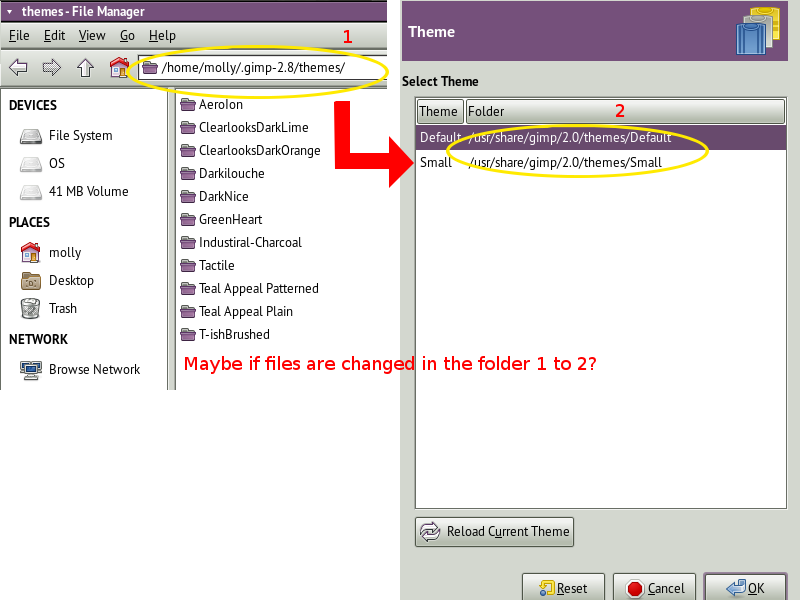
If the themes are transferred from /gimp2.8/themes / to Share/gimp/2.0/themes/
Image
Does this would it work?

_________________
bbbbbbbbbbbImage
bbbbbbbbbbb Be patient, English is not my language.


Top
 Post subject: Re: "Teal Appeal" Theme Release
PostPosted: Sun Jun 08, 2014 9:17 pm  (#33) 
Offline
GimpChat Member
User avatar

Joined: Nov 16, 2011
Posts: 5127
Location: Metro Vancouver, BC
The Warrior wrote:
Odinbc wrote:
Here's what I got. Both seem to work in their own folders under user themes, although they appear alike.

[ Image ]

How did your bg stay white? Did you modify it?

They are alike, except for the drop down menus.
I don't know it might have something to with my system theme settings. In Gimp some themes changes everything some don't. I know more often than not the gtkrc file needs the same setting changed in multiple places. For example, How to Change Gimp Theme Font Color

_________________
Image
Gimp 2.8.18, Linux, median user
Gimp Chat Tutorials Index
Spirit Bear (Kermode)


Top
 Post subject: Re: "Teal Appeal" Theme Release
PostPosted: Sun Jun 08, 2014 9:19 pm  (#34) 
Offline
GimpChat Member
User avatar

Joined: Jun 02, 2013
Posts: 2090
Odinbc wrote:
The Warrior wrote:
Odinbc wrote:
Here's what I got. Both seem to work in their own folders under user themes, although they appear alike.

[ Image ]

How did your bg stay white? Did you modify it?

They are alike, except for the drop down menus.
I don't know it might have something to with my system theme settings. Some themes changes everything some don't. I know more often than not the gtkrc file needs the same setting changed in multiple places. For example, How to Change Gimp Theme Font Color

Odd. I modded the gtkrc file as well. You can see how it looks on mine. Well, it doesn't seem like this is working out too good, LOL. Oh well, can't win em all, haha. Works fine here. Not really getting any feedback.

_________________
Image


Top
 Post subject: Re: "Teal Appeal" Theme Release
PostPosted: Sun Jun 08, 2014 10:17 pm  (#35) 
Offline
GimpChat Member
User avatar

Joined: Nov 16, 2011
Posts: 5127
Location: Metro Vancouver, BC
The Warrior wrote:
Odd. I modded the gtkrc file as well. You can see how it looks on mine. Well, it doesn't seem like this is working out too good, LOL. Oh well, can't win em all, haha. Works fine here. Not really getting any feedback.
It could have something to do with, Preferences | Image Windows | Appearance settings? Although mine are set to theme.

_________________
Image
Gimp 2.8.18, Linux, median user
Gimp Chat Tutorials Index
Spirit Bear (Kermode)


Top
 Post subject: Re: GIMP "Teal Appeal" Theme Release
PostPosted: Sun Jun 08, 2014 10:25 pm  (#36) 
Offline
Script Coder
User avatar

Joined: Feb 18, 2011
Posts: 4826
Location: Bendigo Vic. Australia
Thanks Warrior your themes looks great and works well on my windows 7 Gimp 2.8.10 :coolthup
Maybe a blue theme next? :jumpclap

_________________
Image
No matter how much you push the envelope, it'll still be stationery.


Top
 Post subject: Re: GIMP "Teal Appeal" Theme Release
PostPosted: Sun Jun 08, 2014 10:38 pm  (#37) 
Offline
GimpChat Member
User avatar

Joined: Jun 02, 2013
Posts: 2090
Graechan wrote:
Thanks Warrior your themes looks great and works well on my windows 7 Gimp 2.8.10 :coolthup
Maybe a blue theme next? :jumpclap

I started a blue theme, but ditched it for something else. I'll post it when I get it more completed. Thanks for the compliment, by the way, very much appreciated.

_________________
Image


Top
 Post subject: Re: GIMP "Teal Appeal" Theme Release
PostPosted: Mon Jun 09, 2014 12:27 am  (#38) 
Offline
Script Coder
User avatar

Joined: Jun 22, 2010
Posts: 1171
Location: Here and there
@Molly

You're not supposed add the individual theme folders to the themes folder list - GIMP is going to be looking in the wrong place for the gtktrc files if you do what you have done.

Just leave your theme folder list pointing to your local theme folder: home/molly/.gimp-2.8/themes and the shared theme folder: /usr/share/gimp/2.0/themes

@Warrior

I find your themes aren't changing the text colour on the menubar and menu items (GIMP 2.8.2 on Windows XP in classic theme). I'll have a play later to see what I can do.

Kevin


Top
 Post subject: Re: GIMP "Teal Appeal" Theme Release
PostPosted: Mon Jun 09, 2014 12:39 am  (#39) 
Offline
GimpChat Member
User avatar

Joined: Jun 02, 2013
Posts: 2090
paynekj wrote:
@Warrior

I find your themes aren't changing the text colour on the menubar and menu items (GIMP 2.8.2 on Windows XP in classic theme). I'll have a play later to see what I can do.

Kevin

Interesting. Works fine on my 2.8.10, Vista Home Premium.

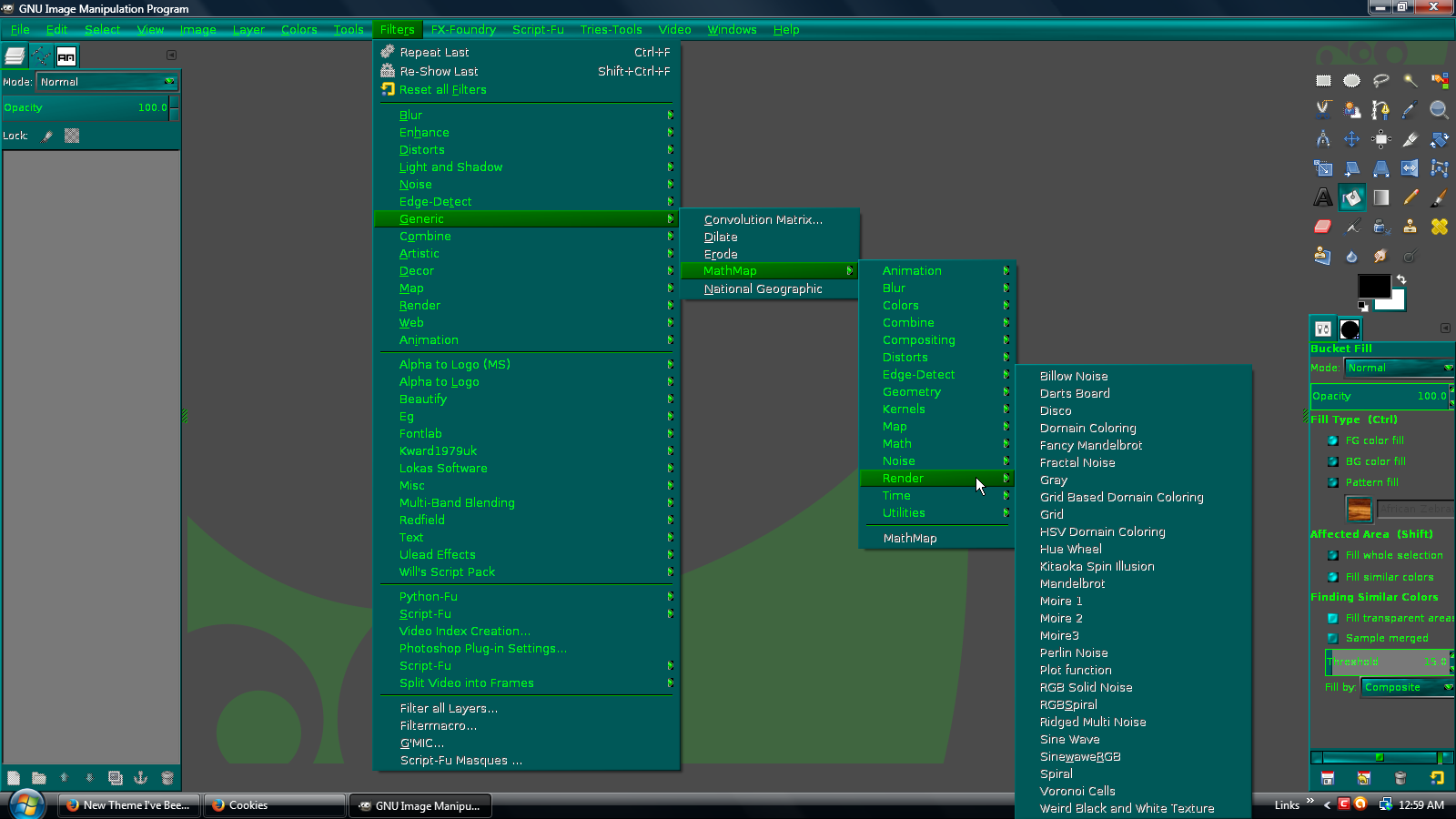
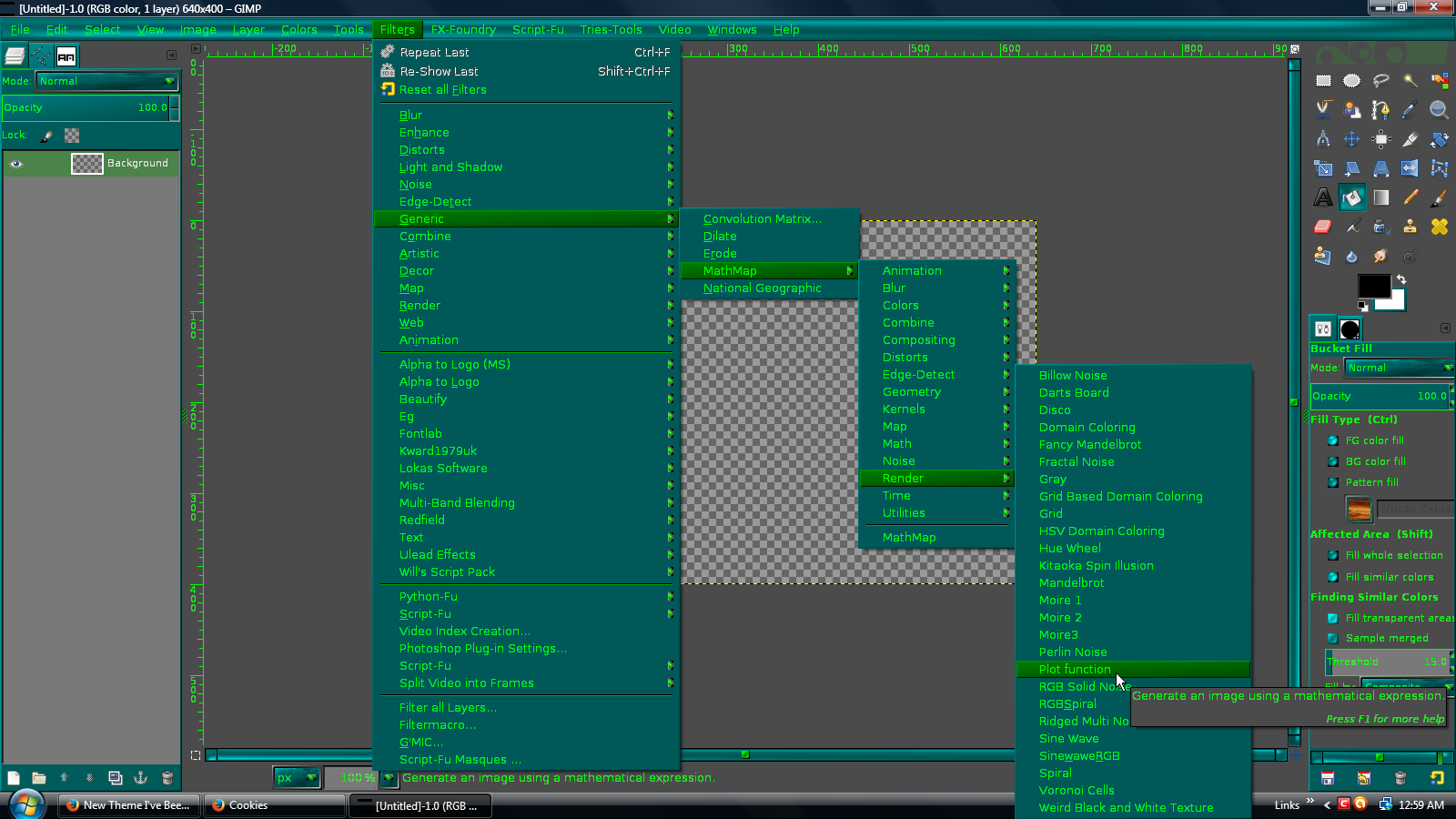
However, the menu items that aren't applicable will stay white. When they're applicable, they will activate to the green color.

For example, without starting a project, see how the menu items are white:

Image

But after I start a project, they turn green:

Image

I do remember doing an edit to the gtkrc file, and had them green, but it was a blurry green, and didn't look right.

Can you do a screen shot?

_________________
Image


Top
 Post subject: Re: GIMP "Teal Appeal" Theme Release
PostPosted: Mon Jun 09, 2014 1:28 am  (#40) 
Offline
Global Moderator
User avatar

Joined: Apr 01, 2012
Posts: 8447
Location: On the other side of your screen
Or pink even

_________________
Image
Free Fun Photo Editing & resources
Poems from the Lord
Gimp Newby
Gimp version 3.2.4 and GMIC-Qt 4.0.2 OS :- Windows 10 Home 64


Top
Post new topic Reply to topic  [ 63 posts ]  Go to page Previous  1, 2, 3, 4  Next

All times are UTC - 5 hours [ DST ]


* Login  


Powered by phpBB3 © phpBB Group