It is currently Tue Nov 24, 2026 1:24 am


All times are UTC - 5 hours [ DST ]


Post new topic Reply to topic  [ 8 posts ] 
Author Message
 Post subject: 'Write permission denied' on Linux
PostPosted: Sun Jun 08, 2014 10:26 pm  (#1) 
Offline
New Member

Joined: Jun 08, 2014
Posts: 2
GIMP Version: 2.8.13
Operating System: Linux
GIMP Experience: Basic Level


Hi everyone, glad I could join you.

Earlier this evening I was getting an error message about 'Write permission denied' when trying to use Video\Split image to Frames. I searched around the net and this forum but didn't really find anything.

So I looked under Edit\Preferences\Folder and I saw the temporary folder was set to /tmp (Linux). I checked the folder permissions of /tmp and they were set to root and could not be changed.

So I changed the temporary folder to a folder under my home directory and I could now use the Split Image to Frames function and it would successfully save the frames. The /tmp folder always worked fine in the past, don't know why it wouldn't work now. (Ubuntu Studio 13.10)

Anyway I just thought I'd post this as it may help somebody.

Happy Gimping !


Share on Facebook Share on Twitter Share on Orkut Share on Digg Share on MySpace Share on Delicious Share on Technorati
Top
 Post subject: Re: 'Write permission denied' on Linux
PostPosted: Sun Jun 08, 2014 10:41 pm  (#2) 
Offline
New Member

Joined: Jun 08, 2014
Posts: 2
Oops, looks like I was wrong wrong about permissions - I was taking an animated gif and unoptimizing it and then trying to split it into frames without saving it to disk first. Once I saved it to disk it worked fine. Egg on my face :hehe


Top
 Post subject: Re: 'Write permission denied' on Linux
PostPosted: Sun Jun 08, 2014 10:43 pm  (#3) 
Offline
GimpChat Member
User avatar

Joined: Jun 02, 2013
Posts: 2090
Congrats on figuring it out. Welcome to the forum.

_________________
Image


Top
 Post subject: Re: 'Write permission denied' on Linux
PostPosted: Sun Jun 08, 2014 10:46 pm  (#4) 
Offline
GimpChat Founder
User avatar

Joined: May 22, 2008
Posts: 5248
Location: Gimpville
Thanks for the info.

That is an odd problem and not the way Split Image to Frames functions for me under Fedora Linux. By default, frames are created in the folder the image was initially loaded from, even if that was the /tmp folder.

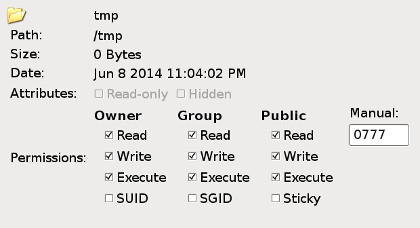
The default permissions of the temp folder should be 777.

Image

The owner of the folder is normally root, with only root being able to change the aforementioned permissions.

Edit: Just saw your 2nd post. :)

_________________
Image


Top
 Post subject: Re: 'Write permission denied' on Linux
PostPosted: Mon Jun 09, 2014 1:52 am  (#5) 
Offline
Script Coder
User avatar

Joined: Apr 23, 2010
Posts: 1553
Location: not from Guildford after all
GnuTux wrote:
That is an odd problem and not the way Split Image to Frames functions for me under Fedora Linux. By default, frames are created in the folder the image was initially loaded from, even if that was the /tmp folder.

I agree. Splitting a multi-layer image into frames should not need to use /tmp (and to my knowledge, never has).

GnuTux wrote:
The default permissions of the temp folder should be 777.

[ Image ]

Traditionally, the permissions for /tmp are 1777. The "1" at the beginning refers to the sticky bit and when it is set, prevents any user except the owner of a file from deleting or renaming it. I am quite surprised that Fedora wouldn't use the same convention, but perhaps it has something to do with SELinux. Nonetheless, I would recommend against changing the permissions of /tmp unless one is confident in what they are doing.

_________________
Any sufficiently primitive technology is indistinguishable from a rock.


Top
 Post subject: Re: 'Write permission denied' on Linux
PostPosted: Mon Jun 09, 2014 6:37 am  (#6) 
Offline
GimpChat Founder
User avatar

Joined: May 22, 2008
Posts: 5248
Location: Gimpville
My understanding is that SELinux prevents users from altering files in your home folder, as well as in /tmp. You bring up an interesting point, though. If you're not using SELinux, setting the sticky bit is a really good idea, especially on an Apache server or other multi-user environment.

It also brings up the question as to why Fedora wouldn't just default to 1777, even with SELinux enabled by default. Disabling SELinux would leave the system vulnerable, unless you remembered to flip that bit. Perhaps there are some issues with both enabled.

_________________
Image


Top
 Post subject: Re: 'Write permission denied' on Linux
PostPosted: Mon Jun 09, 2014 8:36 pm  (#7) 
Offline
GimpChat Member
User avatar

Joined: Oct 07, 2010
Posts: 439
Location: home/Nixnine/.gimp-2.0/scripts/nixnine.scm
FYI:
I have had some issues with Ubuntu Studio suddenly making all my partions read only. Seems to happen after a software update. Happened in 12.10 and 13.10. I have reinstalled/upgraded each time. Don't know if that has anything to do with what you experienced. Running 14.04 now and so far everything is good.

_________________
I refuse to be confused, but am often confused at this refusal.


Top
 Post subject: Re: 'Write permission denied' on Linux
PostPosted: Tue Jun 10, 2014 2:41 am  (#8) 
Offline
GimpChat Member

Joined: Mar 04, 2011
Posts: 2630
Quote:
So I looked under Edit\Preferences\Folder and I saw the temporary folder was set to /tmp (Linux). I checked the folder permissions of /tmp and they were set to root and could not be changed.


Just in the nature of a comment, be careful which /tmp

Using PCLOS KDE the /tmp referenced by Gimp is not the root /tmp but ~/.gimp-2.8/tmp and has permissions 767

Image

There is of course the root /tmp and although not always the case, I have a /tmp in my home partition, permission 444


Top
Post new topic Reply to topic  [ 8 posts ] 

All times are UTC - 5 hours [ DST ]


* Login  


Powered by phpBB3 © phpBB Group