It is currently Tue Nov 17, 2026 7:50 pm


All times are UTC - 5 hours [ DST ]


Post new topic Reply to topic  [ 63 posts ]  Go to page Previous  1, 2, 3, 4  Next
Author Message
 Post subject: Re: GIMP "Teal Appeal" Theme Release
PostPosted: Mon Jun 09, 2014 1:36 am  (#41) 
Offline
GimpChat Member
User avatar

Joined: Jun 02, 2013
Posts: 2090
sallyanne wrote:
Or pink even

Well, how about what's here, the teal and green, haha?

_________________
Image


Top
 Post subject: Re: "Teal Appeal" Theme Release
PostPosted: Mon Jun 09, 2014 1:51 am  (#42) 
Offline
GimpChat Member
User avatar

Joined: Dec 22, 2011
Posts: 399
molly wrote:
What about pinks and purples. :teeth

Yes Molly....I totally agree :D

_________________
Image


Top
 Post subject: Re: "Teal Appeal" Theme Release
PostPosted: Mon Jun 09, 2014 1:54 am  (#43) 
Offline
GimpChat Member
User avatar

Joined: Jun 02, 2013
Posts: 2090
Deblk wrote:
molly wrote:
What about pinks and purples. :teeth

Yes Molly....I totally agree :D

Well, how about what's here, the teal and green, haha? :roll:

_________________
Image


Top
 Post subject: Re: GIMP "Teal Appeal" Theme Release
PostPosted: Mon Jun 09, 2014 2:19 am  (#44) 
Offline
Global Moderator
User avatar

Joined: Apr 01, 2012
Posts: 8507
Location: On the other side of your screen
Nice themes, The Warrior.
I have all of the regular themes in 'Preferences' but don't know where they are from as my themes folder in gimp is empty. [EDIT = they are in also in Public> Public Documents > Better GTK2 Themes for Gimp 2.8 (a zip folder)]. I eventually found a gtkrc file further down the gimp 2.8 list but not in a folder. I can't find my 'share' folder. I'm sure I had one.
All the files I have in my 'gimp' themes path is gimp2/share/gimp/2.0/themes?


Oh I second Molly's request, pink and purple would go nicely

_________________
Image
Free Fun Photo Editing & resources
Poems from the Lord
Gimp Newby
Gimp version 3.2.8 and GMIC-Qt 4.0.2 OS :- Windows 10 Home 64


Last edited by sallyanne on Mon Jun 09, 2014 8:50 am, edited 2 times in total.

Top
 Post subject: Re: GIMP "Teal Appeal" Theme Release
PostPosted: Mon Jun 09, 2014 3:25 am  (#45) 
Offline
Script Coder
User avatar

Joined: Jun 22, 2010
Posts: 1171
Location: Here and there
Let's disregard what I said earlier as with GIMP 2.8.10 on Windows 7 classic theme it works as expected.

There is some styling here that I personally don't like (patterned backgrounds, the areas of black on the radiobuttons, arrows etc and the teal around the colour patches on the colour picker) but overall I think you've done a good job.

And now I'll return to my monochrome world :)

Kevin


Top
 Post subject: Re: GIMP "Teal Appeal" Theme Release
PostPosted: Mon Jun 09, 2014 7:21 am  (#46) 
Offline
GimpChat Member
User avatar

Joined: Apr 07, 2010
Posts: 14182
paynekj wrote:
@Molly

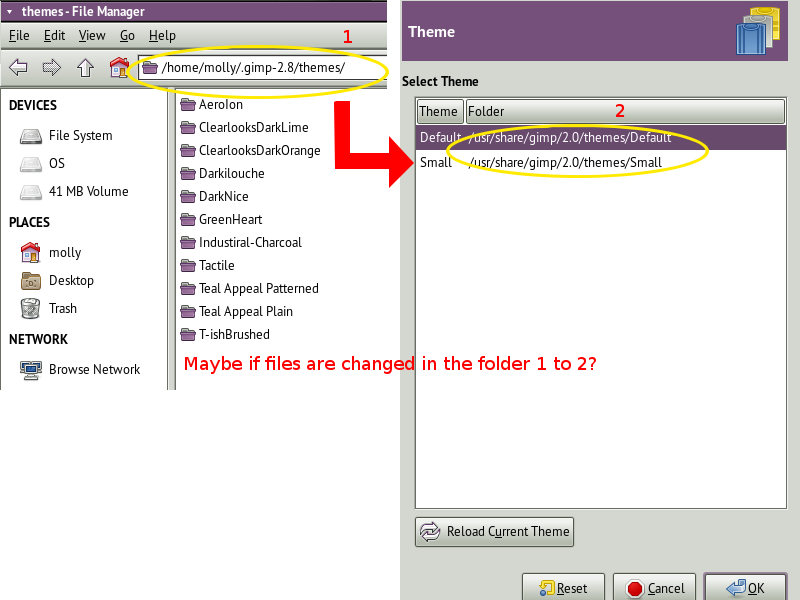
You're not supposed add the individual theme folders to the themes folder list - GIMP is going to be looking in the wrong place for the gtktrc files if you do what you have done.

Just leave your theme folder list pointing to your local theme folder: home/molly/.gimp-2.8/themes and the shared theme folder: /usr/share/gimp/2.0/themes

@Warrior

I find your themes aren't changing the text colour on the menubar and menu items (GIMP 2.8.2 on Windows XP in classic theme). I'll have a play later to see what I can do.

Kevin

Thanks Kevin, I will try that.

_________________
Image


Top
 Post subject: Re: GIMP "Teal Appeal" Theme Release
PostPosted: Mon Jun 09, 2014 7:32 am  (#47) 
Offline
GimpChat Member
User avatar

Joined: Apr 07, 2010
Posts: 14182
The Warrior wrote:
sallyanne wrote:
Or pink even

Well, how about what's here, the teal and green, haha?

@warrior, what is there is great, I think this color thing is just teasing. We all know how Wallace loves purples and some of the women like the pinks, Sooooooo, They will just have to make their own purple and pink themes... :teeth

_________________
Image


Top
 Post subject: Re: GIMP "Teal Appeal" Theme Release
PostPosted: Mon Jun 09, 2014 8:57 am  (#48) 
Offline
GimpChat Member
User avatar

Joined: Jan 10, 2013
Posts: 863
paynekj wrote:
@Molly

You're not supposed add the individual theme folders to the themes folder list - GIMP is going to be looking in the wrong place for the gtktrc files if you do what you have done.

Just leave your theme folder list pointing to your local theme folder: home/molly/.gimp-2.8/themes and the shared theme folder: /usr/share/gimp/2.0/themes


Molly,
That's what I tried to say with screens in viewtopic.php?f=11&t=10505&start=30#p138566

_________________
bbbbbbbbbbbImage
bbbbbbbbbbb Be patient, English is not my language.


Top
 Post subject: Re: GIMP "Teal Appeal" Theme Release
PostPosted: Mon Jun 09, 2014 12:08 pm  (#49) 
Offline
GimpChat Member
User avatar

Joined: Apr 07, 2010
Posts: 14182
Akros wrote:
Molly,
If the themes are transferred from /gimp2.8/themes / to Share/gimp/2.0/themes/
[ Image ]
Does this would it work?

akros, When I change to Share/gimp/2.0/themes/, it goes back to the default gimp theme. I have to point it to Warriors theme to make it work.

_________________
Image


Top
 Post subject: Re: GIMP "Teal Appeal" Theme Release
PostPosted: Mon Jun 09, 2014 3:00 pm  (#50) 
Offline
GimpChat Member
User avatar

Joined: Jan 10, 2013
Posts: 863
Oh! This new look is so strange! :bump
I'm lost! lol :rofl

Molly I had never installed one theme before. But just installed as recommended by The Warrior, and after restart Gimp, the new theme was running.
I will continue using for a while longer and see if I get used to this new theme.

The Warrior
The installed theme is even more beautiful than when seen through the screens GimpChat
Congratulations, beautiful work!
Thanks for sharing. :tyspin

_________________
bbbbbbbbbbbImage
bbbbbbbbbbb Be patient, English is not my language.


Top
 Post subject: Re: GIMP "Teal Appeal" Theme Release
PostPosted: Mon Jun 09, 2014 3:07 pm  (#51) 
Offline
GimpChat Member
User avatar

Joined: Jun 02, 2013
Posts: 2090
Akros wrote:
The Warrior
The installed theme is even more beautiful than when seen through the screens GimpChat
Congratulations, beautiful work!
Thanks for sharing. :tyspin

Thanks Akros, really appreciate it. Many hours go into these themes, nice to get some good feedback.

_________________
Image


Top
 Post subject: Re: GIMP "Teal Appeal" Theme Release
PostPosted: Tue Jun 10, 2014 1:48 am  (#52) 
Offline
GimpChat Member
User avatar

Joined: Jun 02, 2013
Posts: 2090
conbagui wrote:
Just Beautiful... :wow :wow Awesome job Warrior, Impressive... :yr Thank you for sharing.

Thank you sir, I appreciate that very much.

_________________
Image


Top
 Post subject: Re: GIMP "Teal Appeal" Theme Release
PostPosted: Tue Jun 10, 2014 2:23 am  (#53) 
Offline
Global Moderator
User avatar

Joined: Apr 01, 2012
Posts: 8507
Location: On the other side of your screen
sallyanne wrote:
Nice themes, The Warrior.
I have all of the regular themes in 'Preferences' but don't know where they are from as my themes folder in gimp is empty. [EDIT = they are in also in Public> Public Documents > Better GTK2 Themes for Gimp 2.8 (a zip folder)]. I eventually found a gtkrc file further down the gimp 2.8 list but not in a folder. I can't find my 'share' folder. I'm sure I had one.
All the files I have in my 'gimp' themes path is gimp2/share/gimp/2.0/themes?

Oh I second Molly's request, pink and purple would go nicely :hehe :hehe :hehe


Edit again. I have found it! in the program folder :oops: . I have placed the themes in the theme folder and they are not showing up in gimp. I have started up gimp, restarted my computer and started gimp again and still nothing. What am I doing wrong?

_________________
Image
Free Fun Photo Editing & resources
Poems from the Lord
Gimp Newby
Gimp version 3.2.8 and GMIC-Qt 4.0.2 OS :- Windows 10 Home 64


Top
 Post subject: Re: GIMP "Teal Appeal" Theme Release
PostPosted: Tue Jun 10, 2014 5:21 am  (#54) 
Offline
GimpChat Member
User avatar

Joined: May 17, 2014
Posts: 1575
Thank you so much The Warrior. Very good work :bigthup :coolthup
I’ve always found the white so boring :roll: but didn’t know how to change it.
There is one thing, I don’t find any splashes folder.

BTW I’m a woman and I like the green very much :yesnod

_________________
Ella's gallery - YouTube


Top
 Post subject: Re: GIMP "Teal Appeal" Theme Release
PostPosted: Tue Jun 10, 2014 5:24 am  (#55) 
Offline
GimpChat Member
User avatar

Joined: Apr 07, 2010
Posts: 14182
I didn't have a splash folder so I made one and put the splash file into it but it didn't work. Might work for you.

_________________
Image


Top
 Post subject: Re: GIMP "Teal Appeal" Theme Release
PostPosted: Tue Jun 10, 2014 5:30 am  (#56) 
Offline
GimpChat Member
User avatar

Joined: May 17, 2014
Posts: 1575
Thanks for the answer molly. But where exactly do i make a new folder :oops:

_________________
Ella's gallery - YouTube


Top
 Post subject: Re: GIMP "Teal Appeal" Theme Release
PostPosted: Tue Jun 10, 2014 5:41 am  (#57) 
Offline
GimpChat Member
User avatar

Joined: Apr 07, 2010
Posts: 14182
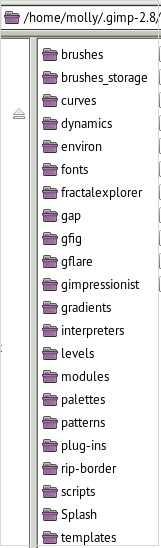
In your user folder where your scripts plugins, gradients etc are.
Image

_________________
Image


Top
 Post subject: Re: GIMP "Teal Appeal" Theme Release
PostPosted: Tue Jun 10, 2014 6:58 am  (#58) 
Offline
Script Coder
User avatar

Joined: Jun 22, 2010
Posts: 1171
Location: Here and there
Molly, the reason it didn't work for you is that you named the folder wrong- it should be splashes not Splash

http://www.gimp.org/about/splash/


Top
 Post subject: Re: GIMP "Teal Appeal" Theme Release
PostPosted: Tue Jun 10, 2014 7:02 am  (#59) 
Offline
GimpChat Member
User avatar

Joined: Apr 07, 2010
Posts: 14182
Thanks Kevin, I changed it to splashes and now I will open gimp to see if it works.
EDIT: No, I tried it twice and gimp opened with the regular default splash.

_________________
Image


Top
 Post subject: Re: GIMP "Teal Appeal" Theme Release
PostPosted: Tue Jun 10, 2014 7:06 am  (#60) 
Offline
GimpChat Member
User avatar

Joined: Apr 07, 2010
Posts: 14182
:oops: :oops: :oops: Got it, forgot to make the s instead of "S"

_________________
Image


Top
Post new topic Reply to topic  [ 63 posts ]  Go to page Previous  1, 2, 3, 4  Next

All times are UTC - 5 hours [ DST ]


* Login  


Powered by phpBB3 © phpBB Group