It is currently Thu Jun 04, 2026 8:43 pm


All times are UTC - 5 hours [ DST ]


Post new topic Reply to topic  [ 25 posts ]  Go to page 1, 2  Next
Author Message
 Post subject: BW recolored
PostPosted: Sun Jan 06, 2013 11:22 pm  (#1) 
Offline
GimpChat Member
User avatar

Joined: Nov 15, 2012
Posts: 949
Location: Mesa, AZ
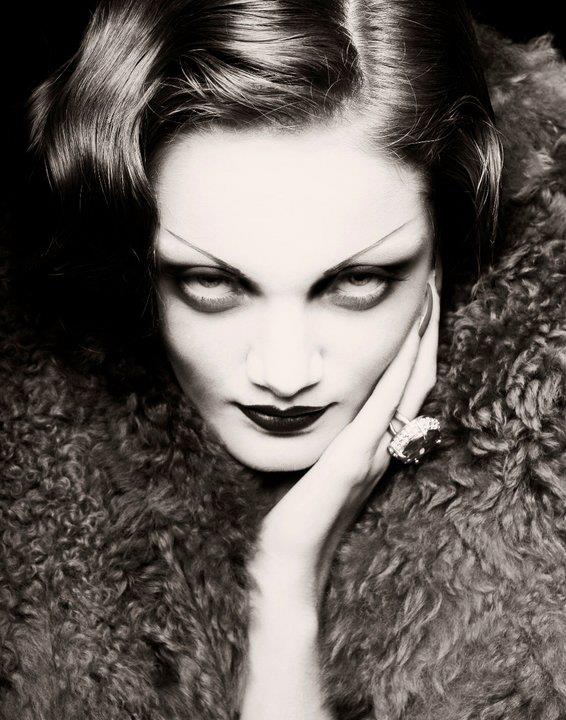
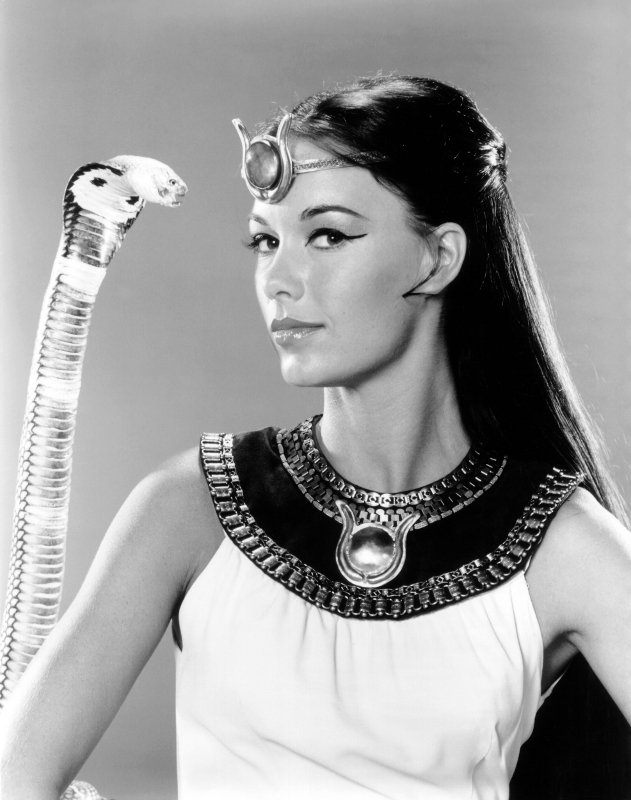
Before:
Image

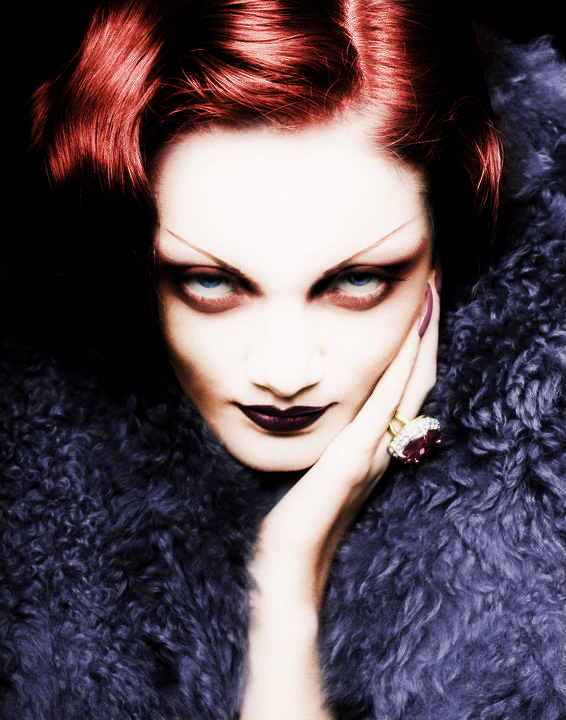
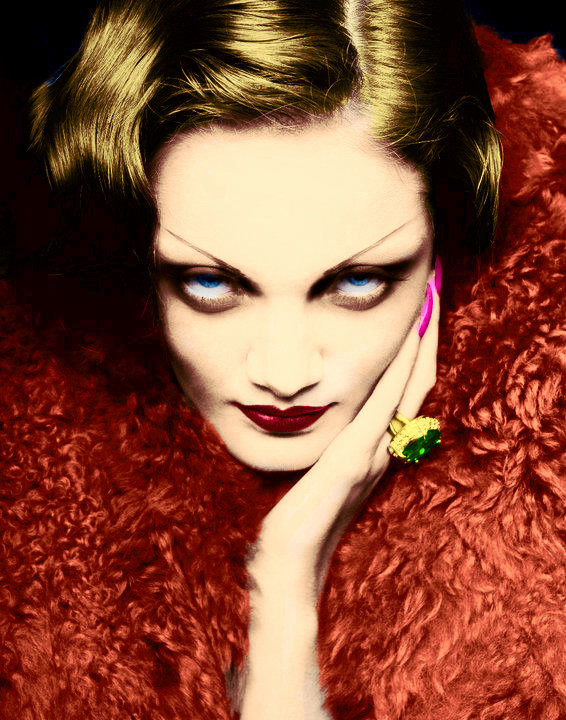
And after I colored it:

Image

_________________
Image

I now have a Tumblr, check it out!


Share on Facebook Share on Twitter Share on Orkut Share on Digg Share on MySpace Share on Delicious Share on Technorati
Top
 Post subject: Re: BW recolored
PostPosted: Sun Jan 06, 2013 11:25 pm  (#2) 
Offline
GimpChat Member
User avatar

Joined: Nov 16, 2011
Posts: 5127
Location: Metro Vancouver, BC
Nice one, ek22!

_________________
Image
Gimp 2.8.18, Linux, median user
Gimp Chat Tutorials Index
Spirit Bear (Kermode)


Top
 Post subject: Re: BW recolored
PostPosted: Mon Jan 07, 2013 4:15 am  (#3) 
Offline
GimpChat Member
User avatar

Joined: Dec 02, 2012
Posts: 203
Location: Cantabria, Spain
Well done!.
Paintihg with brush each color or colorized it using selections?.

There is another way: using G'mic B&W recolorize, but it's difficult to me.

_________________
Image


My Gimp rides on Antergos (Arch), Linux Mint, Debian and Fedora


Top
 Post subject: Re: BW recolored
PostPosted: Wed Jan 09, 2013 12:00 am  (#4) 
Offline
GimpChat Member
User avatar

Joined: Apr 08, 2010
Posts: 5420
Location: Northwest Ohio
excellent result!


Top
 Post subject: Re: BW recolored
PostPosted: Wed Jan 09, 2013 12:50 am  (#5) 
Offline
GimpChat Member
User avatar

Joined: Nov 15, 2012
Posts: 949
Location: Mesa, AZ
jamac4k wrote:
Well done!.
Paintihg with brush each color or colorized it using selections?.

There is another way: using G'mic B&W recolorize, but it's difficult to me.


No I made a layer for each color and colorized it in the hue I wanted, then used layer masks to make the color fit the area it should apply to. There's about 15 layers of colors in that.

I could have sworn someone here did a tut on it a little while back but I couldn't find it again. That's what got me thinking about it.

_________________
Image

I now have a Tumblr, check it out!


Top
 Post subject: Re: BW recolored
PostPosted: Wed Jan 09, 2013 8:45 am  (#6) 
Offline
GimpChat Member
User avatar

Joined: Aug 16, 2012
Posts: 4271
Location: Göteborg, Sweden
ek22: whew, fifteen layers of colour sounds like a lot of work! but the result is very good, i think.

_________________


Top
 Post subject: Re: BW recolored
PostPosted: Wed Jan 09, 2013 10:58 am  (#7) 
Offline
GimpChat Member
User avatar

Joined: Mar 23, 2012
Posts: 7388
Location: Göteborg at last!
You've done that really well EK.


Top
 Post subject: Re: BW recolored
PostPosted: Thu Jan 10, 2013 11:15 am  (#8) 
Offline
GimpChat Member
User avatar

Joined: Aug 30, 2012
Posts: 2174
Really excellent job, I'm intrigued how you done the hair as it appears each individual strand from the scalp has been coloured.

_________________
Image


Top
 Post subject: Re: BW recolored
PostPosted: Mon Jan 14, 2013 7:14 am  (#9) 
Offline
GimpChat Member
User avatar

Joined: Nov 15, 2012
Posts: 949
Location: Mesa, AZ
Uh well, basically, it's a super-soft paintbrush, in places I used the airbrush tool too. On a masked colorized layer. Like I make a BW layer of the image, then I duplicate it and colorize it in the shade and saturation I want. And then I paint the color in with the help of a layer mask. The key for the hair line was a real subtle touch with a very soft tool.


I was sure someone here did a tutorial on it already, but if no one has, I can maybe see about putting one down when I get my replacement comp.

_________________
Image

I now have a Tumblr, check it out!


Top
 Post subject: Re: BW recolored
PostPosted: Mon Jan 21, 2013 9:26 pm  (#10) 
Offline
GimpChat Member
User avatar

Joined: Jan 10, 2013
Posts: 863
Using Gmic recolorize
Image

_________________
bbbbbbbbbbbImage
bbbbbbbbbbb Be patient, English is not my language.


Top
 Post subject: Re: BW recolored
PostPosted: Mon Jan 21, 2013 9:32 pm  (#11) 
Offline
GimpChat Member
User avatar

Joined: Nov 16, 2011
Posts: 5127
Location: Metro Vancouver, BC
Great job, Akros :bigthup
It's an amazing filter!

_________________
Image
Gimp 2.8.18, Linux, median user
Gimp Chat Tutorials Index
Spirit Bear (Kermode)


Top
 Post subject: Re: BW recolored
PostPosted: Mon Jan 21, 2013 10:36 pm  (#12) 
Offline
GimpChat Member
User avatar

Joined: Nov 15, 2012
Posts: 949
Location: Mesa, AZ
Yeah, I'm impressed with how well it works. Though there are a couple of places where it skips over the details. Like her ring for example. But then I'm a bit of a stickler for perfection.

_________________
Image

I now have a Tumblr, check it out!


Top
 Post subject: Re: BW recolored
PostPosted: Sat Jun 14, 2014 6:24 pm  (#13) 
Offline
GimpChat Member
User avatar

Joined: Jan 10, 2013
Posts: 863
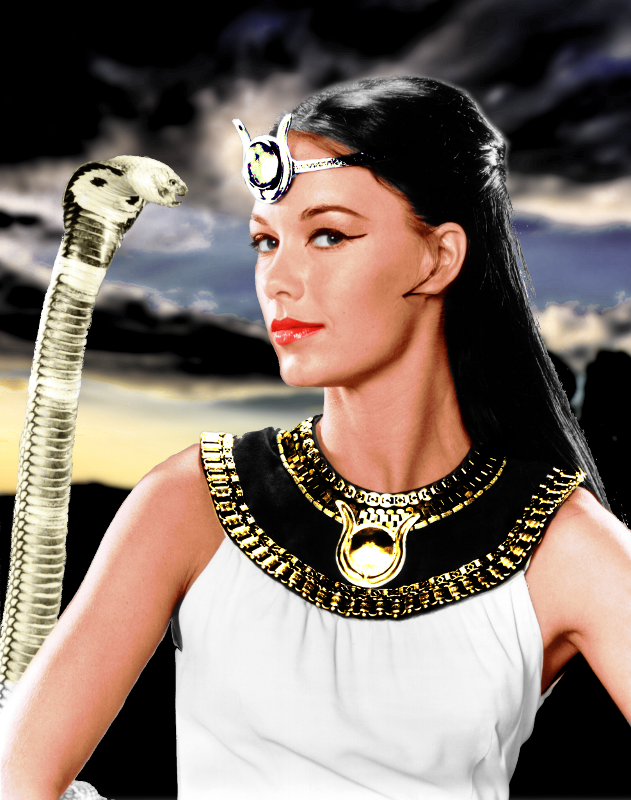
Using layers
Image
The background I used another image
Image
It has some flaws in the contours, but as I was just focused in coloring, had lazy to retouch it.

_________________
bbbbbbbbbbbImage
bbbbbbbbbbb Be patient, English is not my language.


Top
 Post subject: Re: BW recolored
PostPosted: Sat Jun 14, 2014 7:26 pm  (#14) 
Offline
GimpChat Member
User avatar

Joined: Jun 24, 2010
Posts: 504
Location: Western Vic Australia
EK22 and Akros , really nice work.
EK22 , I think you are referring to the recent discussion on Luminosity masks. In particular there was as reference by Odin to an article by Pat David which was very good. There was also a discussion in MeetTheGimp for doing a duotone which uses soft (not thresholded) masks for colorising a B/W.

_________________
Image


Top
 Post subject: Re: BW recolored
PostPosted: Sat Jun 14, 2014 8:26 pm  (#15) 
Offline
Script Coder
User avatar

Joined: May 07, 2014
Posts: 4469
Location: Canada
nice guys.
I did this one a while back.
For the skintone i used colors -> map -> sample colorize and selected a patch of skin from another colored photo that had dark and light and mid tones of color skin.Image
i didnt' spend too much time on the hair line you can see where it gets the dark of color skintone instead of hair. I purely wanted to play around with the colors->map->sample colorize.

_________________
TinT
My GIMP 2.10 plug-in writer Fiverr Gig
Plaid Community Forum
Imageplaid-patterns.com


Top
 Post subject: Re: BW recolored
PostPosted: Sat Jun 14, 2014 8:48 pm  (#16) 
Offline
GimpChat Member
User avatar

Joined: Apr 08, 2010
Posts: 5420
Location: Northwest Ohio
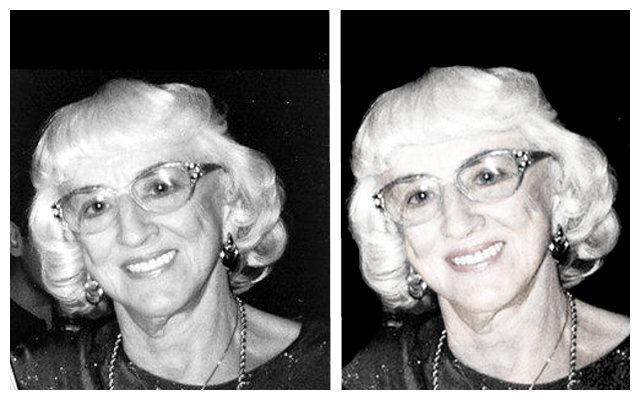
I did this for a memorial poster, so I tried to make the colors faint but realistic, like an older faded picture.
Image
oops, what?
Tries again…Image


Top
 Post subject: Re: BW recolored
PostPosted: Sun Jun 15, 2014 12:23 am  (#17) 
Offline
Script Coder
User avatar

Joined: May 07, 2014
Posts: 4469
Location: Canada
Akros wrote:
Using Gmic recolorize
[ Image ]

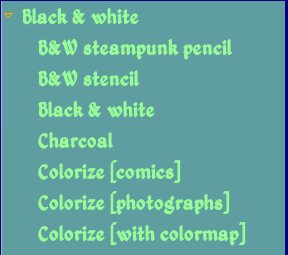
Where is recolorize found in GMIC? i can't seem to find it

_________________
TinT
My GIMP 2.10 plug-in writer Fiverr Gig
Plaid Community Forum
Imageplaid-patterns.com


Top
 Post subject: Re: BW recolored
PostPosted: Sun Jun 15, 2014 4:59 am  (#18) 
Offline
GimpChat Member
User avatar

Joined: Apr 07, 2010
Posts: 14182
It is under BW black and white Image

_________________
Image


Top
 Post subject: Re: BW recolored
PostPosted: Sun Jun 15, 2014 1:43 pm  (#19) 
Offline
GimpChat Member
User avatar

Joined: Jan 10, 2013
Posts: 863
trandoductin I had gone through your blog and read your suggestion. Then follow the links you cited.
That was how I ended up coloring the image (#13)
Thanks for the tips! :bigthup

wbool63 wrote:
There was also a discussion in MeetTheGimp for doing a duotone which uses soft (not thresholded) masks for colorising a B/W.

wbool63 this is interesting.
I will now search for this technique with duotone.
Thanks for the comment and for the tip!

_________________
bbbbbbbbbbbImage
bbbbbbbbbbb Be patient, English is not my language.


Top
 Post subject: Re: BW recolored
PostPosted: Sun Jun 15, 2014 1:49 pm  (#20) 
Offline
Script Coder
User avatar

Joined: May 07, 2014
Posts: 4469
Location: Canada
Akros wrote:
trandoductin I had gone through your blog and read your suggestion. Then follow the links you cited.
That was how I ended up coloring the image (#13)
Thanks for the tips! :bigthup

wbool63 wrote:
There was also a discussion in MeetTheGimp for doing a duotone which uses soft (not thresholded) masks for colorising a B/W.

wbool63 this is interesting.
I will now search for this technique with duotone.
Thanks for the comment and for the tip!

how did you know i had a blog? have you been stalking me? hehe
So you did use other reference images to use as color then?

_________________
TinT
My GIMP 2.10 plug-in writer Fiverr Gig
Plaid Community Forum
Imageplaid-patterns.com


Top
Post new topic Reply to topic  [ 25 posts ]  Go to page 1, 2  Next

All times are UTC - 5 hours [ DST ]


* Login  


Powered by phpBB3 © phpBB Group