It is currently Sat Oct 03, 2026 5:18 pm


All times are UTC - 5 hours [ DST ]


Post new topic Reply to topic  [ 22 posts ]  Go to page 1, 2  Next
Author Message
 Post subject: Help with Logo
PostPosted: Sun Jun 15, 2014 9:21 am  (#1) 
Offline
GimpChat Member

Joined: Jun 06, 2014
Posts: 17
GIMP Version: 2.8.10
Operating System: Windows
GIMP Experience: Beginner Level


Our business has a logo (i am attaching an image of it). I've been playing around trying to figure out gimp, doing the get started tutorials and reading the manuals. What i am wanting to do, is make the logo be part of the back ground of our business card. I don't like the white background behind it, and i figured out how to make it transparent. But I am clueless how to continue. Is there a way to make the image in layers? Is that the way i would proceed? If there are any suggestions about how to make this logo look more distinctive, they would be more than appreciated! Thanks in advance for the help!


Attachments:
Logo.png
Logo.png [ 54.19 KiB | Viewed 3710 times ]
Share on Facebook Share on Twitter Share on Orkut Share on Digg Share on MySpace Share on Delicious Share on Technorati
Top
 Post subject: Re: Help with Logo
PostPosted: Sun Jun 15, 2014 10:00 am  (#2) 
Offline
GimpChat Member
User avatar

Joined: Apr 07, 2010
Posts: 14182
Yes, you can make as many layers as you want. Once you do that you can edit each layer without changing the others. You can make a coloured layer and put it below your logo and the color will show through.

_________________
Image


Top
 Post subject: Re: Help with Logo
PostPosted: Sun Jun 15, 2014 10:05 am  (#3) 
Offline
GimpChat Member
User avatar

Joined: Jun 24, 2010
Posts: 504
Location: Western Vic Australia
Perhaps some thing like this to make it a bit more distinctive ,yet retain the logo.
Image

_________________
Image


Top
 Post subject: Re: Help with Logo
PostPosted: Sun Jun 15, 2014 10:08 am  (#4) 
Offline
GimpChat Member
User avatar

Joined: Apr 07, 2010
Posts: 14182
Looks good Wooble, looks like you bumped it.

_________________
Image


Top
 Post subject: Re: Help with Logo
PostPosted: Sun Jun 15, 2014 10:13 am  (#5) 
Offline
GimpChat Member
User avatar

Joined: Jun 24, 2010
Posts: 504
Location: Western Vic Australia
molly wrote:
Looks good Wooble, looks like you bumped it.

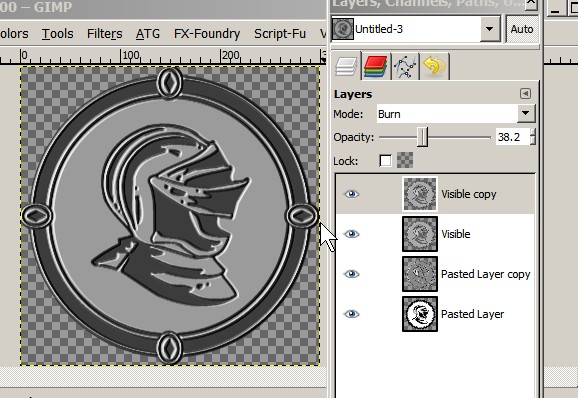
Thanks Molly, yes distort emboss, blend normal mode around 60 %, new layer from visible and copy and burn. There is a lot of room to vary the final outcome with 4 layers.

_________________
Image


Top
 Post subject: Re: Help with Logo
PostPosted: Sun Jun 15, 2014 10:19 am  (#6) 
Offline
GimpChat Member

Joined: Jun 06, 2014
Posts: 17
Thanks for the help! Now for the really stupid question...lol...are you saying i can make separate layers of say the helmet, the ring, and the background? or just duplicate layers of the whole image? Wbool! That is fantastic. I hope i can figure out what you did, because i LOVE it!


Top
 Post subject: Re: Help with Logo
PostPosted: Sun Jun 15, 2014 10:55 am  (#7) 
Offline
GimpChat Member
User avatar

Joined: Apr 07, 2010
Posts: 14182
yes you can put whatever you want on each layer, use you move tool to move them around, color them or whatever, if you don't like them, just turn the layer off with the little eye or delete it. There are some good tutorials on working with layers.

_________________
Image


Top
 Post subject: Re: Help with Logo
PostPosted: Sun Jun 15, 2014 11:00 am  (#8) 
Offline
Administrator
User avatar

Joined: Aug 10, 2012
Posts: 14224
Location: Native to NYC living in Arizona, Gimp 2.8 - 3.0, Win 11 PC.
I made this using your logo... If you like it you can use it and or make any changes you like to it.
Image


Attachments:
Logo By Wallace.xcf [545.55 KiB]
Downloaded 142 times

_________________
Image
"A wise man learns more from a foolish question than a fool can learn from a wise answer"
Image
Top
 Post subject: Re: Help with Logo
PostPosted: Sun Jun 15, 2014 11:01 am  (#9) 
Offline
GimpChat Member
User avatar

Joined: Jun 02, 2013
Posts: 2090
Holy crap Wallace, that's awesome!

_________________
Image


Top
 Post subject: Re: Help with Logo
PostPosted: Sun Jun 15, 2014 11:03 am  (#10) 
Offline
GimpChat Member
User avatar

Joined: Apr 07, 2010
Posts: 14182
Very nice Wallace.
This is a small pdf of working with layers.

http://www.osceola.k12.wi.us/docs/hando ... layers.pdf

_________________
Image


Top
 Post subject: Re: Help with Logo
PostPosted: Sun Jun 15, 2014 11:05 am  (#11) 
Offline
Administrator
User avatar

Joined: Aug 10, 2012
Posts: 14224
Location: Native to NYC living in Arizona, Gimp 2.8 - 3.0, Win 11 PC.
The Warrior wrote:
Holy crap Wallace, that's awesome!

molly wrote:
Very nice Wallace.

Thanks you guys, it's the only thing I've done in a while. :mrgreen:

_________________
Image
"A wise man learns more from a foolish question than a fool can learn from a wise answer"
Image


Top
 Post subject: Re: Help with Logo
PostPosted: Sun Jun 15, 2014 11:10 am  (#12) 
Offline
GimpChat Member
User avatar

Joined: Jun 24, 2010
Posts: 504
Location: Western Vic Australia
DemetriaBeth wrote:
Thanks for the help! Now for the really stupid question...lol...are you saying i can make separate layers of say the helmet, the ring, and the background? or just duplicate layers of the whole image? Wbool! That is fantastic. I hope i can figure out what you did, because i LOVE it!

DeeBee (Your name is too long) You are probably going to get some other ideas from other members. There are some very talented people here. If you then decide that you'd like to use my idea , I'll will do a tut for it or do a couple of them for you to use.

Edit , Wallace has already responded with another great design


Top
 Post subject: Re: Help with Logo
PostPosted: Sun Jun 15, 2014 1:44 pm  (#13) 
Offline
GimpChat Member
User avatar

Joined: Mar 10, 2014
Posts: 845
Image Image
here some quick examples


Top
 Post subject: Re: Help with Logo
PostPosted: Sun Jun 15, 2014 3:51 pm  (#14) 
Offline
GimpChat Founder
User avatar

Joined: May 22, 2008
Posts: 5241
Location: Gimpville
A couple of variations..

Image

Image

Image


Attachments:
File comment: Shiny Logo
shiny-logo.xcf [1.21 MiB]
Downloaded 91 times

_________________
“If you reach for the stars, you just might land on a decently sized hill.” - Stuart Hill
Top
 Post subject: Re: Help with Logo
PostPosted: Sun Jun 15, 2014 4:01 pm  (#15) 
Offline
GimpChat Member

Joined: Jun 06, 2014
Posts: 17
Oh My Goodness!!! I am blown away! Wallace, your design of our logo is absolutely GORGEOUS!!!! I love the ones that GnuTux and Marcello did too! I am going to strive to learn how to do such beautiful work! I paint, mostly wildlife and life and form studies, but i am very interested in this image manipulation.

I am going to use this logo on our business cards. When i get it finished, if y'all don't mind I will send an attachment so you can critique it.

And btw...my friends call me Demi.


Top
 Post subject: Re: Help with Logo
PostPosted: Sun Jun 15, 2014 4:31 pm  (#16) 
Offline
Administrator
User avatar

Joined: Aug 10, 2012
Posts: 14224
Location: Native to NYC living in Arizona, Gimp 2.8 - 3.0, Win 11 PC.
GnuTux wrote:
A couple of variations..

Nice work Tux, good old ML Bevel Reflect at it's finest. ;)
DemetriaBeth wrote:
Oh My Goodness!!! I am blown away! Wallace, your design of our logo is absolutely GORGEOUS!!!! I love the ones that GnuTux and Marcello did too! I am going to strive to learn how to do such beautiful work! I paint, mostly wildlife and life and form studies, but i am very interested in this image manipulation.

I am going to use this logo on our business cards. When i get it finished, if y'all don't mind I will send an attachment so you can critique it.

And btw...my friends call me Demi.

Thanks Demi, feel free to use the logo I made however you like.

_________________
Image
"A wise man learns more from a foolish question than a fool can learn from a wise answer"
Image


Top
 Post subject: Re: Help with Logo
PostPosted: Mon Jun 16, 2014 5:23 am  (#17) 
Offline
GimpChat Member
User avatar

Joined: Jun 24, 2010
Posts: 504
Location: Western Vic Australia
Wallace, Marcello and GnuTux beautiful examples.
With modern , "on demand" printing is there still an advantage in staying with one or two ink colours?
The problem with this logo is that in order to beautify it is to keep it very simple because at "live" size the logo is reduced and a lot of detail is lost.
I think that Tux's silver logo is best of all as he has taken away some detail and would lend itself to a single ink image. I would like to see that logo on a plain background without the drop shadow on a white background.

Demi, here is a cheeky sample of a card in "live" size. (depending of course on your screen resolution and settings). As you can see, a lot of detail is lost


Image

_________________
Image


Top
 Post subject: Re: Help with Logo
PostPosted: Mon Jun 16, 2014 8:20 am  (#18) 
Offline
GimpChat Member
User avatar

Joined: Jan 20, 2013
Posts: 590
Wallace, your works are always so cute!

_________________
Image


Top
 Post subject: Re: Help with Logo
PostPosted: Mon Jun 16, 2014 11:17 am  (#19) 
Offline
Administrator
User avatar

Joined: Aug 10, 2012
Posts: 14224
Location: Native to NYC living in Arizona, Gimp 2.8 - 3.0, Win 11 PC.
Carlos Diniz wrote:
Wallace, your works are always so cute!

Thank you Carlos. :bigthup

_________________
Image
"A wise man learns more from a foolish question than a fool can learn from a wise answer"
Image


Top
 Post subject: Re: Help with Logo
PostPosted: Mon Jun 16, 2014 1:15 pm  (#20) 
Offline
GimpChat Founder
User avatar

Joined: May 22, 2008
Posts: 5241
Location: Gimpville
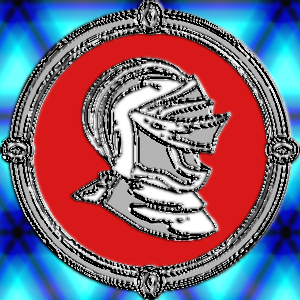
Here is another sample that uses Environment Mapping (ala EnviroLogo Script).

Image


Here's a grayscale image that looks pretty good on a white or light background.
Image

_________________
“If you reach for the stars, you just might land on a decently sized hill.” - Stuart Hill


Top
Post new topic Reply to topic  [ 22 posts ]  Go to page 1, 2  Next

All times are UTC - 5 hours [ DST ]


* Login  


Powered by phpBB3 © phpBB Group