It is currently Wed Nov 25, 2026 5:06 am


All times are UTC - 5 hours [ DST ]


Post new topic Reply to topic  [ 25 posts ]  Go to page Previous  1, 2
Author Message
 Post subject: Re: BW recolored
PostPosted: Sun Jun 15, 2014 3:16 pm  (#21) 
Offline
GimpChat Member
User avatar

Joined: Jan 10, 2013
Posts: 863
trandoductin wrote:
how did you know i had a blog? have you been stalking me? hehe
So you did use other reference images to use as color then?

Yah, You told me Re: Polygon Art (link to Triangulator app on p.2) :hehe

Yah, I used three, one for skin, one for the collar and one for the viperous bat. ;)

_________________
bbbbbbbbbbbImage
bbbbbbbbbbb Be patient, English is not my language.


Top
 Post subject: Re: BW recolored
PostPosted: Sun Jun 15, 2014 8:48 pm  (#22) 
Offline
GimpChat Member
User avatar

Joined: Jun 24, 2010
Posts: 504
Location: Western Vic Australia
Akros wrote:
trandoductin I had gone through your blog and read your suggestion. Then follow the links you cited.
That was how I ended up coloring the image (#13)
Thanks for the tips! :bigthup

wbool63 wrote:
There was also a discussion in MeetTheGimp for doing a duotone which uses soft (not thresholded) masks for colorising a B/W.

wbool63 this is interesting.
I will now search for this technique with duotone.
Thanks for the comment and for the tip!


It is Meetthegimp episode 039

_________________
Image


Top
 Post subject: Re: BW recolored
PostPosted: Tue Jun 17, 2014 8:50 am  (#23) 
Offline
GimpChat Member
User avatar

Joined: Jan 10, 2013
Posts: 863
2-ton wrote:
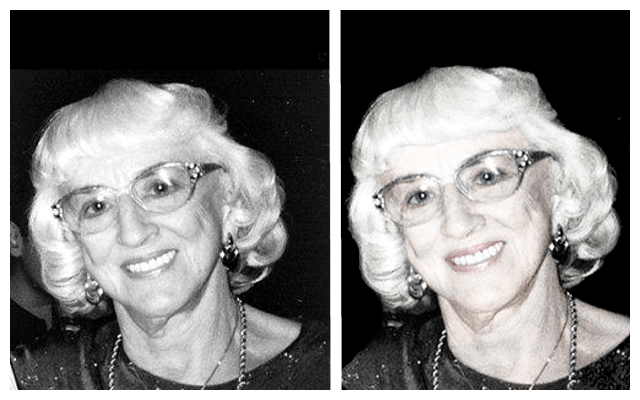
I did this for a memorial poster, so I tried to make the colors faint but realistic, like an older faded picture. [ [url]Image[/url] ]

2-ton,
The colors faint of the image really gave the appearance of fading.
It was realistic, but also left the "sad and lifeless" picture.
I felt like coloring and rescue the joy that the image conveys.

So I did that.
I would like to post my results.
But as this picture was taken for a memorial poster, I do not know if it would be impertinent or disrespectful.

Then I'll be waiting in your permission to post my edition.

wbool63 wrote:
It is Meetthegimp episode 039

wbool63,
Watched the videos # 39 and # 106, interesting technique. I've used in some pictures and enjoyed the results.
Thanks for the tip! :tyspin

_________________
bbbbbbbbbbbImage
bbbbbbbbbbb Be patient, English is not my language.


Top
 Post subject: Re: BW recolored
PostPosted: Tue Jun 17, 2014 10:32 pm  (#24) 
Offline
GimpChat Member
User avatar

Joined: Apr 08, 2010
Posts: 5420
Location: Northwest Ohio
Akros, please do post that picture. I did this for a friend and had never met this person, so I was not sure of her coloring. I did not even know if she was blonde or gray, but because of her age, assumed gray. That is why I wanted to keep the coloring to a minimum. I would like to see a full color rendition.


Top
 Post subject: Re: BW recolored
PostPosted: Thu Jun 19, 2014 1:58 pm  (#25) 
Offline
GimpChat Member
User avatar

Joined: Jan 10, 2013
Posts: 863
2-ton wrote:
I did not even know if she was blonde or gray, but because of her age, assumed gray. That is why I wanted to keep the coloring to a minimum. I would like to see a full color rendition.


2-ton,
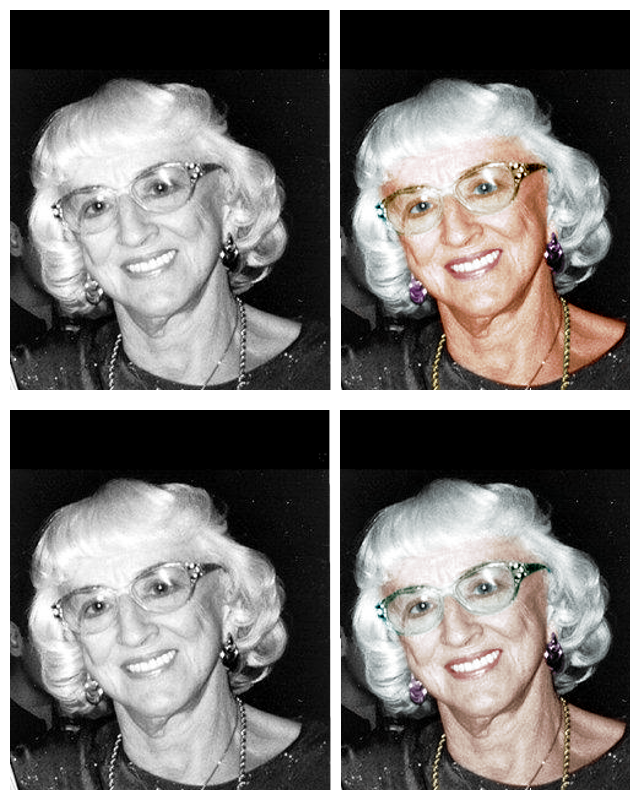
Well, I was not sure about the original hair color. Then just did a imperceptible change.
I have not changed much of what you had done, I just accented a little more color.
Image
My attempt
Image
Maybe if I had added color to the background, could become more natural the colors added.

_________________
bbbbbbbbbbbImage
bbbbbbbbbbb Be patient, English is not my language.


Top
Post new topic Reply to topic  [ 25 posts ]  Go to page Previous  1, 2

All times are UTC - 5 hours [ DST ]


* Login  


Powered by phpBB3 © phpBB Group