It is currently Sat Aug 22, 2026 7:02 am


All times are UTC - 5 hours [ DST ]


Post new topic Reply to topic  [ 190 posts ]  Go to page Previous  1, 2, 3, 4, 5, 6 ... 10  Next
Author Message
 Post subject: Re: Arakne-path-shape-creator6a[Added Grid, Tiles and 'Arrow Stick']
PostPosted: Mon Jun 16, 2014 10:35 am  (#41) 
Offline
GimpChat Member
User avatar

Joined: Mar 10, 2014
Posts: 845
Image
It's working!
I embossed the grid..
Thank you Graechan also by me


Top
 Post subject: Re: Arakne-path-shape-creator6a[Added Grid, Tiles and 'Arrow Stick']
PostPosted: Mon Jun 16, 2014 6:23 pm  (#42) 
Offline
Script Coder
User avatar

Joined: Feb 18, 2011
Posts: 4826
Location: Bendigo Vic. Australia
Note: if you are not getting the new shapes up, delete 'araknepathshapecreatorshapes.pyc' and 'pnt2d.pyc' then restart your Gimp :geek

_________________
Image
No matter how much you push the envelope, it'll still be stationery.


Top
 Post subject: Re: Arakne-path-shape-creator6a[Added Grid, Tiles and 'Arrow Stick']
PostPosted: Mon Jun 16, 2014 6:36 pm  (#43) 
Offline
GimpChat Member
User avatar

Joined: Dec 08, 2013
Posts: 1088
:)


Attachments:
sam-PathShape-modStar2a.png
sam-PathShape-modStar2a.png [ 599.39 KiB | Viewed 2098 times ]

_________________
Image
Top
 Post subject: Re: Arakne-path-shape-creator6a[Added Grid, Tiles and 'Arrow Stick']
PostPosted: Mon Jun 16, 2014 6:48 pm  (#44) 
Offline
GimpChat Member
User avatar

Joined: Apr 07, 2010
Posts: 14182
Marcello wrote:
[ Image ]
It's working!
I embossed the grid..
Thank you Graechan also by me

Graechan... I have deleted the two pyc files 8 times now and they keep coming back. I then emptied my trash and they still keep coming back every time I delete them. How can that happen? I have never heard of this before.

_________________
Image


Top
 Post subject: Re: Arakne-path-shape-creator6a[Added Grid, Tiles and 'Arrow Stick']
PostPosted: Mon Jun 16, 2014 6:54 pm  (#45) 
Offline
Script Coder
User avatar

Joined: Feb 18, 2011
Posts: 4826
Location: Bendigo Vic. Australia
SysTemX Wow that's a very Impressive geometric Image :coolthup

_________________
Image
No matter how much you push the envelope, it'll still be stationery.


Top
 Post subject: Re: Arakne-path-shape-creator6a[Added Grid, Tiles and 'Arrow Stick']
PostPosted: Mon Jun 16, 2014 6:57 pm  (#46) 
Offline
Script Coder
User avatar

Joined: Feb 18, 2011
Posts: 4826
Location: Bendigo Vic. Australia
Molly of course they come back but now they contain the new shape entries

_________________
Image
No matter how much you push the envelope, it'll still be stationery.


Top
 Post subject: Re: Arakne-path-shape-creator6a[Added Grid, Tiles and 'Arrow Stick']
PostPosted: Mon Jun 16, 2014 7:07 pm  (#47) 
Offline
GimpChat Member
User avatar

Joined: Dec 08, 2013
Posts: 1088
Graechan wrote:
SysTemX Wow that's a very Impressive geometric Image :coolthup

Thankyou Graechan :)
:bowdown You wouldn't know of a script :hehe that takes the repitition out of multi-iterations of SHRINK, BEVEL with an input for number of iterations, shrink size (+ or -) and bevel size. :cheers :guitrock

_________________
Image


Top
 Post subject: Re: Arakne-path-shape-creator6a[Added Grid, Tiles and 'Arrow Stick']
PostPosted: Mon Jun 16, 2014 7:40 pm  (#48) 
Offline
Script Coder
User avatar

Joined: Feb 18, 2011
Posts: 4826
Location: Bendigo Vic. Australia
SysTemX not offhand but if you could do an Image of what you want to end up with it would help

_________________
Image
No matter how much you push the envelope, it'll still be stationery.


Top
 Post subject: Re: Arakne-path-shape-creator6a[Added Grid, Tiles and 'Arrow Stick']
PostPosted: Mon Jun 16, 2014 8:26 pm  (#49) 
Offline
Script Coder
User avatar

Joined: Feb 18, 2011
Posts: 4826
Location: Bendigo Vic. Australia
SysTemX are you looking for something like this below↓ with 3 iterations
Image

_________________
Image
No matter how much you push the envelope, it'll still be stationery.


Top
 Post subject: Re: Arakne-path-shape-creator6a[Added Grid, Tiles and 'Arrow Stick']
PostPosted: Mon Jun 16, 2014 8:29 pm  (#50) 
Offline
GimpChat Member
User avatar

Joined: Dec 08, 2013
Posts: 1088
SysTemX wrote:
:)

Sorry Graechan, My heads in the clouds.
The progressive bevelling in the above image is the result of selecting a region and repeating the cycle of (in this case) bevel=15, the shrink selection by 5, repeat bevel=15 etc.
Does this help?
If there were to be a script available, it would probably only require the scripts to be combined. Impossible for me to implement these days.

:hi5 Yes Graechan That the one. You are awesome.
_________________
Image


Top
 Post subject: Re: Arakne-path-shape-creator6a[Added Grid, Tiles and 'Arrow Stick']
PostPosted: Mon Jun 16, 2014 11:58 pm  (#51) 
Offline
Script Coder
User avatar

Joined: Feb 18, 2011
Posts: 4826
Location: Bendigo Vic. Australia
SysTemX 'Stepped Bevel.scm' coming your way soon

_________________
Image
No matter how much you push the envelope, it'll still be stationery.


Top
 Post subject: Re: Arakne-path-shape-creator6a[Added Grid, Tiles and 'Arrow Stick']
PostPosted: Tue Jun 17, 2014 4:55 am  (#52) 
Offline
GimpChat Member
User avatar

Joined: Apr 07, 2010
Posts: 14182
@Graechan,
Here are the screen shots requested.

Image

Image

Image

Image

_________________
Image


Top
 Post subject: Re: Arakne-path-shape-creator6a[Added Grid, Tiles and 'Arrow Stick']
PostPosted: Tue Jun 17, 2014 10:24 am  (#53) 
Offline
Global Moderator
User avatar

Joined: May 16, 2010
Posts: 16164
Deleting those two files didn't work for me Graechan The shape files are in the shape folder but they still don't show up in the drop down menu.

_________________
Image


Top
 Post subject: Re: Arakne-path-shape-creator6a[Added Grid, Tiles and 'Arrow Stick']
PostPosted: Tue Jun 17, 2014 10:31 am  (#54) 
Offline
Global Moderator
User avatar

Joined: May 16, 2010
Posts: 16164
I tried deleting all the pyc files n the shapes folder and the two you suggested Graechan and that still didn't work.

_________________
Image


Top
 Post subject: Re: Arakne-path-shape-creator6a[Added Grid, Tiles and 'Arrow Stick']
PostPosted: Tue Jun 17, 2014 10:56 am  (#55) 
Offline
GimpChat Member
User avatar

Joined: Jan 13, 2011
Posts: 2648
Location: Poland
Rod - by me - in your system remained unremoved version arakne-path-shape-creator5.py (looking at the screenshot - the alphabetical order of shapes - a version of 5E).
The latest version (but for me - has a couple of small errors) - is arakne-path-shape-creator6.py [6A]

_________________
Image


Top
 Post subject: Re: Arakne-path-shape-creator6a[Added Grid, Tiles and 'Arrow Stick']
PostPosted: Tue Jun 17, 2014 11:10 am  (#56) 
Offline
GimpChat Member
User avatar

Joined: Jan 20, 2013
Posts: 14831
Location: roma, italy
Rod,
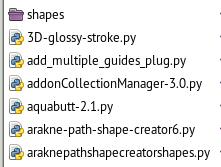
I have the following tree:
-User
- - .gimp-2.8
- - - python (is a folder I use for python plug-ins, which come in folders, like Indexprint, LineBorder...
- - - - arakne-path-shape-creator6a
- - - - - shapes (* see below for the content(
- - - - - arakne-path-shape-creator6.py
- - - - - araknepathshapecreatorshapes.py
- - - - - araknepathshapecreatorshapes.pyc
- - - - - pnt2d.py
- - - - - pnt2d.pyc

the content of shapes folder is:
28 elements: alias 13 pairs of .-py and .pyc shapes and a pair for .init

it works

_________________
"Where am I ?"


Top
 Post subject: Re: Arakne-path-shape-creator6a[Added Grid, Tiles and 'Arrow Stick']
PostPosted: Tue Jun 17, 2014 11:46 am  (#57) 
Offline
GimpChat Member

Joined: Mar 04, 2011
Posts: 2613
Another day, a different time-zone.

Ah, back to M$.

Do not worry about the .pyc files. For some reason in Windows the python files are compiled as Gimp runs. If you want you, can delete the source .py file(s) and leave the equivalent .pyc but then again, why not leave alone.

Image

@Molly
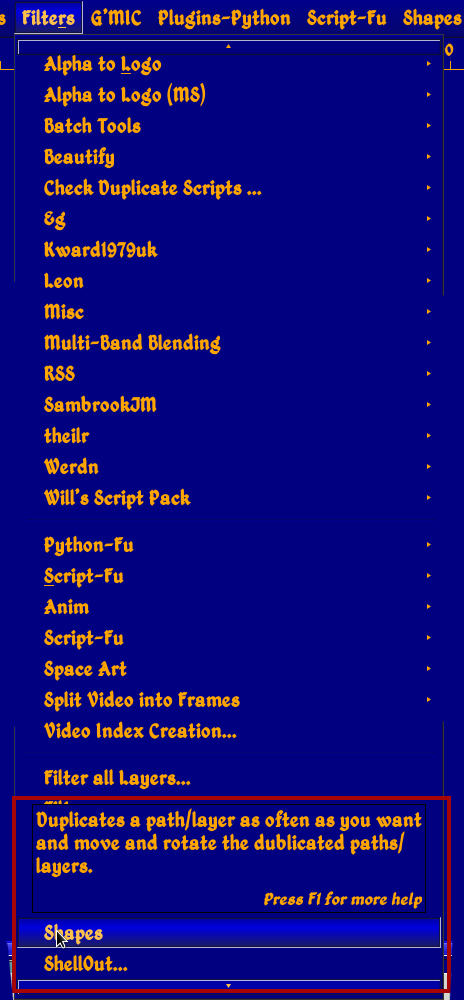
Looks to me that you are accessing the wrong plugin should be this one.

Image

AFAIK the first shape will be a heart, if it is an arc then maybe still using the previous (version) plugin.

Image


Top
 Post subject: Re: Arakne-path-shape-creator6a[Added Grid, Tiles and 'Arrow Stick']
PostPosted: Tue Jun 17, 2014 12:05 pm  (#58) 
Offline
GimpChat Member
User avatar

Joined: Apr 07, 2010
Posts: 14182
@Rich, I don't have a path sub under filters, I was up and down it and no path. I am using Linux-Fedora19, if that makes a difference.

_________________
Image


Top
 Post subject: Re: Arakne-path-shape-creator6a[Added Grid, Tiles and 'Arrow Stick']
PostPosted: Tue Jun 17, 2014 12:53 pm  (#59) 
Offline
GimpChat Member

Joined: Mar 04, 2011
Posts: 2613
I am as baffled as you molly. Going back to my post #38 that is in linux - PCLinuxOS.
When I saw that .pyc files were being produced that pointed towards M$.
Must be some Fedora thing.


Top
 Post subject: Re: Arakne-path-shape-creator6a[Added Grid, Tiles and 'Arrow Stick']
PostPosted: Tue Jun 17, 2014 12:58 pm  (#60) 
Offline
GimpChat Member
User avatar

Joined: Apr 07, 2010
Posts: 14182
That's all I can think of. I don't know what M$ is or means but I have tried everything that I know of. Thanks for trying to help Rich.

_________________
Image


Top
Post new topic Reply to topic  [ 190 posts ]  Go to page Previous  1, 2, 3, 4, 5, 6 ... 10  Next

All times are UTC - 5 hours [ DST ]


* Login  


Powered by phpBB3 © phpBB Group