It is currently Fri Nov 13, 2026 10:35 am


All times are UTC - 5 hours [ DST ]


Post new topic Reply to topic  [ 190 posts ]  Go to page Previous  1, 2, 3, 4, 5, 6, 7 ... 10  Next
Author Message
 Post subject: Re: Arakne-path-shape-creator6a[Added Grid, Tiles and 'Arrow Stick']
PostPosted: Tue Jun 17, 2014 1:15 pm  (#61) 
Offline
GimpChat Member

Joined: Mar 04, 2011
Posts: 2629
M$ = shorthand for Microsoft and in those examples Windows 7.


Top
 Post subject: Re: Arakne-path-shape-creator6a[Added Grid, Tiles and 'Arrow Stick']
PostPosted: Tue Jun 17, 2014 1:45 pm  (#62) 
Offline
GimpChat Member
User avatar

Joined: Apr 07, 2010
Posts: 14182
O' thanks Rich.

_________________
Image


Top
 Post subject: Re: Arakne-path-shape-creator6a[Added Grid, Tiles and 'Arrow Stick']
PostPosted: Tue Jun 17, 2014 2:02 pm  (#63) 
Offline
GimpChat Member
User avatar

Joined: Jan 20, 2013
Posts: 14835
Location: roma, italy
Rod,
I attach here my arakne folder, should you try to use it replacing what you have on your specific plug-ins folder
who knows...

Attachment:
arakne-path-shape-creator6a.zip [36.44 KiB]
Downloaded 89 times

_________________
"Where am I ?"


Top
 Post subject: Re: Arakne-path-shape-creator6a[Added Grid, Tiles and 'Arrow Stick']
PostPosted: Tue Jun 17, 2014 8:29 pm  (#64) 
Offline
Script Coder
User avatar

Joined: Feb 18, 2011
Posts: 4826
Location: Bendigo Vic. Australia
As per Instructions place all .py files and the shapes folder in your userfiles/plugins
C:\Users\user\.gimp-2.8\plug-ins\all .py and the shapes folder

_________________
Image
No matter how much you push the envelope, it'll still be stationery.


Top
 Post subject: Re: Arakne-path-shape-creator6a[Added Grid, Tiles and 'Arrow Stick']
PostPosted: Tue Jun 17, 2014 10:42 pm  (#65) 
Offline
Script Coder
User avatar

Joined: Feb 18, 2011
Posts: 4826
Location: Bendigo Vic. Australia
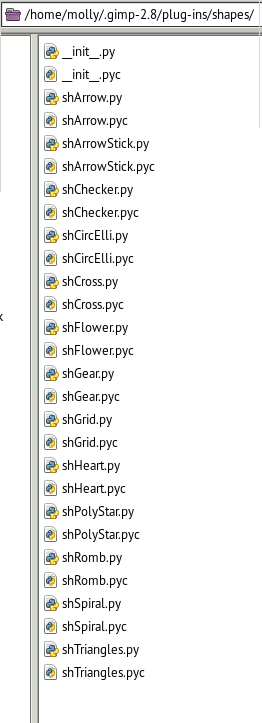
no matter what your operating system your plug-ins folder should contain these files before restarting Gimp
Image

_________________
Image
No matter how much you push the envelope, it'll still be stationery.


Top
 Post subject: Re: Arakne-path-shape-creator6a[Added Grid, Tiles and 'Arrow Stick']
PostPosted: Wed Jun 18, 2014 4:11 am  (#66) 
Offline
GimpChat Member
User avatar

Joined: Apr 07, 2010
Posts: 14182
Graechan, as it shows in my screen shots, I do have the three .py files and the shapes folder in my plug-ins and they are all with permissions. I just don't know of anything else to try.

_________________
Image


Top
 Post subject: Re: Arakne-path-shape-creator6a[Added Grid, Tiles and 'Arrow Stick']
PostPosted: Wed Jun 18, 2014 10:10 am  (#67) 
Offline
GimpChat Member
User avatar

Joined: Nov 16, 2011
Posts: 5127
Location: Metro Vancouver, BC
In Ubuntu I get araknepathshapecreatorshapes.pyc & pnt2d.pyc also.
molly wrote:
@Rich, I don't have a path sub under filters, I was up and down it and no path. I am using Linux-Fedora19, if that makes a difference.
I don't have the sub-menu either, just the main one, but everything works.

_________________
Image
Gimp 2.8.18, Linux, median user
Gimp Chat Tutorials Index
Spirit Bear (Kermode)


Top
 Post subject: Re: Arakne-path-shape-creator6a[Added Grid, Tiles and 'Arrow Stick']
PostPosted: Wed Jun 18, 2014 11:33 am  (#68) 
Offline
GimpChat Member
User avatar

Joined: Apr 07, 2010
Posts: 14182
Well, I have taken everything out and even emptied the trash bin and started from scratch at least 3 times now and mine still doesn't show, The Shapes menu shows but not the other one where you can make the shapes. I also don't get the .pyc files anymore, just the .py. Go figure.

Edit:
My Shapes folder with all the shapes inside also have .pyc files for every .py. Can someone please explain how these pyc files get into my folders when I didn't put them there, and what are .pyc files?
Image

_________________
Image


Top
 Post subject: Re: Arakne-path-shape-creator6a[Added Grid, Tiles and 'Arrow Stick']
PostPosted: Wed Jun 18, 2014 6:00 pm  (#69) 
Offline
Script Coder
User avatar

Joined: Feb 18, 2011
Posts: 4826
Location: Bendigo Vic. Australia
Molly the menu location is Filters/Path/path-shape-creator
the menu item you selected is for the script-fu shapes

_________________
Image
No matter how much you push the envelope, it'll still be stationery.


Top
 Post subject: Re: Arakne-path-shape-creator6a[Added Grid, Tiles and 'Arrow Stick']
PostPosted: Wed Jun 18, 2014 6:46 pm  (#70) 
Offline
GimpChat Member
User avatar

Joined: Apr 07, 2010
Posts: 14182
I don't know what happened Graechan, but all of a sudden the paths / path creater is now there under filters. I didn't do anything, just came back and there it was. Now, how do I make an arrow, I tried it and I just get a line across the layer. no head on the end.
:gaah :hoh

_________________
Image


Top
 Post subject: Re: Arakne-path-shape-creator6a[Added Grid, Tiles and 'Arrow Stick']
PostPosted: Wed Jun 18, 2014 7:40 pm  (#71) 
Offline
GimpChat Member
User avatar

Joined: Mar 10, 2014
Posts: 845
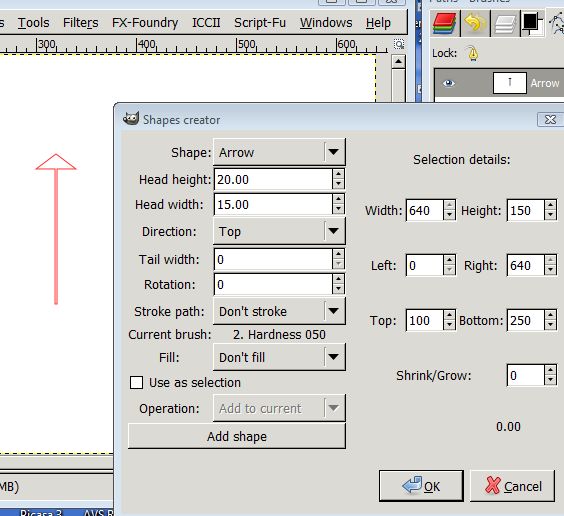
Molly - if this example can be useful
Image


Top
 Post subject: Re: Arakne-path-shape-creator6a[Added Grid, Tiles and 'Arrow Stick']
PostPosted: Wed Jun 18, 2014 8:04 pm  (#72) 
Offline
GimpChat Member
User avatar

Joined: Apr 07, 2010
Posts: 14182
Thank you very much marcello. I will try that in the morning using your settings. Did you try one using the fill?
I will post mine if it turns out, too tired to do it now. :nite :zzz

_________________
Image


Top
 Post subject: Re: Arakne-path-shape-creator6a[Added Grid, Tiles and 'Arrow Stick']
PostPosted: Thu Jun 19, 2014 2:26 am  (#73) 
Offline
GimpChat Member

Joined: Mar 04, 2011
Posts: 2629
molly wrote:
...Now, how do I make an arrow, I tried it and I just get a line across the layer. no head on the end.
:gaah :hoh


Go back to post #38 ;) .."It will work on a full canvas but better in a selection

and
No head on the arrow until you set some values, see Marcellos screenshot


Top
 Post subject: Re: Arakne-path-shape-creator6a[Added Grid, Tiles and 'Arrow Stick']
PostPosted: Thu Jun 19, 2014 4:42 am  (#74) 
Offline
GimpChat Member
User avatar

Joined: Apr 07, 2010
Posts: 14182
Thank you Graechan and Marcello.
Image

_________________
Image


Top
 Post subject: Re: Arakne-path-shape-creator6a[Added Grid, Tiles and 'Arrow Stick']
PostPosted: Thu Jun 19, 2014 6:18 am  (#75) 
Offline
Global Moderator
User avatar

Joined: May 16, 2010
Posts: 16261
Got it figured out. There was indeed a older py arakne-path-shape-creator5 in the plug-ins folder along with the newer version. Removing that version 5 was the key.

Image

Thanks folks! :)

_________________
Image


Top
 Post subject: Re: Arakne-path-shape-creator6a[Added Grid, Tiles and 'Arrow Stick']
PostPosted: Thu Jun 19, 2014 7:06 am  (#76) 
Offline
GimpChat Member
User avatar

Joined: Apr 07, 2010
Posts: 14182
I made a star then I filled it with color. I made a new layer and made another star but I can't figure out how to get rid of the outlines. I wanted to make a different size star on each layer and fill it will different colors but the outlines stay there. :oops:

_________________
Image


Top
 Post subject: Re: Arakne-path-shape-creator6a[Added Grid, Tiles and 'Arrow Stick']
PostPosted: Thu Jun 19, 2014 8:52 am  (#77) 
Offline
Global Moderator
User avatar

Joined: May 16, 2010
Posts: 16261
I wonder if it is possible for the author to add an option to create a selection from the shape and convert it to a path? Not hard to just do it manually but it would be handy to do it all at one time.

_________________
Image


Top
 Post subject: Re: Arakne-path-shape-creator6a[Added Grid, Tiles and 'Arrow Stick']
PostPosted: Tue Jun 24, 2014 6:07 am  (#78) 
Offline
Global Moderator
User avatar

Joined: May 16, 2010
Posts: 16261
New version with star and polygon ellipse available. (6b)
http://registry.gimp.org/node/32128

No need to change (switch) anything it will overwrite the old 6 version.

_________________
Image


Top
 Post subject: Re: Arakne-path-shape-creator6a[Added Grid, Tiles and 'Arrow Stick']
PostPosted: Tue Jun 24, 2014 10:48 am  (#79) 
Offline
GimpChat Member
User avatar

Joined: Jan 13, 2011
Posts: 2648
Location: Poland
According to me-is the best plugin - for use vectors in Gimp.

_________________
Image


Top
 Post subject: Re: Arakne-path-shape-creator6b[added star and polygon ellipse+ bricks
PostPosted: Wed Jun 25, 2014 7:24 pm  (#80) 
Offline
Script Coder
User avatar

Joined: Feb 18, 2011
Posts: 4826
Location: Bendigo Vic. Australia
Arakne-path-shape-creator6b has been released and added to the initial post
these shapes have been added so the list gets longer
ImageImage

Image
Image

_________________
Image
No matter how much you push the envelope, it'll still be stationery.


Top
Post new topic Reply to topic  [ 190 posts ]  Go to page Previous  1, 2, 3, 4, 5, 6, 7 ... 10  Next

All times are UTC - 5 hours [ DST ]


* Login  


Powered by phpBB3 © phpBB Group