It is currently Tue Nov 24, 2026 7:11 am


All times are UTC - 5 hours [ DST ]


Post new topic Reply to topic  [ 28 posts ]  Go to page 1, 2  Next
Author Message
 Post subject: Creating this in Gimp
PostPosted: Sat Jun 21, 2014 9:51 am  (#1) 
Offline
GimpChat Member

Joined: Nov 04, 2013
Posts: 207
GIMP Version: 2.8.10
Operating System: Windows
GIMP Experience: Beginner Level


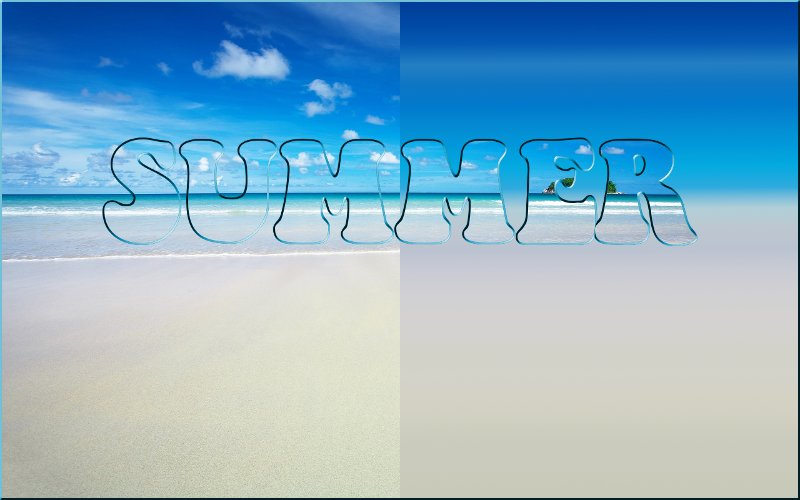
How hard would it be to recreate something like this in Gimp? Just think it might be fun for a project in the future.


Attachments:
0892_Summer_Summer_Text_Final.jpg
0892_Summer_Summer_Text_Final.jpg [ 35.74 KiB | Viewed 3535 times ]
Share on Facebook Share on Twitter Share on Orkut Share on Digg Share on MySpace Share on Delicious Share on Technorati
Top
 Post subject: Re: Creating this in Gimp
PostPosted: Sat Jun 21, 2014 10:22 am  (#2) 
Offline
GimpChat Member
User avatar

Joined: Dec 08, 2013
Posts: 1088
Not hard at all JeannieM

_________________
Image


Top
 Post subject: Re: Creating this in Gimp
PostPosted: Sat Jun 21, 2014 10:31 am  (#3) 
Offline
GimpChat Member

Joined: Nov 04, 2013
Posts: 207
I have been working for a while to figure it out but nothing seems to work.


Top
 Post subject: Re: Creating this in Gimp
PostPosted: Sat Jun 21, 2014 10:40 am  (#4) 
Offline
GimpChat Member
User avatar

Joined: Dec 08, 2013
Posts: 1088
Break it down into layers JeannieM. Background, text, scenery. Always good to figure it out if you can. But definately ask for help. The image in the text-create the text, select it and then copy from the image you want as the text.
clear as mud? ;}

_________________
Image


Top
 Post subject: Re: Creating this in Gimp
PostPosted: Sat Jun 21, 2014 10:57 am  (#5) 
Offline
GimpChat Member

Joined: Jun 19, 2014
Posts: 81
Location: STRATFORD,CT USA
Hi Gimper's - i'd like to try that in gimp to be my first newbie :gimp

CT-Gimper101


Top
 Post subject: Re: Creating this in Gimp
PostPosted: Sat Jun 21, 2014 10:59 am  (#6) 
Offline
GimpChat Member
User avatar

Joined: Dec 08, 2013
Posts: 1088
not much but it might help you :)
3D extrusion script
http://gimpscripts.com/2013/12/3d-extrusion/
perspective shadow script also.

I've lost the link for this script pack but here is the zip. Hopefully I don't get my hand smacked :roll: They can be useful for what you are attempting.


Attachments:
gimpfx-foundry-scriptpack-20080323.zip [248.56 KiB]
Downloaded 116 times
Sample.xcf [1.97 MiB]
Downloaded 178 times
Sample.png
Sample.png [ 167.64 KiB | Viewed 3503 times ]

_________________
Image
Top
 Post subject: Re: Creating this in Gimp
PostPosted: Sat Jun 21, 2014 11:59 am  (#7) 
Offline
GimpChat Member
User avatar

Joined: Nov 16, 2011
Posts: 5127
Location: Metro Vancouver, BC
Something to get you started.
Duplicate background, Alpha select text, inverse selection, clear.
Selection to Path or Channel.
Use Sample Gradient along a Path.
Add gradient layer...
Image
Beach wallpaper

_________________
Image
Gimp 2.8.18, Linux, median user
Gimp Chat Tutorials Index
Spirit Bear (Kermode)


Top
 Post subject: Re: Creating this in Gimp
PostPosted: Sat Jun 21, 2014 12:33 pm  (#8) 
Offline
GimpChat Member
User avatar

Joined: Mar 01, 2014
Posts: 14263
Location: Spain, Aragón
Hi jeanniem, I've tried to do more or less the composition in different layers so as you can see how to work in each layer. Luck in your project! :)


Attachments:
HelloSummer.jpg
HelloSummer.jpg [ 522.94 KiB | Viewed 3446 times ]
HelloSummer.zip [2.63 MiB]
Downloaded 171 times

_________________
Image

Gimp 2.10.36 (samj) portable _ OS Windows 10 Home_ 64bits
Don’t be afraid to start over. It’s a new chance to rebuild what you want.
Top
 Post subject: Re: Creating this in Gimp
PostPosted: Sat Jun 21, 2014 6:45 pm  (#9) 
Offline
GimpChat Member

Joined: Nov 04, 2013
Posts: 207
I call this Fish Tank Text. Now I just need some Ideas for the background.


Attachments:
Fish Tank Text.png
Fish Tank Text.png [ 244.55 KiB | Viewed 3423 times ]
Top
 Post subject: Re: Creating this in Gimp
PostPosted: Sat Jun 21, 2014 10:09 pm  (#10) 
Offline
GimpChat Founder
User avatar

Joined: May 22, 2008
Posts: 5248
Location: Gimpville
I would start by overlaying text with the ocean image, shrink extrude the text layer, then darken the extruded layer. Add a gradient background with some shadows & highlights.

Image

Layers in attached XCF.


Attachments:
File comment: Summer Layers
summer.xcf [3.8 MiB]
Downloaded 116 times

_________________
Image
Top
 Post subject: Re: Creating this in Gimp
PostPosted: Sun Jun 22, 2014 4:33 am  (#11) 
Offline
GimpChat Member
User avatar

Joined: Apr 07, 2010
Posts: 14182
Very cool Tux, nice job.

_________________
Image


Top
 Post subject: Re: Creating this in Gimp
PostPosted: Tue Jun 24, 2014 5:52 am  (#12) 
Offline
GimpChat Member
User avatar

Joined: Mar 01, 2014
Posts: 14263
Location: Spain, Aragón
No perfect but this is my final outcome. Objects found in the internet.


Attachments:
Final-Playa-Poster.jpg
Final-Playa-Poster.jpg [ 1.19 MiB | Viewed 2117 times ]

_________________
Image

Gimp 2.10.36 (samj) portable _ OS Windows 10 Home_ 64bits
Don’t be afraid to start over. It’s a new chance to rebuild what you want.
Top
 Post subject: Re: Creating this in Gimp
PostPosted: Tue Jun 24, 2014 6:02 am  (#13) 
Offline
GimpChat Member
User avatar

Joined: Jan 20, 2013
Posts: 14835
Location: roma, italy
excellent outcome, Issabella!!!
may I give you a (small) suggestion?
put some shadow (manually) below the objects in the bottom part (balloon, etc...)

_________________
"Where am I ?"


Top
 Post subject: Re: Creating this in Gimp
PostPosted: Tue Jun 24, 2014 8:31 am  (#14) 
Offline
GimpChat Member
User avatar

Joined: Mar 01, 2014
Posts: 14263
Location: Spain, Aragón
Thank you Dinasset for helping me to improve the poster. :tyspin . It has been a little challenge for me as I don't know to do shadows. Here my new try.


Attachments:
Playa+shadows-Poster.jpg
Playa+shadows-Poster.jpg [ 1.21 MiB | Viewed 2096 times ]

_________________
Image

Gimp 2.10.36 (samj) portable _ OS Windows 10 Home_ 64bits
Don’t be afraid to start over. It’s a new chance to rebuild what you want.


Last edited by Issabella on Tue Jun 24, 2014 9:03 am, edited 1 time in total.
Top
 Post subject: Re: Creating this in Gimp
PostPosted: Tue Jun 24, 2014 8:41 am  (#15) 
Offline
GimpChat Member
User avatar

Joined: Apr 07, 2010
Posts: 14182
Very nice job Issabella.

_________________
Image


Top
 Post subject: Re: Creating this in Gimp
PostPosted: Tue Jun 24, 2014 8:45 am  (#16) 
Offline
GimpChat Member
User avatar

Joined: Jan 20, 2013
Posts: 14835
Location: roma, italy
now it's quite good!
congrats, Issabella!

_________________
"Where am I ?"


Top
 Post subject: Re: Creating this in Gimp
PostPosted: Tue Jun 24, 2014 8:49 am  (#17) 
Offline
GimpChat Member

Joined: Nov 04, 2013
Posts: 207
All of them are very nice.


Top
 Post subject: Re: Creating this in Gimp
PostPosted: Tue Jun 24, 2014 9:07 am  (#18) 
Offline
GimpChat Member
User avatar

Joined: Mar 01, 2014
Posts: 14263
Location: Spain, Aragón
Molly, I'm happy you like it. :tyspin
Dinasset, thanks for you advice, I like it more now. :tyspin
Jeanniem, you gave the idea, Thank you so much. :tyspin

_________________
Image

Gimp 2.10.36 (samj) portable _ OS Windows 10 Home_ 64bits
Don’t be afraid to start over. It’s a new chance to rebuild what you want.


Top
 Post subject: Re: Creating this in Gimp
PostPosted: Tue Jun 24, 2014 9:50 am  (#19) 
Offline
Global Moderator
User avatar

Joined: Apr 01, 2012
Posts: 8511
Location: On the other side of your screen
Very good Isabella. Looks like you found it ok. 'Perspective shadow'

_________________
Image
Free Fun Photo Editing & resources
Poems from the Lord
Gimp Newby
Gimp version 3.2.8 and GMIC-Qt 4.0.2 OS :- Windows 10 Home 64


Top
 Post subject: Re: Creating this in Gimp
PostPosted: Tue Jun 24, 2014 10:27 am  (#20) 
Offline
GimpChat Member
User avatar

Joined: Mar 01, 2014
Posts: 14263
Location: Spain, Aragón
Thank you Sallyanne, although I should practise 'Perspective shadow' more often. :)

_________________
Image

Gimp 2.10.36 (samj) portable _ OS Windows 10 Home_ 64bits
Don’t be afraid to start over. It’s a new chance to rebuild what you want.


Top
Post new topic Reply to topic  [ 28 posts ]  Go to page 1, 2  Next

All times are UTC - 5 hours [ DST ]


* Login  


Powered by phpBB3 © phpBB Group