It is currently Wed Nov 25, 2026 4:17 pm


All times are UTC - 5 hours [ DST ]


Post new topic Reply to topic  [ 132 posts ]  Go to page Previous  1, 2, 3, 4, 5, 6, 7  Next
Author Message
 Post subject: Re: Sharing Outcomes - Flowers
PostPosted: Thu Jul 03, 2014 7:39 am  (#41) 
Offline
GimpChat Member
User avatar

Joined: Jan 20, 2013
Posts: 590
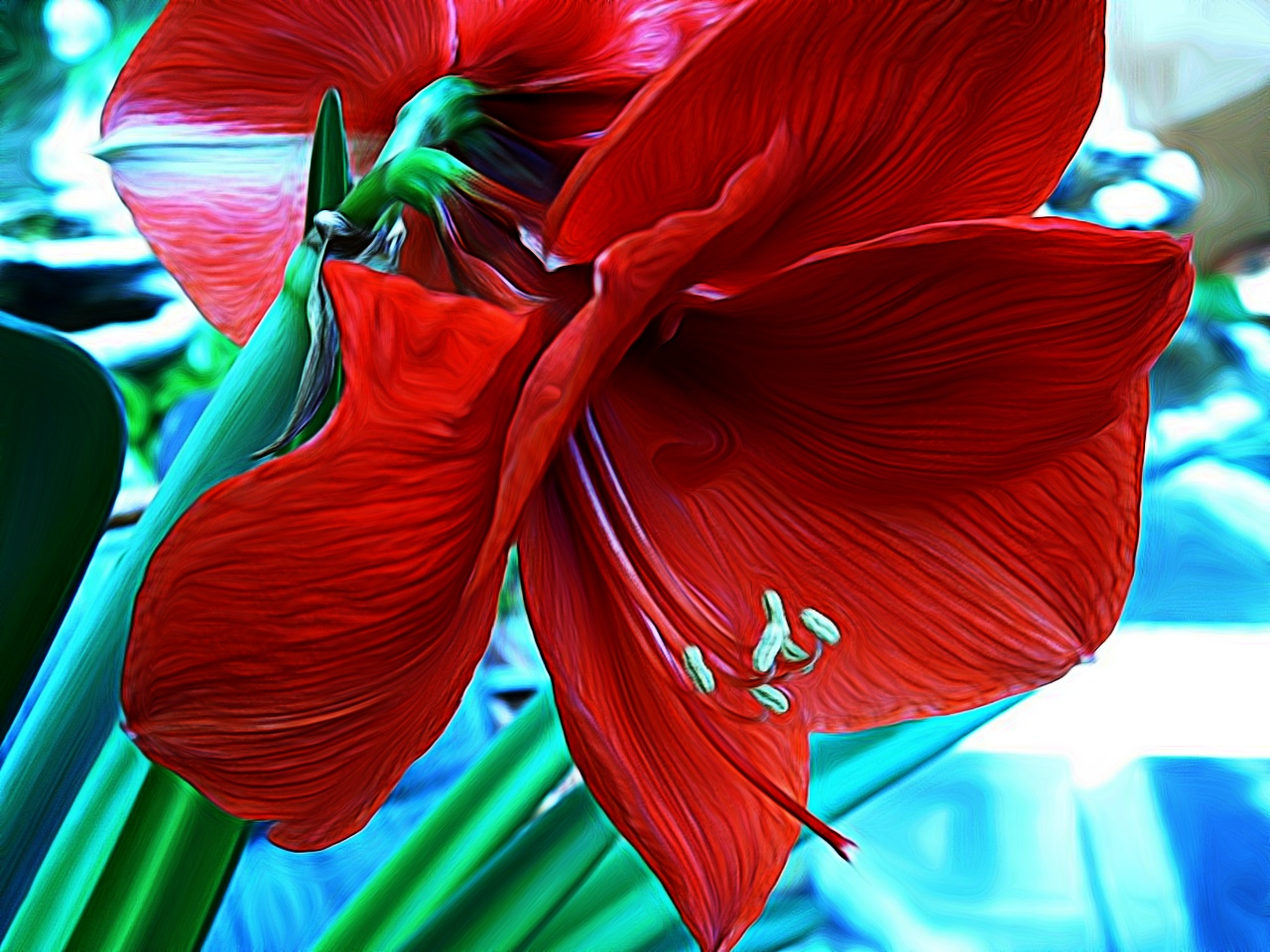
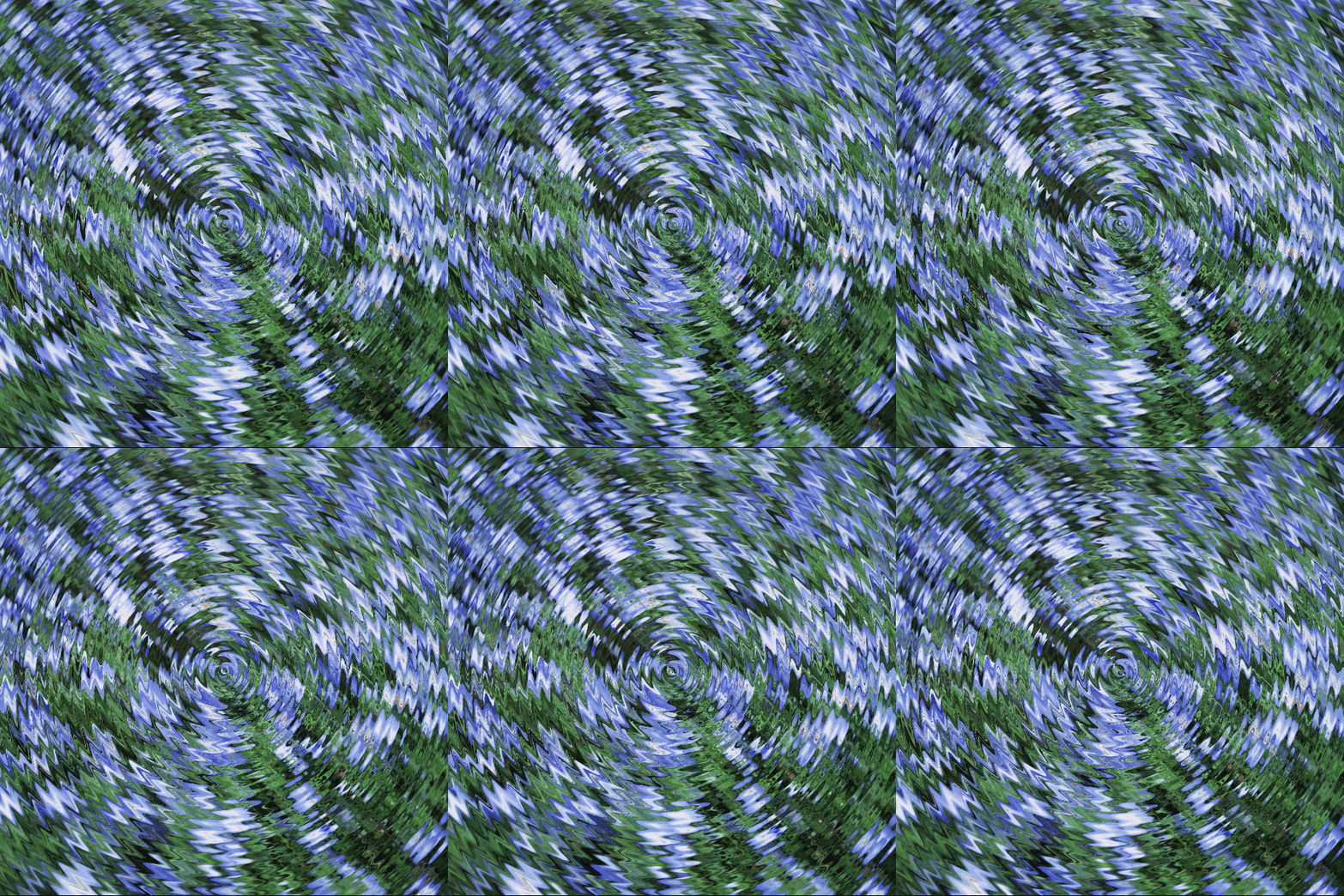
Ella Louise, tell us, please, what did you do to get the effect of waves in animation.

_________________
Image


Top
 Post subject: Re: Sharing Outcomes - Flowers
PostPosted: Thu Jul 03, 2014 7:47 am  (#42) 
Offline
GimpChat Member
User avatar

Joined: May 17, 2014
Posts: 1579
Hi, Carlos I learned it from another tutorial where alc59 explained the waves.
I'll post the link

viewtopic.php?f=24&t=2784&hilit=3D+pop+up&start=20

On the flower I didn't make a selection, I used the whole photo.
But made sure the yellow of the flower was in the center.

_________________
Ella's gallery - YouTube


Top
 Post subject: Re: Sharing Outcomes - Flowers
PostPosted: Thu Jul 03, 2014 2:36 pm  (#43) 
Offline
GimpChat Member
User avatar

Joined: Jun 02, 2014
Posts: 11
Location: here and there
Lovely flowers - enjoying them :jumpclap


Playing with gmic


original color

Attachment:
bo3.jpg
bo3.jpg [ 549.2 KiB | Viewed 2251 times ]


gmic updated

Attachment:
bo2.jpg
bo2.jpg [ 467.6 KiB | Viewed 2251 times ]


Top
 Post subject: Re: Sharing Outcomes - Flowers
PostPosted: Thu Jul 03, 2014 2:54 pm  (#44) 
Offline
GimpChat Member
User avatar

Joined: Jan 20, 2013
Posts: 590
Thanks Ella Louise.

_________________
Image


Top
 Post subject: Re: Sharing Outcomes - Flowers
PostPosted: Thu Jul 03, 2014 2:55 pm  (#45) 
Offline
GimpChat Member
User avatar

Joined: Jan 20, 2013
Posts: 590
Thanks Ella Louise.

_________________
Image


Top
 Post subject: Re: Sharing Outcomes - Flowers
PostPosted: Fri Jul 04, 2014 7:03 am  (#46) 
Offline
GimpChat Member
User avatar

Joined: Jan 20, 2013
Posts: 590
Ella Louise wrote:
Hi, Carlos I learned it from another tutorial where alc59 explained the waves.
I'll post the link

viewtopic.php?f=24&t=2784&hilit=3D+pop+up&start=20

On the flower I didn't make a selection, I used the whole photo.
But made sure the yellow of the flower was in the center.

Ella Louise, I couldn't find the tutorial at the link above. Are you sure it is located there?

_________________
Image


Top
 Post subject: Re: Sharing Outcomes - Flowers
PostPosted: Fri Jul 04, 2014 7:44 am  (#47) 
Offline
GimpChat Member
User avatar

Joined: May 17, 2014
Posts: 1579
Carlos it's not the tutorial I refer to. In post #28, alc59 used under Filters >> waves. There are a few printscreens of it.
That is what I wanted to show you.

_________________
Ella's gallery - YouTube


Top
 Post subject: Re: Sharing Outcomes - Flowers
PostPosted: Fri Jul 04, 2014 2:56 pm  (#48) 
Offline
GimpChat Member
User avatar

Joined: Mar 10, 2014
Posts: 845
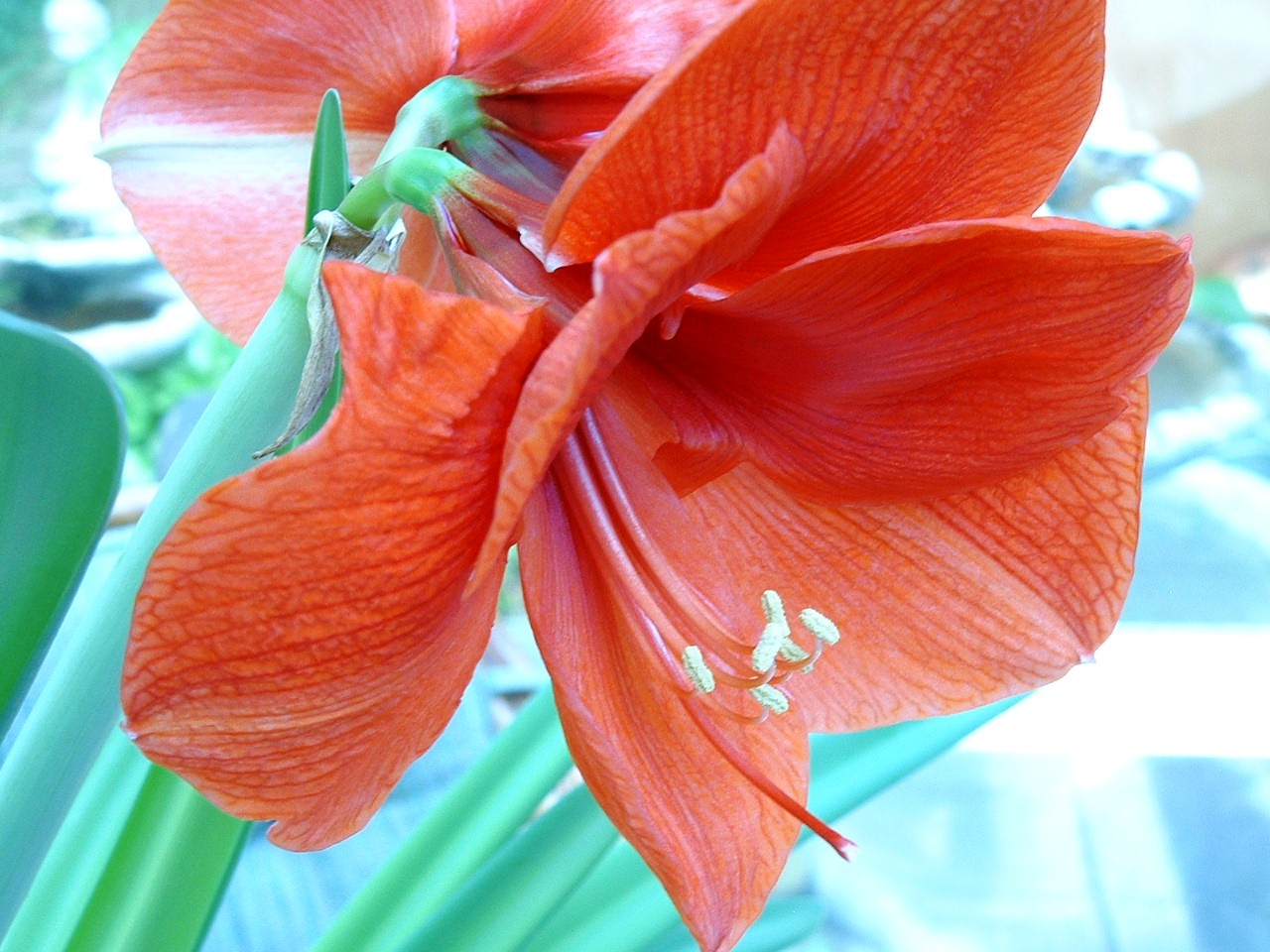
who want to modify this picture? thanks in advance

Image


Top
 Post subject: Re: Sharing Outcomes - Flowers
PostPosted: Fri Jul 04, 2014 3:50 pm  (#49) 
Offline
GimpChat Member
User avatar

Joined: Jan 20, 2013
Posts: 14835
Location: roma, italy
just to start the game...

Attachment:
3494_2010_0427_173112-dn1.jpg
3494_2010_0427_173112-dn1.jpg [ 418.37 KiB | Viewed 2193 times ]


buonanotte!

_________________
"Where am I ?"


Top
 Post subject: Re: Sharing Outcomes - Flowers
PostPosted: Fri Jul 04, 2014 4:02 pm  (#50) 
Offline
GimpChat Member
User avatar

Joined: Jan 10, 2013
Posts: 863
Lets go
Image

_________________
bbbbbbbbbbbImage
bbbbbbbbbbb Be patient, English is not my language.


Top
 Post subject: Re: Sharing Outcomes - Flowers
PostPosted: Fri Jul 04, 2014 4:05 pm  (#51) 
Offline
GimpChat Member
User avatar

Joined: Mar 01, 2014
Posts: 14263
Location: Spain, Aragón
I couldn't avoid trying it. Thank you Marcello. :tyspin


Attachments:
3494_2010_0427_173112Marcello-Distots.jpg
3494_2010_0427_173112Marcello-Distots.jpg [ 992.66 KiB | Viewed 1994 times ]
'MIC.jpg
'MIC.jpg [ 1.47 MiB | Viewed 1994 times ]

_________________
Image

Gimp 2.10.36 (samj) portable _ OS Windows 10 Home_ 64bits
Don’t be afraid to start over. It’s a new chance to rebuild what you want.
Top
 Post subject: Re: Sharing Outcomes - Flowers
PostPosted: Fri Jul 04, 2014 4:11 pm  (#52) 
Offline
GimpChat Member
User avatar

Joined: Mar 10, 2014
Posts: 845
Dinasset , Akros , Issabella
YOU ARE FANTASTIC !!!


Top
 Post subject: Re: Sharing Outcomes - Flowers
PostPosted: Sat Jul 05, 2014 12:50 am  (#53) 
Offline
GimpChat Member
User avatar

Joined: Jan 20, 2013
Posts: 14835
Location: roma, italy
just another view...

Attachment:
3494_2010_0427_173112-dn2.jpg
3494_2010_0427_173112-dn2.jpg [ 319.82 KiB | Viewed 1984 times ]

_________________
"Where am I ?"


Top
 Post subject: Re: Sharing Outcomes - Flowers
PostPosted: Sat Jul 05, 2014 2:34 am  (#54) 
Offline
GimpChat Member
User avatar

Joined: May 17, 2014
Posts: 1579
Carlos Diniz wrote:
Ella Louise, tell us, please, what did you do to get the effect of waves in animation.


See post #59

_________________
Ella's gallery - YouTube


Last edited by Ella on Sat Jul 05, 2014 8:16 am, edited 1 time in total.

Top
 Post subject: Re: Sharing Outcomes - Flowers
PostPosted: Sat Jul 05, 2014 7:22 am  (#55) 
Offline
GimpChat Member
User avatar

Joined: Jan 20, 2013
Posts: 14835
Location: roma, italy
@Issabella
Sorry, Issabella, to say this, but in these particular cases your outcomes are not close to my taste; the original beauty of the flower disappeared: shape, structure, delicacy have gone.
But -as I said- it's just my taste, Marcello did appreciate them.
Sorry again, for this "crude" comment; I hope this critique could stimulate you, not depress you.

_________________
"Where am I ?"


Top
 Post subject: Re: Sharing Outcomes - Flowers
PostPosted: Sat Jul 05, 2014 7:24 am  (#56) 
Offline
GimpChat Member
User avatar

Joined: Jan 20, 2013
Posts: 590
Ella Louise wrote:
Carlos it's not the tutorial I refer to. In post #28, alc59 used under Filters >> waves. There are a few printscreens of it.
That is what I wanted to show you.


Ella Louise, I apologize that I'm not understanding you. I didn't find a photo with wave effects in post #28 of "sharing outcome flowers" neither in "3D pop out photo effect". I saw your screenshot of filter "waves", but I don't understand how to make the animation with 6 layers as you made.

_________________
Image


Top
 Post subject: Re: Sharing Outcomes - Flowers
PostPosted: Sat Jul 05, 2014 7:44 am  (#57) 
Offline
GimpChat Member
User avatar

Joined: May 17, 2014
Posts: 1579
Carlos no need to apologize! I also misunderstand some issues.

In the ” 3D pop out photo effect" tutorial in post #28, alc59 explained the waves on the waterfall, the water seemed to flow.
He posted 3 printscreens.

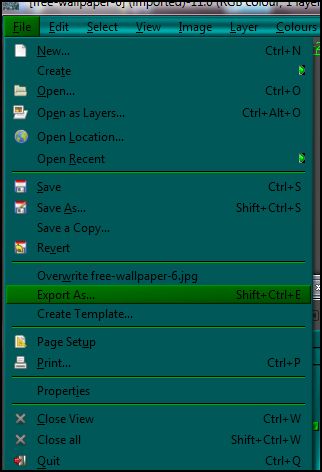
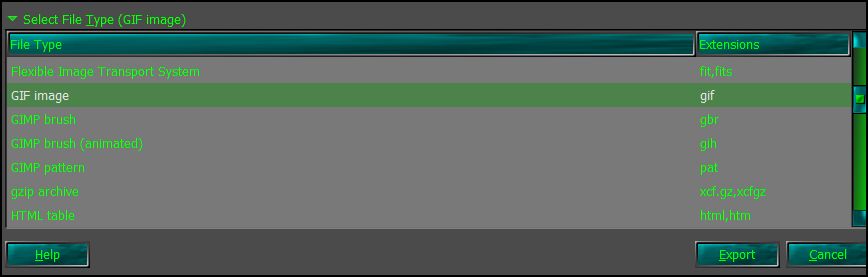
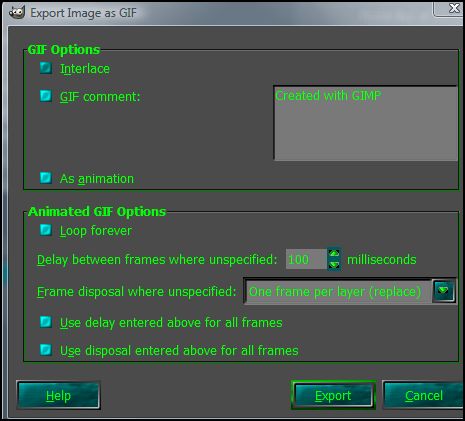
You have to export the file as a GIF animation. If you don't know how I post another few printscreens.

_________________
Ella's gallery - YouTube


Top
 Post subject: Re: Sharing Outcomes - Flowers
PostPosted: Sat Jul 05, 2014 8:03 am  (#58) 
Offline
GimpChat Member
User avatar

Joined: May 17, 2014
Posts: 1579
Sorry, Carlos my fault.
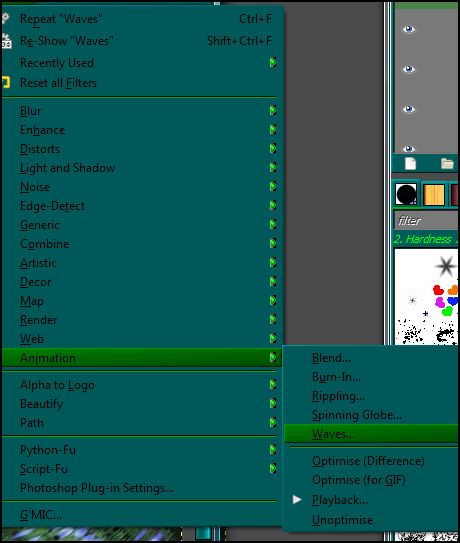
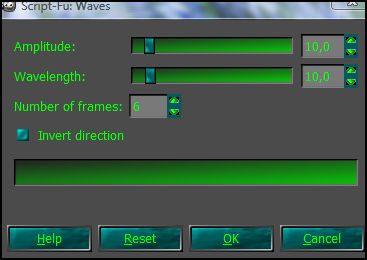
It must be >> Filters >> animation >> waves

I'll post another few printscreens and remove the previous ones, to avoid misunderstanding.

_________________
Ella's gallery - YouTube


Last edited by Ella on Sat Jul 05, 2014 8:14 am, edited 1 time in total.

Top
 Post subject: Re: Sharing Outcomes - Flowers
PostPosted: Sat Jul 05, 2014 8:10 am  (#59) 
Offline
GimpChat Member
User avatar

Joined: May 17, 2014
Posts: 1579
Image

Image

Image

Image

as animation

loop forever

100 milliseconds

One frame per layer (replace)

Use delay entered above for all frames

Use disposal entered above for all frames

Image

Image

_________________
Ella's gallery - YouTube


Top
 Post subject: Re: Sharing Outcomes - Flowers
PostPosted: Sat Jul 05, 2014 8:27 am  (#60) 
Offline
GimpChat Member
User avatar

Joined: Jan 20, 2013
Posts: 590
Thanks, Ella Louise. Now I understood.

_________________
Image


Top
Post new topic Reply to topic  [ 132 posts ]  Go to page Previous  1, 2, 3, 4, 5, 6, 7  Next

All times are UTC - 5 hours [ DST ]


* Login  


Powered by phpBB3 © phpBB Group