It is currently Wed Nov 25, 2026 10:21 am


All times are UTC - 5 hours [ DST ]


Post new topic Reply to topic  [ 83 posts ]  Go to page Previous  1, 2, 3, 4, 5  Next
Author Message
 Post subject: Re: Sharing outcomes - black&white
PostPosted: Wed Jul 09, 2014 11:45 pm  (#21) 
Offline
GimpChat Member
User avatar

Joined: Jan 10, 2013
Posts: 863
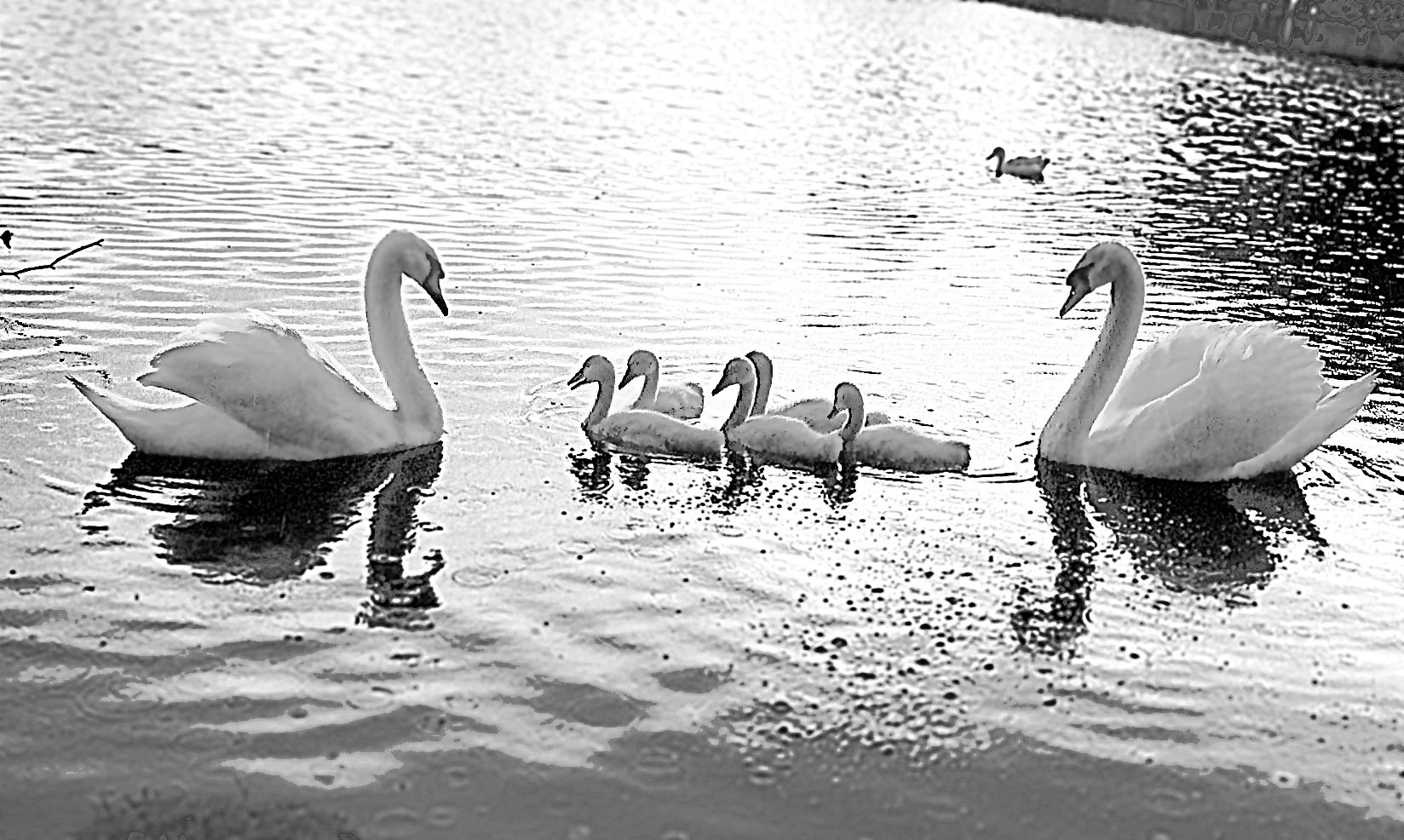
On the image of swans all results were very good.

I liked everything about the touch of Kelvin, removing "dirts" and leveling the swans.
The tip of the Acmespace on G'MIC-Colors-Zone System was interesting. I tried, but did not feel comfortable with this filter.

The outcome of Sally was excellent! (maybe the brightness on Swan left can be better adjusted), but few would notice it. And even gave artistic touch to the picture.

Here's my swan try in GIMP.
Image

_________________
bbbbbbbbbbbImage
bbbbbbbbbbb Be patient, English is not my language.


Top
 Post subject: Re: Sharing outcomes - black&white
PostPosted: Wed Jul 09, 2014 11:58 pm  (#22) 
Offline
GimpChat Member
User avatar

Joined: Jan 10, 2013
Posts: 863
sallyanne wrote:
[ Image ]
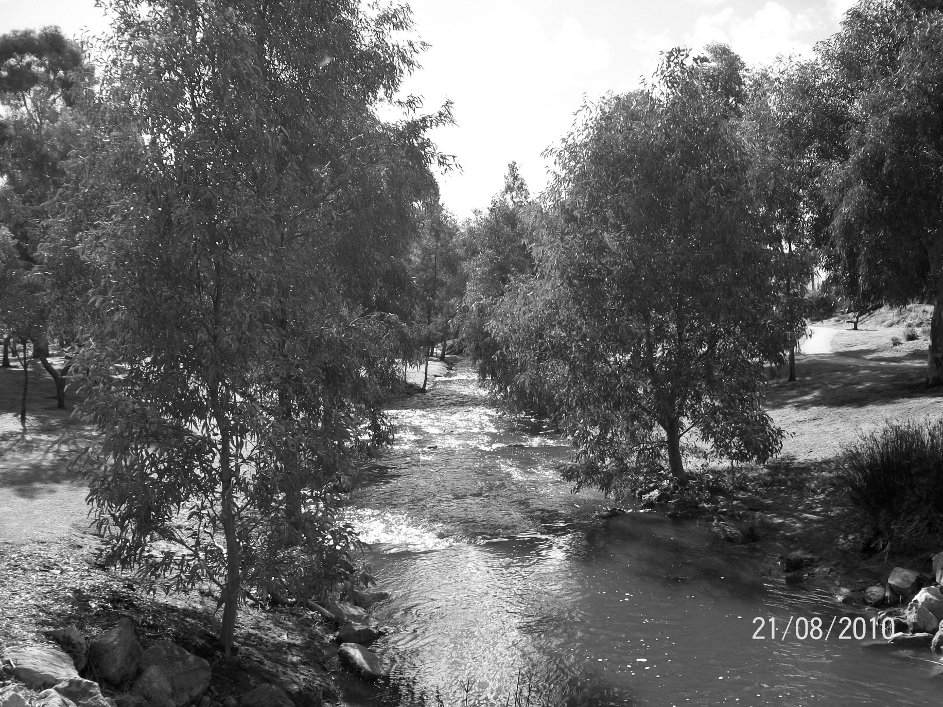
This is just desaturated from a colour photo.

Sally, Could you share this colorful picture with us? Very pretty! :)
sallyanne wrote:
Just took the middle out of a photo and did it three ways in G'MIC
dithering[ [url]Image[/url] ]colourize colourmap[ [url]Image[/url] ]Black and white film - agfa APX 100[ [url]Image[/url] ]

Sally, I liked the first and third.
The first has a good contrast, but a bit dark.
The third has a good lighting but little contrast.
The second dark thought.
It would be an interesting result, with the contrast of the first and the lighting of the third. ;)

_________________
bbbbbbbbbbbImage
bbbbbbbbbbb Be patient, English is not my language.


Top
 Post subject: Re: Sharing outcomes - black&white
PostPosted: Thu Jul 10, 2014 12:15 am  (#23) 
Offline
GimpChat Member
User avatar

Joined: Jan 20, 2013
Posts: 14835
Location: roma, italy
paynekj wrote:
Here's what I've made of the swans:
Attachment:
Ducksintheriver-original-new2.jpg

I'll confess to using Photivo for the following:
Shadow recovery
Texture contrast
Pyramid Denoising
L* curve adjustment

In GIMP:
Rotation to get the adult swan's heads level
Crop to get rid of the unwanted distractions
Clone out stick on the left

Kevin

Kevin, your outcome is a masterpiece! Thanks for teaching how to improve all aspects of the photo: this is really "photo enhancement"

_________________
"Where am I ?"


Top
 Post subject: Re: Sharing outcomes - black&white
PostPosted: Thu Jul 10, 2014 12:17 am  (#24) 
Offline
GimpChat Member
User avatar

Joined: Jan 20, 2013
Posts: 14835
Location: roma, italy
sallyanne wrote:
[ Image ]
This is just desaturated from a colour photo.

Good picture, maybe a little bit more contrast could improve the oucome

_________________
"Where am I ?"


Top
 Post subject: Re: Sharing outcomes - black&white
PostPosted: Thu Jul 10, 2014 12:21 am  (#25) 
Offline
GimpChat Member
User avatar

Joined: Jan 20, 2013
Posts: 14835
Location: roma, italy
sallyanne wrote:
Just took the middle out of a photo and did it three ways in G'MIC
dithering
[ Image ]
colourize colourmap
[ Image ]
Black and white film - agfa APX 100
[ Image ]

each of the three processing has its own charme
thanks for sharing your experiments with the many possibilities of our "manipulation program"!

_________________
"Where am I ?"


Top
 Post subject: Re: Sharing outcomes - black&white
PostPosted: Thu Jul 10, 2014 12:23 am  (#26) 
Offline
GimpChat Member
User avatar

Joined: Jan 20, 2013
Posts: 14835
Location: roma, italy
Acmespace wrote:
Here's my swan try in GIMP. I used G'MIC-Colors-Zone System to lighten the shadows. Then I used curves to brighten the low-mid tones and bring out more detail in the feathers. Then I decided the swans were still too dark but the water was too bright, so I ran Zone System again on a separate layer and painted a layer mask to affect only the swans.

Note for using the Zone System filter: When you're brightening the shadows on a too-dark picture, you're probably not watching the highlights. Which is a problem because this filter indicates blown (overexposed) highlights by turning them BLACK. Fix this by adjusting the white point down from 255 to 254 or 253 or lower. Zoom in on the preview to make sure all the black spots are gone. Alternatively, simply run the filter and output it to a new layer, then set the layer to "lighten only." It's a very useful filter, once you figure out where the black spots came from ;-)

[ Image ]

I have to give a try to the filter tested by you.
It seems to be very effective. Good

_________________
"Where am I ?"


Top
 Post subject: Re: Sharing outcomes - black&white
PostPosted: Thu Jul 10, 2014 12:25 am  (#27) 
Offline
GimpChat Member
User avatar

Joined: Jan 20, 2013
Posts: 14835
Location: roma, italy
sallyanne wrote:
decided to crop then I selected the birds and used curves + contrast/brightness on them.
[ Image ]

your swans are very sweet...excellent

_________________
"Where am I ?"


Top
 Post subject: Re: Sharing outcomes - black&white
PostPosted: Thu Jul 10, 2014 12:28 am  (#28) 
Offline
GimpChat Member
User avatar

Joined: Jan 20, 2013
Posts: 14835
Location: roma, italy
@Issabella
your challenge has been taken up by very good players!
you must be happy!

_________________
"Where am I ?"


Top
 Post subject: Re: Sharing outcomes - black&white
PostPosted: Thu Jul 10, 2014 12:31 am  (#29) 
Offline
Global Moderator
User avatar

Joined: Apr 01, 2012
Posts: 8511
Location: On the other side of your screen
Thank you Akros and dinasett. Akros it really isn't that 'pretty'.
It is a photo of the local drain - run off from the streets. It is made to look natural but it isn't. I took the photo because we rarely get that much water in it. The first time I saw the photo I decided to colourize the water, I don't have that photo anymore - I wrote over it. The water is brown, probably from a mixture of soil and rubbish.
Ducks still like it though.
By the way if you still want me to post it. Do you think I should put it in a new thread?

_________________
Image
Free Fun Photo Editing & resources
Poems from the Lord
Gimp Newby
Gimp version 3.2.8 and GMIC-Qt 4.0.2 OS :- Windows 10 Home 64


Top
 Post subject: Re: Sharing outcomes - black&white
PostPosted: Thu Jul 10, 2014 12:33 am  (#30) 
Offline
Global Moderator
User avatar

Joined: Apr 01, 2012
Posts: 8511
Location: On the other side of your screen
Thanks for the reminder dinasset. Thank you Issabella for the photo to play with.

_________________
Image
Free Fun Photo Editing & resources
Poems from the Lord
Gimp Newby
Gimp version 3.2.8 and GMIC-Qt 4.0.2 OS :- Windows 10 Home 64


Top
 Post subject: Re: Sharing outcomes - black&white
PostPosted: Thu Jul 10, 2014 12:36 am  (#31) 
Offline
GimpChat Member
User avatar

Joined: Sep 22, 2012
Posts: 2089
Location: US
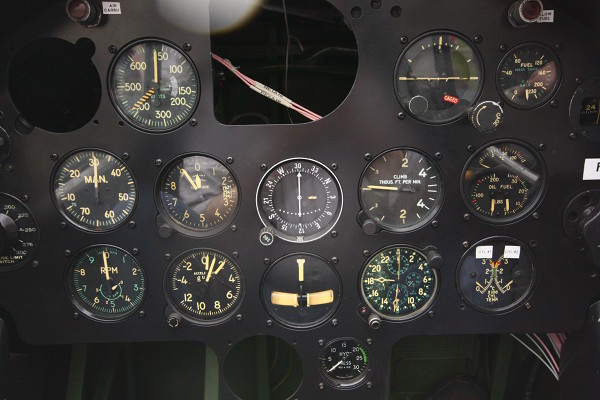
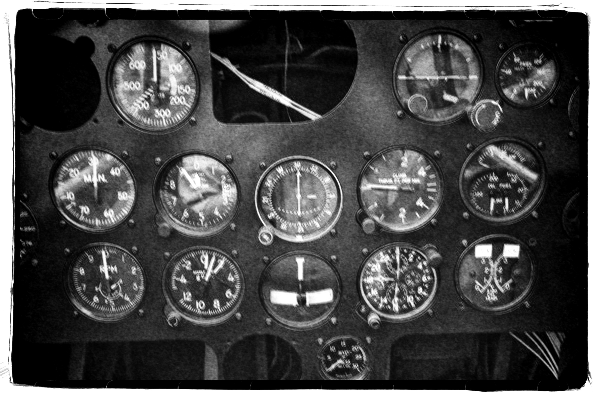
From the image posted here originally by ofnuts

retro-style photograph

ImageImage


Top
 Post subject: Re: Sharing outcomes - black&white
PostPosted: Thu Jul 10, 2014 2:01 am  (#32) 
Offline
GimpChat Member
User avatar

Joined: Mar 01, 2014
Posts: 14263
Location: Spain, Aragón
Wow! I'm over the moon with all of you making so wonderful improvement on the photo. I'll have to practice all of your methods too. Thank you so much my friends. :) :tyspin

_________________
Image

Gimp 2.10.36 (samj) portable _ OS Windows 10 Home_ 64bits
Don’t be afraid to start over. It’s a new chance to rebuild what you want.


Top
 Post subject: Re: Sharing outcomes - black&white
PostPosted: Thu Jul 10, 2014 2:25 am  (#33) 
Offline
GimpChat Member
User avatar

Joined: Mar 01, 2014
Posts: 14263
Location: Spain, Aragón
K1TesseraEna, your outcome is very good, it's excellent! Well done! Could you tell us how to get so good outcome? sorry I ask so much but I want to learn as much as I can. :) :tyspin

_________________
Image

Gimp 2.10.36 (samj) portable _ OS Windows 10 Home_ 64bits
Don’t be afraid to start over. It’s a new chance to rebuild what you want.


Top
 Post subject: Re: Sharing outcomes - black&white
PostPosted: Thu Jul 10, 2014 5:48 am  (#34) 
Offline
GimpChat Member
User avatar

Joined: Jan 20, 2013
Posts: 14835
Location: roma, italy
trying to learn from Kevin
a new trial still on the ducks

Attachment:
Ducksintheriver-DN-trynew.png
Ducksintheriver-DN-trynew.png [ 1.23 MiB | Viewed 2043 times ]


list of filters used:
- gmic garagecoder tone enhance
- gmic iain denoise
- gimp brightness/contrast
- gimp rotate
- gimp retinex
- gimp gradient
- gimp crop
+ some manual intervention

_________________
"Where am I ?"


Top
 Post subject: Re: Sharing outcomes - black&white
PostPosted: Thu Jul 10, 2014 5:55 am  (#35) 
Offline
GimpChat Member
User avatar

Joined: Mar 01, 2014
Posts: 14263
Location: Spain, Aragón
Thank you Dinasset, I'll follow the steps given. :tyspin

_________________
Image

Gimp 2.10.36 (samj) portable _ OS Windows 10 Home_ 64bits
Don’t be afraid to start over. It’s a new chance to rebuild what you want.


Top
 Post subject: Re: Sharing outcomes - black&white
PostPosted: Thu Jul 10, 2014 6:32 am  (#36) 
Offline
GimpChat Member
User avatar

Joined: Mar 01, 2014
Posts: 14263
Location: Spain, Aragón
Here my last outcome about swans.


Attachments:
Last outcome-Swans.jpg
Last outcome-Swans.jpg [ 841.76 KiB | Viewed 2038 times ]

_________________
Image

Gimp 2.10.36 (samj) portable _ OS Windows 10 Home_ 64bits
Don’t be afraid to start over. It’s a new chance to rebuild what you want.
Top
 Post subject: Re: Sharing outcomes - black&white
PostPosted: Thu Jul 10, 2014 7:12 am  (#37) 
Offline
GimpChat Member
User avatar

Joined: Jan 10, 2013
Posts: 863
sallyanne wrote:
Ducks still like it though.
By the way if you still want me to post it. Do you think I should put it in a new thread?

Yes, please Sally! :yesnod
I think that you can attach to any post or post on sharing outcomes - cityscapes
Thx Sally :tyspin

_________________
bbbbbbbbbbbImage
bbbbbbbbbbb Be patient, English is not my language.


Top
 Post subject: Re: Sharing outcomes - black&white
PostPosted: Thu Jul 10, 2014 7:34 am  (#38) 
Offline
GimpChat Member
User avatar

Joined: Mar 01, 2014
Posts: 14263
Location: Spain, Aragón
Akros, your outcome was great and I liked a lot too. What were your steps to get it so nice? By the way when I see your avatar makes me laugh. :)

_________________
Image

Gimp 2.10.36 (samj) portable _ OS Windows 10 Home_ 64bits
Don’t be afraid to start over. It’s a new chance to rebuild what you want.


Top
 Post subject: Re: Sharing outcomes - black&white
PostPosted: Thu Jul 10, 2014 8:09 am  (#39) 
Offline
GimpChat Member
User avatar

Joined: Jan 10, 2013
Posts: 863
Issabella wrote:
Akros, your outcome was great and I liked a lot too. What were your steps to get it so nice? By the way when I see your avatar makes me laugh. :)

Thx Issabella, you are always kind. :)
I used luminosity Masks (saulgoode), curves, masks, high pass filter and zone system separator. :mrgreen:

_________________
bbbbbbbbbbbImage
bbbbbbbbbbb Be patient, English is not my language.


Top
 Post subject: Re: Sharing outcomes - black&white
PostPosted: Thu Jul 10, 2014 8:17 am  (#40) 
Offline
Global Moderator
User avatar

Joined: Apr 01, 2012
Posts: 8511
Location: On the other side of your screen
Very nice Issabella

_________________
Image
Free Fun Photo Editing & resources
Poems from the Lord
Gimp Newby
Gimp version 3.2.8 and GMIC-Qt 4.0.2 OS :- Windows 10 Home 64


Top
Post new topic Reply to topic  [ 83 posts ]  Go to page Previous  1, 2, 3, 4, 5  Next

All times are UTC - 5 hours [ DST ]


* Login  


Powered by phpBB3 © phpBB Group