It is currently Sat Oct 03, 2026 2:00 pm


All times are UTC - 5 hours [ DST ]


Post new topic Reply to topic  [ 20 posts ] 
Author Message
 Post subject: Separate A380 from the background image
PostPosted: Thu Jul 17, 2014 8:28 am  (#1) 
Offline
GimpChat Member
User avatar

Joined: Feb 14, 2013
Posts: 462
Location: Stockholm
GIMP Version: 2.8.10
Operating System: Mac OS
GIMP Experience: Beginner Level


Hello.

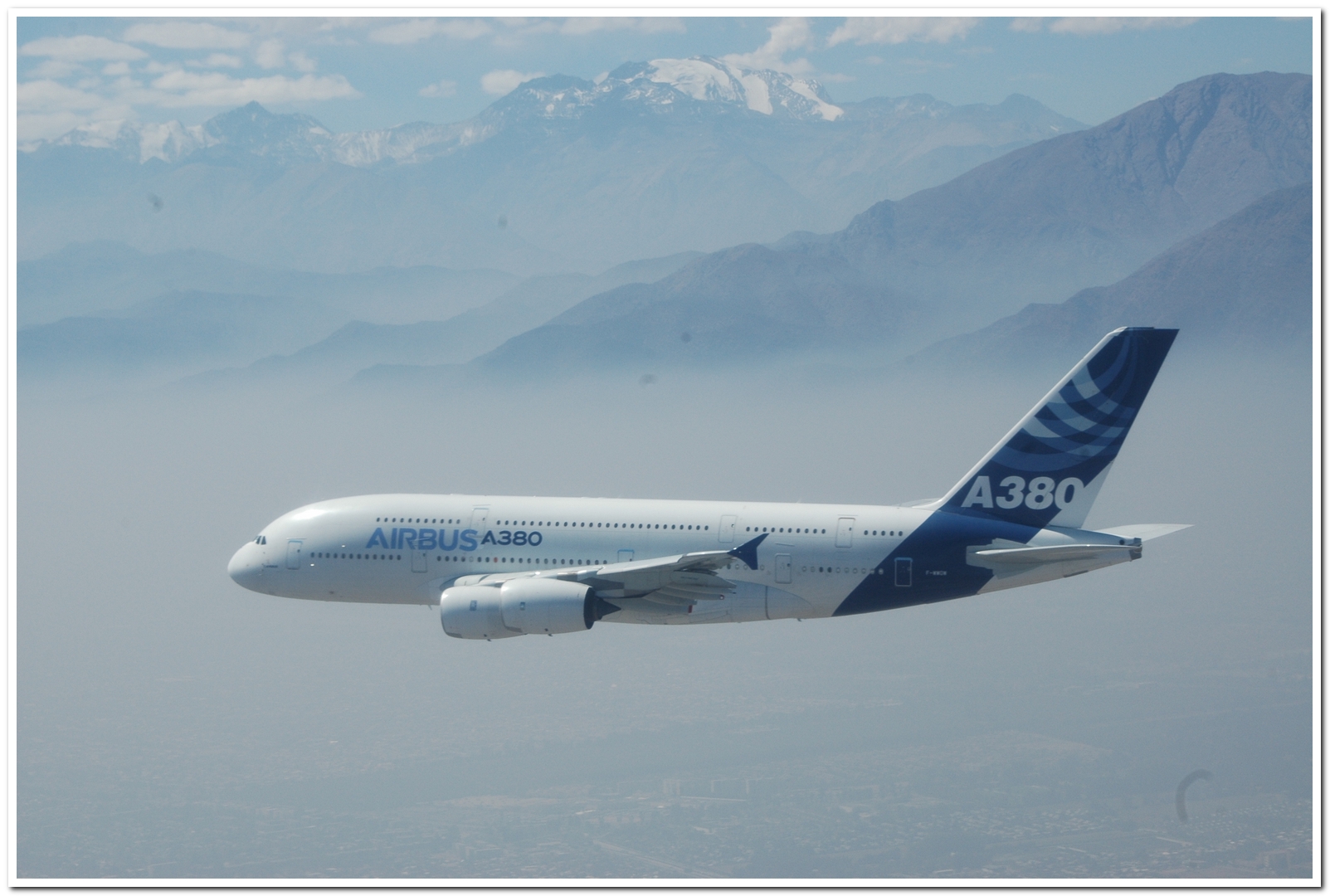
I need to know how to separate the Airbus 380 from the background image.
Do anyone know how to do that.
Thanks in advance.

Image

_________________
Late 2017 iMac Retina 4K 21,5 inch Mac OS High Sierra version 10.13.4
3,6 GHz Intel Core i7
16 GB Ram 2400 MHz DDR4
Graphic card Radeon Pro 560 4096 MB
Affinity Photo and Affinity Designers.


Share on Facebook Share on Twitter Share on Orkut Share on Digg Share on MySpace Share on Delicious Share on Technorati
Top
 Post subject: Re: Separate A380 from the background image
PostPosted: Thu Jul 17, 2014 1:15 pm  (#2) 
Offline
GimpChat Member
User avatar

Joined: Jan 10, 2013
Posts: 863
Perhaps these tutorial videos of Tom Blands, can be helpful to you.

http://youtu.be/5pBNVLP3PQ0
http://youtu.be/_YVzXh8jLRM

_________________
bbbbbbbbbbbImage
bbbbbbbbbbb Be patient, English is not my language.


Top
 Post subject: Re: Separate A380 from the background image
PostPosted: Thu Jul 17, 2014 2:49 pm  (#3) 
Offline
GimpChat Member
User avatar

Joined: Feb 14, 2013
Posts: 462
Location: Stockholm
OK I try.
Thank you very much Akros

_________________
Late 2017 iMac Retina 4K 21,5 inch Mac OS High Sierra version 10.13.4
3,6 GHz Intel Core i7
16 GB Ram 2400 MHz DDR4
Graphic card Radeon Pro 560 4096 MB
Affinity Photo and Affinity Designers.


Top
 Post subject: Re: Separate A380 from the background image
PostPosted: Thu Jul 17, 2014 2:54 pm  (#4) 
Offline
GimpChat Member
User avatar

Joined: Jan 10, 2013
Posts: 863
Lurifax73 wrote:
OK I try.
Thank you very much Akros

You are welcome! :)
Image

_________________
bbbbbbbbbbbImage
bbbbbbbbbbb Be patient, English is not my language.


Top
 Post subject: Re: Separate A380 from the background image
PostPosted: Thu Jul 17, 2014 3:01 pm  (#5) 
Offline
GimpChat Founder
User avatar

Joined: May 22, 2008
Posts: 5241
Location: Gimpville
That looks good, Akros. :2thup

Just a couple of small artifacts left behind that can be fixed manually.

_________________
“If you reach for the stars, you just might land on a decently sized hill.” - Stuart Hill


Top
 Post subject: Re: Separate A380 from the background image
PostPosted: Thu Jul 17, 2014 3:06 pm  (#6) 
Offline
Script Coder
User avatar

Joined: Oct 25, 2010
Posts: 4812
Lurifax73 wrote:
GIMP Version: 2.8.10
Operating System: Mac OS
GIMP Experience: Beginner Level


Hello.

I need to know how to separate the Airbus 380 from the background image.
Do anyone know how to do that.
Thanks in advance.

[ Image ]


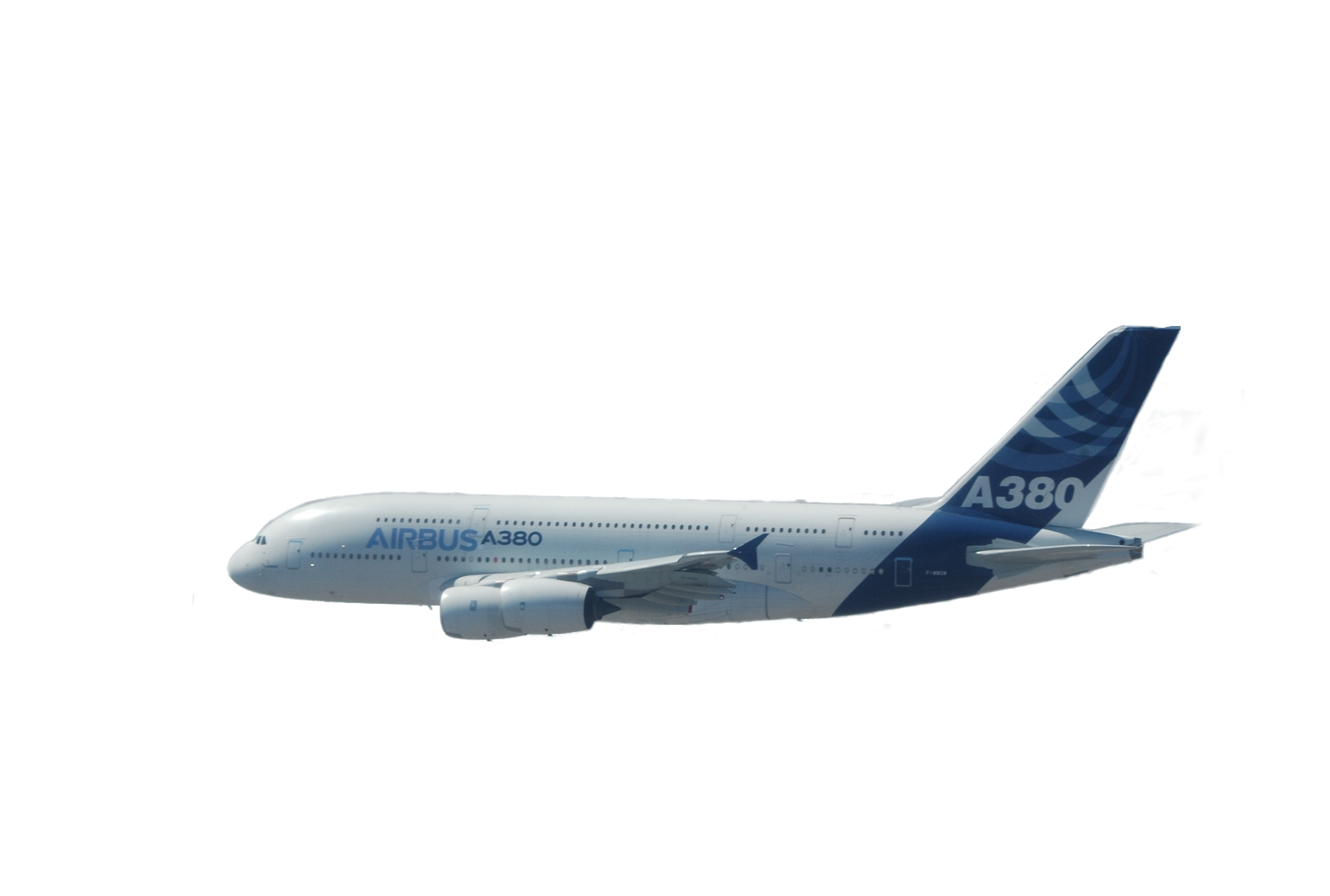
Very typical case of drawing a path that follows the plane outline and then using it as a selection.

Done in 5 minutes (you can improve on it, by including a few protruding things that I left out)

Attachment:
A380-Outline.png
A380-Outline.png [ 259.76 KiB | Viewed 3583 times ]


PM me a mail address if you want the XCF with the path (5MB)

_________________
Image


Top
 Post subject: Re: Separate A380 from the background image
PostPosted: Thu Jul 17, 2014 3:37 pm  (#7) 
Offline
Administrator
User avatar

Joined: Aug 10, 2012
Posts: 14224
Location: Native to NYC living in Arizona, Gimp 2.8 - 3.0, Win 11 PC.
I think ofnuts's approach would be the best way to remove the background, given the overall colors within the image.
I usually employ this technique to remove the background from an image, but there needs to be some good contrast of colors in order to use this method... https://www.youtube.com/watch?v=AnbxtMCHKV0

_________________
Image
"A wise man learns more from a foolish question than a fool can learn from a wise answer"
Image


Top
 Post subject: Re: Separate A380 from the background image
PostPosted: Thu Jul 17, 2014 4:14 pm  (#8) 
Offline
Script Coder
User avatar

Joined: Oct 25, 2010
Posts: 4812
Wallace wrote:
I think ofnuts's approach would be the best way to remove the background, given the overall colors within the image.
I usually employ this technique to remove the background from an image, but there needs to be some good contrast of colors in order to use this method... https://www.youtube.com/watch?v=AnbxtMCHKV0


IMHO it is the only valid method on most man-made objects, because it is the only one that preserves straight lines and smooth curves (it can even reconstruct them...). And once you have learned the moves with the path tool it is quite fast.

_________________
Image


Top
 Post subject: Re: Separate A380 from the background image
PostPosted: Thu Jul 17, 2014 4:16 pm  (#9) 
Offline
GimpChat Member
User avatar

Joined: Jan 10, 2013
Posts: 863
GnuTux wrote:
That looks good, Akros. :2thup

Just a couple of small artifacts left behind that can be fixed manually.

These small details ...
I'm always too lazy. :mrgreen:
ofnuts wrote:
Very typical case of drawing a path that follows the plane outline and then using it as a selection.
Done in 5 minutes (you can improve on it, by including a few protruding things that I left out)

:clap :jumpclap :coolthup
Great outcome ofnuts!
Very clean!

_________________
bbbbbbbbbbbImage
bbbbbbbbbbb Be patient, English is not my language.


Top
 Post subject: Re: Separate A380 from the background image
PostPosted: Thu Jul 17, 2014 4:21 pm  (#10) 
Offline
GimpChat Member
User avatar

Joined: Feb 14, 2013
Posts: 462
Location: Stockholm
Thanks all of you.
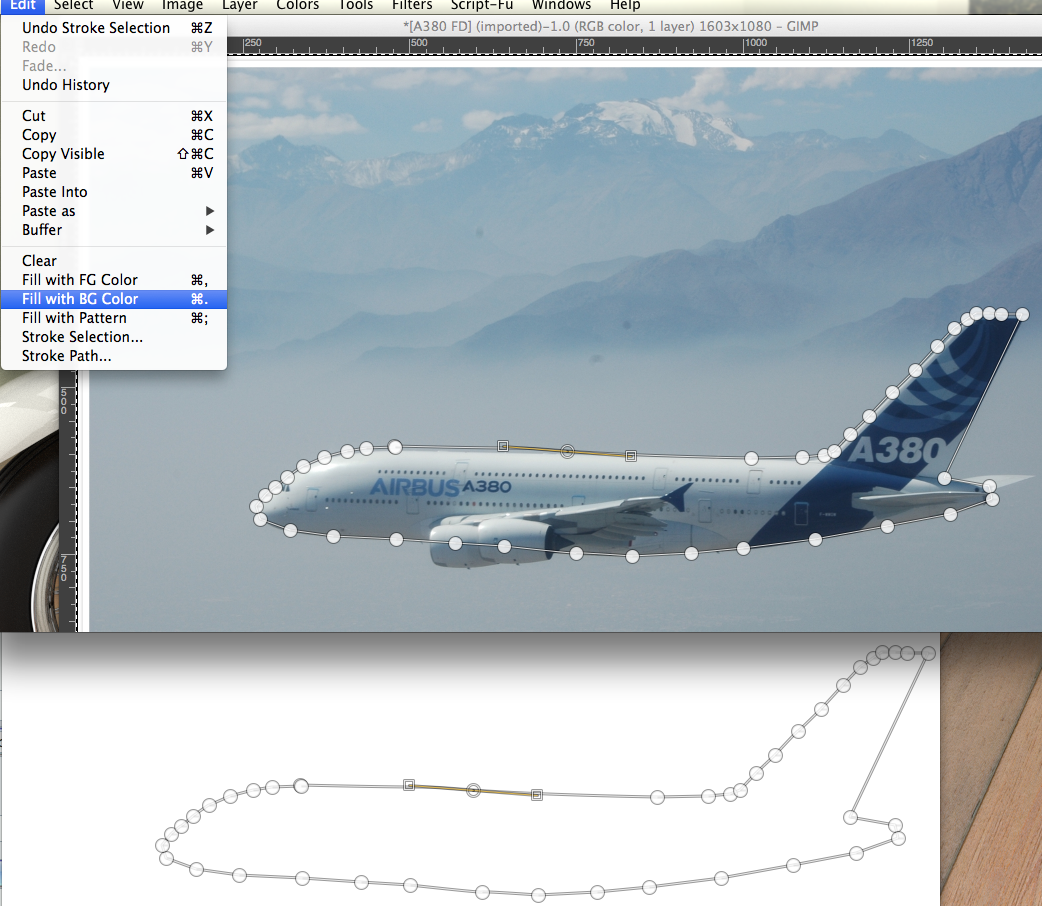
I use Path tool and I think it work, but the first path and the last one don't connecting to each other?
I think I doing something wrong because everything turned white.


Image

_________________
Late 2017 iMac Retina 4K 21,5 inch Mac OS High Sierra version 10.13.4
3,6 GHz Intel Core i7
16 GB Ram 2400 MHz DDR4
Graphic card Radeon Pro 560 4096 MB
Affinity Photo and Affinity Designers.


Top
 Post subject: Re: Separate A380 from the background image
PostPosted: Thu Jul 17, 2014 4:42 pm  (#11) 
Offline
GimpChat Member
User avatar

Joined: Feb 14, 2013
Posts: 462
Location: Stockholm
OK I use Lasso tool and cut. Perfect
Thank you.

Image

_________________
Late 2017 iMac Retina 4K 21,5 inch Mac OS High Sierra version 10.13.4
3,6 GHz Intel Core i7
16 GB Ram 2400 MHz DDR4
Graphic card Radeon Pro 560 4096 MB
Affinity Photo and Affinity Designers.


Top
 Post subject: Re: Separate A380 from the background image
PostPosted: Thu Jul 17, 2014 6:06 pm  (#12) 
Offline
GimpChat Member
User avatar

Joined: Sep 22, 2012
Posts: 2089
Location: US
Lurifax73 wrote:
Thanks all of you.
I use Path tool and I think it work, but the first path and the last one don't connecting to each other?
I think I doing something wrong because everything turned white.


Use Ctrl+click to connect the start and the end anchor points. You'll also notice the change in the Path tool's tooltip.
P.S. Well, on Mac it is a Command key I think.


Top
 Post subject: Re: Separate A380 from the background image
PostPosted: Thu Jul 17, 2014 6:33 pm  (#13) 
Offline
Script Coder
User avatar

Joined: Oct 25, 2010
Posts: 4812
I happen to be working on a plane too... I spent a bit under two hours, for 290 points (actual image size is 3700x2100):

Attachment:
PlaneCutout.jpg
PlaneCutout.jpg [ 84.07 KiB | Viewed 2507 times ]

_________________
Image


Top
 Post subject: Re: Separate A380 from the background image
PostPosted: Fri Jul 25, 2014 12:43 pm  (#14) 
Offline
GimpChat Member
User avatar

Joined: Jan 10, 2013
Posts: 863
ofnuts wrote:
I happen to be working on a plane too... I spent a bit under two hours, for 290 points (actual image size is 3700x2100):
Attachment:
PlaneCutout.jpg

Excellent Ofnuts!
I looked for any failure, but the details were all preserved. Image
The fact that the cockpit is not transparent helped.
Technique and patience, commendable! :clap

_________________
bbbbbbbbbbbImage
bbbbbbbbbbb Be patient, English is not my language.


Top
 Post subject: Re: Separate A380 from the background image
PostPosted: Fri Jul 25, 2014 1:43 pm  (#15) 
Offline
GimpChat Member
User avatar

Joined: Feb 14, 2013
Posts: 462
Location: Stockholm
Thanks all.

K1TesseraEna OK next time I try with CMD to connect the path.

Ofnuts. Perfect cut background from the airplane. Thanks for offering about XCF.
Lurifax.

_________________
Late 2017 iMac Retina 4K 21,5 inch Mac OS High Sierra version 10.13.4
3,6 GHz Intel Core i7
16 GB Ram 2400 MHz DDR4
Graphic card Radeon Pro 560 4096 MB
Affinity Photo and Affinity Designers.


Top
 Post subject: Re: Separate A380 from the background image
PostPosted: Fri Jul 25, 2014 3:00 pm  (#16) 
Offline
Script Coder
User avatar

Joined: Oct 25, 2010
Posts: 4812
The final picture... http://imgur.com/dOh7W3r

Having an accurate selection on the plane helped a lot.

_________________
Image


Top
 Post subject: Re: Separate A380 from the background image
PostPosted: Fri Jul 25, 2014 3:33 pm  (#17) 
Offline
GimpChat Member
User avatar

Joined: Feb 14, 2013
Posts: 462
Location: Stockholm
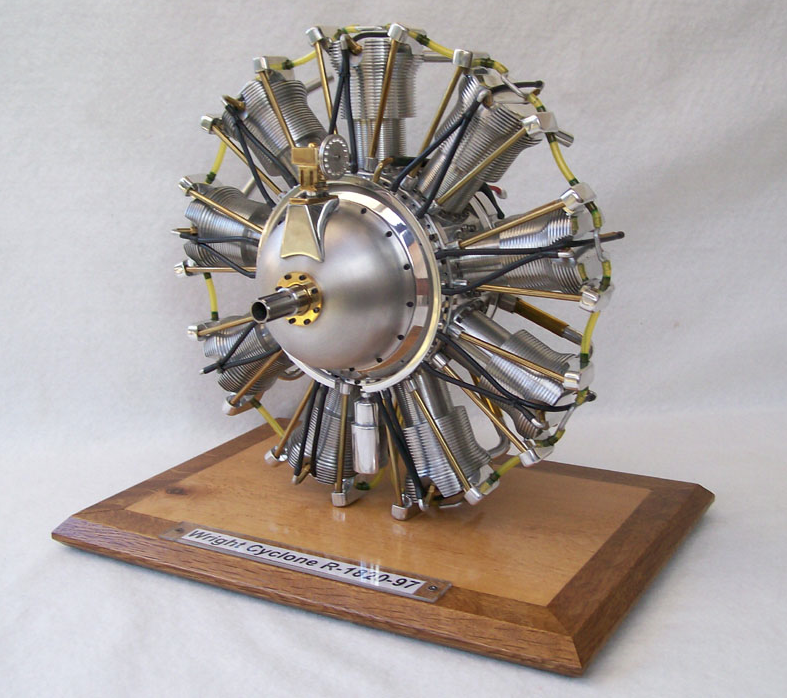
Wery good ofnuts. Looks real. Do you know if there is a star engine on that machine. I made one few year ago for my Blender made Tiger Moth.

_________________
Late 2017 iMac Retina 4K 21,5 inch Mac OS High Sierra version 10.13.4
3,6 GHz Intel Core i7
16 GB Ram 2400 MHz DDR4
Graphic card Radeon Pro 560 4096 MB
Affinity Photo and Affinity Designers.


Top
 Post subject: Re: Separate A380 from the background image
PostPosted: Fri Jul 25, 2014 3:46 pm  (#18) 
Offline
Script Coder
User avatar

Joined: Oct 25, 2010
Posts: 4812
Yes it's a good ol' Wright Cyclone:

Attachment:
WrightCyclone.jpg
WrightCyclone.jpg [ 65.64 KiB | Viewed 2467 times ]

_________________
Image


Top
 Post subject: Re: Separate A380 from the background image
PostPosted: Sat Jul 26, 2014 1:00 am  (#19) 
Offline
GimpChat Member
User avatar

Joined: Feb 14, 2013
Posts: 462
Location: Stockholm
ofnuts. If you like this one I going to make one.
Image

Lurifax

_________________
Late 2017 iMac Retina 4K 21,5 inch Mac OS High Sierra version 10.13.4
3,6 GHz Intel Core i7
16 GB Ram 2400 MHz DDR4
Graphic card Radeon Pro 560 4096 MB
Affinity Photo and Affinity Designers.


Top
 Post subject: Re: Separate A380 from the background image
PostPosted: Sat Jul 26, 2014 6:03 am  (#20) 
Offline
Script Coder
User avatar

Joined: Oct 25, 2010
Posts: 4812
Cool model...

_________________
Image


Top
Post new topic Reply to topic  [ 20 posts ] 

All times are UTC - 5 hours [ DST ]


* Login  


Powered by phpBB3 © phpBB Group