It is currently Thu Aug 27, 2026 6:18 am


All times are UTC - 5 hours [ DST ]


Post new topic Reply to topic  [ 38 posts ]  Go to page Previous  1, 2
Author Message
 Post subject: Re: Guideline Placement Using ALT Key... [UNSOLVED]
PostPosted: Wed Jul 30, 2014 10:44 pm  (#21) 
Offline
Administrator
User avatar

Joined: Aug 10, 2012
Posts: 14176
Location: Native to NYC living in Arizona, Gimp 2.8 - 3.0, Win 11 PC.
conbagui wrote:
Wallace when I press Ctrl only and double right click, I get the Horizontal guide. The same when I press Alt only and double right click, I get the Vertical. Try that my friend, maybe that will solve the problem.

CTRL works fine, but the ALT does not produce a guideline. The courser will move to the vertical position as if to place a guideline, but no guide line will be placed.
I'm also pretty sure that it did work at one point. Now nothing... :gaah
I even tried my old keyboard, but it's the same on that too. :?

_________________
Image
"A wise man learns more from a foolish question than a fool can learn from a wise answer"
Image


Top
 Post subject: Re: Guideline Placement Using ALT Key... [UNSOLVED]
PostPosted: Wed Jul 30, 2014 11:58 pm  (#22) 
Offline
GimpChat Member
User avatar

Joined: Dec 08, 2013
Posts: 1088
SysTemX wrote:
My lost of the ALT key occurred after a windows update, maybe it not gimp.


Wallace: I just came across a note I made regarding that windows update.
The thumbnail view on internet explorer and gimp preview stopped functioning. Did not bother me as Faststone viewer runs permanently on my desktop.
I have no interest in pursuing a remedy as msw8.1 has run me out of headache pills.

Long live Linux. Or bring back XP :mrgreen:

_________________
Image


Top
 Post subject: Re: Guideline Placement Using ALT Key... [UNSOLVED]
PostPosted: Thu Jul 31, 2014 12:23 am  (#23) 
Offline
Administrator
User avatar

Joined: Aug 10, 2012
Posts: 14176
Location: Native to NYC living in Arizona, Gimp 2.8 - 3.0, Win 11 PC.
SysTemX wrote:
SysTemX wrote:
My lost of the ALT key occurred after a windows update, maybe it not gimp.


Wallace: I just came across a note I made regarding that windows update.
The thumbnail view on internet explorer and gimp preview stopped functioning. Did not bother me as Faststone viewer runs permanently on my desktop.
I have no interest in pursuing a remedy as msw8.1 has run me out of headache pills.

Long live Linux. Or bring back XP :mrgreen:

I don't get it? :?
I still have my old machine running xp and Gimp 2.6.11.
I was going to install a copy of Gimp 2.6.11 on my new computer, but haven't done it yet.

_________________
Image
"A wise man learns more from a foolish question than a fool can learn from a wise answer"
Image


Top
 Post subject: Re: Guideline Placement Using ALT Key... [UNSOLVED]
PostPosted: Thu Jul 31, 2014 12:35 am  (#24) 
Offline
Script Coder
User avatar

Joined: Apr 23, 2010
Posts: 1553
Location: not from Guildford after all
Sometimes problems such as this are caused by the ALT key being intercepted by the GUI. You might try using ALT+SHIFT click instead of ALT+click. You might also check your accessibility settings.

_________________
Any sufficiently primitive technology is indistinguishable from a rock.


Top
 Post subject: Re: Guideline Placement Using ALT Key... [UNSOLVED]
PostPosted: Thu Jul 31, 2014 1:16 am  (#25) 
Offline
Administrator
User avatar

Joined: Aug 10, 2012
Posts: 14176
Location: Native to NYC living in Arizona, Gimp 2.8 - 3.0, Win 11 PC.
saulgoode wrote:
Sometimes problems such as this are caused by the ALT key being intercepted by the GUI. You might try using ALT+SHIFT click instead of ALT+click. You might also check your accessibility settings.

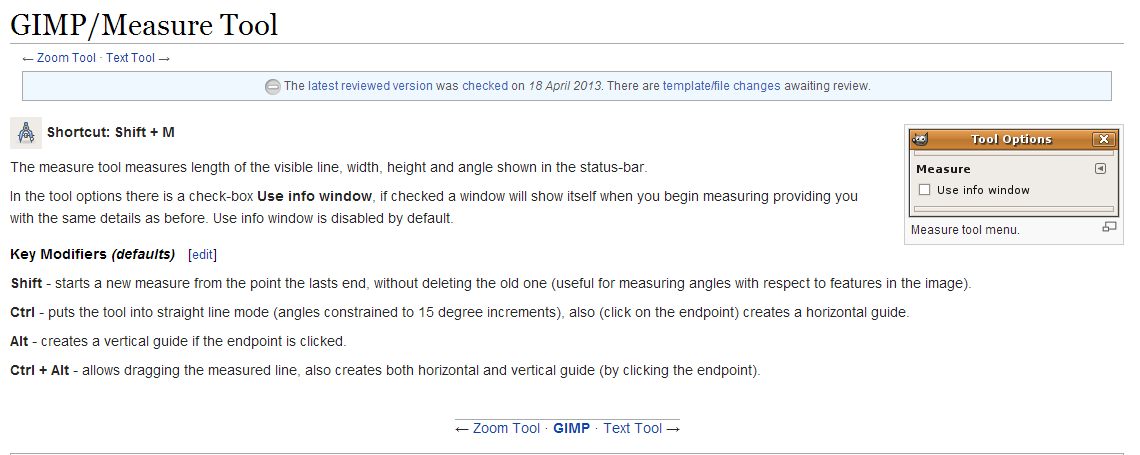
I know I'm doing it right, because that's how it's suppose to work. CTRL will add a horizontal guideline and ALT adds one vertically. That's how it has always worked for me and that is what the Gimp documentation states.
Image
I'm not sure what you mean by checking my accessibility settings. Do you mean my Windows accessibility settings? Because I'm not aware of this in Gimp.
BTW, CTRL+ALT doesn't work either when using the measuring tool.

_________________
Image
"A wise man learns more from a foolish question than a fool can learn from a wise answer"
Image


Top
 Post subject: Re: Guideline Placement Using ALT Key... [UNSOLVED]
PostPosted: Thu Jul 31, 2014 2:32 am  (#26) 
Offline
Script Coder
User avatar

Joined: Apr 23, 2010
Posts: 1553
Location: not from Guildford after all
It is not a matter of you doing anything wrong, it is a matter of your GUI (hypothetically) intercepting your ALT+click before it ever gets to GIMP. For example (hypothetical), if Windows assigned ALT+click to open the Properties dialog for the object under the cursor, then GIMP would never see an ALT+click. However, if you hold down ALT+SHIFT while clicking, Windows would ignore it, and GIMP would see if the ALT key is being held down on the click (GIMP will ignore the SHIFT key because nothing has been assigned to ALT+SHIFT+click) and will execute the appropriate command.

_________________
Any sufficiently primitive technology is indistinguishable from a rock.


Top
 Post subject: Re: Guideline Placement Using ALT Key... [UNSOLVED]
PostPosted: Thu Jul 31, 2014 2:36 am  (#27) 
Offline
Administrator
User avatar

Joined: Aug 10, 2012
Posts: 14176
Location: Native to NYC living in Arizona, Gimp 2.8 - 3.0, Win 11 PC.
:ninja by saulgoode
I've tested every Windows 7 keyboard shortcut that includes the use of the ALT key and they all function as they should.
I've also tested some of the ALT key functions that I know of within other programs and all I've tested thus far work properly.
So I'm now thinking it has something to do with Gimp.

_________________
Image
"A wise man learns more from a foolish question than a fool can learn from a wise answer"
Image


Top
 Post subject: Re: Guideline Placement Using ALT Key... [UNSOLVED]
PostPosted: Thu Jul 31, 2014 2:46 am  (#28) 
Offline
Administrator
User avatar

Joined: Aug 10, 2012
Posts: 14176
Location: Native to NYC living in Arizona, Gimp 2.8 - 3.0, Win 11 PC.
saulgoode wrote:
It is not a matter of you doing anything wrong, it is a matter of your GUI (hypothetically) intercepting your ALT+click before it ever gets to GIMP. For example (hypothetical), if Windows assigned ALT+click to open the Properties dialog for the object under the cursor, then GIMP would never see an ALT+click. However, if you hold down ALT+SHIFT while clicking, Windows would ignore it, and GIMP would see if the ALT key is being held down on the click (GIMP will ignore the SHIFT key because nothing has been assigned to ALT+SHIFT+click) and will execute the appropriate command.

Doing ALT+SHIFT+right click does nothing and there isn't anything within windows that I'm aware of that uses the ALT+Right Click.
The ALT key does not seem to have any function in Gimp. Although when I try to place a guideline vertically at the end point of a measurement, the courser does move to the vertical position, but no guide is placed.
I feel like I've been repeating myself. :oops:

_________________
Image
"A wise man learns more from a foolish question than a fool can learn from a wise answer"
Image


Top
 Post subject: Re: Guideline Placement Using ALT Key... [UNSOLVED]
PostPosted: Thu Jul 31, 2014 3:28 am  (#29) 
Offline
Administrator
User avatar

Joined: Aug 10, 2012
Posts: 14176
Location: Native to NYC living in Arizona, Gimp 2.8 - 3.0, Win 11 PC.
I found out what was causing this issue. Now all I need to do is install the Script-Fu Interface Scrolling Modification, because the issue was being caused by AltDrag.

_________________
Image
"A wise man learns more from a foolish question than a fool can learn from a wise answer"
Image


Top
 Post subject: Re: Guideline Placement Using ALT Key... [UNSOLVED]
PostPosted: Thu Jul 31, 2014 3:33 am  (#30) 
Offline
Script Coder
User avatar

Joined: Jun 22, 2010
Posts: 1171
Location: Here and there
For me on Windows 7 GIMP 2.8.10 it works

I create the measurement, then press and hold the ALT key, move the cursor over the required end point and the cursor changes to the vertical line and arrow, then left-click and the guide is added.

You could check your new keyboard is generating ALT key codes. I've just tried downloading and running KeyCodes Display: http://delphiforfun.org/programs/utilities/KeyCodes.htm and that shows I get
OnKeyDown, Key code=18, Control keys= Alt{Left}, Key name ALT
OnKeyup, Key code=18, Control keys=, Key name ALT
when I press the left ALT key

Kevin

:ninja by you


Top
 Post subject: Re: Guideline Placement Using ALT Key... [UNSOLVED]
PostPosted: Thu Jul 31, 2014 3:46 am  (#31) 
Offline
Administrator
User avatar

Joined: Aug 10, 2012
Posts: 14176
Location: Native to NYC living in Arizona, Gimp 2.8 - 3.0, Win 11 PC.
paynekj wrote:
For me on Windows 7 GIMP 2.8.10 it works

I create the measurement, then press and hold the ALT key, move the cursor over the required end point and the cursor changes to the vertical line and arrow, then left-click and the guide is added.

You could check your new keyboard is generating ALT key codes. I've just tried downloading and running KeyCodes Display: http://delphiforfun.org/programs/utilities/KeyCodes.htm and that shows I get
OnKeyDown, Key code=18, Control keys= Alt{Left}, Key name ALT
OnKeyup, Key code=18, Control keys=, Key name ALT
when I press the left ALT key

Kevin

:ninja by you

Thanks Paynekj, but I found what was causing the problem.

_________________
Image
"A wise man learns more from a foolish question than a fool can learn from a wise answer"
Image


Top
 Post subject: Re: Guideline Placement Using ALT Key...
PostPosted: Thu Jul 31, 2014 6:55 am  (#32) 
Offline
GimpChat Member

Joined: Mar 04, 2011
Posts: 2613
Quote:


[font=Century Gothic]When I use the measure tool, :measure to place a guideline, I can place a guideline horizontally at the end-point of the measurement by using the CTRL key, but can't place one vertically using the ALT key... snip..

Ofnuts wrote
Same here (Linux) but the Alt-Control combo to get both guides works.


I find the same as Ofnuts with PCLinuxOS KDE and Gimp 2.8.10
alt on its own does not work
ctrl + alt places both horizontal and vertical guides
but strangely
left win + alt places a vertical guide (I know ;) a linux machine and the win key). Why it should be mapped this way, I do not know. Looking at the linux keyboard options, none of the win/alt options are enabled.


Top
 Post subject: Re: Guideline Placement Using ALT Key...
PostPosted: Thu Jul 31, 2014 8:32 am  (#33) 
Offline
Administrator
User avatar

Joined: Aug 10, 2012
Posts: 14176
Location: Native to NYC living in Arizona, Gimp 2.8 - 3.0, Win 11 PC.
rich2005 wrote:
I find the same as Ofnuts with PCLinuxOS KDE and Gimp 2.8.10
alt on its own does not work
ctrl + alt places both horizontal and vertical guides
but strangely
left win + alt places a vertical guide (I know ;) a linux machine and the win key). Why it should be mapped this way, I do not know. Looking at the linux keyboard options, none of the win/alt options are enabled.

After all I've been through yesterday I'd like to forget about this stupid ALT key thing. I'm just relived that I found what was wrong, and it was right under my nose all the time too. Which doesn't make the fact that I found the solution to the issue any better. :oops:

_________________
Image
"A wise man learns more from a foolish question than a fool can learn from a wise answer"
Image


Top
 Post subject: Re: Guideline Placement Using ALT Key... [UNSOLVED]
PostPosted: Thu Jul 31, 2014 9:37 am  (#34) 
Offline
Script Coder
User avatar

Joined: Apr 23, 2010
Posts: 1553
Location: not from Guildford after all
Wallace wrote:
I found out what was causing this issue. Now all I need to do is install the Script-Fu Interface Scrolling Modification, because the issue was being caused by AltDrag.

So the problem was that this add-on program, Altdrag, was intercepting ALT+click and preventing GIMP from receiving it? If so, then I would note that the program also intercepts ALT+SHIFT+click and this is why that combination failed to work.

_________________
Any sufficiently primitive technology is indistinguishable from a rock.


Top
 Post subject: Re: Guideline Placement Using ALT Key... [SOLVED]
PostPosted: Thu Jul 31, 2014 10:04 am  (#35) 
Offline
GimpChat Member
User avatar

Joined: Nov 16, 2011
Posts: 5127
Location: Metro Vancouver, BC
In Linux (version in signature) I'm unable to use ALT click on an end point to create a vertical guide, although I seem to remember in the past I could. The mouse pointer shows the correct icon but without success. Shift + ALT works. In my case saulgoode might have identified why.

_________________
Image
Gimp 2.8.18, Linux, median user
Gimp Chat Tutorials Index
Spirit Bear (Kermode)


Top
 Post subject: Re: Guideline Placement Using ALT Key... [UNSOLVED]
PostPosted: Thu Jul 31, 2014 10:18 am  (#36) 
Offline
Administrator
User avatar

Joined: Aug 10, 2012
Posts: 14176
Location: Native to NYC living in Arizona, Gimp 2.8 - 3.0, Win 11 PC.
saulgoode wrote:
So the problem was that this add-on program, Altdrag, was intercepting ALT+click and preventing GIMP from receiving it? If so, then I would note that the program also intercepts ALT+SHIFT+click and this is why that combination failed to work.

Yes that's what was happening alright. Funny thing about this is, that I picked this AltDrag thing up to deal with some of the large dialog windows in Gimp. I can still use the AltDrag, but not while I'm working with Gimp.
I wonder if it would have any effect on Photoshop like it did on Gimp.

Odinbc wrote:
In Linux (version in signature) I'm unable to use ALT click on an end point to create a vertical guide, although I seem to remember in the past I could. The mouse pointer shows the correct icon but without success. Shift + ALT works. In my case saulgoode might have identified why.

:ninja by Odin...
Yes saulgoode was right.
If he hadn't mentioned this I think I'd still be looking to solve the issue.

_________________
Image
"A wise man learns more from a foolish question than a fool can learn from a wise answer"
Image


Top
 Post subject: Re: Guideline Placement Using ALT Key... [UNSOLVED]
PostPosted: Thu Jul 31, 2014 4:54 pm  (#37) 
Offline
Script Coder
User avatar

Joined: Apr 23, 2010
Posts: 1553
Location: not from Guildford after all
Wallace wrote:
saulgoode wrote:
So the problem was that this add-on program, Altdrag, was intercepting ALT+click and preventing GIMP from receiving it? If so, then I would note that the program also intercepts ALT+SHIFT+click and this is why that combination failed to work.

Yes that's what was happening alright. Funny thing about this is, that I picked this AltDrag thing up to deal with some of the large dialog windows in Gimp. I can still use the AltDrag, but not while I'm working with Gimp.

You might be able to find a different ALT+[mod] that will work for the GIMP guides. In theory, the AltDrag program should pass through to the application any ALT+ operations that it doesn't recognize, so perhaps ALT+WINKEY, ALT+WINKEY+SHIFT, or somesuch would work.

You might also want to contact the author of the program and describe your experience. It is a fairly common paradigm under GNU/Linux that if an ALT+ combination doesn't work (because the window manager is already using it), then the ALT+SHIFT combination should provide a work-a-round. It might be better if the AltDrag program used something other than ALT+SHIFT+drag for window snapping.

_________________
Any sufficiently primitive technology is indistinguishable from a rock.


Top
 Post subject: Re: Guideline Placement Using ALT Key... [UNSOLVED]
PostPosted: Thu Jul 31, 2014 9:41 pm  (#38) 
Offline
Administrator
User avatar

Joined: Aug 10, 2012
Posts: 14176
Location: Native to NYC living in Arizona, Gimp 2.8 - 3.0, Win 11 PC.
saulgoode wrote:
You might be able to find a different ALT+[mod] that will work for the GIMP guides. In theory, the AltDrag program should pass through to the application any ALT+ operations that it doesn't recognize, so perhaps ALT+WINKEY, ALT+WINKEY+SHIFT, or somesuch would work.

You might also want to contact the author of the program and describe your experience. It is a fairly common paradigm under GNU/Linux that if an ALT+ combination doesn't work (because the window manager is already using it), then the ALT+SHIFT combination should provide a work-a-round. It might be better if the AltDrag program used something other than ALT+SHIFT+drag for window snapping.

So far, Gimp is the only program that this has had any effect on. The program is really a script that doesn't require installation and runs in the background, I can turn it on or off at will. I also can remember being able to use the ALT+click and CTRL+ALT for placing guidelines in Gimp. I've been using AltDran for a wile now. It's only as recent as this week that this has been happening.
Contacting the author is a good point that I hadn't thought about and will do so.
It would be nice if AltDrag had an options for changing it's key assignment. As it stands, I use to have AltDrag running continually in the background. Now I only run it when it's needed.
I really don't understand why windows OS has this kind of constraint anyway, and the fact that I have to resort to using this AltDrag thing as a work-around is ridiculous at best.
Thanks Saulgoode, your input has really been instrumental in helping me solve this annoying issue. :bigthup

_________________
Image
"A wise man learns more from a foolish question than a fool can learn from a wise answer"
Image


Top
Post new topic Reply to topic  [ 38 posts ]  Go to page Previous  1, 2

All times are UTC - 5 hours [ DST ]


* Login  


Powered by phpBB3 © phpBB Group