It is currently Sun Jul 05, 2026 10:22 am


All times are UTC - 5 hours [ DST ]


Post new topic Reply to topic  [ 235 posts ]  Go to page Previous  1 ... 8, 9, 10, 11, 12  Next
Author Message
 Post subject: Re: Script-Fu Interface Scrolling Modification V1.0 Official Release
PostPosted: Mon Mar 24, 2014 5:48 am  (#201) 
Offline
GimpChat Member
User avatar

Joined: Apr 07, 2010
Posts: 14182
Odinbc wrote:
I just gave this Gimp mod a go, it works flawlessly (Ubuntu 13.10, Gimp 2.8.6 & 2.8.10, user plug-ins folder).

[ Image ]

Very nice Odin... I love the chrome and blue combination.

_________________
Image


Top
 Post subject: Re: Script-Fu Interface Scrolling Modification V1.0 Official Release
PostPosted: Fri Apr 04, 2014 1:42 pm  (#202) 
Offline
GimpChat Member
User avatar

Joined: Nov 16, 2011
Posts: 5127
Location: Metro Vancouver, BC
I'm curious if there has been any feedback from Gimp dev about the Script-Fu Interface Scrolling mod?

_________________
Image
Gimp 2.8.18, Linux, median user
Gimp Chat Tutorials Index
Spirit Bear (Kermode)


Top
 Post subject: Re: Script-Fu Interface Scrolling Modification V1.0 Official Release
PostPosted: Fri Apr 04, 2014 6:23 pm  (#203) 
Offline
GimpChat Member
User avatar

Joined: Sep 24, 2010
Posts: 12788
You're a coding genius Tux; works in 64-bit GIMP for sure. I guess I must have been sleeping or something and didn't see the thread. lol

Yes, the GIMP developers need to add this one as a needed update. Not all script-fus have enough options for needing this, but there are some that I occasionally use (and they are from you; guess necessity is the mother of invention; lol) that would make this a very useful feature indeed. :)

_________________
Lyle

Psalm 109:8

Image


Top
 Post subject: Re: Script-Fu Interface Scrolling Modification V1.0 Official Release
PostPosted: Sat Apr 05, 2014 5:43 am  (#204) 
Offline
GimpChat Founder
User avatar

Joined: May 22, 2008
Posts: 5241
Location: Gimpville
GIMP's core devs are aware of the scrolling enhancement. I submitted a patch over a month ago.

I have no idea if they have plans to add this enhancement to GIMP. Whatever the case, we will continue to offer the enhanced module here.

_________________
“If you reach for the stars, you just might land on a decently sized hill.” - Stuart Hill


Top
 Post subject: Re: Script-Fu Interface Scrolling Modification V1.0 Official Release
PostPosted: Sun Apr 06, 2014 11:08 pm  (#205) 
Offline
Administrator
User avatar

Joined: Aug 10, 2012
Posts: 14115
Location: Native to NYC living in Arizona, Gimp 2.8 - 3.0, Win 11 PC.
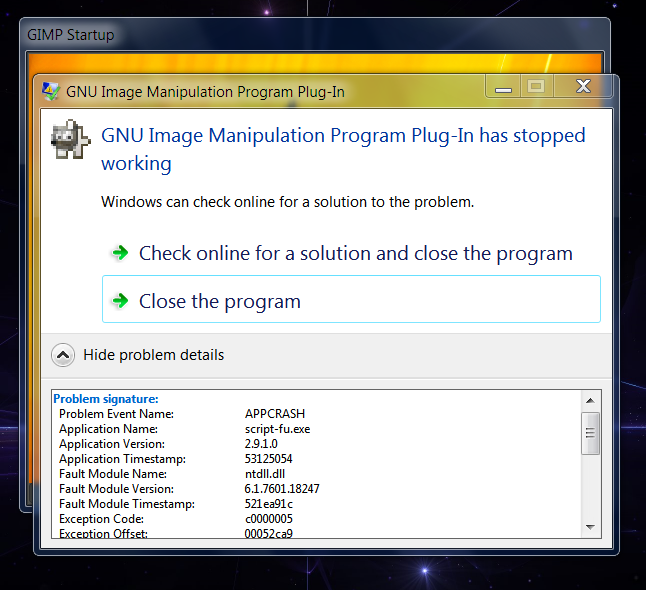
I installed the "Scrolling Modification" .exe and my Script-Fu crashed. My Gimp install is the latest Partha 2.8.10, and I'e only been running it for a few weeks now.
I uninstalled it and now everything is as it was. My Script-Fu is OK now.
I have yet to reinstall this script to try and recreate that event.


I have reinstalled the "Scrolling Modification.exe plugin" and this occurred.
Image
This is the same crash that occurred before.
However, Gimp still opens, but all Script-Fu is disabled/not functioning.

_________________
Image
"A wise man learns more from a foolish question than a fool can learn from a wise answer"
Image


Top
 Post subject: Re: Script-Fu Interface Scrolling Modification V1.0 Official Release
PostPosted: Mon Apr 07, 2014 3:18 am  (#206) 
Offline
GimpChat Member
User avatar

Joined: Apr 22, 2010
Posts: 126
Hi Wallace!:)
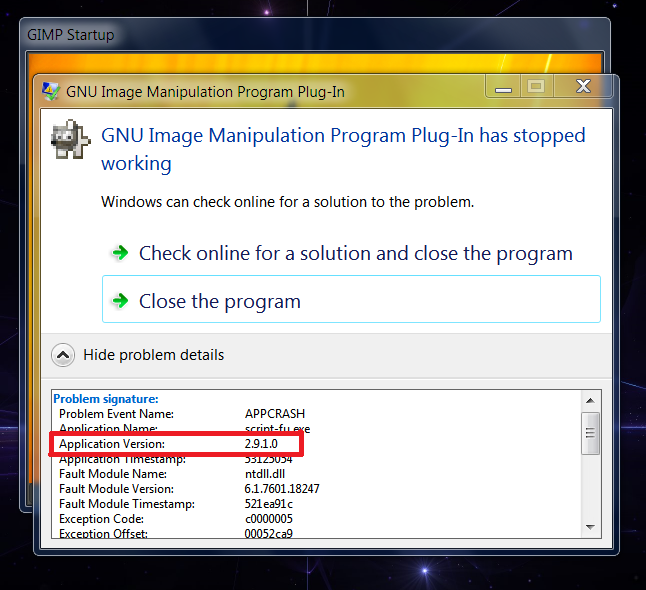
You downloaded the wrong version,this is for Gimp 2.9.1
Download plugin for the version 2.8 and try again,should be all ok.
script-fu.exe_win32-Gimp 2.8

I greet.

Image

_________________
Image


Top
 Post subject: Re: Script-Fu Interface Scrolling Modification V1.0 Official Release
PostPosted: Mon Apr 07, 2014 5:59 am  (#207) 
Offline
Administrator
User avatar

Joined: Aug 10, 2012
Posts: 14115
Location: Native to NYC living in Arizona, Gimp 2.8 - 3.0, Win 11 PC.
pogogogo wrote:
Hi Wallace!:)
You downloaded the wrong version,this is for Gimp 2.9.1
Download plugin for the version 2.8 and try again,should be all ok.
script-fu.exe_win32-Gimp 2.8

I greet.

[ Image ]

Oh... :oops:
That would explain it. Although it did work, but eventually it crashed my Script-Fu.
Thanks Pogogogo for pointing this out.

_________________
Image
"A wise man learns more from a foolish question than a fool can learn from a wise answer"
Image


Top
 Post subject: Re: Script-Fu Interface Scrolling Modification V1.0 Official Release
PostPosted: Mon Apr 07, 2014 7:32 am  (#208) 
Offline
GimpChat Founder
User avatar

Joined: May 22, 2008
Posts: 5241
Location: Gimpville
I didn't realize there was a Windows executable in this thread for GIMP 2.9.x.

Where is it located? We need to ensure it's clearly labeled as such (or removed).

_________________
“If you reach for the stars, you just might land on a decently sized hill.” - Stuart Hill


Top
 Post subject: Re: Script-Fu Interface Scrolling Modification V1.0 Official Release
PostPosted: Mon Apr 07, 2014 8:11 am  (#209) 
Offline
GimpChat Founder
User avatar

Joined: May 22, 2008
Posts: 5241
Location: Gimpville
Ok. I found and removed the 2.9.x version, with the link on 1st page updated to point to the GIMP 2.8.10 version.

_________________
“If you reach for the stars, you just might land on a decently sized hill.” - Stuart Hill


Top
 Post subject: Re: Script-Fu Interface Scrolling Modification V1.0 Official Release
PostPosted: Mon Apr 07, 2014 8:18 am  (#210) 
Offline
Administrator
User avatar

Joined: Aug 10, 2012
Posts: 14115
Location: Native to NYC living in Arizona, Gimp 2.8 - 3.0, Win 11 PC.
GnuTux wrote:
Ok. I found and removed the 2.9.x version with the link on 1st page updated to point to the GIMP 2.8.10 version.

Good! :bigthup
If I had known this was the incorrect version. I wouldn't have downloaded it and installed it.

_________________
Image
"A wise man learns more from a foolish question than a fool can learn from a wise answer"
Image


Top
 Post subject: Re: Script-Fu Interface Scrolling Modification V1.0 Official Release
PostPosted: Mon Apr 07, 2014 10:49 am  (#211) 
Offline
GimpChat Member
User avatar

Joined: Apr 07, 2010
Posts: 14182
:teeth

_________________
Image


Top
 Post subject: Re: Script-Fu Interface Scrolling Modification V1.0 Official Release
PostPosted: Wed Apr 09, 2014 6:30 am  (#212) 
Offline
Script Coder
User avatar

Joined: Nov 06, 2012
Posts: 239
Location: Italy
Hi GnuTux. Though I have been away from this forum over the latest months, every now and then I have taken a look at the most significant new topics, and recently I couldn't help noticing this very interesting thread and what it presents.

Thanks for devising this plugin. It proves to be an excellent replacement for the default Script-Fu interface, as it opens up new prospects for the development of all those scripts that would require a large amount of options and so far was impossible to carry out without the risk that the relevant dialog boxes could exceed the screen size.

As far as I could verify on my PC, your modification works fine, and like others before me already said I too think it would deserve to ultimately become the new default Script-Fu interface. I hope the GIMP team will take this possibility into consideration in view of the upcoming stable releases.

Thanks again. :)

_________________
Gino D's GIMP scripts: https://sites.google.com/site/ginodonig/gimp-scripts


Top
 Post subject: Re: Script-Fu Interface Scrolling Modification V1.0 Official Release
PostPosted: Wed Apr 09, 2014 8:05 am  (#213) 
Offline
GimpChat Founder
User avatar

Joined: May 22, 2008
Posts: 5241
Location: Gimpville
Thank you for testing this modification, GinoD. Perhaps the core devs will see the benefit of this mod and add it to GIMP or implement a similar enhancement.

_________________
“If you reach for the stars, you just might land on a decently sized hill.” - Stuart Hill


Top
 Post subject: Re: Script-Fu Interface Scrolling Modification V1.0 Official Release
PostPosted: Thu Jul 31, 2014 3:45 am  (#214) 
Offline
Administrator
User avatar

Joined: Aug 10, 2012
Posts: 14115
Location: Native to NYC living in Arizona, Gimp 2.8 - 3.0, Win 11 PC.
What's a good script to test the scroll function with? I need a really large window to try it out on.
edit
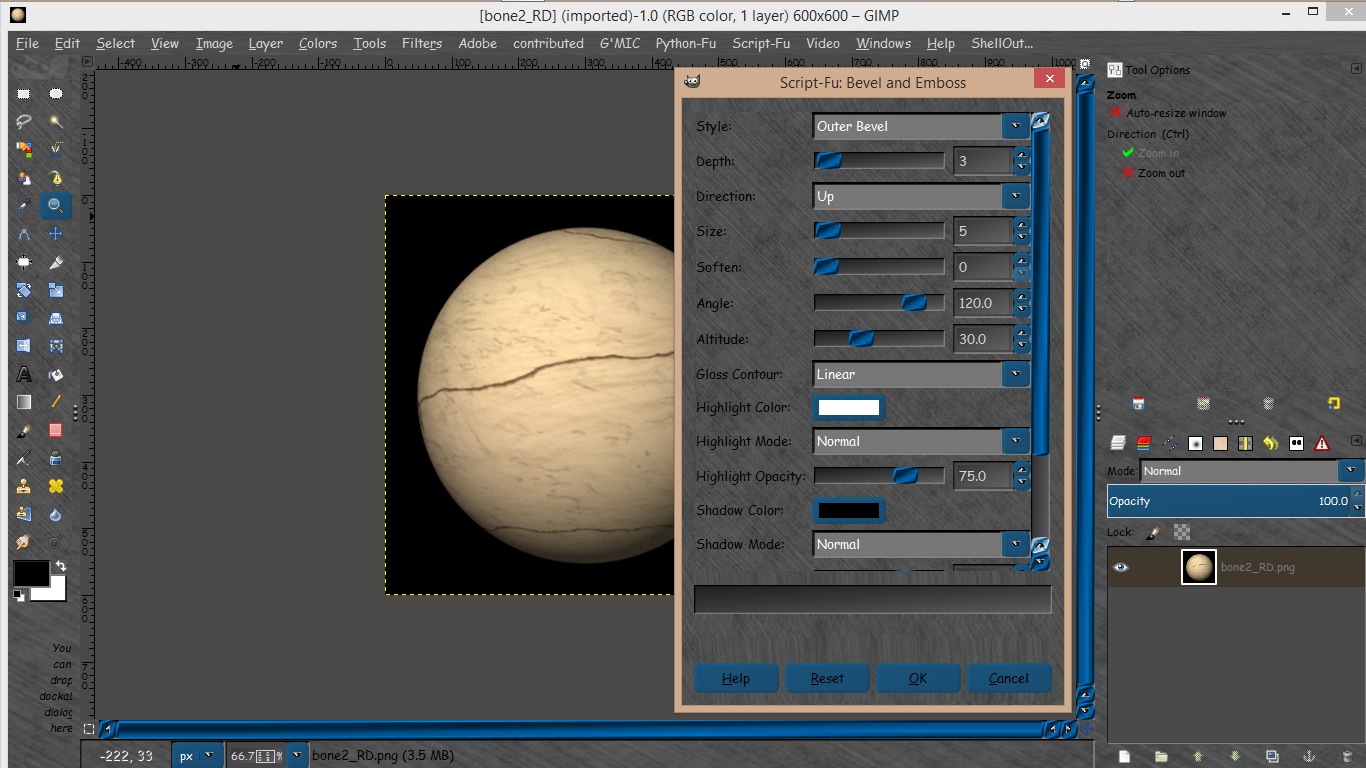
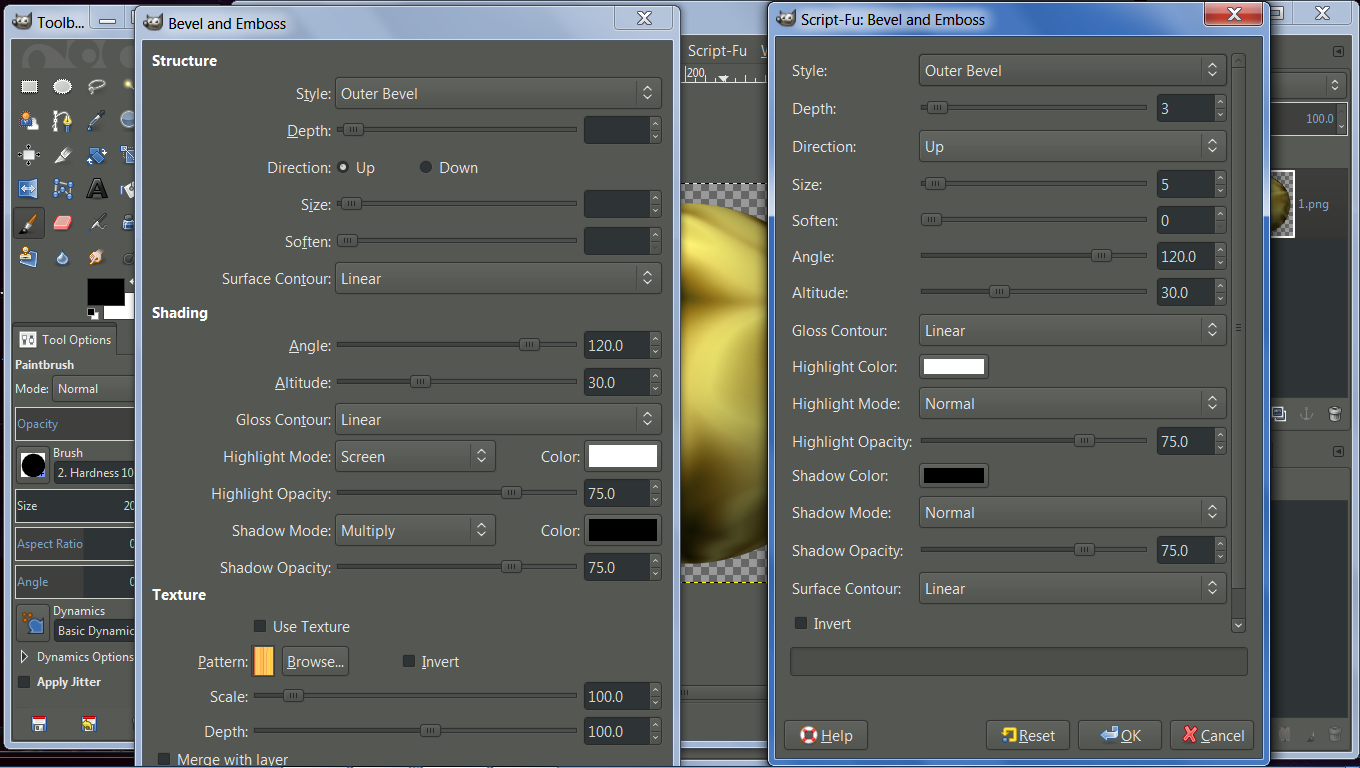
I tried testing the scroll function using the layer effect>bevel and emboss script. There wasn't a scroll bar on the dialog window. The layer effect>bevel and emboss script has a pretty big window so some of it was cut off.
I also removed the old script-fu plugin before installing the correct script-fu plugin for my OS and still no scroll bar.
Sorry that I'm having all sorts of issues these days and now I'm having them with Gimp too. :oops:
I did however see scroll bars on some of FP's script dialog windows that I know were not there before.
So far, It looks like the bevel and emboss script dialog windows is the only one that's large enough to have a scroll bar that doesn't.
So it's not that big of a deal.

_________________
Image
"A wise man learns more from a foolish question than a fool can learn from a wise answer"
Image


Top
 Post subject: Re: Script-Fu Interface Scrolling Modification V1.0 Official Release
PostPosted: Thu Jul 31, 2014 6:55 am  (#215) 
Offline
Global Moderator
User avatar

Joined: May 16, 2010
Posts: 16079
Wallace wrote:
What's a good script to test the scroll function with? I need a really large window to try it out on.
edit
I tried testing the scroll function using the layer effect>bevel and emboss script. There wasn't a scroll bar on the dialog window. The layer effect>bevel and emboss script has a pretty big window so some of it was cut off.
I also removed the old script-fu plugin before installing the correct script-fu plugin for my OS and still no scroll bar.
Sorry that I'm having all sorts of issues these days and now I'm having them with Gimp too. :oops:
I did however see scroll bars on some of FP's script dialog windows that I know were not there before.
So far, It looks like the bevel and emboss script dialog windows is the only one that's large enough to have a scroll bar that doesn't.
So it's not that big of a deal.

Wallace can you resize the bevel and emboss dialog interface window "smaller" and then see the scroll bars?
Image

_________________
Image


Top
 Post subject: Re: Script-Fu Interface Scrolling Modification V1.0 Official Release
PostPosted: Thu Jul 31, 2014 8:14 am  (#216) 
Offline
Administrator
User avatar

Joined: Aug 10, 2012
Posts: 14115
Location: Native to NYC living in Arizona, Gimp 2.8 - 3.0, Win 11 PC.
Rod wrote:
Wallace can you resize the bevel and emboss dialog interface window "smaller" and then see the scroll bars?

From the looks of things, the one on the left without the scroll bar is Python Bevel and Emboss.
That's the only thing that I can think of that makes any sense. Most of the other dialog windows I've run into don't need to have a scroll bar or be resized. So the plugin must be doing it's job then.
Image

_________________
Image
"A wise man learns more from a foolish question than a fool can learn from a wise answer"
Image


Top
 Post subject: Re: Script-Fu Interface Scrolling Modification V1.0 Official Release
PostPosted: Thu Jul 31, 2014 12:56 pm  (#217) 
Offline
GimpChat Member
User avatar

Joined: Sep 24, 2010
Posts: 12788
Glad this subject made a come back; forgot to install it again and soon will do so again. :)

_________________
Lyle

Psalm 109:8

Image


Top
 Post subject: Re: Script-Fu Interface Scrolling Modification V1.0 Official Release
PostPosted: Thu Jul 31, 2014 1:07 pm  (#218) 
Offline
Administrator
User avatar

Joined: Aug 10, 2012
Posts: 14115
Location: Native to NYC living in Arizona, Gimp 2.8 - 3.0, Win 11 PC.
lylejk wrote:
Glad this subject made a come back; forgot to install it again and soon will do so again. :)

Yeah, so will you forget?
It's a really good addition to Gimp, which I feel should be fully implemented as a standard.

_________________
Image
"A wise man learns more from a foolish question than a fool can learn from a wise answer"
Image


Top
 Post subject: Re: Script-Fu Interface Scrolling Modification V1.0 Official Release
PostPosted: Thu Jul 31, 2014 1:17 pm  (#219) 
Offline
GimpChat Member
User avatar

Joined: Sep 24, 2010
Posts: 12788
Nope; just did right after I posted Wallace. :)

_________________
Lyle

Psalm 109:8

Image


Top
 Post subject: Re: Script-Fu Interface Scrolling Modification V1.0 Official Release
PostPosted: Thu Jul 31, 2014 1:21 pm  (#220) 
Offline
Administrator
User avatar

Joined: Aug 10, 2012
Posts: 14115
Location: Native to NYC living in Arizona, Gimp 2.8 - 3.0, Win 11 PC.
lylejk wrote:
Nope; just did right after I posted Wallace. :)

:bigthup

_________________
Image
"A wise man learns more from a foolish question than a fool can learn from a wise answer"
Image


Top
Post new topic Reply to topic  [ 235 posts ]  Go to page Previous  1 ... 8, 9, 10, 11, 12  Next

All times are UTC - 5 hours [ DST ]


* Login  


Powered by phpBB3 © phpBB Group