It is currently Mon Aug 31, 2026 5:49 pm


All times are UTC - 5 hours [ DST ]


Post new topic Reply to topic  [ 68 posts ]  Go to page Previous  1, 2, 3, 4
Author Message
 Post subject: Re: Filmstrip Combine
PostPosted: Sun Aug 10, 2014 9:57 am  (#61) 
Offline
GimpChat Member
User avatar

Joined: Jan 13, 2011
Posts: 2648
Location: Poland
http://gimpchat.com/viewtopic.php?f=9&t=10356&start=30#p137873

_________________
Image


Top
 Post subject: Re: Filmstrip Combine
PostPosted: Sun Aug 10, 2014 9:59 am  (#62) 
Offline
GimpChat Member

Joined: Mar 04, 2011
Posts: 2613
@Carlos Diniz / Molly

There is Graechan's excellent script film strip combine.scm in post #31 of this thread.
viewtopic.php?f=9&t=10356&start=30#p137873

which produces one effect "To use place 5 equally sized images into a directory then select that directory when you open the Menu"

but the standard filmstrip is in Filters -> Combine -> Filmstrip


Top
 Post subject: Re: Filmstrip Combine
PostPosted: Sun Aug 10, 2014 10:02 am  (#63) 
Offline
GimpChat Member
User avatar

Joined: Apr 07, 2010
Posts: 14182
I also looked in Plug-ins. As in my last post, it shows I do have it, BUT WHERE?
Could some one tell me why the standard filmstrip isn't in my script folder but It IS in
GIMP under filters > Combine > filmstrip. I did a search but it just comes up with one in GAP and has a .c ext.

_________________
Image


Top
 Post subject: Re: Filmstrip Combine
PostPosted: Sun Aug 10, 2014 10:35 am  (#64) 
Offline
GimpChat Member

Joined: Mar 04, 2011
Posts: 2613
Still using Fedora? Molly

The standard Gimp filter Combine -> Film Strip is a plug-in and you can find it here /usr/lib/gimp/2.0/plug-ins/film


Top
 Post subject: Re: Filmstrip Combine
PostPosted: Sun Aug 10, 2014 11:13 am  (#65) 
Offline
Script Coder
User avatar

Joined: Oct 25, 2010
Posts: 4812
molly wrote:
I also looked in Plug-ins. As in my last post, it shows I do have it, BUT WHERE?
Could some one tell me why the standard filmstrip isn't in my script folder but It IS in
GIMP under filters > Combine > filmstrip. I did a search but it just comes up with one in GAP and has a .c ext.


Since you are in Linux:
grep -B4 -A5 strip ~/.gimp-2.8/pluginrc

In the output:
(plug-in-def "/usr/lib/gimp/2.0/plug-ins/film" 1386361952
    (proc-def "plug-in-film" 1
         "Combine several images on a film strip"
         "Compose several images to a roll film"
         "Peter Kirchgessner"
         "Peter Kirchgessner ([email protected])"
         "1997"
         "_Filmstrip..."
         1
        (menu-path "<Image>/Filters/Combine")                                       
        (icon stock-id -1 "")                                                       
         "INDEXED*, GRAY*, RGB*"                                                   
         12 1                                                                       

No .py extension in "/usr/lib/gimp/2.0/plug-ins/film" so it's likely a binary. To confirm:
file /usr/lib/gimp/2.0/plug-ins/film

gives:
/usr/lib/gimp/2.0/plug-ins/film: ELF 64-bit LSB executable, x86-64, version 1 (SYSV), dynamically linked (uses shared libs), for GNU/Linux 2.6.24, BuildID[sha1]=0xb9c548be1ad40e9bc8e58f8395339373e326f5ea, stripped

_________________
Image


Top
 Post subject: Re: Filmstrip Combine
PostPosted: Sun Aug 10, 2014 11:36 am  (#66) 
Offline
GimpChat Member
User avatar

Joined: Apr 07, 2010
Posts: 14182
Thank you ofnuts. I see it now. I figured it was not something I added so Graechan's is a completely different beast that I didn't have.

_________________
Image


Top
 Post subject: Re: Filmstrip Combine
PostPosted: Sun Aug 10, 2014 7:02 pm  (#67) 
Offline
Script Coder
User avatar

Joined: Feb 18, 2011
Posts: 4826
Location: Bendigo Vic. Australia
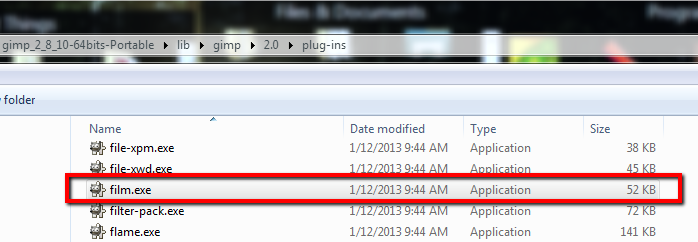
Molly Filmstrip is a default plugin located in you gimp folder as below↓
Image

although the tutorial used Filmstrip to create the image, I did not as it was easier to join the layers together to form 1 layer

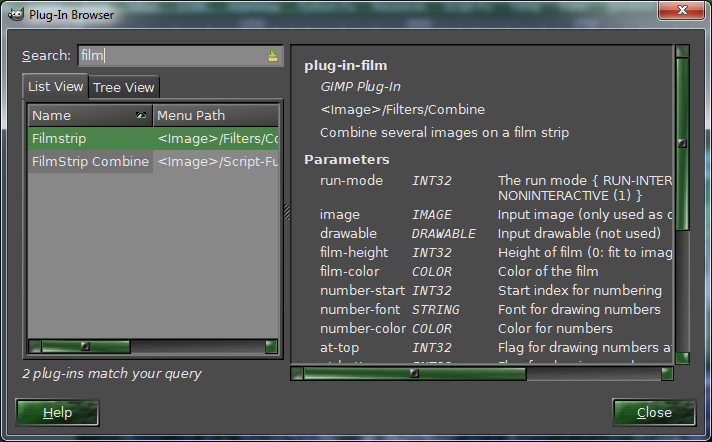
Here is the the plugin browser showing both 'Filmstrip' and 'Filmstrip Combine'
Image

_________________
Image
No matter how much you push the envelope, it'll still be stationery.


Top
 Post subject: Re: Filmstrip Combine
PostPosted: Mon Aug 11, 2014 7:48 am  (#68) 
Offline
GimpChat Member
User avatar

Joined: Jan 20, 2013
Posts: 590
Thanks dinasset, rich2055 and Molly.

_________________
Image


Top
Post new topic Reply to topic  [ 68 posts ]  Go to page Previous  1, 2, 3, 4

All times are UTC - 5 hours [ DST ]


* Login  


Powered by phpBB3 © phpBB Group