It is currently Fri Oct 02, 2026 9:27 pm


All times are UTC - 5 hours [ DST ]


Post new topic Reply to topic  [ 7 posts ] 
Author Message
 Post subject: Carving
PostPosted: Sun Aug 03, 2014 6:32 am  (#1) 
Offline
GimpChat Member
User avatar

Joined: May 27, 2011
Posts: 707
GIMP Version: 2.8.10
Operating System: Windows
GIMP Experience: Beginner Level


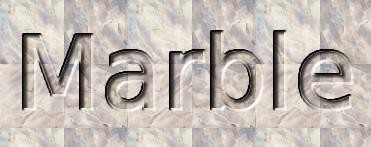
Is it my eyes or is carving on Gimp not really carving?

Image

(file create ,logo,carve)
This looks more like raised letter,they are not "sinking" in the background

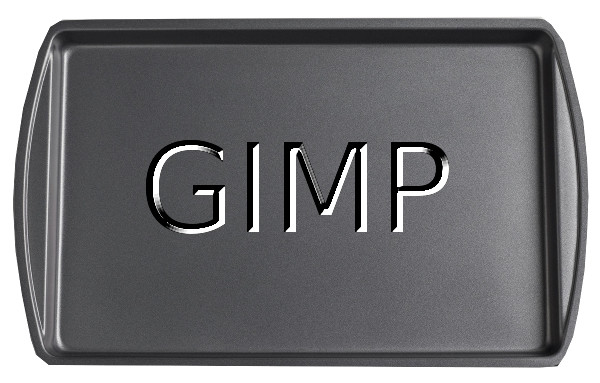
Image

and this is in scriptfu (chisel or carve)
Both are raised,not carved..


Share on Facebook Share on Twitter Share on Orkut Share on Digg Share on MySpace Share on Delicious Share on Technorati
Top
 Post subject: Re: Carving
PostPosted: Sun Aug 03, 2014 8:30 am  (#2) 
Offline
GimpChat Member
User avatar

Joined: Apr 07, 2010
Posts: 14182
Yes, you are correct Pirate, Use the method that Tux used in one of his posts. I have to find it. He just used the GC shadow.

_________________
Image


Top
 Post subject: Re: Carving
PostPosted: Sun Aug 03, 2014 3:08 pm  (#3) 
Offline
Administrator
User avatar

Joined: Aug 10, 2012
Posts: 14222
Location: Native to NYC living in Arizona, Gimp 2.8 - 3.0, Win 11 PC.
Here's a link to a tutorial I've used that creates a pretty convening pressed in text effect.
https://www.youtube.com/watch?v=JiwrdMt1K6c

Molly's suggestion is a good one, because with the GC Shadow.scm, you can make an inner shadow that also creates a very convening carved/pressed in effect on text.
Adding a highlight to the inner shadow can help to improve the overall effect as well.
With the GC Shadow.scm, you will have to adjust it's parameter to get the best effect/fit to the text you're planning to use.
You can also use this script to create the highlights, by reversing the shadows x and y offset and changing the color to white.

See Gimp Scripts, GC Shadow for more information...
http://gimpscripts.com/2013/05/gc-shadow/

Support thread located here...
http://gimpchat.com/viewtopic.php?f=9&t=7357

_________________
Image
"A wise man learns more from a foolish question than a fool can learn from a wise answer"
Image


Top
 Post subject: Re: Carving
PostPosted: Sun Aug 03, 2014 3:18 pm  (#4) 
Offline
GimpChat Member
User avatar

Joined: Apr 07, 2010
Posts: 14182
Here is the post I was trying to find and you will see the settings on post #22. Very easy and effective.
viewtopic.php?p=141567#p141567

_________________
Image


Top
 Post subject: Re: Carving
PostPosted: Tue Aug 12, 2014 11:26 pm  (#5) 
Offline
Script Coder
User avatar

Joined: Jul 14, 2010
Posts: 697
It depends on your mental expectation of the light source.

Here is a bump map of a raised (white) and lowered (black) heightfield.
Attachment:
bumps.jpg
bumps.jpg [ 21.31 KiB | Viewed 2942 times ]


I selected the lighting to be from the Lower Right, but if you are mentally expecting it to be from the upper left it will appear backwards.

By adding different shadow options (bottom two sets) the effect can be enhanced.

-Rob A>

_________________
Image
Fantasy Cartography and Mapping by RobA


Top
 Post subject: Re: Carving
PostPosted: Thu Aug 14, 2014 8:45 pm  (#6) 
Offline
GimpChat Member
User avatar

Joined: May 27, 2011
Posts: 707
Roba

I am trying to carve without any shadow


Top
 Post subject: Re: Carving
PostPosted: Tue Aug 26, 2014 7:36 am  (#7) 
Offline
Script Coder
User avatar

Joined: Jul 14, 2010
Posts: 697
pirate541 wrote:
Roba

I am trying to carve without any shadow


IT is the shadow that provides the visual cue to whether it is supposed to be carved or raised. Otherwise one looks like the other with a different lighting orientation.

-Rob A>

_________________
Image
Fantasy Cartography and Mapping by RobA


Top
Post new topic Reply to topic  [ 7 posts ] 

All times are UTC - 5 hours [ DST ]


* Login  


Powered by phpBB3 © phpBB Group