It is currently Wed Sep 30, 2026 1:42 am


All times are UTC - 5 hours [ DST ]


Post new topic Reply to topic  [ 5 posts ] 
Author Message
 Post subject: Please help.
PostPosted: Wed Aug 13, 2014 2:16 pm  (#1) 
Offline
GimpChat Member

Joined: Aug 10, 2014
Posts: 140
Location: San Antonio, Tx
GIMP Version: 2.8.10
Operating System: Windows
GIMP Experience: Beginner Level


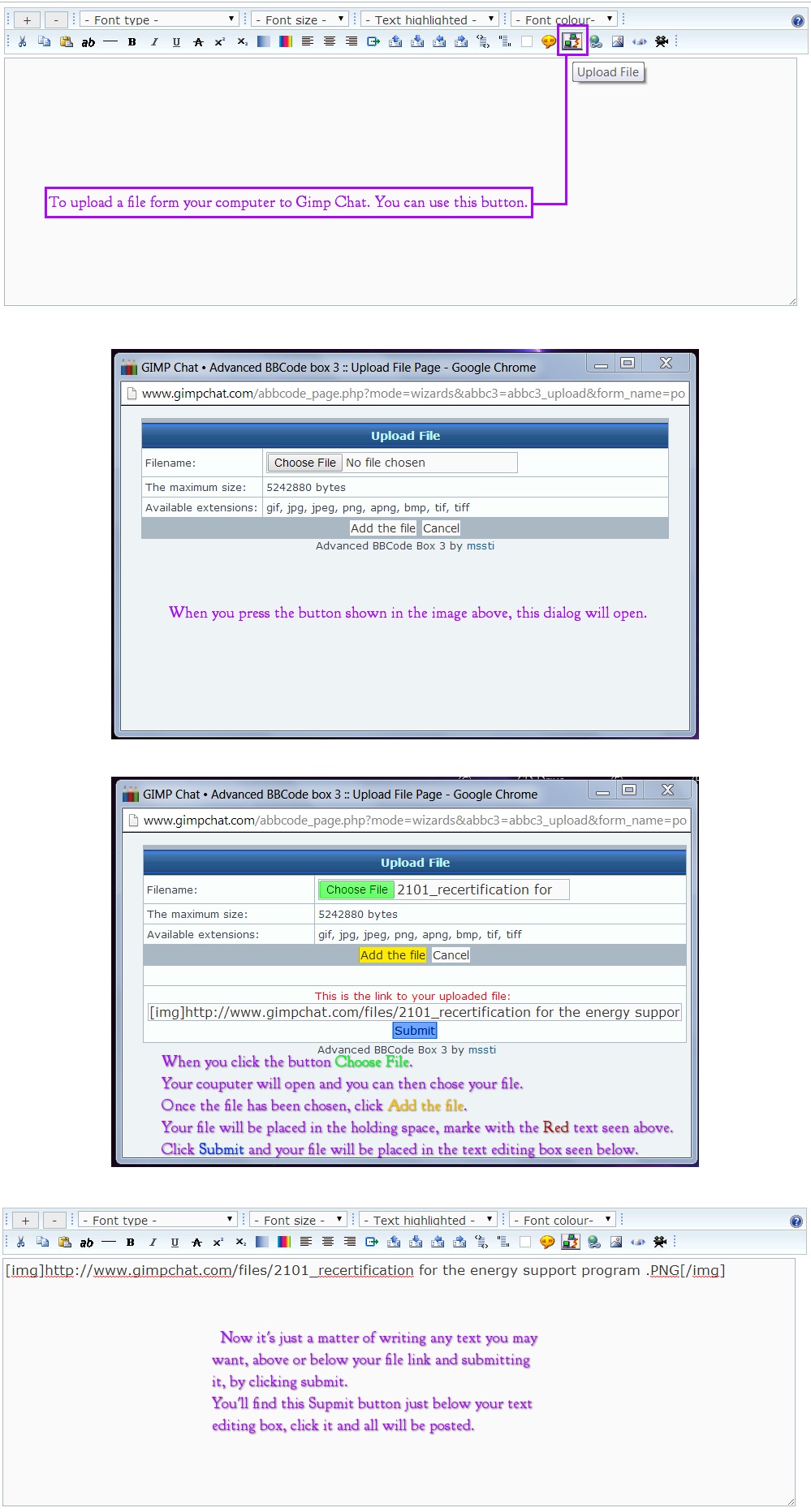
Would someone please tell me how to upload an image that I made in Gimp in here? It's in my computer and I would love for u all to see it. Thank u in advanced for the help.

_________________
Image


Share on Facebook Share on Twitter Share on Orkut Share on Digg Share on MySpace Share on Delicious Share on Technorati
Top
 Post subject: Re: Please help.
PostPosted: Wed Aug 13, 2014 2:24 pm  (#2) 
Offline
GimpChat Member
User avatar

Joined: Dec 10, 2013
Posts: 1004
Hello Adventure, welcome to Gimp Chat!

When you post your replies you'll see the following:

Image

The icon with the two computers attached by the red cord - click on that and choose your file. I'm sure someone else can better explain this but, give it a try.

_________________
Image
Macbook Air - MacOS Sierra 10.12
McGimp 2.8.14
G'mic 1.6.5


Top
 Post subject: Re: Please help.
PostPosted: Wed Aug 13, 2014 2:47 pm  (#3) 
Offline
GimpChat Member
User avatar

Joined: Apr 07, 2010
Posts: 14182
Go to full editor, beside the submit button and click this Image and follow the buttons starting with browse.

_________________
Image


Top
 Post subject: Re: Please help.
PostPosted: Wed Aug 13, 2014 3:39 pm  (#4) 
Offline
Administrator
User avatar

Joined: Aug 10, 2012
Posts: 14219
Location: Native to NYC living in Arizona, Gimp 2.8 - 3.0, Win 11 PC.
There are a few ways to upload files to Gimp Chat and this is one of them...Image

_________________
Image
"A wise man learns more from a foolish question than a fool can learn from a wise answer"
Image


Top
 Post subject: Re: Please help.
PostPosted: Thu Aug 14, 2014 3:48 am  (#5) 
Offline
Global Moderator
User avatar

Joined: Apr 01, 2012
Posts: 8473
Location: On the other side of your screen
It may also say 'Browse' instead of 'choose file' Mine does.

_________________
Image
Free Fun Photo Editing & resources
Poems from the Lord
Gimp Newby
Gimp version 3.2.4 and GMIC-Qt 4.0.2 OS :- Windows 10 Home 64


Top
Post new topic Reply to topic  [ 5 posts ] 

All times are UTC - 5 hours [ DST ]


* Login  


Powered by phpBB3 © phpBB Group