It is currently Mon Aug 24, 2026 8:20 am


All times are UTC - 5 hours [ DST ]


Post new topic Reply to topic  [ 14 posts ] 
Author Message
 Post subject: Can this effect be done in Gimp?
PostPosted: Sat Aug 23, 2014 10:46 am  (#1) 
Offline
GimpChat Member

Joined: Aug 12, 2014
Posts: 31
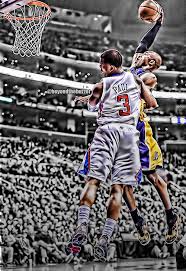
I've been trying many effects to get some of my pics to look like this but haven't come close and would like to know if anyone can come close to this using Gimp?Image
I don't know if I put this in the right place but forgive me if it isn't.


Share on Facebook Share on Twitter Share on Orkut Share on Digg Share on MySpace Share on Delicious Share on Technorati
Top
 Post subject: Re: Can this effect be done in Gimp?
PostPosted: Sat Aug 23, 2014 11:02 am  (#2) 
Offline
GimpChat Member
User avatar

Joined: Sep 24, 2010
Posts: 12837
GIMP ACE Plugin and better, G'MIC with Local Contrast Enhancement. Afterwards some G'MIC anisotrophic filtering for cleanup. :)

_________________
Lyle

Psalm 109:8

Image


Top
 Post subject: Re: Can this effect be done in Gimp?
PostPosted: Sat Aug 23, 2014 11:12 am  (#3) 
Offline
GimpChat Member

Joined: Aug 12, 2014
Posts: 31
Ok, but what gimp ace plugin and better?


Top
 Post subject: Re: Can this effect be done in Gimp?
PostPosted: Sat Aug 23, 2014 11:46 am  (#4) 
Offline
GimpChat Member

Joined: Aug 12, 2014
Posts: 31
Found it but as with the pspi plug, it won't work for me...thanks anyway.


Top
 Post subject: Re: Can this effect be done in Gimp?
PostPosted: Sat Aug 23, 2014 11:49 am  (#5) 
Offline
GimpChat Member
User avatar

Joined: Sep 24, 2010
Posts: 12837
Get G'MIC; much more powerful arsenal. Can just do it all using this plugin alone (HDR, contrast enhancement, and anisotrophic smoothing). :)

_________________
Lyle

Psalm 109:8

Image


Top
 Post subject: Re: Can this effect be done in Gimp?
PostPosted: Sat Aug 23, 2014 11:51 am  (#6) 
Offline
GimpChat Founder
User avatar

Joined: May 22, 2008
Posts: 5241
Location: Gimpville
Check out this thread. It describes one method to achieve the effect you are looking for.

_________________
“If you reach for the stars, you just might land on a decently sized hill.” - Stuart Hill


Top
 Post subject: Re: Can this effect be done in Gimp?
PostPosted: Sat Aug 23, 2014 11:56 am  (#7) 
Offline
GimpChat Member

Joined: Aug 12, 2014
Posts: 31
Thank you lylejk and GnuTux, I'm going to look them over now and come back with a result. All of your assistance is very much appreciated.


Top
 Post subject: Re: Can this effect be done in Gimp?
PostPosted: Sat Aug 23, 2014 11:58 am  (#8) 
Offline
GimpChat Founder
User avatar

Joined: May 22, 2008
Posts: 5241
Location: Gimpville
Here is another thread that might help.

_________________
“If you reach for the stars, you just might land on a decently sized hill.” - Stuart Hill


Top
 Post subject: Re: Can this effect be done in Gimp?
PostPosted: Sat Aug 23, 2014 12:30 pm  (#9) 
Offline
Administrator
User avatar

Joined: Aug 10, 2012
Posts: 14171
Location: Native to NYC living in Arizona, Gimp 2.8 - 3.0, Win 11 PC.
These type of images rely heavily on your selection tools and layer masks, to isolate your subject.
ImageImage
The suggested threads, which showcase this technique. Should steer you in the right direction.

I did the image above rather quickly using the Free Selection tool to isolate MJ and a layer mask for the hoop.

_________________
Image
"A wise man learns more from a foolish question than a fool can learn from a wise answer"
Image


Last edited by Wallace on Sat Aug 23, 2014 12:35 pm, edited 1 time in total.

Top
 Post subject: Re: Can this effect be done in Gimp?
PostPosted: Sat Aug 23, 2014 12:31 pm  (#10) 
Offline
Script Coder
User avatar

Joined: Apr 23, 2010
Posts: 1553
Location: not from Guildford after all
I used the Fattal02 GEGL op (under the Tools menu), and desaturated the background, to produce the following:
Image

XCF file available at:
http://barn.kerosenecow.net/u/saul/m/fattal-dunks-xcf/

_________________
Any sufficiently primitive technology is indistinguishable from a rock.


Top
 Post subject: Re: Can this effect be done in Gimp?
PostPosted: Sat Aug 23, 2014 12:40 pm  (#11) 
Offline
GimpChat Member
User avatar

Joined: Dec 10, 2013
Posts: 1004
Wow really love this effect gentlemen. Thanks for the links to the threads.

_________________
Image
Macbook Air - MacOS Sierra 10.12
McGimp 2.8.14
G'mic 1.6.5


Top
 Post subject: Re: Can this effect be done in Gimp?
PostPosted: Sat Aug 23, 2014 9:00 pm  (#12) 
Offline
GimpChat Member

Joined: Aug 12, 2014
Posts: 31
Image

Ok, it's not the best quality pic but tried it on my nephew. Any tips on what you see could've been done better?


Top
 Post subject: Re: Can this effect be done in Gimp?
PostPosted: Sat Aug 23, 2014 10:09 pm  (#13) 
Offline
Administrator
User avatar

Joined: Aug 10, 2012
Posts: 14171
Location: Native to NYC living in Arizona, Gimp 2.8 - 3.0, Win 11 PC.
MagicMamba wrote:
[ Image ]

Ok, it's not the best quality pic but tried it on my nephew. Any tips on what you see could've been done better?

Got to see the original image, to make any kind of assessment on how it came out.
Looks pretty good though.

_________________
Image
"A wise man learns more from a foolish question than a fool can learn from a wise answer"
Image


Top
 Post subject: Re: Can this effect be done in Gimp?
PostPosted: Sat Aug 23, 2014 11:41 pm  (#14) 
Offline
GimpChat Member

Joined: Aug 12, 2014
Posts: 31
Oh yea, I forgot that part...lol, here it is
Image


Top
Post new topic Reply to topic  [ 14 posts ] 

All times are UTC - 5 hours [ DST ]


* Login  


Powered by phpBB3 © phpBB Group