It is currently Thu Oct 01, 2026 5:50 am


All times are UTC - 5 hours [ DST ]


Post new topic Reply to topic  [ 47 posts ]  Go to page Previous  1, 2, 3
Author Message
 Post subject: Re: making some patterns seamless
PostPosted: Fri Sep 12, 2014 3:31 pm  (#41) 
Offline
GimpChat Member
User avatar

Joined: Apr 07, 2010
Posts: 14182
YES.... took 3 days to make someone understand what I wanted. Just a simple transparent pattern which isn't really transparent, if you know what I am trying to say. ]
THANKS

_________________
Image


Top
 Post subject: Re: making some patterns seamless
PostPosted: Fri Sep 12, 2014 3:35 pm  (#42) 
Offline
Administrator
User avatar

Joined: Aug 10, 2012
Posts: 14220
Location: Native to NYC living in Arizona, Gimp 2.8 - 3.0, Win 11 PC.
molly wrote:
YES.... took 3 days to make someone understand what I wanted. Just a simple transparent pattern which isn't really transparent, if you know what I am trying to say. ]
THANKS


3 days!? :hehe
Sorry I didn't read the thread sooner.
As you know the pattern isn't transparent.
Although you could open the pattern as an image and lower its opacity then rename it and save as a pattern.

_________________
Image
"A wise man learns more from a foolish question than a fool can learn from a wise answer"
Image


Top
 Post subject: Re: making some patterns seamless
PostPosted: Fri Sep 12, 2014 3:53 pm  (#43) 
Offline
GimpChat Member
User avatar

Joined: Apr 07, 2010
Posts: 14182
Thanks conbagui, but I am striving for the checkerboard that looks exactly like the default transparent layer.

_________________
Image


Top
 Post subject: Re: making some patterns seamless
PostPosted: Fri Sep 12, 2014 3:57 pm  (#44) 
Offline
GimpChat Member
User avatar

Joined: Apr 07, 2010
Posts: 14182
Wallace wrote:
Here is the pattern you're looking for.
[ Image ]
Attachment:
graychecker.zip

oops, I missed your pattern, thanks Wally.

_________________
Image


Top
 Post subject: Re: making some patterns seamless
PostPosted: Fri Sep 12, 2014 5:57 pm  (#45) 
Offline
Administrator
User avatar

Joined: Aug 10, 2012
Posts: 14220
Location: Native to NYC living in Arizona, Gimp 2.8 - 3.0, Win 11 PC.
molly wrote:
oops, I missed your pattern, thanks Wally.

:bigthup

_________________
Image
"A wise man learns more from a foolish question than a fool can learn from a wise answer"
Image


Top
 Post subject: Re: making some patterns seamless
PostPosted: Fri Sep 12, 2014 6:29 pm  (#46) 
Offline
GimpChat Founder
User avatar

Joined: May 22, 2008
Posts: 5241
Location: Gimpville
I posted a larger gray checkerboard pattern a while back in this post and you responded in the very next post, Molly.

Wallace's varying sizes of 4 block patterns are a bit more versatile and easier to use. :bigthup

_________________
“If you reach for the stars, you just might land on a decently sized hill.” - Stuart Hill


Top
 Post subject: Re: making some patterns seamless
PostPosted: Fri Sep 26, 2014 6:42 pm  (#47) 
Offline
GimpChat Member
User avatar

Joined: Apr 07, 2010
Posts: 14182
GnuTux wrote:
I posted a larger gray checkerboard pattern a while back in this post and you responded in the very next post, Molly.

Wallace's varying sizes of 4 block patterns are a bit more versatile and easier to use. :bigthup


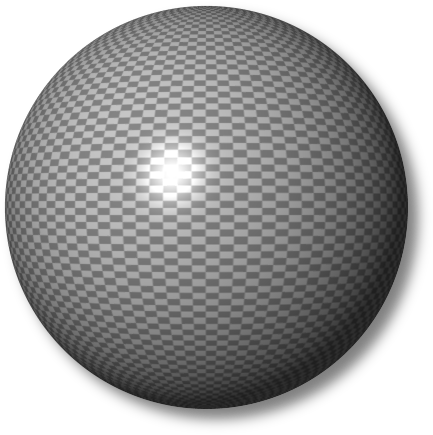
Thank you Tux, I forgot all about that post, I did download them at the time and I was wondering later where I got the gray checkerboard. It was you, the Phantom. :teeth, thanks. That is one of my most favorite backgrounds of all.
_________________
Image


Top
Post new topic Reply to topic  [ 47 posts ]  Go to page Previous  1, 2, 3

All times are UTC - 5 hours [ DST ]


* Login  


Powered by phpBB3 © phpBB Group



