It is currently Sat Oct 10, 2026 9:52 am


All times are UTC - 5 hours [ DST ]


Post new topic Reply to topic  [ 256 posts ]  Go to page Previous  1, 2, 3, 4, 5 ... 13  Next
Author Message
 Post subject: Re: [G'MIC] Smart foreground extraction tool
PostPosted: Fri Sep 12, 2014 6:40 pm  (#21) 
Offline
Script Coder
User avatar

Joined: Feb 18, 2011
Posts: 4826
Location: Bendigo Vic. Australia
Is anyone compiling a 64bit for Windows

_________________
Image
No matter how much you push the envelope, it'll still be stationery.


Top
 Post subject: Re: [G'MIC] Smart foreground extraction tool
PostPosted: Sat Sep 13, 2014 1:34 am  (#22) 
Offline
GimpChat Member

Joined: Oct 21, 2012
Posts: 13
First bravo! there is so much that can be done with the G'mic interactive window, which means that there is so much to come...

I tested the filter and it works flawlessly and it's pretty fast even on big pictures. I only find it inconvenient that it was not possible to zoom to be accurate on big pictures.

Gimp uses CTRL+wheel to zoom out and in, would it be possible to add that feature to the window?


Top
 Post subject: Re: [G'MIC] Smart foreground extraction tool
PostPosted: Sat Sep 13, 2014 1:39 am  (#23) 
Offline
GimpChat Member

Joined: Feb 28, 2014
Posts: 137
This is just beautiful. I can't wait for the Windows version.

A suggestion for the future based on watching the videos... if there was a way to toggle the background from transparent to black, white, and possibly other base colors, it would be easier to identify some of the missing bits that fade into the transparent. For example, the top of the penguin's left wing.

However, as is would have helped me a lot on a couple of projects, and will be sure to in the future. Thank you for your hard work :).

_________________
Margaret McGaffey Fisk
steampunk, fantasy, science fiction, and romance author
Tales to Tide You Over


Top
 Post subject: Re: [G'MIC] Smart foreground extraction tool
PostPosted: Sat Sep 13, 2014 1:40 am  (#24) 
Offline
GimpChat Member

Joined: Oct 21, 2012
Posts: 13
[SPACE] allow to toggle between different background visualization : completely off or transparency, I would find useful to add another state : completely on. Because the transparency mode make me loose accurate viewing, maybe the transparency mode is too transparent too.


Top
 Post subject: Re: [G'MIC] Smart foreground extraction tool
PostPosted: Sat Sep 13, 2014 1:53 am  (#25) 
Offline
GimpChat Member

Joined: Oct 21, 2012
Posts: 13
would it be possible to work with lines also or to have a way to put zillions of dots just by moving the mouse?


Top
 Post subject: Re: [G'MIC] Smart foreground extraction tool
PostPosted: Sat Sep 13, 2014 3:30 am  (#26) 
Offline
GimpChat Member
User avatar

Joined: Jan 03, 2011
Posts: 1656
So, I've changed the controls a little bit to make it more flexible :

- 'Enter' is now used to switch between different three background view modes (pure black, pure white, and grid).
- 'SPACE' force the update of the extraction mask.
- 'M' toggles size of the control markers.
- 'Arrow UP' and 'Arrow Left' controls the opacity of the background.

So you can have a background that can be fully transparent, fully opaque, fully black or fully white.

The zoom feature could be interesting to add, but this adds a lot more complexity to the code, so it will take more time to do it.
Not sure I'll be able to do it soon, as I'm quite busy with administrative stuffs right now.


Top
 Post subject: Re: [G'MIC] Smart foreground extraction tool
PostPosted: Sat Sep 13, 2014 4:13 am  (#27) 
Offline
GimpChat Member

Joined: Jan 20, 2014
Posts: 66
Great tool and fairly easy to use.
For the loose hair, is it possible to mark it so that you can use different algorithm to trace?


Top
 Post subject: Re: [G'MIC] Smart foreground extraction tool
PostPosted: Sat Sep 13, 2014 4:46 am  (#28) 
Offline
GimpChat Member
User avatar

Joined: Jan 03, 2011
Posts: 1656
A general answer : almost everything is possible, but we need an increasing number of contributors to go with the increasing number of requests :)


Top
 Post subject: Re: [G'MIC] Smart foreground extraction tool
PostPosted: Sat Sep 13, 2014 6:12 am  (#29) 
Offline
GimpChat Member
User avatar

Joined: Mar 15, 2014
Posts: 115
Location: Brooklyn, NY
First, to quote ZondeR, Bravo! This is the signature feature that, for me, makes 1.6.0.0 feel like a major release. Just having -display work in the context of a Gimp-G'MIC filter was, to me, worth the price of admission, but now this - ! I don't often use smilies, but this is a worthy occasion:
:yes
My first experiment on a noise-ravaged image was pretty satisfying, and this on a (now) pretty old code snapshot (about Thursday midnight UTC):
Image
It seems to deal with noise quite well. The only sins of omission I can find seem due to my own ambiguous marking (the hairlock on the left hand side was marked neither fore nor back.)
Yes. Indeed. Contribute! It's the flip side of F/OSS. None of the toys we so enjoy using make themselves. But compared to the price paid for commercial offerings, what F/OSS exacts is just time and expertise, and, in fact, that gives its own reward: you get to meet incredible people who go on to enrich your own life. You can't get that just by spending money.
Ding! New build finished. Excuse me, but I gotta tip...


Top
 Post subject: Re: [G'MIC] Smart foreground extraction tool
PostPosted: Sat Sep 13, 2014 7:25 am  (#30) 
Offline
Global Moderator
User avatar

Joined: Apr 01, 2012
Posts: 8480
Location: On the other side of your screen
Looks pretty good. Thank you for another great feature. :)

_________________
Image
Free Fun Photo Editing & resources
Poems from the Lord
Gimp Newby
Gimp version 3.2.6 and GMIC-Qt 4.0.2 OS :- Windows 10 Home 64


Top
 Post subject: Re: [G'MIC] Smart foreground extraction tool
PostPosted: Sat Sep 13, 2014 7:37 am  (#31) 
Offline
GimpChat Member
User avatar

Joined: Apr 07, 2010
Posts: 14182
Ronounours wrote:
Hi there,

These two last days, I've worked quite hard on the G'MIC code (particularly for the GIMP plug-in), and I'd like to share something with you.
This is not yet available in current stable version 1.6.0.0, but it is in current beta 1.6.0.1_beta.

I've added a new filter, named Contours / Extract foreground whose aim is to help extracting a foreground object in an opaque RGB image.
Instead of having to manually draw a selection around the object, with classical selection tools, this filter proposes an alternative approach :
You just have to define control points that can be either labeled 'background' or 'foreground' points. Then, the algorithm tries to automatically
deduce the whole shape of the foreground mask, from the position of the control points and the analysis of the image contours.
I won't enter too much in the algorithm details, but this is intended to save time when doing this tedious selection work.

Here is a video I've recorded to show how the extraction process work (in real-time!).
What you see here is the user adding green and red control points (resp. foreground and background points), and the algorithm is updating its estimated extraction mask.

www.youtube.com Video from : www.youtube.com


and two olders (from yesterday :p ) :

www.youtube.com Video from : www.youtube.com


and

www.youtube.com Video from : www.youtube.com


This also shows that now, a G'MIC filter in the GIMP plug-in can open interactive windows. This promises good things to come in the future :)
Hope you'll enjoy this little spoiler !

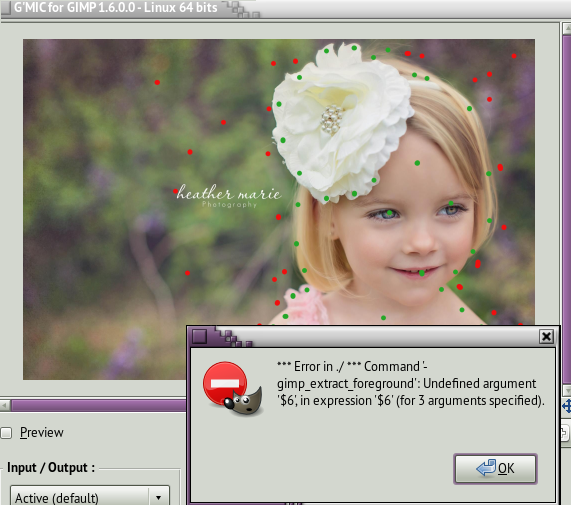
David, that looks great but where do I find the Linux Beta 16.01 version? 'I tried it with the 1.6.0.0 version and this is the error I received.
Image

_________________
Image


Top
 Post subject: Re: [G'MIC] Smart foreground extraction tool
PostPosted: Sat Sep 13, 2014 10:07 am  (#32) 
Offline
GimpChat Member
User avatar

Joined: Mar 15, 2014
Posts: 115
Location: Brooklyn, NY
Sorry. I'm not David, but will this do?
http://sourceforge.net/projects/gmic/files/beta/
As of this writing, the linux binaries seem current to about 18:30 UTC yesterday (9/12)
And, if you're of an adventurous mind, there's git:
Basic howto: http://gmic.sourceforge.net/repository.shtml

GRO


Top
 Post subject: Re: [G'MIC] Smart foreground extraction tool
PostPosted: Sat Sep 13, 2014 10:10 am  (#33) 
Offline
GimpChat Member
User avatar

Joined: Apr 07, 2010
Posts: 14182
Thanks grosood, I downloaded and installed the beta version and I put the green dots on the girl and the red dots on the bg and the thing is going back and forth for 15 mins now. I don't know if it is working or what it is doing. Is there a chance that I should be using a smaller preview, or does that make a difference?

_________________
Image


Top
 Post subject: Re: [G'MIC] Smart foreground extraction tool
PostPosted: Sat Sep 13, 2014 10:17 am  (#34) 
Offline
Global Moderator
User avatar

Joined: May 16, 2010
Posts: 16200
Graechan wrote:
Is anyone compiling a 64bit for Windows


Doing so now Graechan. Will post a download after successful testing. :bigthup

EDIT: Seems to be working after refresh filters.

Image


Top
 Post subject: Re: [G'MIC] Smart foreground extraction tool
PostPosted: Sat Sep 13, 2014 10:57 am  (#35) 
Offline
Global Moderator
User avatar

Joined: May 16, 2010
Posts: 16200
Strange. There is no "Reset" button nor does clicking "Apply" or "OK" open a new window. It just adds a new layer to the image.


Top
 Post subject: Re: [G'MIC] Smart foreground extraction tool
PostPosted: Sat Sep 13, 2014 11:42 am  (#36) 
Offline
GimpChat Member
User avatar

Joined: Mar 15, 2014
Posts: 115
Location: Brooklyn, NY
@molly
It is fairly quick, as it works out a solution as you go along. For me, 1024x1024 RGB, I had a images back in Gimp in less than a minute. Per David's instructions, I set the control points (B, F) with an occasional ENTER to judge the intermediary solution. ESC when I thought I was happy.

The red and green dots disappear, are replaced by the word "Processing" and, five or ten seconds tops, the interactive -display window disappears and replaced with the masked image. I've have tried it with pretty noisy images and it manages quite decent solutions.

Your working window is a new interactive display window. Is it possible that it had become buried under other windows? All the while you are setting dots, Gimp runs its busy-busy indicator. Is it possible the interactive display is still active, still waiting for input, but buried?

GRO


Top
 Post subject: Re: [G'MIC] Smart foreground extraction tool
PostPosted: Sat Sep 13, 2014 11:52 am  (#37) 
Offline
GimpChat Member
User avatar

Joined: Sep 22, 2012
Posts: 2089
Location: US
Thank you Rod for trying to compile 64-bit beta.
I'm not sure samj compiles betas. But I got a feeling it will become stable soon.
This major feature alone deserves version update release.

Stuff seems working smoothly and gets the job done wonderfully.

Needed only 2(!) points of each fg and bg matting to get an excellent result.
Maybe this is not the most difficult object to extract but still. Simply amazing!!!

Image


Top
 Post subject: Re: [G'MIC] Smart foreground extraction tool
PostPosted: Sat Sep 13, 2014 11:56 am  (#38) 
Offline
GimpChat Member
User avatar

Joined: Apr 07, 2010
Posts: 14182
@grosood. I was still putting dots in when it was working, I guess, I am still very confused, as usual, I will try to give it another go. So I just have to put a green dot on the foreground and a red one on the bg, :gaah

_________________
Image


Top
 Post subject: Re: [G'MIC] Smart foreground extraction tool
PostPosted: Sat Sep 13, 2014 12:25 pm  (#39) 
Offline
Global Moderator
User avatar

Joined: May 16, 2010
Posts: 16200
I retrieved the src from here.
http://sourceforge.net/projects/gmic/fi ... z/download

Perhaps the code does not compile correctly for 64 bit?


Top
 Post subject: Re: [G'MIC] Smart foreground extraction tool
PostPosted: Sat Sep 13, 2014 12:38 pm  (#40) 
Offline
GimpChat Member
User avatar

Joined: Mar 15, 2014
Posts: 115
Location: Brooklyn, NY
@molly
Have patience; you are working with new code AND - for Gimp-G'MIC - new UI interactions.
-Pick your target layer.
-From Gimp-G'MIC, Contours-> Extract foreground
-(optional) To clean up from previous efforts, hit "Reset all Control Points" (They are retained from session to session).
-Hit OK or Apply to start - an interactive display window appears with your current layer echoed.
-Apply red pts to background, green pts to foreground. As K1TesseraEna showed, you
don't need very many!
-Examine intermediary solutions by pressing Enter
-Signal completion by pressing 'Q' or 'Esc' -- While you are setting dots, Gimp main window will display its 'busy' animation.
-Your dots disappear. After a few seconds, your interactive display window disappears, and modified layers appear in your layer stack. (You will briefly see 'Processing')
I've never seen an update take longer than ten seconds.
Try capturing verbose output to log or the console if it behaves oddly
GRO


Top
Post new topic Reply to topic  [ 256 posts ]  Go to page Previous  1, 2, 3, 4, 5 ... 13  Next

All times are UTC - 5 hours [ DST ]


* Login  


Powered by phpBB3 © phpBB Group