It is currently Thu Aug 20, 2026 3:01 pm


All times are UTC - 5 hours [ DST ]


Post new topic Reply to topic  [ 256 posts ]  Go to page Previous  1 ... 6, 7, 8, 9, 10, 11, 12, 13  Next
Author Message
 Post subject: Re: [G'MIC] Smart foreground extraction tool
PostPosted: Fri Sep 26, 2014 10:51 am  (#161) 
Offline
GimpChat Member
User avatar

Joined: Nov 16, 2011
Posts: 5127
Location: Metro Vancouver, BC
pirate541 wrote:
Rod
Thank You for Your kind reply.
but how do i cut them from a png file?
Try the Guillotine. With some of the images you may have to do it in two goes, horizontally and vertically. It's a faster layout using a guide script like, Grid of guides or GAT Tools with adjustments.

_________________
Image
Gimp 2.8.18, Linux, median user
Gimp Chat Tutorials Index
Spirit Bear (Kermode)


Top
 Post subject: Re: [G'MIC] Smart foreground extraction tool
PostPosted: Fri Sep 26, 2014 2:27 pm  (#162) 
Offline
GimpChat Member
User avatar

Joined: May 27, 2011
Posts: 707
Odin
I still don't understand how to divide them into layers.
I thought I had it with Gmic'''extract" but when I saved it it didn't save it as layers


Top
 Post subject: Re: [G'MIC] Smart foreground extraction tool
PostPosted: Fri Sep 26, 2014 3:33 pm  (#163) 
Offline
GimpChat Member
User avatar

Joined: Nov 16, 2011
Posts: 5127
Location: Metro Vancouver, BC
Guillotine extracts to images.
G'MIC | Arrays & tiles | Extract objects (set Output to New layers) to a layer stack.

_________________
Image
Gimp 2.8.18, Linux, median user
Gimp Chat Tutorials Index
Spirit Bear (Kermode)


Top
 Post subject: Re: [G'MIC] Smart foreground extraction tool
PostPosted: Fri Sep 26, 2014 8:48 pm  (#164) 
Offline
GimpChat Member
User avatar

Joined: May 27, 2011
Posts: 707
Rod,Odin and Molly

Image

for Your help :yr


Top
 Post subject: Re: [G'MIC] Smart foreground extraction tool
PostPosted: Fri Sep 26, 2014 8:54 pm  (#165) 
Offline
GimpChat Member
User avatar

Joined: Nov 16, 2011
Posts: 5127
Location: Metro Vancouver, BC
Excellent!

_________________
Image
Gimp 2.8.18, Linux, median user
Gimp Chat Tutorials Index
Spirit Bear (Kermode)


Top
 Post subject: Re: [G'MIC] Smart foreground extraction tool
PostPosted: Fri Sep 26, 2014 9:49 pm  (#166) 
Offline
Script Coder
User avatar

Joined: Feb 18, 2011
Posts: 4826
Location: Bendigo Vic. Australia
Rod would it be possible for you to recreate the .phf files with the help of the foreground extraction tool
Steampunk text is to good to let go of and so is photofont :yes :jumpclap

_________________
Image
No matter how much you push the envelope, it'll still be stationery.


Top
 Post subject: Re: [G'MIC] Smart foreground extraction tool
PostPosted: Fri Sep 26, 2014 11:07 pm  (#167) 
Offline
GimpChat Member
User avatar

Joined: May 27, 2011
Posts: 707
Graechan

I have 2 sets saved as xcf files and letters are in alphabetical order..
Problem I have is that forum won't let me post them.
I can email if You want them


Top
 Post subject: Re: [G'MIC] Smart foreground extraction tool
PostPosted: Sat Sep 27, 2014 12:38 am  (#168) 
Offline
Script Coder
User avatar

Joined: Feb 18, 2011
Posts: 4826
Location: Bendigo Vic. Australia
Thanks Pirate541, I just finished getting one set downloaded and I'm reading some info here Photofont program for Gimp
to try and refresh my memory on how .phf files are created, and it's confusing
the file below is the one I have after I manage to convert it I'll try some more
Pirate541 try 7zip and load as an attachment, I will send you a PM now
Image

attached is .png of Image above↓

Attachment:
Graechan-2014-09-27-15-25-19554.zip [520.44 KiB]
Downloaded 115 times

_________________
Image
No matter how much you push the envelope, it'll still be stationery.


Top
 Post subject: Re: [G'MIC] Smart foreground extraction tool
PostPosted: Sat Sep 27, 2014 5:49 am  (#169) 
Offline
GimpChat Member
User avatar

Joined: Apr 07, 2010
Posts: 14182
I am trying to make brushes out of these but I can't get them the correct size.
Image

_________________
Image


Top
 Post subject: Re: [G'MIC] Smart foreground extraction tool
PostPosted: Sat Sep 27, 2014 6:16 am  (#170) 
Offline
Global Moderator
User avatar

Joined: May 16, 2010
Posts: 16164
Graechan wrote:
Rod would it be possible for you to recreate the .phf files with the help of the foreground extraction tool
Steampunk text is to good to let go of and so is photofont :yes :jumpclap

When i get some time i will try and convert to PHF Graechan. :)
The PHF file will be huge because the images will be embedded and not called from a PHF file.As the PHF non embedded file does. I will probably upload to dropbox when they are finished.

Pirate those look excellent! And thank you Graechan for the PNG file.

The only other person i know has these PHF steampunk files is PC and he hasn't been around in a great while. Kind of worried about him actually. I had them uploaded to simplygimp.com server but that domain is dead now.

_________________
Image


Top
 Post subject: Re: [G'MIC] Smart foreground extraction tool
PostPosted: Sat Sep 27, 2014 7:07 pm  (#171) 
Offline
Script Coder
User avatar

Joined: Feb 18, 2011
Posts: 4826
Location: Bendigo Vic. Australia
Rod After I have created the images as per your example xcf, do you remember what to do next I have positioned them as images as per your example for non-embeded, all I have to go by are your phf files for paperclips and non-embeded

_________________
Image
No matter how much you push the envelope, it'll still be stationery.


Top
 Post subject: Re: [G'MIC] Smart foreground extraction tool
PostPosted: Sat Sep 27, 2014 9:54 pm  (#172) 
Offline
Script Coder
User avatar

Joined: Feb 18, 2011
Posts: 4826
Location: Bendigo Vic. Australia
For photofont discussion please go to this link PhotoFont program for Gimp :bigthup

_________________
Image
No matter how much you push the envelope, it'll still be stationery.


Top
 Post subject: Re: [G'MIC] Smart foreground extraction tool
PostPosted: Sat Sep 27, 2014 10:09 pm  (#173) 
Offline
GimpChat Member
User avatar

Joined: Sep 22, 2012
Posts: 2089
Location: US
Graechan wrote:
For photofont discussion please go to this link PhotoFont program for Gimp :bigthup


Thread hijacking detected? :hehe


Top
 Post subject: Re: [G'MIC] Smart foreground extraction tool
PostPosted: Sat Sep 27, 2014 11:36 pm  (#174) 
Offline
Script Coder
User avatar

Joined: Feb 18, 2011
Posts: 4826
Location: Bendigo Vic. Australia
K1TesseraEna wrote:
Graechan wrote:
For photofont discussion please go to this link PhotoFont program for Gimp :bigthup


Thread hijacking detected? :hehe

Yes I'm a 'bad boy' ;)

_________________
Image
No matter how much you push the envelope, it'll still be stationery.


Top
 Post subject: Re: [G'MIC] Smart foreground extraction tool
PostPosted: Fri Oct 03, 2014 6:19 pm  (#175) 
Offline
GimpChat Member
User avatar

Joined: May 27, 2011
Posts: 707
ok,
Finally installed Gmic
but when i click ok,this iImages what I get


Top
 Post subject: Re: [G'MIC] Smart foreground extraction tool
PostPosted: Fri Oct 03, 2014 7:21 pm  (#176) 
Offline
GimpChat Member

Joined: Jul 11, 2010
Posts: 349
pirate541 wrote:
ok,
Finally installed Gmic
but when i click ok,this is what I get


I also starting to get the same errors with extraction and the colorize[interactive]. What concerns me, is that I went from pogo's back to Graechan's which had worked previously and I am now getting the same errors.

Using Win7 64bit


Top
 Post subject: Re: [G'MIC] Smart foreground extraction tool
PostPosted: Fri Oct 03, 2014 8:25 pm  (#177) 
Offline
GimpChat Member
User avatar

Joined: May 27, 2011
Posts: 707
Bilbo
Thank You for letting me know that :)
I thought I had misinstalled the new Gmic


Top
 Post subject: Re: [G'MIC] Smart foreground extraction tool
PostPosted: Fri Oct 03, 2014 9:05 pm  (#178) 
Offline
Script Coder
User avatar

Joined: Feb 18, 2011
Posts: 4826
Location: Bendigo Vic. Australia
Pirate could you post your Image for me to try

_________________
Image
No matter how much you push the envelope, it'll still be stationery.


Top
 Post subject: Re: [G'MIC] Smart foreground extraction tool
PostPosted: Fri Oct 03, 2014 9:19 pm  (#179) 
Offline
GimpChat Member
User avatar

Joined: May 27, 2011
Posts: 707
Graechan

There You go.
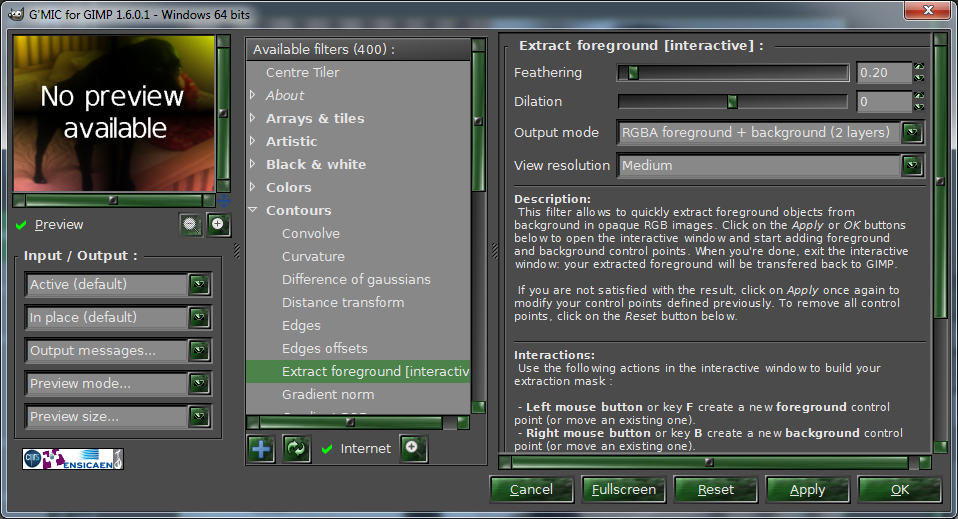
Gmic opens and shows this:
Image

When i click "ok" is when I get the error message
here's the pic I used:
Image

Thank You for helping :)


Top
 Post subject: Re: [G'MIC] Smart foreground extraction tool
PostPosted: Fri Oct 03, 2014 10:22 pm  (#180) 
Offline
Script Coder
User avatar

Joined: Feb 18, 2011
Posts: 4826
Location: Bendigo Vic. Australia
The Image was not all that good and my hand is wobbly but I managed this
Image

Image

Image
When installing 1.6.0.1 make sure you replace all the .dll and curl.exe files and not just the plugin,even when updating

_________________
Image
No matter how much you push the envelope, it'll still be stationery.


Top
Post new topic Reply to topic  [ 256 posts ]  Go to page Previous  1 ... 6, 7, 8, 9, 10, 11, 12, 13  Next

All times are UTC - 5 hours [ DST ]


* Login  


Powered by phpBB3 © phpBB Group