It is currently Wed Sep 30, 2026 11:00 am


All times are UTC - 5 hours [ DST ]


Post new topic Reply to topic  [ 5 posts ] 
Author Message
 Post subject: Fonts getting cut off, still no fix?
PostPosted: Sun Oct 12, 2014 5:28 pm  (#1) 
Offline
New Member

Joined: Oct 12, 2014
Posts: 1
GIMP Version: 2.8.10
Operating System: Windows
OS Version: 8.1
GIMP Experience: Beginner Level


Hello, I'm relatively new to GIMP but as I start to get more versed with it, the one thing I keep noticing is that when I use bold versions of a font it regularly chops off the top 5% or so from the font, no matter the size. Seems to do this across the board, and as far as I can google I haven't seen a fix.

I noticed looking at the board that there were people talking about this as a problem in 2013, with no fix for it, but it's 2014 now and I can't imagine that something as simple as 'make the text display properly' is still not a thing that GIMP has figured out. Does anyone have any tips? And if GIMP truly is just not capable of doing this one thing, any recommendations of another free program that might solve the problem and output text image elements I could then put back into GIMP? Because this is ridiculous.


Share on Facebook Share on Twitter Share on Orkut Share on Digg Share on MySpace Share on Delicious Share on Technorati
Top
 Post subject: Re: Fonts getting cut off, still no fix?
PostPosted: Sun Oct 12, 2014 5:41 pm  (#2) 
Offline
GimpChat Member
User avatar

Joined: Apr 07, 2010
Posts: 14182
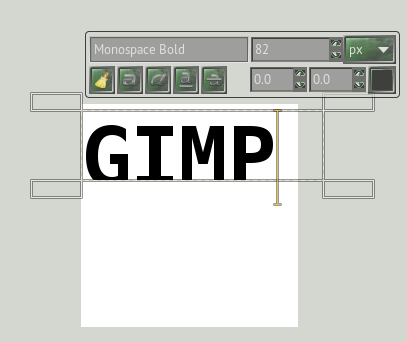
When you make your text, is the text box completely outside the text?
If it is down too low, the bottom part of the text will be missing.
Here are two screen shots of one text completely inside box and the other one not. The one that is touching the lines will be cut off.
Image

Image

_________________
Image


Top
 Post subject: Re: Fonts getting cut off, still no fix?
PostPosted: Sun Oct 12, 2014 5:46 pm  (#3) 
Offline
Script Coder
User avatar

Joined: Oct 25, 2010
Posts: 4812
litrock wrote:
GIMP Version: 2.8.10
Operating System: Windows
OS Version: 8.1
GIMP Experience: Beginner Level


Hello, I'm relatively new to GIMP but as I start to get more versed with it, the one thing I keep noticing is that when I use bold versions of a font it regularly chops off the top 5% or so from the font, no matter the size. Seems to do this across the board, and as far as I can google I haven't seen a fix.

I noticed looking at the board that there were people talking about this as a problem in 2013, with no fix for it, but it's 2014 now and I can't imagine that something as simple as 'make the text display properly' is still not a thing that GIMP has figured out. Does anyone have any tips? And if GIMP truly is just not capable of doing this one thing, any recommendations of another free program that might solve the problem and output text image elements I could then put back into GIMP? Because this is ridiculous.


Did you report the bug or at least checked that this is a reported bug?

_________________
Image


Top
 Post subject: Re: Fonts getting cut off, still no fix?
PostPosted: Sun Oct 12, 2014 6:14 pm  (#4) 
Offline
GimpChat Member
User avatar

Joined: Sep 22, 2012
Posts: 2089
Location: US
Yes, I was one of those people having exactly the same issue with text tool in 2.8.2
You probably saw my thread on GC dated January 2013.
The thing is I don't have this problem since version 2.8.8 (?) I think.
Was going to report a bug back then but IIRC it was already reported.


Top
 Post subject: Re: Fonts getting cut off, still no fix?
PostPosted: Sun Oct 12, 2014 8:56 pm  (#5) 
Offline
GimpChat Member
User avatar

Joined: Nov 16, 2011
Posts: 5127
Location: Metro Vancouver, BC
litrock wrote:
Hello, I'm relatively new to GIMP but as I start to get more versed with it, the one thing I keep noticing is that when I use bold versions of a font it regularly chops off the top 5% or so from the font, no matter the size. Seems to do this across the board, and as far as I can google I haven't seen a fix.

Do you have bold versions of these typefaces installed on your machine or are you trying to faux bold regular fonts?

_________________
Image
Gimp 2.8.18, Linux, median user
Gimp Chat Tutorials Index
Spirit Bear (Kermode)


Top
Post new topic Reply to topic  [ 5 posts ] 

All times are UTC - 5 hours [ DST ]


* Login  


Powered by phpBB3 © phpBB Group