It is currently Thu Jul 23, 2026 11:50 pm


All times are UTC - 5 hours [ DST ]


Post new topic Reply to topic  [ 240 posts ]  Go to page Previous  1 ... 3, 4, 5, 6, 7, 8, 9 ... 12  Next
Author Message
 Post subject: Re: path-inbetweener
PostPosted: Tue Nov 04, 2014 7:07 am  (#101) 
Offline
Global Moderator
User avatar

Joined: Apr 01, 2012
Posts: 8433
Location: On the other side of your screen
Image
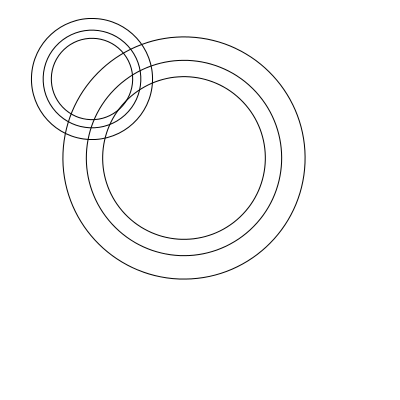
The designs are not exactly the same but have the same amount of points

Maybe they are not layers. I just realized it was in the paths dialogue. But it didn't stroke the path and I even tried to stroke it after but nothing happened.

_________________
Image
Free Fun Photo Editing & resources
Poems from the Lord
Gimp Newby
Gimp version 3.2.4 and GMIC-Qt 4.2.0 OS :- Windows 10 Home 64


Top
 Post subject: Re: path-inbetweener
PostPosted: Tue Nov 04, 2014 7:22 am  (#102) 
Offline
Global Moderator
User avatar

Joined: Apr 01, 2012
Posts: 8433
Location: On the other side of your screen
just tried a star inside a star and got the same thing.

_________________
Image
Free Fun Photo Editing & resources
Poems from the Lord
Gimp Newby
Gimp version 3.2.4 and GMIC-Qt 4.2.0 OS :- Windows 10 Home 64


Top
 Post subject: Re: path-inbetweener
PostPosted: Tue Nov 04, 2014 7:32 am  (#103) 
Offline
Script Coder
User avatar

Joined: Oct 25, 2010
Posts: 4812
Your two spirals must be in different paths, not be two strokes in the same path. Otherwise what the script does is generate intermediate paths between your path and itself, leading to exact copies of the path. In my example in post #90, the two Gs are two distinct paths (as is the guide path above them):

Attachment:
inbetweener.png
inbetweener.png [ 95.2 KiB | Viewed 1659 times ]

_________________
Image


Top
 Post subject: Re: path-inbetweener
PostPosted: Tue Nov 04, 2014 7:59 am  (#104) 
Offline
Global Moderator
User avatar

Joined: Apr 01, 2012
Posts: 8433
Location: On the other side of your screen
They were 2 separate paths. Do I need to put them on the same canvas or separate? Let me try it again.
EDIT: I created two paths on one canvas with the path shape creator. Nothing happened between the paths. I also did one with 2 separate paths and still nothing. Was there only the one plugin I needed? I have downloaded and installed your most recent one.

_________________
Image
Free Fun Photo Editing & resources
Poems from the Lord
Gimp Newby
Gimp version 3.2.4 and GMIC-Qt 4.2.0 OS :- Windows 10 Home 64


Top
 Post subject: Re: path-inbetweener
PostPosted: Tue Nov 04, 2014 8:24 am  (#105) 
Offline
Script Coder
User avatar

Joined: Oct 25, 2010
Posts: 4812
sallyanne wrote:
They were 2 separate paths. Do I need to put them on the same canvas or separate? Let me try it again.
EDIT: I created two paths on one canvas with the path shape creator. Nothing happened between the paths. I also did one with 2 separate paths and still nothing. Was there only the one plugin I needed? I have downloaded and installed your most recent one.

Given your screen shot above you have the two spirals as strokes in the same path (each path preview would have shown only one single spiral otherwise). See here for some explanations.

_________________
Image


Top
 Post subject: Re: path-inbetweener
PostPosted: Tue Nov 04, 2014 8:44 am  (#106) 
Offline
GimpChat Member
User avatar

Joined: Apr 07, 2010
Posts: 14182
I made a third path with the curve but I don't know how to tie that in with the to and from.
FILL

Image

STROKE

Image

_________________
Image


Top
 Post subject: Re: path-inbetweener
PostPosted: Tue Nov 04, 2014 9:02 am  (#107) 
Offline
GimpChat Member
User avatar

Joined: Mar 10, 2014
Posts: 845
great updating ofnut!


Top
 Post subject: Re: path-inbetweener
PostPosted: Tue Nov 04, 2014 9:03 am  (#108) 
Offline
Script Coder
User avatar

Joined: Oct 25, 2010
Posts: 4812
molly wrote:
I made a third path with the curve but I don't know how to tie that in with the to and from.

Attachment:
inbetweenerdialog.png
inbetweenerdialog.png [ 34.86 KiB | Viewed 1643 times ]


If your dialog doesn't look like this, then you need to get the latest version.

_________________
Image


Top
 Post subject: Re: path-inbetweener
PostPosted: Tue Nov 04, 2014 9:23 am  (#109) 
Offline
GimpChat Member
User avatar

Joined: Apr 07, 2010
Posts: 14182
Strange, I downloaded that this morning and got rid of 0.0 and gave it permissions. My dialogue is still the same as it was before.

_________________
Image


Top
 Post subject: Re: path-inbetweener
PostPosted: Tue Nov 04, 2014 9:31 am  (#110) 
Offline
Script Coder
User avatar

Joined: Oct 25, 2010
Posts: 4812
Well, when you start the dialog it shows you what file it is actually executing.... (see the top of my dialog screenshot). Yours will also have the version in the file name (if you didn't remove it). You may have had duplicate versions of the old one (and Gimp registers only the first one it finds).

_________________
Image


Top
 Post subject: Re: path-inbetweener
PostPosted: Tue Nov 04, 2014 9:47 am  (#111) 
Offline
GimpChat Member
User avatar

Joined: Sep 22, 2012
Posts: 2089
Location: US
I've used your script to create flat design drop shadows*. I wrote down some notes back then but had forgotten to ask you. So here they are


The script doesn't blend paths using the nearest anchor points
but according to the paths start and end points?
That's what I'm getting with two 3angles: before and after rotating big 3angle 90 degrees clockwise.

ImageImage

Had to cheat to blend these two paths ;)
Image


*Now look at the comment #30 in that thread and you being all skeptical about inbetweener script capabilities, lol


Last edited by K1TesseraEna on Tue Nov 04, 2014 9:56 am, edited 1 time in total.

Top
 Post subject: Re: path-inbetweener
PostPosted: Tue Nov 04, 2014 9:50 am  (#112) 
Offline
GimpChat Member
User avatar

Joined: Apr 07, 2010
Posts: 14182
Thanks I got it now. I will have to change my Theme. I couldn't see the yes and no option, it was too dark ... my fault.
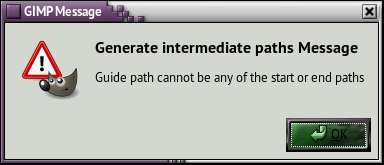
This is the error I get when I try it. I guess I don't know how to make a stroke path. I made an arc then stroked it then I tried to run the generator with the yes clicked and I get this error. Image

_________________
Image


Top
 Post subject: Re: path-inbetweener
PostPosted: Tue Nov 04, 2014 10:02 am  (#113) 
Offline
Script Coder
User avatar

Joined: Oct 25, 2010
Posts: 4812
molly wrote:
Thanks I got it now. I will have to change my Theme. I couldn't see the yes and no option, it was too dark ... my fault.
This is the error I get when I try it. I guess I don't know how to make a stroke path. I made an arc then stroked it then I tried to run the generator with the yes clicked and I get this error. [ Image ]


You need three distinct paths. The start, the end, and the guide. You are using on the the start/end path also as the guide path.

_________________
Image


Top
 Post subject: Re: path-inbetweener
PostPosted: Tue Nov 04, 2014 10:11 am  (#114) 
Offline
Script Coder
User avatar

Joined: Oct 25, 2010
Posts: 4812
K1TesseraEna wrote:
[font=Tahoma]I've used your script to create flat design drop shadows*. I wrote down some notes back then but had forgotten to ask you. So here they are


The script doesn't blend paths using the nearest anchor points
but according to the paths start and end points?
That's what I'm getting with two 3angles: before and after rotating big 3angle 90 degrees clockwise.


Yes, it's the order of the points that counts(*). Using the closest point when you twist the path over itself would yield unpredictable results. It would also break the assumption that you get the same results if you take the end paths and one of the intermediate paths and run the script on both sides.

For polygons, it's easy to force the first/last points. Just delete any segment between two points, and reconnect again. The new start and end points are the two points you reconnected. Of course you don't now in which direction the polygon runs, but I have a script to reverse strokes. For curve paths a similar technique is possible but requires a bit more care to preserve the tangents.

_________________
Image


Top
 Post subject: Re: path-inbetweener
PostPosted: Tue Nov 04, 2014 10:41 am  (#115) 
Offline
GimpChat Member
User avatar

Joined: Sep 22, 2012
Posts: 2089
Location: US
Thanks for the update, ofnuts, I've just tested it, like that guide-path addition.

To Stroke all paths I can merge visible paths and stroke but
how can I stroke all paths at once with each path-stroke on separate layers (e.g. for animation)?


Top
 Post subject: Re: path-inbetweener
PostPosted: Tue Nov 04, 2014 10:48 am  (#116) 
Offline
Script Coder
User avatar

Joined: Oct 25, 2010
Posts: 4812
This is what my stroke-visible-paths script is all about (with the "multiple" layer option).

_________________
Image


Top
 Post subject: Re: path-inbetweener
PostPosted: Tue Nov 04, 2014 11:00 am  (#117) 
Offline
GimpChat Member
User avatar

Joined: Sep 22, 2012
Posts: 2089
Location: US
ofnuts wrote:
This is what my stroke-visible-paths script is all about (with the "multiple" layer option).


LOL, it was posted 4 hrs ago. I downloaded inbetweener last night and, naturally, did/could not see it there.
Is it Christmas already? My wishes come true even before I think of them?


Top
 Post subject: Re: path-inbetweener
PostPosted: Tue Nov 04, 2014 12:01 pm  (#118) 
Offline
GimpChat Member
User avatar

Joined: Mar 10, 2014
Posts: 845
Playing with the "stretch" settings

Image

these are the 2 original paths
Image


Top
 Post subject: Re: path-inbetweener
PostPosted: Tue Nov 04, 2014 12:05 pm  (#119) 
Offline
GimpChat Member
User avatar

Joined: Sep 22, 2012
Posts: 2089
Location: US
regarding path-inbetweener script....
what line do i change in script to avoid square brackets in paths names, e.g. pathA to pathB [03/30]?
After I run stroke-visible-paths script, path names migrate to the new layers names.

I'm trying to run Animstack script to make an animation and square brackets
have a functional meaning - to define tags (see http://registry.gimp.org/node/26501)
I have to rename all layers manually to get rid of the brackets otherwise Animstack crashes.
Thanks.


Top
 Post subject: Re: path-inbetweener
PostPosted: Tue Nov 04, 2014 12:14 pm  (#120) 
Offline
Script Coder
User avatar

Joined: Oct 25, 2010
Posts: 4812
K1TesseraEna wrote:
ofnuts wrote:
This is what my stroke-visible-paths script is all about (with the "multiple" layer option).


LOL, it was posted 4 hrs ago. I downloaded inbetweener last night and, naturally, did/could not see it there.
Is it Christmas already? My wishes come true even before I think of them?


I updated it 4 hours ago, but it has been around for a while. See history at top of files:
v0.0: 2012-06-22: Initial version

_________________
Image


Top
Post new topic Reply to topic  [ 240 posts ]  Go to page Previous  1 ... 3, 4, 5, 6, 7, 8, 9 ... 12  Next

All times are UTC - 5 hours [ DST ]


cron

* Login  


Powered by phpBB3 © phpBB Group