It is currently Sat Sep 19, 2026 6:08 am


All times are UTC - 5 hours [ DST ]


Post new topic Reply to topic  [ 12 posts ] 
Author Message
 Post subject: Focuswriter mini-review
PostPosted: Thu Nov 13, 2014 8:40 am  (#1) 
Offline
GimpChat Member
User avatar

Joined: Apr 27, 2010
Posts: 1510
Location: Sweden
As part of my NanoWriMo effort (see thread here) I have tried exploring some other ways of entering text than my normal go-tos VIM and LibreOffice. When writing prose I find I don't need the formatting buttons, tool box etc visible at every moment. I looked around and found Focuswriter.

This free text editor exists for Windows, Mac and Linux and I've found it really nice to work with. I pulled and compiled the latest development version off github, but there are stable binary packages/installers available for all operating systems on their homepage (and linux distros usually have it in their repositories).

For my NaNoWriMo effort I made myself a fantasy/book theme that looks like this:

Image
(search Google-images for "focuswriter theme" to get more examples.).

As you can read in the screenshot above, Focuswriter is run in full-screen and you move your cursor to the edges of the screen to access menus (but most things can be done swiftly with keyboard shortcuts).

For NaNoWriMo it conveniently displays all information you need (I have a feeling NaNoWriMo influenced it a bit). It otherwise has all the basic text editor features you expect, like copy&paste, left/middle/right align, bold/cursive/underline, spell checking and things like that. It also allow you to mark blocks of text e.g. with "***" to separate "scenes". You then get a list with scenes you can quickly jump to or even rearrange in a different order if you change your mind about your story. It's still quite clear that this program is mainly aimed at the actual creation of the story though, not for the revision/postediting (for that a more full-featured formatting editor like libreoffice is better).

I also happen to be among those that really enjoy the optional typewriter sounds it can play when you type - it's a little gimicky but it really feels like you are getting things done! :)

Anyway, Focuswriter is small, fast and free - worth checking out if you enjoy writing.
.
Griatch

_________________


Last edited by Griatch on Sat Nov 15, 2014 11:56 am, edited 1 time in total.

Share on Facebook Share on Twitter Share on Orkut Share on Digg Share on MySpace Share on Delicious Share on Technorati
Top
 Post subject: Re: Focuswriter mini-review
PostPosted: Fri Nov 14, 2014 3:15 am  (#2) 
Offline
GimpChat Member
User avatar

Joined: Apr 27, 2010
Posts: 1510
Location: Sweden
Updated the screenshot with correct referencing. :)
.
Griatch

_________________


Top
 Post subject: Re: Focuswriter mini-review
PostPosted: Fri Nov 14, 2014 8:48 am  (#3) 
Offline
GimpChat Member
User avatar

Joined: Mar 23, 2012
Posts: 7388
Location: Göteborg at last!
Thank you Griatch. I'll find this very useful.


Top
 Post subject: Re: Focuswriter mini-review
PostPosted: Fri Nov 14, 2014 10:44 am  (#4) 
Offline
GimpChat Member
User avatar

Joined: Aug 28, 2012
Posts: 3060
Location: Idk where I am.
Ooo, this is nice!

_________________
Image
Reality is a lovely place...But I wouldn't wanna live there.


Top
 Post subject: Re: Focuswriter mini-review
PostPosted: Sat Nov 15, 2014 9:38 am  (#5) 
Offline
GimpChat Member
User avatar

Joined: Apr 27, 2010
Posts: 1510
Location: Sweden
@Erasian, Moko:

Yep, it's a nice little program indeed. :) And open-source to boot.
.
Griatch

_________________


Top
 Post subject: Re: Focuswriter mini-review
PostPosted: Sat Nov 15, 2014 10:49 am  (#6) 
Offline
Retired Staff
User avatar

Joined: May 22, 2008
Posts: 6946
Location: Somewhere in GIMP
Happily, focuswriter is available in the Fedora repositories. Just do yum install focuswriter. Other Linux users may want to check their version's repositories.

It takes a little getting used to. A bare, blank page confronts you when you open it. Move the mouse up to the top or bottom or left side and there are menu items, etc. I LOVE the typing sound. It's really nice not to be confronted with all those "helps" like you get in Word and in Writer. I always try to close out that stuff but can't seem to get them all turned off.

Griatch, did you copy and paste your text onto a bg? Trying to change the theme and the only thing I can import are images with an .fwtz extension.

_________________
Image
World War IV will be fought with sticks and stones. - Albert Einstein


Top
 Post subject: Re: Focuswriter mini-review
PostPosted: Sat Nov 15, 2014 11:43 am  (#7) 
Offline
GimpChat Member
User avatar

Joined: Nov 16, 2011
Posts: 5127
Location: Metro Vancouver, BC
Oregonian wrote:
Griatch, did you copy and paste your text onto a bg? Trying to change the theme and the only thing I can import are images with an .fwtz extension.
Rather than Import (existing themes), use the New button in the Themes dialog.
Select the blank image under, Window Background.

_________________
Image
Gimp 2.8.18, Linux, median user
Gimp Chat Tutorials Index
Spirit Bear (Kermode)


Top
 Post subject: Re: Focuswriter mini-review
PostPosted: Sat Nov 15, 2014 11:49 am  (#8) 
Offline
GimpChat Member
User avatar

Joined: Apr 27, 2010
Posts: 1510
Location: Sweden
@Oregonian

No, I didn't paste any text, my focuswriter setup does look like this when I write. You can only import/export themes as .fwtz. As Odinbc said, you need to create a new theme. You can also copy an existg theme and edit it. You can then select your own background, the margins, font-type, transparency etc to create your own theme (the theme edit menu looks short at first; remember that you can scroll down for more stuff).

At least the Linux Mint repository version of Focuswriter has a silly little bug that makes it type an "s" if you press ctrl+s when there is nothing to save. A minor thing but a little annoying. That's why I compiled the bleeding-edge version from github, which doesn't do that.
.
Griatch

_________________


Top
 Post subject: Re: Focuswriter mini-review
PostPosted: Sat Nov 15, 2014 12:35 pm  (#9) 
Offline
Retired Staff
User avatar

Joined: May 22, 2008
Posts: 6946
Location: Somewhere in GIMP
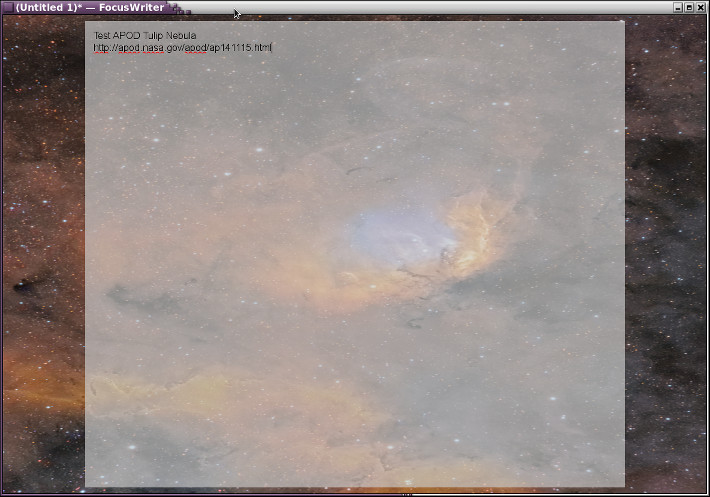
Thank you both so much. I downloaded it from APOD (Tulip Nebula - http://apod.nasa.gov/apod/ap141115.html ) and gave it a try. I was also happy I could enlarge the font.

Image


BTW, Odin, that should be the "ADD" button.

_________________
Image
World War IV will be fought with sticks and stones. - Albert Einstein


Top
 Post subject: Re: Focuswriter mini-review
PostPosted: Sat Nov 15, 2014 1:15 pm  (#10) 
Offline
GimpChat Member
User avatar

Joined: Apr 27, 2010
Posts: 1510
Location: Sweden
@Oregonian

Nice space-y theme. You should be able to press F11 to go into full-screen mode (to get rid of the window bar too).
.
Griatch

_________________


Top
 Post subject: Re: Focuswriter mini-review
PostPosted: Sat Nov 15, 2014 2:27 pm  (#11) 
Offline
Retired Staff
User avatar

Joined: May 22, 2008
Posts: 6946
Location: Somewhere in GIMP
Griatch wrote:
You should be able to press F11 to go into full-screen mode (to get rid of the window bar too). Griatch
Yes, I know. I deliberately shrank it for taking a screen shot. Thanks.

_________________
Image
World War IV will be fought with sticks and stones. - Albert Einstein


Top
 Post subject: Re: Focuswriter mini-review
PostPosted: Sat Nov 15, 2014 4:44 pm  (#12) 
Offline
GimpChat Member
User avatar

Joined: Apr 27, 2010
Posts: 1510
Location: Sweden
Ah, I see. :)
.
Griatch

_________________


Top
Post new topic Reply to topic  [ 12 posts ] 

All times are UTC - 5 hours [ DST ]


* Login  


Powered by phpBB3 © phpBB Group