It is currently Mon Jun 15, 2026 11:51 pm


All times are UTC - 5 hours [ DST ]


Post new topic Reply to topic  [ 1370 posts ]  Go to page Previous  1 ... 40, 41, 42, 43, 44, 45, 46 ... 69  Next
Author Message
 Post subject: Re: Bevel Reflect Logo V1.6 (FG-BG Gradient Bug Fixed)
PostPosted: Wed Oct 29, 2014 3:21 pm  (#841) 
Offline
GimpChat Member
User avatar

Joined: Apr 07, 2010
Posts: 14182
Wow, I really like that one Lyle. You used the flat option and copper or brass? Or not.

_________________
Image


Top
 Post subject: Re: Bevel Reflect Logo V1.6 (FG-BG Gradient Bug Fixed)
PostPosted: Wed Oct 29, 2014 3:27 pm  (#842) 
Offline
GimpChat Member
User avatar

Joined: Jun 02, 2013
Posts: 2090
Wallace wrote:
A robot chicken.
Image
Nice work Wallace.

molly wrote:
Wow, I really like that one Lyle. You used the flat option and copper or brass? Or not.
I think you meant Wallace.

_________________
Image


Top
 Post subject: Re: Bevel Reflect Logo V1.6 (FG-BG Gradient Bug Fixed)
PostPosted: Wed Oct 29, 2014 3:33 pm  (#843) 
Offline
GimpChat Member
User avatar

Joined: Apr 07, 2010
Posts: 14182
Oops,sorry wallace, anyway, it is cute

_________________
Image


Top
 Post subject: Re: Bevel Reflect Logo V1.6 (FG-BG Gradient Bug Fixed)
PostPosted: Wed Oct 29, 2014 3:38 pm  (#844) 
Offline
Administrator
User avatar

Joined: Aug 10, 2012
Posts: 14019
Location: Native to NYC living in Arizona, Gimp 2.8 - 3.0, Win 11 PC.
molly wrote:
Wow, I really like that one Lyle. You used the flat option and copper or brass? Or not.

I used the BRL default settings and my e-map called Dove.

The Warrior wrote:
Wallace wrote:
A robot chicken.
Image
Nice work Wallace.

molly wrote:
Wow, I really like that one Lyle. You used the flat option and copper or brass? Or not.
I think you meant Wallace.

Thanks Warrior.
You so silly Molly. :hehe

If you don't have my Dove e-map, you can pick it up from the link below.
http://gimpchat.com/viewtopic.php?f=11& ... 10#p148150

_________________
Image
"A wise man learns more from a foolish question than a fool can learn from a wise answer"
Image


Last edited by Wallace on Wed Oct 29, 2014 3:42 pm, edited 2 times in total.

Top
 Post subject: Re: Bevel Reflect Logo V1.6 (FG-BG Gradient Bug Fixed)
PostPosted: Wed Oct 29, 2014 3:40 pm  (#845) 
Offline
GimpChat Member
User avatar

Joined: Apr 07, 2010
Posts: 14182
I know.

_________________
Image


Top
 Post subject: Re: Bevel Reflect Logo V1.6 (FG-BG Gradient Bug Fixed)
PostPosted: Wed Oct 29, 2014 3:43 pm  (#846) 
Offline
Administrator
User avatar

Joined: Aug 10, 2012
Posts: 14019
Location: Native to NYC living in Arizona, Gimp 2.8 - 3.0, Win 11 PC.
molly wrote:
I know.

:hehe

_________________
Image
"A wise man learns more from a foolish question than a fool can learn from a wise answer"
Image


Top
 Post subject: Re: Bevel Reflect Logo V1.6 (FG-BG Gradient Bug Fixed)
PostPosted: Thu Nov 13, 2014 9:06 am  (#847) 
Offline
GimpChat Member
User avatar

Joined: Apr 08, 2010
Posts: 5420
Location: Northwest Ohio
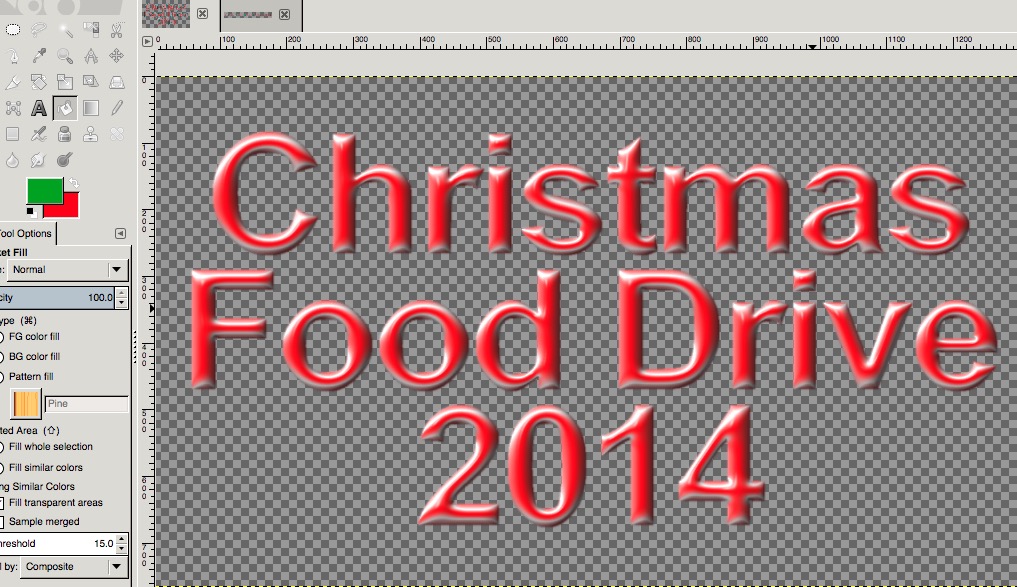
OK, I've searched until my eyes crossed....I forgot how to get my own gradient to work...I need to make lettering for Christmas, so I need an e-map to use in the Bevel Reflect Logo script...red and green. I tried several ways to use red and green gradient but it either comes out all red or all green or another color altogether, and not a nice shiny color. In fact, some of the trials came out all blurry. So, what I need it the instructions to make my own map. I've done it before, but have no idea where to find the discussion with the instructions...GAH. Wish I could figure out how to search better, I can never figure out what to search for.


Top
 Post subject: Re: Bevel Reflect Logo V1.6 (FG-BG Gradient Bug Fixed)
PostPosted: Thu Nov 13, 2014 9:22 am  (#848) 
Offline
GimpChat Member
User avatar

Joined: Apr 07, 2010
Posts: 14182
This is the thread where the discussion of flat emaps started. You can use any flat image using your own colors, gradients etc. Make a very small selection on the upper left corner and delete, that way you will end up with a transparent background.
viewtopic.php?f=12&t=10643
This is one of mine. Image

_________________
Image


Top
 Post subject: Re: Bevel Reflect Logo V1.6 (FG-BG Gradient Bug Fixed)
PostPosted: Thu Nov 13, 2014 10:10 am  (#849) 
Offline
GimpChat Member
User avatar

Joined: Apr 08, 2010
Posts: 5420
Location: Northwest Ohio
Thanks for the link. I have been trying to do both bevel reflect logo and envirologo. Both work but I cannot quite figure out how to get the colors the way I want. Seems when I select use active gradient, which is red and green, it only uses the background color of the gradient, and it seems to change the color a bit. IE, red doesn't look red, but sort of off-red.
This is what red looks like using envirologo...
Image


this is what I get with Bevel Reflect Logo...notice the gradient colors I have. So will a envirologo map make a difference?
Image


Top
 Post subject: Re: Bevel Reflect Logo V1.6 (FG-BG Gradient Bug Fixed)
PostPosted: Thu Nov 13, 2014 10:30 am  (#850) 
Offline
GimpChat Member
User avatar

Joined: Apr 07, 2010
Posts: 14182
Try thiis one Image

Image

round

Image

_________________
Image


Top
 Post subject: Re: Bevel Reflect Logo V1.6 (FG-BG Gradient Bug Fixed)
PostPosted: Thu Nov 13, 2014 10:50 am  (#851) 
Offline
Administrator
User avatar

Joined: Aug 10, 2012
Posts: 14019
Location: Native to NYC living in Arizona, Gimp 2.8 - 3.0, Win 11 PC.
I made this e-map and this is the results I got using default setting and this e-map. I also added a green outline to the text after running BRL.
Attachment:
CH Emap.png
CH Emap.png [ 52.6 KiB | Viewed 1551 times ]

Image

_________________
Image
"A wise man learns more from a foolish question than a fool can learn from a wise answer"
Image


Top
 Post subject: Re: Bevel Reflect Logo V1.6 (FG-BG Gradient Bug Fixed)
PostPosted: Thu Nov 13, 2014 10:55 am  (#852) 
Offline
GimpChat Founder
User avatar

Joined: May 22, 2008
Posts: 5241
Location: Gimpville
Cool maps , Molly & Wallace. :bigthup

2-ton wrote:
Seems when I select use active gradient, which is red and green, it only uses the background color of the gradient, and it seems to change the color a bit. IE, red doesn't look red, but sort of off-red.

I appears you are still using BRL V1.5, which has the active gradient bug you are seeing. That bug was corrected in V1.6. Grab the new version and that should fix it.
http://gimpscripts.com/2014/02/bevel-reflect-logo

_________________
“If you reach for the stars, you just might land on a decently sized hill.” - Stuart Hill


Top
 Post subject: Re: Bevel Reflect Logo V1.6 (FG-BG Gradient Bug Fixed)
PostPosted: Thu Nov 13, 2014 11:23 am  (#853) 
Offline
GimpChat Member
User avatar

Joined: Apr 07, 2010
Posts: 14182
I wish I didn't get started on this script again... it's too addictive.
Image

Image

_________________
Image


Top
 Post subject: Re: Bevel Reflect Logo V1.6 (FG-BG Gradient Bug Fixed)
PostPosted: Thu Nov 13, 2014 11:47 am  (#854) 
Offline
Administrator
User avatar

Joined: Aug 10, 2012
Posts: 14019
Location: Native to NYC living in Arizona, Gimp 2.8 - 3.0, Win 11 PC.
molly wrote:
I wish I didn't get started on this script again... it's too addictive.
[ Image ]

[ Image ]

That's nice Molly, I like your other one too.
Can you show me how you made the Molly-red/green map please?

_________________
Image
"A wise man learns more from a foolish question than a fool can learn from a wise answer"
Image


Top
 Post subject: Re: Bevel Reflect Logo V1.6 (FG-BG Gradient Bug Fixed)
PostPosted: Thu Nov 13, 2014 12:04 pm  (#855) 
Offline
GimpChat Founder
User avatar

Joined: May 22, 2008
Posts: 5241
Location: Gimpville
Another option would be to create a split color map spherical map.

Image

Image

_________________
“If you reach for the stars, you just might land on a decently sized hill.” - Stuart Hill


Top
 Post subject: Re: Bevel Reflect Logo V1.6 (FG-BG Gradient Bug Fixed)
PostPosted: Thu Nov 13, 2014 12:08 pm  (#856) 
Offline
Administrator
User avatar

Joined: Aug 10, 2012
Posts: 14019
Location: Native to NYC living in Arizona, Gimp 2.8 - 3.0, Win 11 PC.
GnuTux wrote:
Another option would be to create a split color map spherical map.

Image

[ Image ]

Cool!
Through a little white in the mix and you've got yourself a Christmas Camouflage pattern. :hehe

_________________
Image
"A wise man learns more from a foolish question than a fool can learn from a wise answer"
Image


Top
 Post subject: Re: Bevel Reflect Logo V1.6 (FG-BG Gradient Bug Fixed)
PostPosted: Thu Nov 13, 2014 12:13 pm  (#857) 
Offline
GimpChat Member
User avatar

Joined: Apr 07, 2010
Posts: 14182
Thats a really nice idea too Tux, I like it.
@wallace, I started out with my (molly-gold.glitter.png) then colorized it to green then duped it and on the top layer, I filled it with red, I played with the modes until I got it to be half red and half green then used that map in the BRL. I didn't write it down when I did it but I think that was the way. After that, I ran the supernova again at a very pastel yellow, almost white.
Image

_________________
Image


Top
 Post subject: Re: Bevel Reflect Logo V1.6 (FG-BG Gradient Bug Fixed)
PostPosted: Thu Nov 13, 2014 12:44 pm  (#858) 
Offline
Administrator
User avatar

Joined: Aug 10, 2012
Posts: 14019
Location: Native to NYC living in Arizona, Gimp 2.8 - 3.0, Win 11 PC.
molly wrote:
Thats a really nice idea too Tux, I like it.
@wallace, I started out with my (molly-gold.glitter.png) then colorized it to green then duped it and on the top layer, I filled it with red, I played with the modes until I got it to be half red and half green then used that map in the BRL. I didn't write it down when I did it but I think that was the way. After that, I ran the supernova again at a very pastel yellow, almost white.
[ Image ]

Okay. thanks Molly.
Where did you get the "molly-gold.glitter.png", or did you create it?

_________________
Image
"A wise man learns more from a foolish question than a fool can learn from a wise answer"
Image


Top
 Post subject: Re: Bevel Reflect Logo V1.6 (FG-BG Gradient Bug Fixed)
PostPosted: Thu Nov 13, 2014 12:49 pm  (#859) 
Offline
GimpChat Member
User avatar

Joined: Apr 07, 2010
Posts: 14182
I made it but don't ask me how, I forget, I might have opened my satin pattern and put gold glitter on it, I will have to go look to see if I can do it again.
EDIT:
This is all I could find. in attachement below


Attachments:
gold-pats.7z [2.6 MiB]
Downloaded 100 times

_________________
Image
Top
 Post subject: Re: Bevel Reflect Logo V1.6 (FG-BG Gradient Bug Fixed)
PostPosted: Thu Nov 13, 2014 1:26 pm  (#860) 
Offline
Administrator
User avatar

Joined: Aug 10, 2012
Posts: 14019
Location: Native to NYC living in Arizona, Gimp 2.8 - 3.0, Win 11 PC.
molly wrote:
I made it but don't ask me how, I forget, I might have opened my satin pattern and put gold glitter on it, I will have to go look to see if I can do it again.
EDIT:
This is all I could find. in attachement below

Thanks Molly.
That was my next question, how you did it. :hehe

_________________
Image
"A wise man learns more from a foolish question than a fool can learn from a wise answer"
Image


Top
Post new topic Reply to topic  [ 1370 posts ]  Go to page Previous  1 ... 40, 41, 42, 43, 44, 45, 46 ... 69  Next

All times are UTC - 5 hours [ DST ]


* Login  


Powered by phpBB3 © phpBB Group