It is currently Tue Sep 22, 2026 11:38 am


All times are UTC - 5 hours [ DST ]


Post new topic Reply to topic  [ 230 posts ]  Go to page Previous  1 ... 3, 4, 5, 6, 7, 8, 9 ... 12  Next
Author Message
 Post subject: Re: 'Extrude from Path' Script
PostPosted: Sat Nov 08, 2014 6:06 am  (#101) 
Offline
GimpChat Member
User avatar

Joined: Jan 20, 2013
Posts: 590
OK, Graechan.

_________________
Image


Top
 Post subject: Re: 'Extrude from Path' Script
PostPosted: Sun Nov 09, 2014 8:32 pm  (#102) 
Offline
GimpChat Member
User avatar

Joined: May 27, 2011
Posts: 707
Graechan
Then how can I resize a brush ?
Most are too big to use


Top
 Post subject: Re: 'Extrude from Path' Script
PostPosted: Sun Nov 09, 2014 9:03 pm  (#103) 
Offline
Script Coder
User avatar

Joined: Feb 18, 2011
Posts: 4826
Location: Bendigo Vic. Australia
I do not know why the brushsize setting in 2.8 doesn't work or of any workaround I can use as yet but I'm trying now

_________________
Image
No matter how much you push the envelope, it'll still be stationery.


Top
 Post subject: Re: 'Extrude from Path' Script
PostPosted: Sun Nov 09, 2014 9:12 pm  (#104) 
Offline
Administrator
User avatar

Joined: Aug 10, 2012
Posts: 14206
Location: Native to NYC living in Arizona, Gimp 2.8 - 3.0, Win 11 PC.
pirate541 wrote:
Graechan
Then how can I resize a brush ?
Most are too big to use

Try this brush.
Attachment:
3x3 Dot Brush.zip [152 Bytes]
Downloaded 173 times

I use 2.8.10 and made this brush for just this purpose. It's not too big and it's not too small.

_________________
Image
"A wise man learns more from a foolish question than a fool can learn from a wise answer"
Image


Top
 Post subject: Re: 'Extrude from Path' Script
PostPosted: Sun Nov 09, 2014 9:22 pm  (#105) 
Offline
GimpChat Member
User avatar

Joined: May 27, 2011
Posts: 707
Quote:
I do not know why the brushsize setting in 2.8 doesn't work or of any workaround I can use as yet but I'm trying now

Cool,Thank You Greachan

Wallace thank You for the brush :)


Top
 Post subject: Re: 'Extrude from Path' Script
PostPosted: Mon Nov 10, 2014 12:08 am  (#106) 
Offline
Script Coder
User avatar

Joined: Feb 18, 2011
Posts: 4826
Location: Bendigo Vic. Australia
The brush bug is fixed in 2.8.14 other than that I cannot think of a workaround for this problem

_________________
Image
No matter how much you push the envelope, it'll still be stationery.


Top
 Post subject: Re: 'Extrude from Path' Rel2
PostPosted: Thu Nov 13, 2014 12:59 am  (#107) 
Offline
Script Coder
User avatar

Joined: Feb 18, 2011
Posts: 4826
Location: Bendigo Vic. Australia
Extrude from path has been updated to Rel2 to solve brush problem in gimp :hehe
please see initial post for update and info

_________________
Image
No matter how much you push the envelope, it'll still be stationery.


Top
 Post subject: Re: 'Extrude from Path' Rel2
PostPosted: Thu Nov 13, 2014 6:09 pm  (#108) 
Offline
Script Coder
User avatar

Joined: Feb 18, 2011
Posts: 4826
Location: Bendigo Vic. Australia
Unless a fix is found for the brush-size problem in pre 2-8-14 releases
then they will remain excluded from using the brush and brush-size widgets, sorry I could find no other cure

_________________
Image
No matter how much you push the envelope, it'll still be stationery.


Top
 Post subject: Re: 'Extrude from Path' Rel2.1
PostPosted: Thu Nov 20, 2014 1:34 am  (#109) 
Offline
Script Coder
User avatar

Joined: Feb 18, 2011
Posts: 4826
Location: Bendigo Vic. Australia
Rel 2.1 has been upload see initial post or GimpScripts this version has a brush spacing setting output using this setting shown below
Image

_________________
Image
No matter how much you push the envelope, it'll still be stationery.


Top
 Post subject: Re: 'Extrude from Path' Rel2.1
PostPosted: Thu Nov 20, 2014 7:25 am  (#110) 
Offline
Global Moderator
User avatar

Joined: May 16, 2010
Posts: 16173
Nice Graechan. Thanks for the update. :) I suggest you guys just update to GIMP-2.8.14. It is working fine for me.
Image

_________________
Image


Top
 Post subject: Re: 'Extrude from Path' Rel2.1
PostPosted: Thu Nov 20, 2014 12:30 pm  (#111) 
Offline
Retired Staff
User avatar

Joined: May 22, 2008
Posts: 6946
Location: Somewhere in GIMP
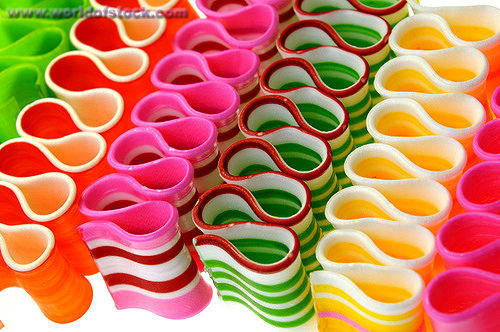
This script would be ideal for making ribbon candy pictures if I could only make a path ...

Image

_________________
Image
World War IV will be fought with sticks and stones. - Albert Einstein


Top
 Post subject: Re: 'Extrude from Path' Rel2.1
PostPosted: Thu Nov 20, 2014 5:39 pm  (#112) 
Offline
Script Coder
User avatar

Joined: Feb 18, 2011
Posts: 4826
Location: Bendigo Vic. Australia
Nice candy 'O',Rod everything functions OK in pre 2.8.14 except brush choice and size

_________________
Image
No matter how much you push the envelope, it'll still be stationery.


Top
 Post subject: Re: 'Extrude from Path' Rel2.1
PostPosted: Thu Nov 20, 2014 11:44 pm  (#113) 
Offline
Script Coder
User avatar

Joined: Feb 18, 2011
Posts: 4826
Location: Bendigo Vic. Australia
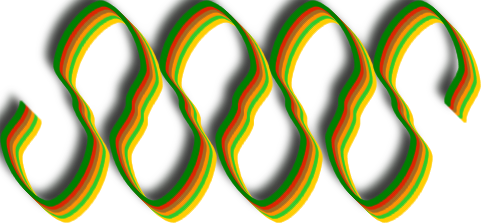
'O' to create a wave for your candy
1/ create a path on your image in a straight line
2/ go to paths decorate/periodic wave/sinewave (from ofnuts)
3/ run the script using a candy colored gradient (sorry I didn't have the right gradient)

Image

_________________
Image
No matter how much you push the envelope, it'll still be stationery.


Top
 Post subject: Re: 'Extrude from Path' Rel2.1
PostPosted: Fri Nov 21, 2014 3:23 am  (#114) 
Offline
Retired Staff
User avatar

Joined: May 22, 2008
Posts: 6946
Location: Somewhere in GIMP
Thanks, Graechan. I tried finagling with the path (Ofnuts' script) and came out with some kind of wobbly-looking loops. :hehe
Image

_________________
Image
World War IV will be fought with sticks and stones. - Albert Einstein


Top
 Post subject: Re: 'Extrude from Path' Rel2.1
PostPosted: Fri Nov 21, 2014 12:21 pm  (#115) 
Offline
GimpChat Member
User avatar

Joined: Apr 08, 2010
Posts: 5420
Location: Northwest Ohio
sigh, can't get this to work on my mac. I had to rename my 1 px brush to match the call for the brush, and it goes through some stuff, then it crashes my mcgimp. darn.


Top
 Post subject: Re: 'Extrude from Path' Rel2.1
PostPosted: Fri Nov 21, 2014 5:31 pm  (#116) 
Offline
GimpChat Member

Joined: Mar 14, 2011
Posts: 998
2-ton wrote:
sigh, can't get this to work on my mac. I had to rename my 1 px brush to match the call for the brush, and it goes through some stuff, then it crashes my mcgimp. darn.

What were you trying to do when it crashed? Sorry, I didn't go through the 12 pages of this thread. :(


Top
 Post subject: Re: 'Extrude from Path' Rel2.1
PostPosted: Fri Nov 21, 2014 6:45 pm  (#117) 
Offline
Script Coder
User avatar

Joined: Feb 18, 2011
Posts: 4826
Location: Bendigo Vic. Australia
2-ton wrote:
sigh, can't get this to work on my mac. I had to rename my 1 px brush to match the call for the brush, and it goes through some stuff, then it crashes my mcgimp. darn.

2Ton what is your gimp version
why did you need to rename your default "1. Pixel" brush
Image
if you download and instal a fresh copy of the script and do undo this [ I had to rename my 1 px brush] and load this xcf
Attachment:
Graechan-2014-11-22-14-42-13347.xcf [15.04 KiB]
Downloaded 74 times

then run the script with everything set to default you will get something similiar to the image below
Image
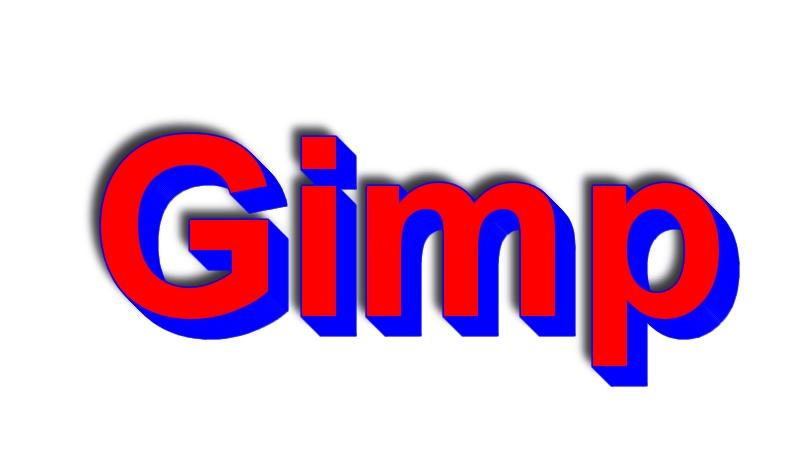
Then with some changes to menu settings you will be able to create this from a text layer
Image
I added the border later

_________________
Image
No matter how much you push the envelope, it'll still be stationery.


Last edited by Graechan on Fri Nov 21, 2014 10:49 pm, edited 2 times in total.

Top
 Post subject: Re: 'Extrude from Path' Rel2.1
PostPosted: Fri Nov 21, 2014 10:24 pm  (#118) 
Offline
Administrator
User avatar

Joined: Aug 10, 2012
Posts: 14206
Location: Native to NYC living in Arizona, Gimp 2.8 - 3.0, Win 11 PC.
I tried making a candy ribbon.
Image

_________________
Image
"A wise man learns more from a foolish question than a fool can learn from a wise answer"
Image


Top
 Post subject: Re: 'Extrude from Path' Rel2.1
PostPosted: Fri Nov 21, 2014 10:39 pm  (#119) 
Offline
Script Coder
User avatar

Joined: Feb 18, 2011
Posts: 4826
Location: Bendigo Vic. Australia
Wallace your ribbon candy looks very nice I just glossed it a little
Image

_________________
Image
No matter how much you push the envelope, it'll still be stationery.


Top
 Post subject: Re: 'Extrude from Path' Rel2.1
PostPosted: Fri Nov 21, 2014 10:52 pm  (#120) 
Offline
Administrator
User avatar

Joined: Aug 10, 2012
Posts: 14206
Location: Native to NYC living in Arizona, Gimp 2.8 - 3.0, Win 11 PC.
Graechan wrote:
Wallace your ribbon candy looks very nice I just glossed it a little
[ Image ]

That's cool!
Here's another one.
Image

_________________
Image
"A wise man learns more from a foolish question than a fool can learn from a wise answer"
Image


Top
Post new topic Reply to topic  [ 230 posts ]  Go to page Previous  1 ... 3, 4, 5, 6, 7, 8, 9 ... 12  Next

All times are UTC - 5 hours [ DST ]


* Login  


Powered by phpBB3 © phpBB Group