It is currently Wed Jul 29, 2026 2:23 pm


All times are UTC - 5 hours [ DST ]


Post new topic Reply to topic  [ 230 posts ]  Go to page Previous  1 ... 5, 6, 7, 8, 9, 10, 11, 12  Next
Author Message
 Post subject: Re: 'Extrude from Path' Rel2.1
PostPosted: Sat Nov 22, 2014 10:26 pm  (#141) 
Offline
GimpChat Member

Joined: Mar 14, 2011
Posts: 998
2-ton wrote:
where are the basic brush files? I only see brushes in my user files where I stash the ones I download. I am not sure where to look for the ones that come with Gimp.

*never mind, I just remembered that I can look in preferences and track them down.

*no, can't find them, the path doesn't include where it starts from. Gah, too complicated for a non-techie

2-ton,

Why would you need to find the system brushes? I don't understand.

In any case, right-click on the McGimp app, click on "Show Package Content" and then navigate to Resources/gimp/2.0/share/brushes.


Top
 Post subject: Re: 'Extrude from Path' Rel2.1
PostPosted: Sat Nov 22, 2014 10:32 pm  (#142) 
Offline
GimpChat Member

Joined: Mar 14, 2011
Posts: 998
Graechan wrote:
But if the menu bar item Script-Fu has already been created why not use it

Because there is already Filters -> Script-Fu? Why would you want to create another menu item called Script-Fu?


Top
 Post subject: Re: 'Extrude from Path' Rel2.1
PostPosted: Sat Nov 22, 2014 10:46 pm  (#143) 
Offline
Script Coder
User avatar

Joined: Feb 18, 2011
Posts: 4826
Location: Bendigo Vic. Australia
It's important that system resources are all there as script and plugin writers routinely use them in their plugins and scripts

_________________
Image
No matter how much you push the envelope, it'll still be stationery.


Top
 Post subject: Re: 'Extrude from Path' Rel2.1
PostPosted: Sat Nov 22, 2014 11:00 pm  (#144) 
Offline
GimpChat Member
User avatar

Joined: Apr 08, 2010
Posts: 5420
Location: Northwest Ohio
partha wrote:
2-ton wrote:
where are the basic brush files? I only see brushes in my user files where I stash the ones I download. I am not sure where to look for the ones that come with Gimp.

*never mind, I just remembered that I can look in preferences and track them down.

*no, can't find them, the path doesn't include where it starts from. Gah, too complicated for a non-techie

2-ton,

Why would you need to find the system brushes? I don't understand.

In any case, right-click on the McGimp app, click on "Show Package Content" and then navigate to Resources/gimp/2.0/share/brushes.


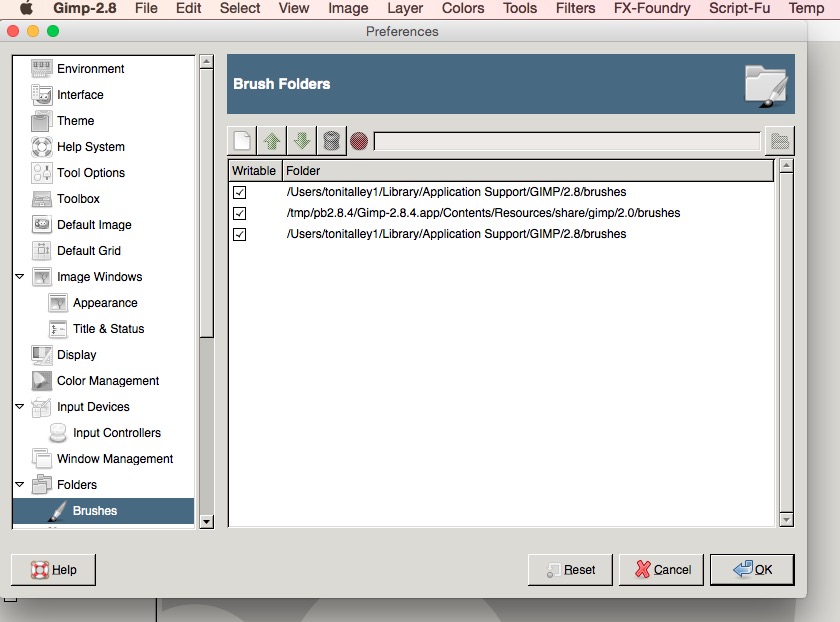
I was wanting to see what the basics were. I did find them. But when I looked in preferences, I saw that I had two of the same brush folders pointed at, so I tried to delete the duplicate listing. It did disappear from the listing in preferences, and I restarted gimp and it's back and now instead of duplicate brushes, I have triplicate brushes. Not all of them just some of them. I have no idea how to get back down to one set of them. Here is a screen shot of the gimp preferences brush folder...obviously I know just enough of my computer to be dangerous.
Image


Top
 Post subject: Re: 'Extrude from Path' Rel2.1
PostPosted: Sat Nov 22, 2014 11:20 pm  (#145) 
Offline
GimpChat Member

Joined: Mar 14, 2011
Posts: 998
2-ton wrote:
partha wrote:
2-ton wrote:
where are the basic brush files? I only see brushes in my user files where I stash the ones I download. I am not sure where to look for the ones that come with Gimp.

*never mind, I just remembered that I can look in preferences and track them down.

*no, can't find them, the path doesn't include where it starts from. Gah, too complicated for a non-techie

2-ton,

Why would you need to find the system brushes? I don't understand.

In any case, right-click on the McGimp app, click on "Show Package Content" and then navigate to Resources/gimp/2.0/share/brushes.


I was wanting to see what the basics were. I did find them. But when I looked in preferences, I saw that I had two of the same brush folders pointed at, so I tried to delete the duplicate listing. It did disappear from the listing in preferences, and I restarted gimp and it's back and now instead of duplicate brushes, I have triplicate brushes. Not all of them just some of them. I have no idea how to get back down to one set of them. Here is a screen shot of the gimp preferences brush folder...obviously I know just enough of my computer to be dangerous.
...

I don't know how the same folder showed up twice. By the way, have you thought about going to latest version 2.8.14? :)

Anyway, let's try an experiment.

Move your personal folder (/Users/YourUsername/Library/Application Support/GIMP/2.8) by dragging it in Finder to a temporary location.

Restart Gimp.

Make sure it's all working. It'll automatically create your personal Folder.

Now close down Gimp.

Add the individual folders with your older personal folder that you saved to a temporary location starting with scripts. See if Extrude works now.

Next add your brushes. See if your brushes are visible.

etc. etc.

Let me know if this does not work.

We'll get it working for you. :)


Top
 Post subject: Re: 'Extrude from Path' Rel2.1
PostPosted: Sat Nov 22, 2014 11:22 pm  (#146) 
Offline
GimpChat Member

Joined: Mar 14, 2011
Posts: 998
Graechan wrote:
It's important that system resources are all there as script and plugin writers routinely use them in their plugins and scripts

I am not sure what you mean, but OK. :)


Top
 Post subject: Re: 'Extrude from Path' Rel2.1
PostPosted: Sat Nov 22, 2014 11:48 pm  (#147) 
Offline
Script Coder
User avatar

Joined: Feb 18, 2011
Posts: 4826
Location: Bendigo Vic. Australia
Partha as an example to create any Logo involving fire you would use the default gradient 'Incandescent'

_________________
Image
No matter how much you push the envelope, it'll still be stationery.


Top
 Post subject: Re: 'Extrude from Path' Rel2.1
PostPosted: Sun Nov 23, 2014 8:31 am  (#148) 
Offline
GimpChat Member
User avatar

Joined: Apr 08, 2010
Posts: 5420
Location: Northwest Ohio
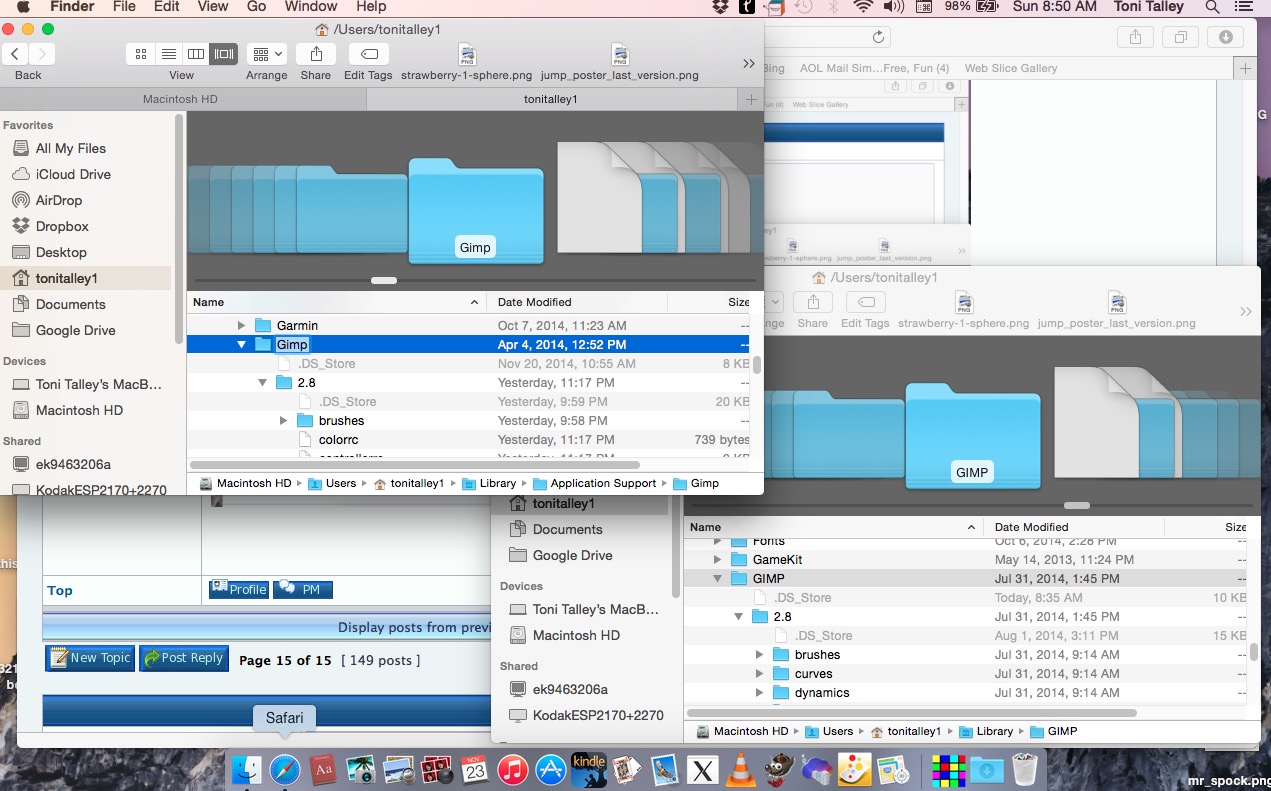
I did notice that I still have an older version of McGimp in the same list as the current one, in my users folder. Perhaps it's loading my lists from there. I never use it, so I'll delete that one and see if it makes a difference. I am not sure I can figure out how to do the other properly. And right now, I would like to get the brushes under control before I attempt to get the script to work.

*aaaaand this might be a problem. Looks like I have two of the same gimps in the same path. I don't know yet if there are some different scripts in each one, but I am guessing yes. I don't know which one to delete/move but I think the one with the most recent dates is the one I have used most frequently to dump new stuff into. The gimp folders in the user file, are those the ones I can remove and then will rebuild when I reopen gimp...and then I would have to go through the removed folders and replace the stuff I had added by hand? This might have to wait until after the holidays, I have a lot I would have to dig through and make sure I don't have duplicates
Image


Top
 Post subject: Re: 'Extrude from Path' Rel2.1
PostPosted: Sun Nov 23, 2014 9:17 am  (#149) 
Offline
GimpChat Member

Joined: Mar 14, 2011
Posts: 998
2-ton wrote:
I did notice that I still have an older version of McGimp in the same list as the current one, in my users folder. Perhaps it's loading my lists from there. I never use it, so I'll delete that one and see if it makes a difference. I am not sure I can figure out how to do the other properly. And right now, I would like to get the brushes under control before I attempt to get the script to work.

*aaaaand this might be a problem. Looks like I have two of the same gimps in the same path. I don't know yet if there are some different scripts in each one, but I am guessing yes. I don't know which one to delete/move but I think the one with the most recent dates is the one I have used most frequently to dump new stuff into. The gimp folders in the user file, are those the ones I can remove and then will rebuild when I reopen gimp...and then I would have to go through the removed folders and replace the stuff I had added by hand? This might have to wait until after the holidays, I have a lot I would have to dig through and make sure I don't have duplicates

OK, You can safely delete the old Gimp app and restart the new Gimp app. All your brushes/scripts will be safely.


Top
 Post subject: Re: 'Extrude from Path' Rel2.1
PostPosted: Sun Nov 23, 2014 10:10 am  (#150) 
Offline
GimpChat Member
User avatar

Joined: Apr 08, 2010
Posts: 5420
Location: Northwest Ohio
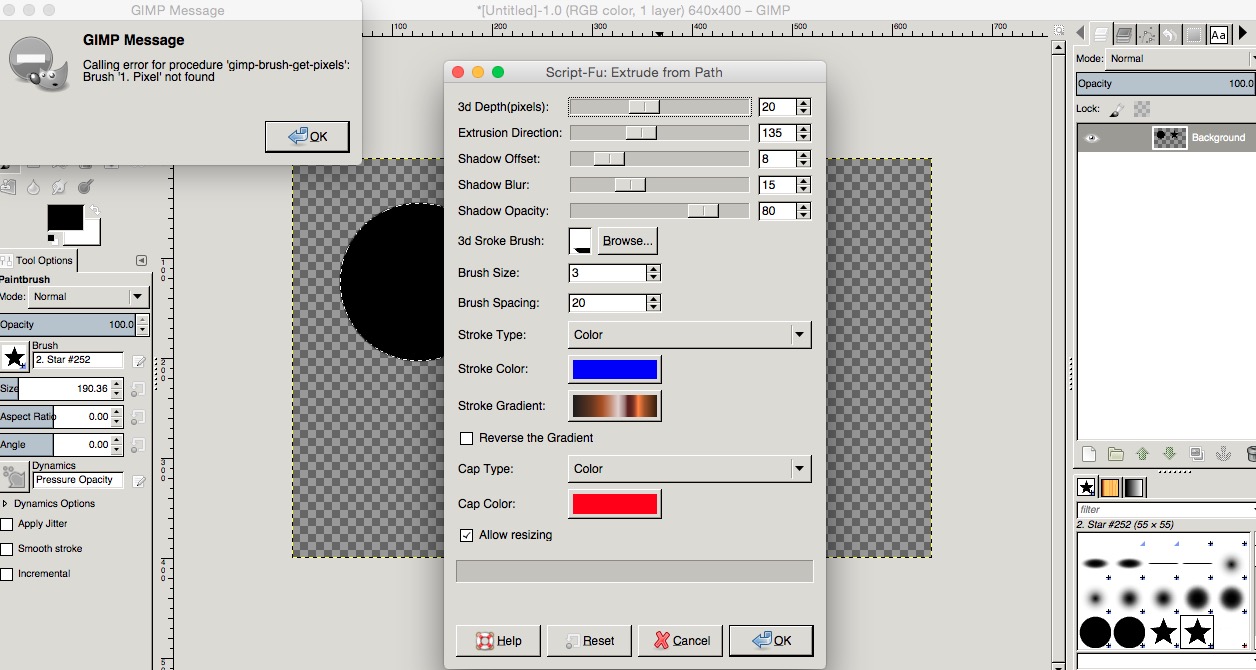
ok, so I moved the gimp folder that is lower right in the screen shot but still have triple basic brushes, double of some of my other brushes, and extrude from path is still crashing. These are not the actual apps, just the myusername folders.

*went into apps and trashed the old actual app. Back to double brushes for my basic brushes and gimp loads so fast now!!!!! So I tried the Extrude from Path and we are back to what first happened...screen shot when I try to run it. If anyone has that brush with that name, maybe then it would work???
Image


Top
 Post subject: Re: 'Extrude from Path' Rel2.1
PostPosted: Sun Nov 23, 2014 10:43 am  (#151) 
Offline
GimpChat Member

Joined: Mar 14, 2011
Posts: 998
2-ton wrote:
ok, so I moved the gimp folder that is lower right in the screen shot but still have triple basic brushes, double of some of my other brushes, and extrude from path is still crashing. These are not the actual apps, just the myusername folders.

*went into apps and trashed the old actual app. Back to double brushes for my basic brushes and gimp loads so fast now!!!!! So I tried the Extrude from Path and we are back to what first happened...screen shot when I try to run it. If anyone has that brush with that name, maybe then it would work???


No, that brush is not the issue. Tell me, did you change the default theme? My builds come with a gray theme (best for photography)? Also, I can't tell what is being loaded from your personal folder that is overwriting system files.

Open terminal app. Now type (or copy and paste) exactly the following in that app.
cp /tmp/rungimp* ~/

(Notice the [space] between * and tilde (~))
Open Finder. In your home folder there will be a file called rungimp-2.8-2014-xx-xx-xx-xx-xx.log where xx are numbers. Email me that file.


Top
 Post subject: Re: 'Extrude from Path' Rel2.1
PostPosted: Sun Nov 23, 2014 10:55 am  (#152) 
Offline
Global Moderator
User avatar

Joined: May 16, 2010
Posts: 16139
2-ton wrote:
ok, so I moved the gimp folder that is lower right in the screen shot but still have triple basic brushes, double of some of my other brushes, and extrude from path is still crashing. These are not the actual apps, just the myusername folders.

*went into apps and trashed the old actual app. Back to double brushes for my basic brushes and gimp loads so fast now!!!!! So I tried the Extrude from Path and we are back to what first happened...screen shot when I try to run it. If anyone has that brush with that name, maybe then it would work???
[ Image ]

I have had this issue before and so i changed the name of the called brush in the script to one i had in my /.gimp-2.8/brushes folder and it worked. Try creating a 1 pixel square (or round) brush and name it My-1Pixel-Brush.gbr
Rename the called brush in the script My-1Pixel-Brush.gbr and make sure the new brush is in the brushes folder and restart GIMP.

_________________
Image


Top
 Post subject: Re: 'Extrude from Path' Rel2.1
PostPosted: Sun Nov 23, 2014 6:30 pm  (#153) 
Offline
Script Coder
User avatar

Joined: Feb 18, 2011
Posts: 4826
Location: Bendigo Vic. Australia
2Ton could you please post a screenshot of what you have in Edit/Preferences/folders/brushes,
as this could be the cause of your problems

_________________
Image
No matter how much you push the envelope, it'll still be stationery.


Top
 Post subject: Re: 'Extrude from Path' Rel2.1
PostPosted: Sun Nov 23, 2014 8:15 pm  (#154) 
Offline
GimpChat Member
User avatar

Joined: Apr 08, 2010
Posts: 5420
Location: Northwest Ohio
partha wrote:
2-ton wrote:
ok, so I moved the gimp folder that is lower right in the screen shot but still have triple basic brushes, double of some of my other brushes, and extrude from path is still crashing. These are not the actual apps, just the myusername folders.

*went into apps and trashed the old actual app. Back to double brushes for my basic brushes and gimp loads so fast now!!!!! So I tried the Extrude from Path and we are back to what first happened...screen shot when I try to run it. If anyone has that brush with that name, maybe then it would work???


No, that brush is not the issue. Tell me, did you change the default theme? My builds come with a gray theme (best for photography)? Also, I can't tell what is being loaded from your personal folder that is overwriting system files.

Open terminal app. Now type (or copy and paste) exactly the following in that app.
cp /tmp/rungimp* ~/

(Notice the [space] between * and tilde (~))
Open Finder. In your home folder there will be a file called rungimp-2.8-2014-xx-xx-xx-xx-xx.log where xx are numbers. Email me that file.
OK, email sent. And no, I have never changed the theme. I am the "default queen", I never change themes or screensavers or much of anything in any program. Adding an avatar is about as wild as I get.


Top
 Post subject: Re: 'Extrude from Path' Rel2.1
PostPosted: Sun Nov 23, 2014 8:21 pm  (#155) 
Offline
GimpChat Member
User avatar

Joined: Apr 08, 2010
Posts: 5420
Location: Northwest Ohio
Graechan, here is a screen shot, and no, I don't know why I have two of the same.Image


Top
 Post subject: Re: 'Extrude from Path' Rel2.1
PostPosted: Sun Nov 23, 2014 8:35 pm  (#156) 
Offline
Script Coder
User avatar

Joined: Feb 18, 2011
Posts: 4826
Location: Bendigo Vic. Australia
2Ton try deleting one of the duplicated paths then restart gimp and check to see if your brushes are duplicated

_________________
Image
No matter how much you push the envelope, it'll still be stationery.


Top
 Post subject: Re: 'Extrude from Path' Rel2.1
PostPosted: Sun Nov 23, 2014 8:46 pm  (#157) 
Offline
GimpChat Member

Joined: Mar 14, 2011
Posts: 998
2-ton wrote:
...
OK, email sent. And no, I have never changed the theme. I am the "default queen", I never change themes or screensavers or much of anything in any program. Adding an avatar is about as wild as I get.

If you are the default queen ( :) ), your system is getting overwritten with some stuff from your personal folder. Let's take this offline and I'll respond to your email.


Top
 Post subject: Re: 'Extrude from Path' Rel2.1
PostPosted: Sun Nov 23, 2014 8:48 pm  (#158) 
Offline
GimpChat Member
User avatar

Joined: Apr 08, 2010
Posts: 5420
Location: Northwest Ohio
Graechan, I already tried that. It came back with all 3 and I had yet another copy of brushes. I got rid of one of my older gimps and that seemed to help, I am back to two copies of brushes, lol.


Top
 Post subject: Re: 'Extrude from Path' Rel2.1
PostPosted: Sun Nov 23, 2014 9:02 pm  (#159) 
Offline
Script Coder
User avatar

Joined: Feb 18, 2011
Posts: 4826
Location: Bendigo Vic. Australia
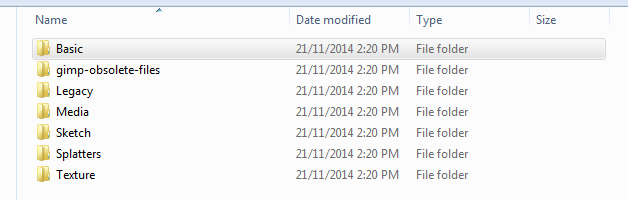
if you go to where you normally add your brushes and you have these folders
Image
delete them and you should only have 1 copy when you restart Gimp

_________________
Image
No matter how much you push the envelope, it'll still be stationery.


Top
 Post subject: Re: 'Extrude from Path' Rel2.1
PostPosted: Mon Nov 24, 2014 11:19 am  (#160) 
Offline
GimpChat Member
User avatar

Joined: Apr 08, 2010
Posts: 5420
Location: Northwest Ohio
I have none of those folders where I add my brushes...I always add them to my users gimp path because I don't want to mess with mcgimp itself.


Top
Post new topic Reply to topic  [ 230 posts ]  Go to page Previous  1 ... 5, 6, 7, 8, 9, 10, 11, 12  Next

All times are UTC - 5 hours [ DST ]


* Login  


Powered by phpBB3 © phpBB Group