It is currently Wed Sep 16, 2026 6:17 pm


All times are UTC - 5 hours [ DST ]


Post new topic Reply to topic  [ 25 posts ]  Go to page 1, 2  Next
Author Message
 Post subject: 12MB vs. 16MB camera
PostPosted: Fri Dec 05, 2014 6:10 pm  (#1) 
Offline
GimpChat Member
User avatar

Joined: Apr 07, 2010
Posts: 14182
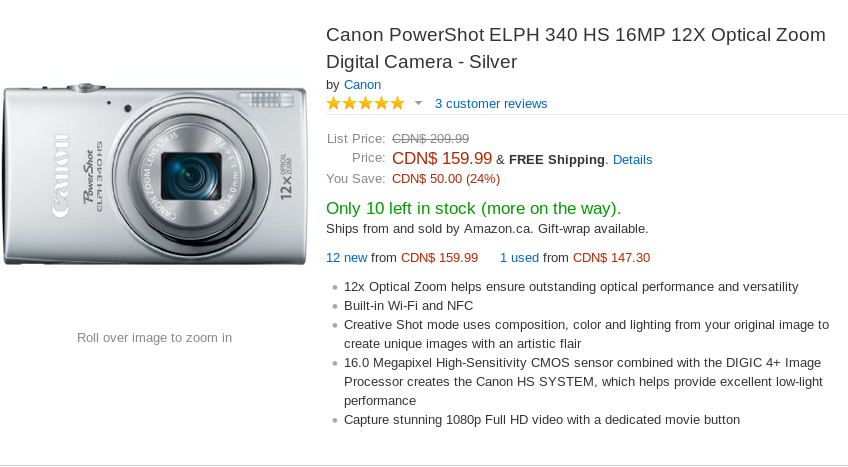
I am no camera buff and I use a point and shoot camera most of the time but I have a nice Canon 16MB on my horizon right now.
I have a neighbor that has the same camera but hers is 12MB and she said anything larger than that is hard to send as she sends tons of pictures to her family in Greece.
My question is: Can these pictures be made smaller so they would be easier to send? OR is this a major procedure. Thanks in advance. Camera specs below
Image

_________________
Image


Share on Facebook Share on Twitter Share on Orkut Share on Digg Share on MySpace Share on Delicious Share on Technorati
Top
 Post subject: Re: 12MB vs. 16MB camera
PostPosted: Fri Dec 05, 2014 6:20 pm  (#2) 
Offline
GimpChat Member

Joined: Mar 14, 2012
Posts: 13
Molly -

Do you have Irfanview? It's not a complete photo editor like Gimp, but, among other things, allows you to resize photos to a pre-determined file size very easily. Even allows quick batch processing (including resizing). Be sure to download both the main program and the plug-ins. Note that this is a windows program, but runs just fine on my mac using wine, and should also work just fine on linux using wine.

Hope that helps!


Top
 Post subject: Re: 12MB vs. 16MB camera
PostPosted: Fri Dec 05, 2014 6:23 pm  (#3) 
Offline
GimpChat Member
User avatar

Joined: Oct 06, 2013
Posts: 143
I'm sure it has size settings -- my new Nikon has about the same mp and it has a broad range. I usually shrink and/or crop before sending anyway. It's better to shoot large than to wish you had more detail later.

ETA: And definitely, IrfanView! I even use it in Linux.

_________________
Image


Top
 Post subject: Re: 12MB vs. 16MB camera
PostPosted: Fri Dec 05, 2014 6:26 pm  (#4) 
Offline
GimpChat Member
User avatar

Joined: Apr 07, 2010
Posts: 14182
Thank you Matera and mole.I will look into it.

_________________
Image


Top
 Post subject: Re: 12MB vs. 16MB camera
PostPosted: Fri Dec 05, 2014 7:20 pm  (#5) 
Offline
Administrator
User avatar

Joined: Aug 10, 2012
Posts: 14204
Location: Native to NYC living in Arizona, Gimp 2.8 - 3.0, Win 11 PC.
I'm no good with cameras. :(

_________________
Image
"A wise man learns more from a foolish question than a fool can learn from a wise answer"
Image


Top
 Post subject: Re: 12MB vs. 16MB camera
PostPosted: Fri Dec 05, 2014 7:30 pm  (#6) 
Offline
GimpChat Member
User avatar

Joined: Apr 07, 2010
Posts: 14182
Me too. I was always quite happy or content with point and shoot but sometimes when I see all these fantastic pictures shown here in this forum I thought I might want something a little better but not too expensive.
I liked this one that I posted. It has wifi and I don't understand that. Does that mean I can send pictures right from the camera through email?

_________________
Image


Top
 Post subject: Re: 12MB vs. 16MB camera
PostPosted: Fri Dec 05, 2014 7:34 pm  (#7) 
Offline
Administrator
User avatar

Joined: Aug 10, 2012
Posts: 14204
Location: Native to NYC living in Arizona, Gimp 2.8 - 3.0, Win 11 PC.
molly wrote:
Me too. I was always quite happy or content with point and shoot but sometimes when I see all these fantastic pictures shown here in this forum I thought I might want something a little better but not too expensive.
I liked this one that I posted. It has wifi and I don't understand that. Does that mean I can send pictures right from the camera through email?

Yeah, I think that's what that means, but I'm not 100% sure.

_________________
Image
"A wise man learns more from a foolish question than a fool can learn from a wise answer"
Image


Top
 Post subject: Re: 12MB vs. 16MB camera
PostPosted: Fri Dec 05, 2014 8:27 pm  (#8) 
Offline
GimpChat Member
User avatar

Joined: Nov 16, 2011
Posts: 5127
Location: Metro Vancouver, BC
Recording Pixel options
L (Large) 16M/4608x3456
M1 (Medium 1) 8M/3264x2448
M2 (Medium 2) 3M/2048x1536
S (Small) 0.3M/640x480
Aspect Ratios: 16:9, 3:2, 4:3, 1:1
There are two Compression Ratio levels as well.

_________________
Image
Gimp 2.8.18, Linux, median user
Gimp Chat Tutorials Index
Spirit Bear (Kermode)


Top
 Post subject: Re: 12MB vs. 16MB camera
PostPosted: Fri Dec 05, 2014 8:48 pm  (#9) 
Offline
GimpChat Member
User avatar

Joined: Apr 07, 2010
Posts: 14182
Odin, are you saying that those settings are on the camera?

_________________
Image


Top
 Post subject: Re: 12MB vs. 16MB camera
PostPosted: Fri Dec 05, 2014 9:11 pm  (#10) 
Offline
Script Coder
User avatar

Joined: Oct 25, 2010
Posts: 4812
There are the photos you take and there are the photos you share. I don't expect any GC regular to send a picture directly off the camera without tinkering with it a little... If you have more pixels, you have more options to resize/crop/rework the image, so pixels are good as long as they are not obtained by compromising with other desirable features such as sensor sensitivity and noise.

I don't use Irfanview, but for bulk processing I have a script that resizes the pictures to 3000x2000, boosts the saturation a bit, and sharpens then a bit.
#! /bin/bash

dir=${1:-.}

for f in "$dir/"*.JPG;
do
        echo "Exporting $f"
        convert "$f" -modulate 100,120  -geometry 3000 -sharpen 0x1.0 -quality 85 "$dir/$(basename "$f" .JPG).jpg"
done

This produces the default shareable pictures.

_________________
Image


Top
 Post subject: Re: 12MB vs. 16MB camera
PostPosted: Fri Dec 05, 2014 9:42 pm  (#11) 
Offline
GimpChat Member
User avatar

Joined: Nov 16, 2011
Posts: 5127
Location: Metro Vancouver, BC
molly wrote:
Odin, are you saying that those settings are on the camera?
I downloaded the Canon elph 340 manual and those are the in camera settings. Output is JPEG & MPEG-4 (no RAW).

_________________
Image
Gimp 2.8.18, Linux, median user
Gimp Chat Tutorials Index
Spirit Bear (Kermode)


Top
 Post subject: Re: 12MB vs. 16MB camera
PostPosted: Sat Dec 06, 2014 10:44 am  (#12) 
Offline
New Member

Joined: Dec 06, 2014
Posts: 1
Go with the larger camera. You can always reduce the size of the image file with Irfanview or Gimp or any image software.

John


Top
 Post subject: Re: 12MB vs. 16MB camera
PostPosted: Sat Dec 06, 2014 11:04 am  (#13) 
Offline
GimpChat Member
User avatar

Joined: Apr 07, 2010
Posts: 14182
Thank you, I don't want to go with a larger camera. I just want to be able to make them smaller so they will easier to send.

_________________
Image


Top
 Post subject: Re: 12MB vs. 16MB camera
PostPosted: Sat Dec 06, 2014 3:09 pm  (#14) 
Offline
Script Coder
User avatar

Joined: Oct 25, 2010
Posts: 4812
molly wrote:
Thank you, I don't want to go with a larger camera. I just want to be able to make them smaller so they will easier to send.


If you take a small image directly, it may be too small to give a good print. Take the picture at the native camera size, and make a resized copy of those you want to send.

_________________
Image


Top
 Post subject: Re: 12MB vs. 16MB camera
PostPosted: Sat Dec 06, 2014 3:12 pm  (#15) 
Offline
GimpChat Member
User avatar

Joined: Apr 07, 2010
Posts: 14182
Thanks ofnuts. So is Gimp > Image > scale image as good as any other way to do this?

_________________
Image


Top
 Post subject: Re: 12MB vs. 16MB camera
PostPosted: Sat Dec 06, 2014 4:56 pm  (#16) 
Offline
GimpChat Member
User avatar

Joined: Nov 16, 2011
Posts: 5127
Location: Metro Vancouver, BC
molly wrote:
Thanks ofnuts. So is Gimp > Image > scale image as good as any other way to do this?
Yes Gimp is just fine for scaling images. If you don't need to send print quality, rescale in Gimp and your good to go. If you have a save for the web plug-in use it as well. If you need print quality scale using Print Size 300+ PPI first.

_________________
Image
Gimp 2.8.18, Linux, median user
Gimp Chat Tutorials Index
Spirit Bear (Kermode)


Top
 Post subject: Re: 12MB vs. 16MB camera
PostPosted: Sat Dec 06, 2014 5:35 pm  (#17) 
Offline
GimpChat Member
User avatar

Joined: Apr 07, 2010
Posts: 14182
Thanks again Odin.

_________________
Image


Top
 Post subject: Re: 12MB vs. 16MB camera
PostPosted: Sat Dec 06, 2014 6:03 pm  (#18) 
Offline
Script Coder
User avatar

Joined: Oct 25, 2010
Posts: 4812
Odinbc wrote:
molly wrote:
If you have a save for the web plug-in use it as well.


You can even start there. The JPEG from the camera is normally very high quality (97 on mine) with no or moderate chroma subsampling. The SFW plugin lets you change the JPEG options(*) (chroma subsampling has a lot of effect on size) and this may be enough to reduce the file size. The JPEG from my 12MPix camera are around 5MB, by lowering quality to 85 with maxiup chroma subsampling the file size goes under 2MB.

Btw, the camera has likely a setting for image quality... You can use that to some extent, you'll lose less by lowering the JPEG quality than by using smaller pictures.

(*) You can also use the Advanced Options in the JPEG export but you cannot check interactively the size of the generated file nor the image quality.

_________________
Image


Top
 Post subject: Re: 12MB vs. 16MB camera
PostPosted: Sat Dec 06, 2014 6:25 pm  (#19) 
Offline
GimpChat Member
User avatar

Joined: Apr 07, 2010
Posts: 14182
Wow, I am going to have to digest all of this.
I just downloaded that save file for the web but I guess it needs to be compiled. There are several files in the folder.

_________________
Image


Top
 Post subject: Re: 12MB vs. 16MB camera
PostPosted: Sat Dec 06, 2014 7:23 pm  (#20) 
Offline
GimpChat Member
User avatar

Joined: Nov 16, 2011
Posts: 5127
Location: Metro Vancouver, BC
molly wrote:
Wow, I am going to have to digest all of this.
I just downloaded that save file for the web but I guess it needs to be compiled. There are several files in the folder.
Your Fedora package manager might have 'gimp-plugin-registry' available already. If so I believe 'save for web' is included. Check the Gimp File menu for 'Save for web' (before export) you might have it already.

Gimp's own, Export as JPEG Advanced Options are all you really need. Just remember to add a *.jpeg extension so you get the proper dialog. Use the dialog Help button if need be.

_________________
Image
Gimp 2.8.18, Linux, median user
Gimp Chat Tutorials Index
Spirit Bear (Kermode)


Top
Post new topic Reply to topic  [ 25 posts ]  Go to page 1, 2  Next

All times are UTC - 5 hours [ DST ]


* Login  


Powered by phpBB3 © phpBB Group