It is currently Sun Nov 08, 2026 5:17 am


All times are UTC - 5 hours [ DST ]


Post new topic Reply to topic  [ 52 posts ]  Go to page 1, 2, 3  Next
Author Message
 Post subject: from daylight to moonlight
PostPosted: Fri Dec 26, 2014 2:35 am  (#1) 
Offline
GimpChat Member
User avatar

Joined: Jan 20, 2013
Posts: 14835
Location: roma, italy
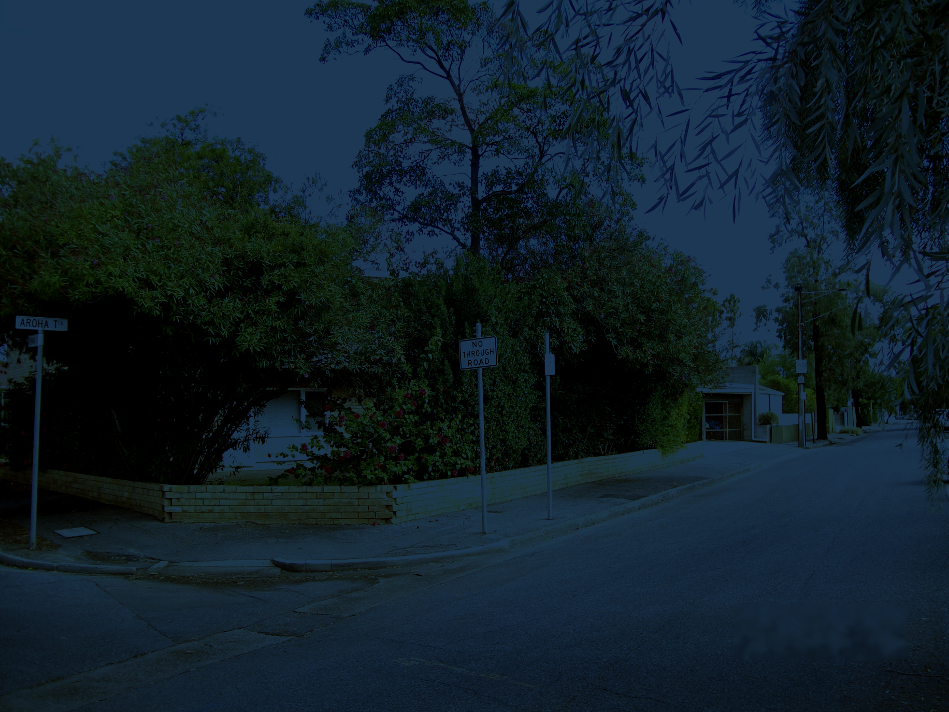
a very little script, for those who like to look at their photos under the moonlight....!

Attachment:
from_daylight_to_moonlight.7z [588 Bytes]
Downloaded 278 times


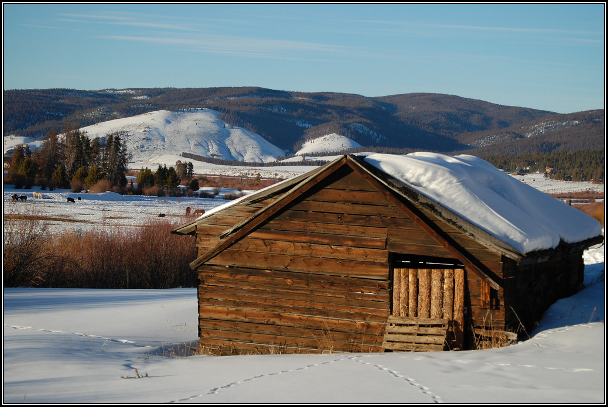
before...
Attachment:
DSCF0733.png
DSCF0733.png [ 2.69 MiB | Viewed 4180 times ]


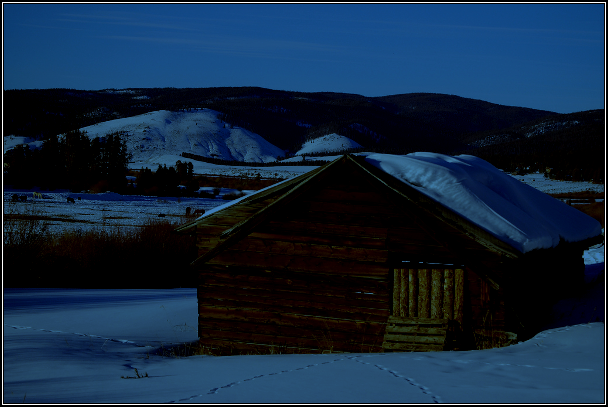
after
Attachment:
DSCF0733-moonlight128.png
DSCF0733-moonlight128.png [ 1.57 MiB | Viewed 4180 times ]

_________________
"Where am I ?"


Share on Facebook Share on Twitter Share on Orkut Share on Digg Share on MySpace Share on Delicious Share on Technorati
Top
 Post subject: Re: from daylight to moonlight
PostPosted: Fri Dec 26, 2014 6:04 pm  (#2) 
Offline
Script Coder
User avatar

Joined: Feb 18, 2011
Posts: 4826
Location: Bendigo Vic. Australia
A excellent script for a nice effect on images that is easy to control :bigthup
thank you Dinasset

_________________
Image
No matter how much you push the envelope, it'll still be stationery.


Top
 Post subject: Re: from daylight to moonlight
PostPosted: Fri Dec 26, 2014 6:28 pm  (#3) 
Offline
Administrator
User avatar

Joined: Aug 10, 2012
Posts: 14265
Location: Native to NYC living in Arizona, Gimp 2.8 - 3.0, Win 11 PC.
That's an impressive before and after example.

_________________
Image
"A wise man learns more from a foolish question than a fool can learn from a wise answer"
Image


Top
 Post subject: Re: from daylight to moonlight
PostPosted: Fri Dec 26, 2014 6:37 pm  (#4) 
Offline
GimpChat Member
User avatar

Joined: Apr 07, 2010
Posts: 14182
All I see on the bottom one is pure black. Is it just my pc or... am I missing something.

_________________
Image


Top
 Post subject: Re: from daylight to moonlight
PostPosted: Fri Dec 26, 2014 7:17 pm  (#5) 
Offline
Administrator
User avatar

Joined: Aug 10, 2012
Posts: 14265
Location: Native to NYC living in Arizona, Gimp 2.8 - 3.0, Win 11 PC.
molly wrote:
All I see on the bottom one is pure black. Is it just my pc or... am I missing something.

It must be your pc Molly. That black image you see is the night time, it looks like it's night.

_________________
Image
"A wise man learns more from a foolish question than a fool can learn from a wise answer"
Image


Top
 Post subject: Re: from daylight to moonlight
PostPosted: Fri Dec 26, 2014 8:00 pm  (#6) 
Offline
Script Coder
User avatar

Joined: Feb 18, 2011
Posts: 4826
Location: Bendigo Vic. Australia
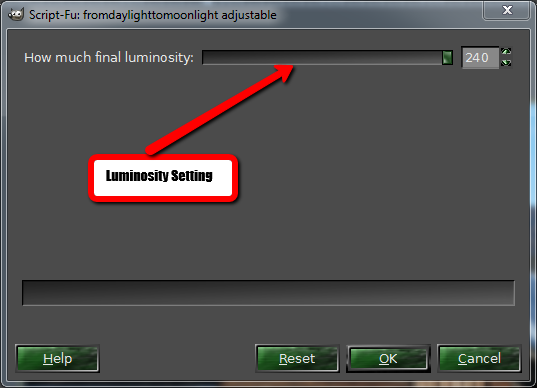
Molly The script has a adj 'moonlight' setting
original
Image
moonlit
Image

_________________
Image
No matter how much you push the envelope, it'll still be stationery.


Top
 Post subject: Re: from daylight to moonlight
PostPosted: Fri Dec 26, 2014 8:01 pm  (#7) 
Offline
GimpChat Member
User avatar

Joined: Apr 07, 2010
Posts: 14182
Now isn't that something, either someone reposted a different image or my pc didn't upload the whole thing, I now see what is supposed to be there. The buildings look as if it were really night time. Before, it was like someone used a pure black bucket fill on a layer. Anyway, nice dinasset. thanks for the script.

_________________
Image


Top
 Post subject: Re: from daylight to moonlight
PostPosted: Fri Dec 26, 2014 8:07 pm  (#8) 
Offline
Script Coder
User avatar

Joined: Feb 18, 2011
Posts: 4826
Location: Bendigo Vic. Australia
What more can be said :evilgrin
Image

_________________
Image
No matter how much you push the envelope, it'll still be stationery.


Top
 Post subject: Re: from daylight to moonlight
PostPosted: Fri Dec 26, 2014 8:32 pm  (#9) 
Offline
GimpChat Member
User avatar

Joined: Apr 07, 2010
Posts: 14182
@Graechan, When I looked at that post by Dinasset, the picture was completely black, I closed it and opened it again and it was still completely black, (The last time I looked, I am not blind.) I rebooted FF and the next time I could see the buildings.

_________________
Image


Top
 Post subject: Re: from daylight to moonlight
PostPosted: Sat Dec 27, 2014 2:35 am  (#10) 
Offline
GimpChat Member
User avatar

Joined: Jan 20, 2013
Posts: 14835
Location: roma, italy
glad someone likes it, thanks for the nice words, it was an easy Christmas gift.
Sometimes a simple thing is missing among the terrific bulk of scripts available in Gimp...

_________________
"Where am I ?"


Top
 Post subject: Re: from daylight to moonlight
PostPosted: Sat Dec 27, 2014 7:09 am  (#11) 
Offline
GimpChat Member
User avatar

Joined: Apr 07, 2010
Posts: 14182
Thanks Dinasset, I was able to open the 7-zip by going over to Windows and then placing it on a USB stick. Works great and I added a little bit of supernova to it.
Image

_________________
Image


Top
 Post subject: Re: from daylight to moonlight
PostPosted: Sat Dec 27, 2014 7:32 am  (#12) 
Offline
GimpChat Member
User avatar

Joined: Jan 20, 2013
Posts: 14835
Location: roma, italy
fine! under the moonlight every "star" is at home...

_________________
"Where am I ?"


Top
 Post subject: Re: from daylight to moonlight
PostPosted: Sat Dec 27, 2014 8:32 am  (#13) 
Offline
Global Moderator
User avatar

Joined: Apr 01, 2012
Posts: 8498
Location: On the other side of your screen
Took me a while to unzip it. I finally got it last night but forgot about it until I saw your post again. I just tried it and it even works on 'sunny' daylight scenes.
Thank you dinasset :)

_________________
Image
Free Fun Photo Editing & resources
Poems from the Lord
Gimp Newby
Gimp version 3.2.6 and GMIC-Qt 4.0.2 OS :- Windows 10 Home 64


Top
 Post subject: Re: from daylight to moonlight
PostPosted: Sat Dec 27, 2014 8:43 am  (#14) 
Offline
Global Moderator
User avatar

Joined: Apr 01, 2012
Posts: 8498
Location: On the other side of your screen
Just found this one and downloaded it - installed it and found where it is in the menu. Will have to wait till after church tomorrow to play. I got to go.
Good night.

_________________
Image
Free Fun Photo Editing & resources
Poems from the Lord
Gimp Newby
Gimp version 3.2.6 and GMIC-Qt 4.0.2 OS :- Windows 10 Home 64


Top
 Post subject: Re: from daylight to moonlight
PostPosted: Sat Dec 27, 2014 8:57 am  (#15) 
Offline
GimpChat Member
User avatar

Joined: Jan 20, 2013
Posts: 14835
Location: roma, italy
good night, Sally!
"see" you tomorrow...

_________________
"Where am I ?"


Top
 Post subject: Re: from daylight to moonlight
PostPosted: Sat Dec 27, 2014 11:16 am  (#16) 
Offline
GimpChat Member
User avatar

Joined: Aug 16, 2012
Posts: 4271
Location: Göteborg, Sweden
looks like it's working really well! i don't want to download it on erisian's computer, but when i get my own again i think this is a great effect.

_________________


Top
 Post subject: Re: from daylight to moonlight
PostPosted: Sat Dec 27, 2014 11:37 am  (#17) 
Offline
GimpChat Member
User avatar

Joined: Apr 07, 2010
Posts: 14182
sallyanne wrote:
Just found this one and downloaded it - installed it and found where it is in the menu. Will have to wait till after church tomorrow to play. I got to go.
Good night.


Script-Fu > colors

_________________
Image


Top
 Post subject: Re: from daylight to moonlight
PostPosted: Sat Dec 27, 2014 12:14 pm  (#18) 
Offline
GimpChat Member
User avatar

Joined: Mar 10, 2014
Posts: 845
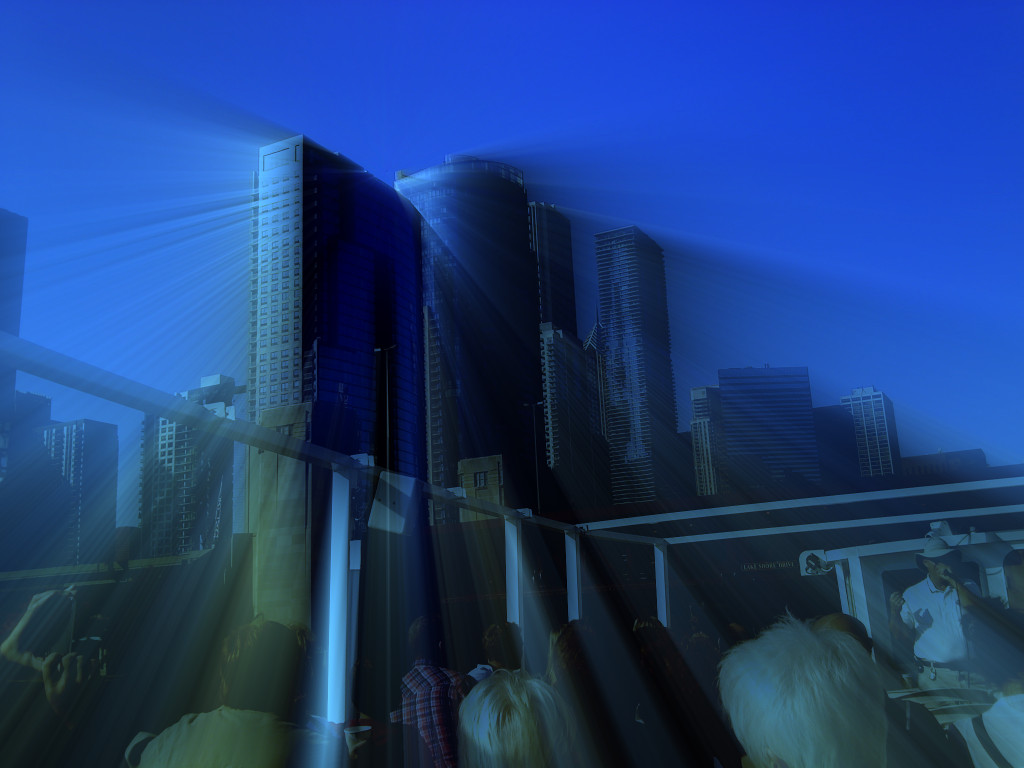
Thanks Dinasset!
I used your script plus Luce on my picture (boat tourist tour in Chicago)

Image


Top
 Post subject: Re: from daylight to moonlight
PostPosted: Sat Dec 27, 2014 1:48 pm  (#19) 
Offline
GimpChat Member
User avatar

Joined: Jan 20, 2013
Posts: 14835
Location: roma, italy
nice outcome, Marcello!

_________________
"Where am I ?"


Top
 Post subject: Re: from daylight to moonlight
PostPosted: Sat Dec 27, 2014 10:05 pm  (#20) 
Offline
Global Moderator
User avatar

Joined: Apr 01, 2012
Posts: 8498
Location: On the other side of your screen
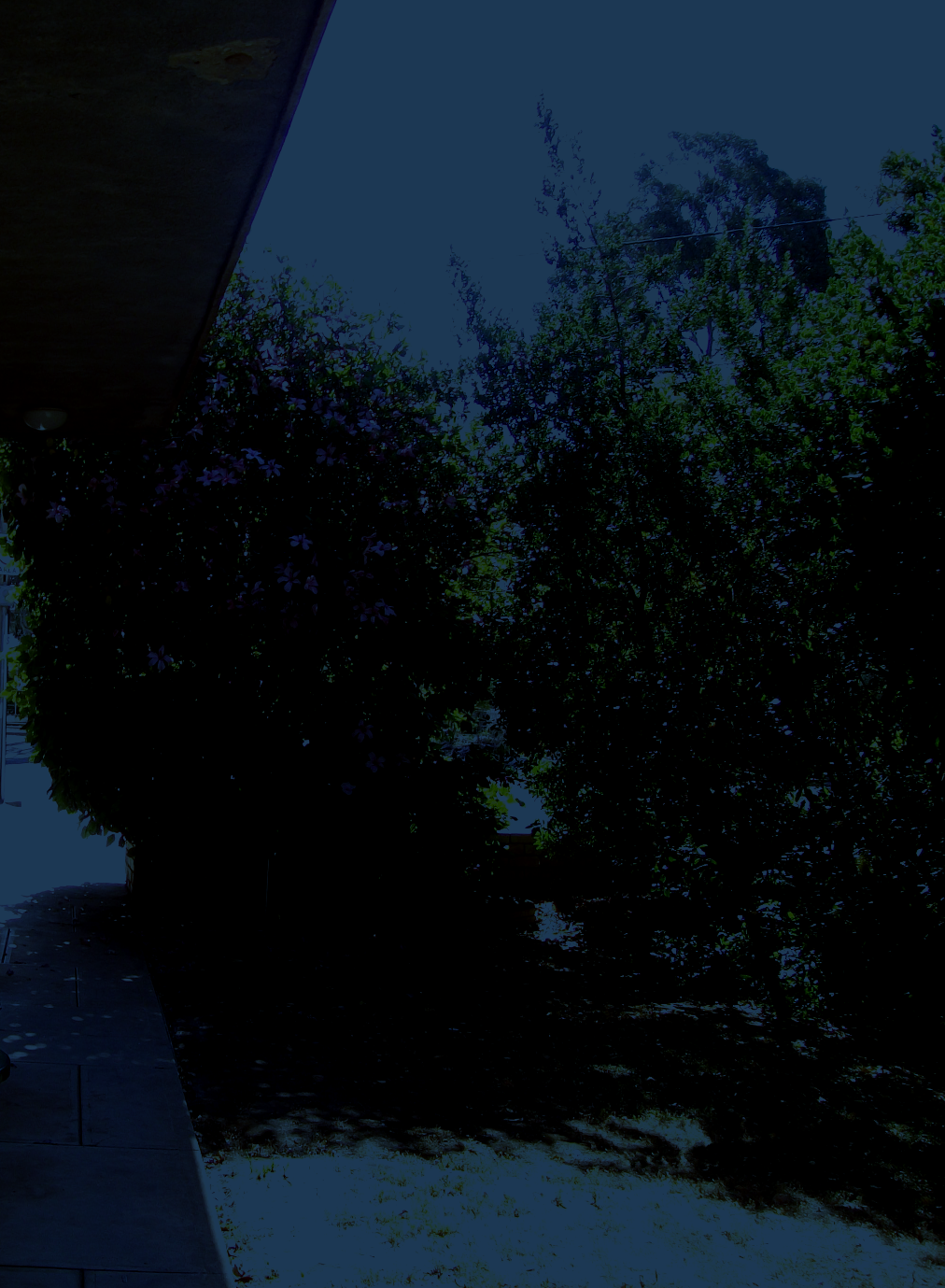
Just done two with your default settings. Not added anything else yet.
Image
Image

_________________
Image
Free Fun Photo Editing & resources
Poems from the Lord
Gimp Newby
Gimp version 3.2.6 and GMIC-Qt 4.0.2 OS :- Windows 10 Home 64


Top
Post new topic Reply to topic  [ 52 posts ]  Go to page 1, 2, 3  Next

All times are UTC - 5 hours [ DST ]


* Login  


Powered by phpBB3 © phpBB Group