It is currently Sun Jun 07, 2026 10:05 am


All times are UTC - 5 hours [ DST ]


Post new topic Reply to topic  [ 126 posts ]  Go to page Previous  1, 2, 3, 4, 5 ... 7  Next
Author Message
 Post subject: Re: Announcing ArrowsCreator-0.3[update 1]
PostPosted: Wed Dec 31, 2014 5:54 pm  (#21) 
Offline
GimpChat Member

Joined: Jul 13, 2014
Posts: 109
Hi,
I've updated (called update 1) the plug-in in the first post for three reasons:
1) policy of the pre-registration message concerning the GIMP version have been changed: permitting the user, if he which, to attempt registration anyway.
2) post-registration the plug-in uses the PDB GIMP version. Those first two follow from the problem encountered by Graechan (see above posts).
3) tweaking of the priority of the function responsible for the switching between the plug-in and GIMP. This should lessen the slow down with GIMP's usage (like moving the anchors) in the plug-In's window.


Top
 Post subject: Re: Announcing ArrowsCreator-0.3[update 1]
PostPosted: Wed Dec 31, 2014 7:13 pm  (#22) 
Offline
Script Coder
User avatar

Joined: Feb 18, 2011
Posts: 4826
Location: Bendigo Vic. Australia
Thank you for the update rob_brz1 that worked a treat and is preferable to a mod just for my Portable

_________________
Image
No matter how much you push the envelope, it'll still be stationery.


Top
 Post subject: Re: Announcing ArrowsCreator-0.3[update 1]
PostPosted: Wed Dec 31, 2014 8:24 pm  (#23) 
Offline
Administrator
User avatar

Joined: Aug 10, 2012
Posts: 14014
Location: Native to NYC living in Arizona, Gimp 2.8 - 3.0, Win 11 PC.
Happy New Year 2015...

_________________
Image
"A wise man learns more from a foolish question than a fool can learn from a wise answer"
Image


Top
 Post subject: Re: Announcing ArrowsCreator-0.3[update 1]
PostPosted: Wed Dec 31, 2014 9:03 pm  (#24) 
Offline
Script Coder
User avatar

Joined: Feb 18, 2011
Posts: 4826
Location: Bendigo Vic. Australia
rob_brz1 would it be possible to post an Image of the different types of arrows that can be created
Other confusing features are the 'next arrow' and 'next segment' options, how should these be used?

_________________
Image
No matter how much you push the envelope, it'll still be stationery.


Top
 Post subject: Re: Announcing ArrowsCreator-0.3[update 1]
PostPosted: Wed Dec 31, 2014 9:26 pm  (#25) 
Offline
GimpChat Member

Joined: Jul 13, 2014
Posts: 109
Hi,
Graechan wrote:
rob_brz1 would it be posible to post an Image of the different types of arrows that can be created
I will try, one per arrow type so seven in all. Does the one that I have already published count?

Wallace wrote:
Happy New Year 2015...
Healthy and Happy New Year 2015 to you Wallace and all the other 'gimpchat' members.


Top
 Post subject: Re: Announcing ArrowsCreator-0.3[update 1]
PostPosted: Wed Dec 31, 2014 9:28 pm  (#26) 
Offline
Administrator
User avatar

Joined: Aug 10, 2012
Posts: 14014
Location: Native to NYC living in Arizona, Gimp 2.8 - 3.0, Win 11 PC.
rob_brz1 wrote:
Healthy and Happy New Year 2015 to you Wallace and all the other 'gimpchat' members.

:jumpclap :sdrunk :smooch :noiseblower

_________________
Image
"A wise man learns more from a foolish question than a fool can learn from a wise answer"
Image


Top
 Post subject: Re: Announcing ArrowsCreator-0.3[update 1]
PostPosted: Wed Dec 31, 2014 9:42 pm  (#27) 
Offline
Script Coder
User avatar

Joined: Feb 18, 2011
Posts: 4826
Location: Bendigo Vic. Australia
rob_brz1 the 'next arrow' and 'next segment' options, how should these be used
Image

_________________
Image
No matter how much you push the envelope, it'll still be stationery.


Top
 Post subject: Re: Announcing ArrowsCreator-0.3[update 1]
PostPosted: Thu Jan 01, 2015 9:45 am  (#28) 
Offline
GimpChat Member

Joined: Jul 13, 2014
Posts: 109
Hi,
Graechan wrote:
rob_brz1 the 'next arrow' and 'next segment' options, how should these be used
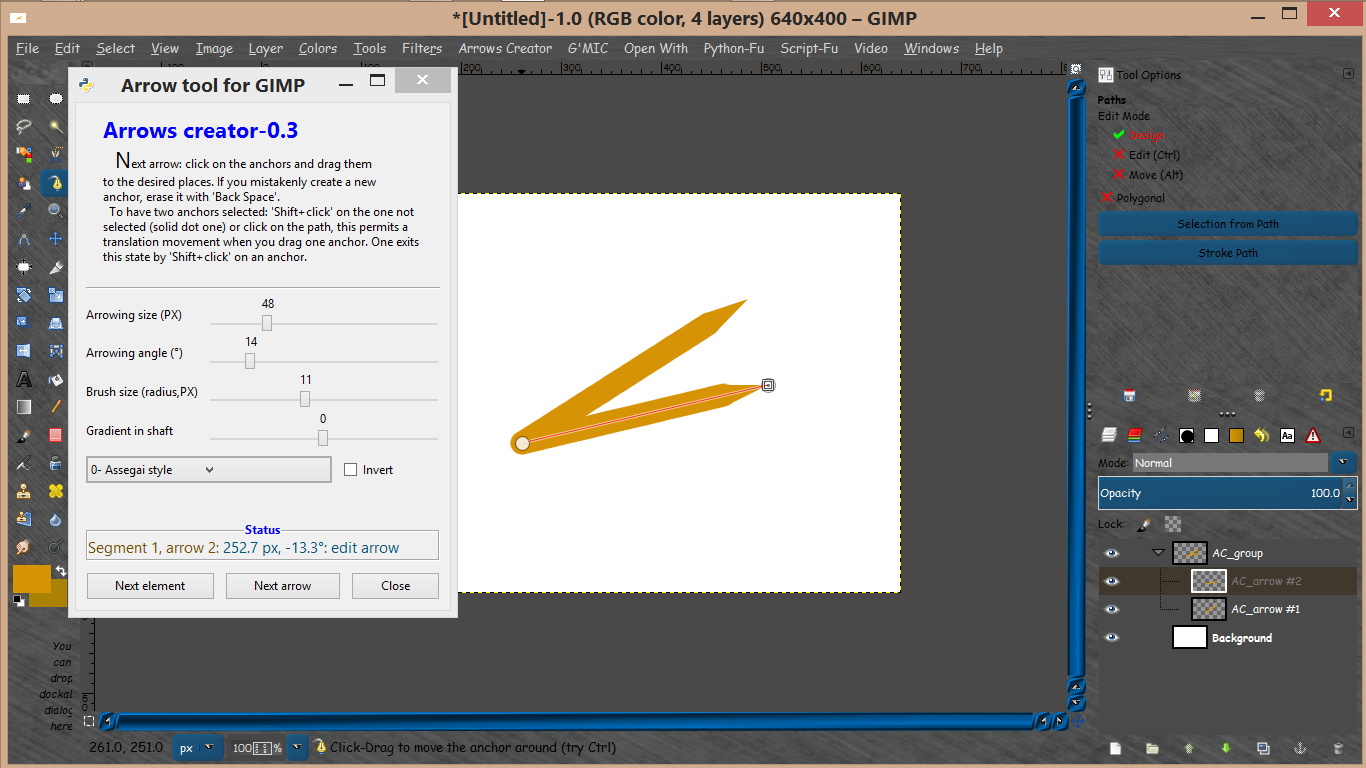
[ Image ]

Should slow down on the assignments, since I have not finish the first one yet: 'examples of arrow style' (I don't multi-task well ;) ). In that period of the year I expect it to take many days. In the mean while you could precise what you found baffling in the button usage of 'Next segment' and 'Next arrow', so that I can target my answer or remarks more precisely than 'you click on them buttons and see what happens'. By the way the previous answer is a valid one for an experimental approach (bottom up).


Top
 Post subject: Re: Announcing ArrowsCreator-0.3[update 1]
PostPosted: Thu Jan 01, 2015 5:32 pm  (#29) 
Offline
Script Coder
User avatar

Joined: Feb 18, 2011
Posts: 4826
Location: Bendigo Vic. Australia
rob_brz1 does that mean the 'next arrow' and 'next segment' options are for future development

_________________
Image
No matter how much you push the envelope, it'll still be stationery.


Top
 Post subject: Re: Announcing ArrowsCreator-0.3[update 1]
PostPosted: Fri Jan 02, 2015 7:37 pm  (#30) 
Offline
GimpChat Member

Joined: Jul 13, 2014
Posts: 109
Graechan wrote:
rob_brz1 does that mean the 'next arrow' and 'next segment' options are for future development
Not at this time.
What gives you that idea?


Top
 Post subject: Re: Announcing ArrowsCreator-0.3[update 1]
PostPosted: Sat Jan 03, 2015 3:29 am  (#31) 
Offline
Script Coder
User avatar

Joined: Feb 18, 2011
Posts: 4826
Location: Bendigo Vic. Australia
rob_brz1 wrote:
Graechan wrote:
rob_brz1 does that mean the 'next arrow' and 'next segment' options are for future development
Not at this time.
What gives you that idea?

because nothing is mentioned about how to use them

_________________
Image
No matter how much you push the envelope, it'll still be stationery.


Top
 Post subject: Re: Announcing ArrowsCreator-0.3[update 2]
PostPosted: Sat Jan 17, 2015 6:13 pm  (#32) 
Offline
GimpChat Member

Joined: Jul 13, 2014
Posts: 109
Hi,
An 'update 2' have been posted at the beginning of the thread. The changes are:
1) correction on bugs and cleaning,
2) completed a change in initializing of the path anchors and using a path tattoo,
3) some small variation to the text of the plug-in, my priority is to have this plug-in run as smoothly as possible for it's user (basic tutorial is the plug-in text).


Top
 Post subject: Re: Announcing ArrowsCreator-0.3[update 1]
PostPosted: Sun Jan 18, 2015 3:31 am  (#33) 
Offline
Global Moderator
User avatar

Joined: May 16, 2010
Posts: 16015
Graechan wrote:
rob_brz1 wrote:
Graechan wrote:
rob_brz1 does that mean the 'next arrow' and 'next segment' options are for future development
Not at this time.
What gives you that idea?

because nothing is mentioned about how to use them

Graechan click next arrow and move the two previously made nodes from the other arrow. This creates another arrow element.

Image

For adding new consecutive arrow heads from a previous point-
Click new element and drag one of the nodes to another location (the tail end node).
Image

_________________
Image


Top
 Post subject: Re: Announcing ArrowsCreator-0.3[update 3]
PostPosted: Mon Feb 02, 2015 8:10 pm  (#34) 
Offline
GimpChat Member

Joined: Jul 13, 2014
Posts: 109
Hi,
An 'update 3' have been posted at the beginning of the thread. The changes are:
1) completed a check of the plug-in text and
2) added a line 'Relative to previous...' in 'Status' to help construction. It provides the length and orientation in relation to the previous element if there is more then one element (arrow) during a session or the next. Exit the plug-in with the button 'Close', for a reliable use of it, in the next session.


Top
 Post subject: Re: Announcing ArrowsCreator-0.3[update 3]
PostPosted: Tue Feb 03, 2015 6:30 am  (#35) 
Offline
Global Moderator
User avatar

Joined: May 16, 2010
Posts: 16015
rob_brz1 wrote:
Hi,
An 'update 3' have been posted at the beginning of the thread. The changes are:
1) completed a check of the plug-in text and
2) added a line 'Relative to previous...' in 'Status' to help construction. It provides the length and orientation in relation to the previous element if there is more then one element (arrow) during a session or the next. Exit the plug-in with the button 'Close', for a reliable use of it, in the next session.

Great! Thanks. :)

_________________
Image


Top
 Post subject: Re: Announcing ArrowsCreator-0.3[update 3]
PostPosted: Tue Feb 03, 2015 6:47 am  (#36) 
Offline
GimpChat Member
User avatar

Joined: Apr 07, 2010
Posts: 14182
Thanks, works great rob_brz1 wrote

_________________
Image


Top
 Post subject: Re: Announcing ArrowsCreator-0.3[update 3]
PostPosted: Tue Feb 03, 2015 10:38 am  (#37) 
Offline
GimpChat Member

Joined: Jul 13, 2014
Posts: 109
Hi,
Rod and molly thanks for the feedback. :)

Forgot in my last post to add: if the next session start by loading the image it should be the previously saved 'XCF'.


Top
 Post subject: Re: Announcing ArrowsCreator-0.3[update 3]
PostPosted: Tue Feb 03, 2015 12:14 pm  (#38) 
Offline
Global Moderator
User avatar

Joined: May 16, 2010
Posts: 16015
rob_brz1 wrote:
Hi,
Rod and molly thanks for the feedback. :)

Forgot in my last post to add: if the next session start by loading the image it should be the previously saved 'XCF'.

Ok. Because of the paths correct? :bigthup

_________________
Image


Top
 Post subject: Re: Announcing ArrowsCreator-0.3[update 3]
PostPosted: Tue Feb 03, 2015 9:08 pm  (#39) 
Offline
GimpChat Member

Joined: Jul 13, 2014
Posts: 109
Hi Rod,
Rod wrote:
rob_brz1 wrote:
Hi,
Rod and molly thanks for the feedback. :)

Forgot in my last post to add: if the next session start by loading the image it should be the previously saved 'XCF'.

Ok. Because of the paths correct? :bigthup

Could have been, but each session start with new AC path(s) so it's not the link to previous element.
The arrow layers and their parasites with the last element is that link, here.


Top
 Post subject: Re: Announcing ArrowsCreator-0.3
PostPosted: Mon Feb 16, 2015 2:02 pm  (#40) 
Offline
GimpChat Member

Joined: Jul 13, 2014
Posts: 109
Hi,
An update have been posted at the beginning of the thread, with it the version is now 0.3.0 (more mature, no release candidate).
The changes are:
1) Corrected, again, the slow down with GIMP's usage (like moving the anchors) of the refresh in the plug-In's window, because it seems worse than before. And other bugs
2) 'Status' display is now correct, if after (not during) a session you erase "AC_arrow #?" layer(s) and continue at the next session.
3) Introduce new tool-tip and added text to some.


Top
Post new topic Reply to topic  [ 126 posts ]  Go to page Previous  1, 2, 3, 4, 5 ... 7  Next

All times are UTC - 5 hours [ DST ]


* Login  


Powered by phpBB3 © phpBB Group




