It is currently Fri Sep 18, 2026 9:40 am


All times are UTC - 5 hours [ DST ]


Post new topic Reply to topic  [ 17 posts ] 
Author Message
 Post subject: Avatar photomanipulation tutorial
PostPosted: Mon Dec 29, 2014 3:27 pm  (#1) 
Offline
GimpChat Member
User avatar

Joined: Nov 02, 2014
Posts: 57
Hi! :) My last tutorial for these year is now online! :)

http://www.asganafer.it/voglio-diventare-un-avatar/

Who want to be an Avatar? :)


Attachments:
avatar_p2.png
avatar_p2.png [ 3.2 MiB | Viewed 3787 times ]
Share on Facebook Share on Twitter Share on Orkut Share on Digg Share on MySpace Share on Delicious Share on Technorati
Top
 Post subject: Re: Avatar photomanipulation tutorial
PostPosted: Mon Dec 29, 2014 4:08 pm  (#2) 
Offline
Script Coder
User avatar

Joined: Dec 27, 2014
Posts: 508
Very impressive, Asganafer!
Any chance of an English version for those of us who don't speak fluent Italian?


Top
 Post subject: Re: Avatar photomanipulation tutorial
PostPosted: Mon Dec 29, 2014 5:15 pm  (#3) 
Offline
Administrator
User avatar

Joined: Aug 10, 2012
Posts: 14206
Location: Native to NYC living in Arizona, Gimp 2.8 - 3.0, Win 11 PC.
That pretty cool! :bigthup
Would you need a particular size image to be able to work with?

_________________
Image
"A wise man learns more from a foolish question than a fool can learn from a wise answer"
Image


Top
 Post subject: Re: Avatar photomanipulation tutorial
PostPosted: Mon Dec 29, 2014 11:23 pm  (#4) 
Offline
Global Moderator
User avatar

Joined: Oct 02, 2014
Posts: 5047
Location: Sydney Australia
I had a look at the tutorial and would like to try it; like previous posters have said an English language version would be nice or I suppose we could try Google Translate!

Given Avatar's leading man is Sam Worthington and given his heritage, its easy to see where they got those ears from in the movie ... ;)

Image

_________________
Image

Respect should be offered freely but hard earned


Top
 Post subject: Re: Avatar photomanipulation tutorial
PostPosted: Sat Jan 03, 2015 12:50 pm  (#5) 
Offline
GimpChat Member
User avatar

Joined: Nov 02, 2014
Posts: 57
jontait2 wrote:
Very impressive, Asganafer!
Any chance of an English version for those of us who don't speak fluent Italian?


Now i can't because i haven't so much time D: i can only write tutorial in italian, my wish is to translate all the website and tutorial in english!! Alone i can't do so much :(


Top
 Post subject: Re: Avatar photomanipulation tutorial
PostPosted: Sat Jan 03, 2015 12:53 pm  (#6) 
Offline
GimpChat Member
User avatar

Joined: Nov 02, 2014
Posts: 57
Wallace wrote:
That pretty cool! :bigthup
Would you need a particular size image to be able to work with?


There isn't a particular size of image. In my opinion the best thing is to have a big image, but i done this tutorial on small image too ;) So you can do on all image :)


Top
 Post subject: Re: Avatar photomanipulation tutorial
PostPosted: Sat Jan 03, 2015 1:17 pm  (#7) 
Offline
GimpChat Member
User avatar

Joined: Apr 07, 2010
Posts: 14182
Very cool and well written Asganafer. It would be great if some one could translate it into English... hint

_________________
Image


Top
 Post subject: Re: Avatar photomanipulation tutorial
PostPosted: Sat Jan 03, 2015 2:55 pm  (#8) 
Offline
Administrator
User avatar

Joined: Aug 10, 2012
Posts: 14206
Location: Native to NYC living in Arizona, Gimp 2.8 - 3.0, Win 11 PC.
Asganafer wrote:
Wallace wrote:
That pretty cool! :bigthup
Would you need a particular size image to be able to work with?


There isn't a particular size of image. In my opinion the best thing is to have a big image, but i done this tutorial on small image too ;) So you can do on all image :)

Thanks Asganafer! :bigthup
I may have to give your tutorial a try, but I'm not sure what male Avatar characters look like. I think I'll have to google this to find out. ;)

_________________
Image
"A wise man learns more from a foolish question than a fool can learn from a wise answer"
Image


Top
 Post subject: Re: Avatar photomanipulation tutorial
PostPosted: Sun Jan 04, 2015 1:46 am  (#9) 
Offline
Script Coder
User avatar

Joined: Dec 27, 2014
Posts: 508
I've tried using Google Translate on Asganafer's website and I have to say it's actually not bad!
There are a few words not translated at all and some phrases mistranslated but generally it's good
enough to get the gist of the tutorial.

For example, the opening section in Italian:

Quote:
Voglio diventare un AVATAR!

Buongiorno a tutti! :) Dopo aver visto il film di Avatar molti di voi si saranno domandati “Ma come sarei io
se fossi un Na’Vi?”. Beh oggi siamo qui per rispondere a questa domanda. Siete pronti a scoprirlo?
Prima di cominciare procuriamoci i seguenti materiali:
•Foto (quella che volete voi, io ho scelto questa)
•Sfondo
•Iride
•Capelli
•Orecchie
•Perline
•Piuma di gallina
•Font

Dopo esserci procurati tutto il necessario partiamo aprendo la nostra immagine.

gets translated as:

Quote:
I want to become an AVATAR!

Hello everyone! :) After watching the film Avatar many of you may have wondered, "How would I be if
I were a Na'Vi?". Well today we are here to answer this question. Are you ready to find out? Before
starting procuriamoci the following materials:
• Photos (what you want, I chose this )
• Background
• Iris
• Hair
• Ears
• Beads
• Feather chicken
• Font

After we procured everything necessary we start opening our image.

The translator hasn't recognised "procuriamoci" (the imperative form of the verb to procure) and
"Piuma di gallina" has been mistranslated as "Feather chicken" instead of "Chicken feather" :rofl

But I think this is good enough for us to get the gist of Asganafer's tuts.

https://translate.google.co.uk/translat ... edit-text=


Top
 Post subject: Re: Avatar photomanipulation tutorial
PostPosted: Sun Jan 04, 2015 11:32 am  (#10) 
Offline
GimpChat Member
User avatar

Joined: Apr 07, 2010
Posts: 14182
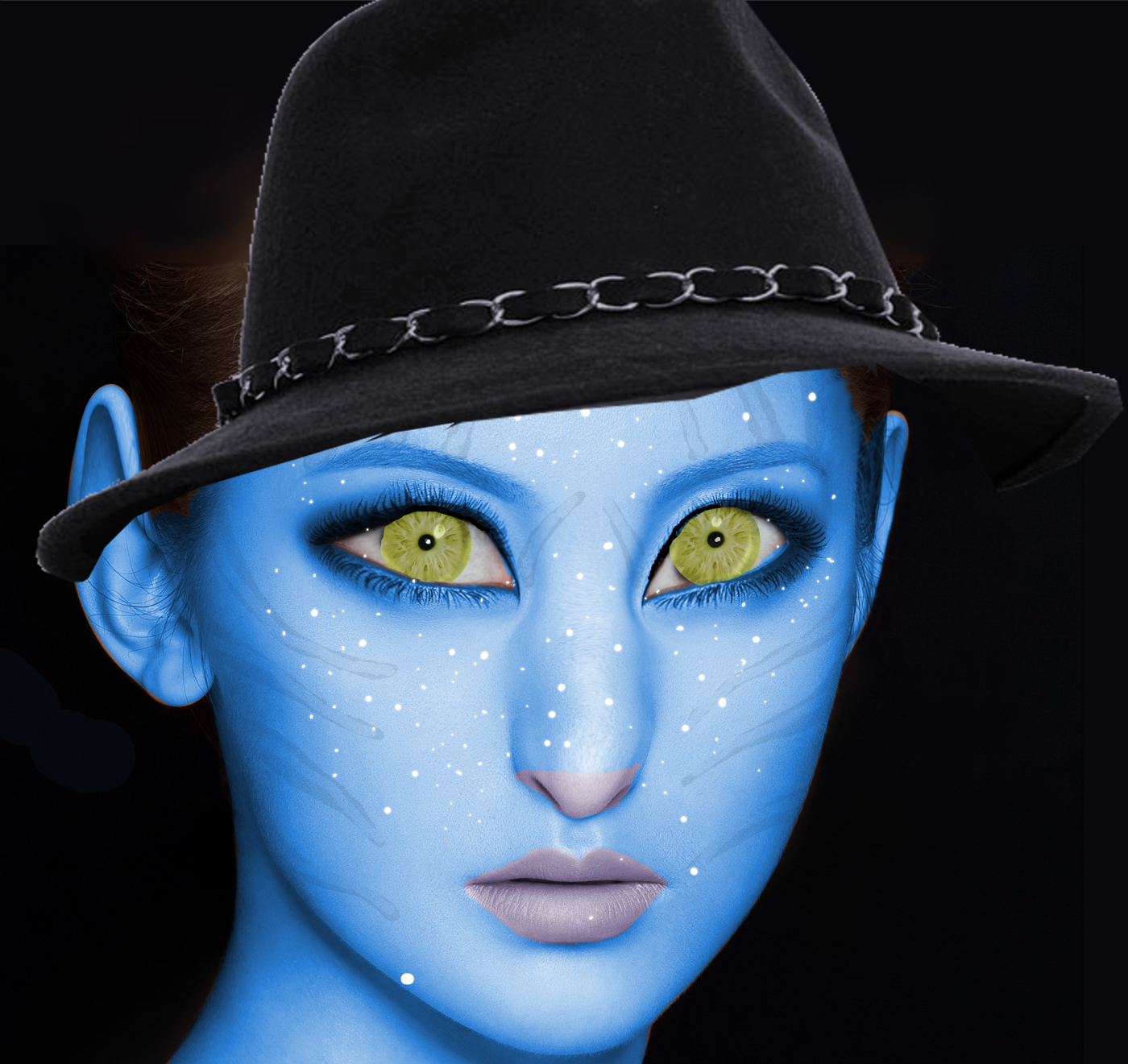
Here is my try at it.
Image

The original here...

Image

_________________
Image


Top
 Post subject: Re: Avatar photomanipulation tutorial
PostPosted: Sun Jan 04, 2015 12:57 pm  (#11) 
Offline
Administrator
User avatar

Joined: Aug 10, 2012
Posts: 14206
Location: Native to NYC living in Arizona, Gimp 2.8 - 3.0, Win 11 PC.
molly wrote:
Here is my try at it.
[ Image ]

The original here...

[ Image ]

That looks cool Molly :bigthup , but that hat seem a bit small I think.

_________________
Image
"A wise man learns more from a foolish question than a fool can learn from a wise answer"
Image


Top
 Post subject: Re: Avatar photomanipulation tutorial
PostPosted: Sun Jan 04, 2015 1:37 pm  (#12) 
Offline
GimpChat Member
User avatar

Joined: Apr 07, 2010
Posts: 14182
I know, I don't like it either but I didn't know what to do with the girls head. I had to select all her skin but a lot of it was with hair over it so I tried to hide it with a hat. I will try some more to fix it.
Edit: There I fixed it, is that better Wallace? :teeth

_________________
Image


Top
 Post subject: Re: Avatar photomanipulation tutorial
PostPosted: Sun Jan 04, 2015 3:01 pm  (#13) 
Offline
Administrator
User avatar

Joined: Aug 10, 2012
Posts: 14206
Location: Native to NYC living in Arizona, Gimp 2.8 - 3.0, Win 11 PC.
molly wrote:
I know, I don't like it either but I didn't know what to do with the girls head. I had to select all her skin but a lot of it was with hair over it so I tried to hide it with a hat. I will try some more to fix it.
Edit: There I fixed it, is that better Wallace? :teeth

It looks a bit better, but that hat really doesn't go with an Avatar character.
I tried making one with an image of myself,but it came out terrible so I trashed it.

_________________
Image
"A wise man learns more from a foolish question than a fool can learn from a wise answer"
Image


Top
 Post subject: Re: Avatar photomanipulation tutorial
PostPosted: Sun Jan 04, 2015 3:46 pm  (#14) 
Offline
GimpChat Member
User avatar

Joined: Apr 07, 2010
Posts: 14182
I will try something later tonight Wallace the slave driver.

_________________
Image


Top
 Post subject: Re: Avatar photomanipulation tutorial
PostPosted: Sun Jan 04, 2015 5:03 pm  (#15) 
Offline
Administrator
User avatar

Joined: Aug 10, 2012
Posts: 14206
Location: Native to NYC living in Arizona, Gimp 2.8 - 3.0, Win 11 PC.
molly wrote:
I will try something later tonight Wallace the slave driver.

At least you posted something Molly. I've got nothing to post as of yet. :(

_________________
Image
"A wise man learns more from a foolish question than a fool can learn from a wise answer"
Image


Top
 Post subject: Re: Avatar photomanipulation tutorial
PostPosted: Sun Jan 04, 2015 5:50 pm  (#16) 
Offline
GimpChat Member
User avatar

Joined: Apr 07, 2010
Posts: 14182
Ok, now it is someone else's turn, this is a real fun tute. Here is my last edit... :teeth
Image

_________________
Image


Top
 Post subject: Re: Avatar photomanipulation tutorial
PostPosted: Tue Jan 06, 2015 5:35 am  (#17) 
Offline
GimpChat Member
User avatar

Joined: Nov 02, 2014
Posts: 57
molly wrote:
Ok, now it is someone else's turn, this is a real fun tute. Here is my last edit... :teeth
[ Image ]


Some advice for your work ;) In my opinion you must to change hair (please xD) because they are innatural and the image of hair is too much small for your subject.
After that try to review color strip on the skin, make them more darker and shade it on the center.
Another advice is refer to the eyes. Try to use shade tool and shade the border of yellow and after that remove white point in the centre of pupil :gimp
In the end take care about the light! Remember that you must use elements where the light have the same direction! :)

Try again and re-submit your work :)
And thanks to all for visit my tut :yes


Top
Post new topic Reply to topic  [ 17 posts ] 

All times are UTC - 5 hours [ DST ]


* Login  


Powered by phpBB3 © phpBB Group