It is currently Tue Nov 17, 2026 11:47 am


All times are UTC - 5 hours [ DST ]


Post new topic Reply to topic  [ 30 posts ]  Go to page Previous  1, 2
Author Message
 Post subject: Re: Python Install Help
PostPosted: Tue Mar 15, 2011 11:46 pm  (#21) 
Offline
GimpChat Member

Joined: Apr 12, 2010
Posts: 5870
Willy maybe you could not resist the tentation to install the last stable version of Python ?

If so there the problem gimp 2.6 require a obsolete version, same for the other libraries so grab the gimptrick pack and use that

_________________
My 3D Gallery on Deviantart http://photocomix2.deviantart.com/
Main gallery http://www.flickriver.com/photos/photocomix-mandala/
Mandala and simmetry http://www.flickriver.com/photos/photocomix_mandala/

Image

Mrs Wilbress


Top
 Post subject: Python Install Help
PostPosted: Tue Mar 15, 2011 11:55 pm  (#22) 
Offline
GimpChat Member
User avatar

Joined: Sep 24, 2010
Posts: 12862
It would be cool to be able to use the most current version of python inside Windows GIMP. Maybe some folks here might figure a way to allow this, so I do agree with you PC. :)

_________________
Lyle

Psalm 109:8

Image


Top
 Post subject: Re: Python Install Help
PostPosted: Tue Mar 15, 2011 11:56 pm  (#23) 
Offline
Global Moderator
User avatar

Joined: May 16, 2010
Posts: 16274
Okay here is what you probably need to do Willy.
If your system can not find the Python Path you need to create a variable for it.
Not sure how this works on Vista I am guessing about the same though -
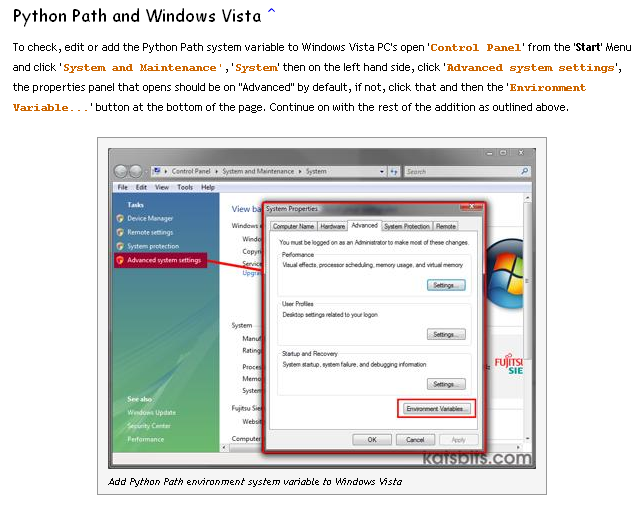
Go to - Start/Control Panel/System/
When the dialog for system opens tick the advanced tab
Click the Environment Variables tab (should be at the bottom)
Click new for System Variables (bottom)
After clicking new a new path dialog will pop up put these value in it

variable name - PythonPath
variable value - C:\PYTHON26;C:\PYTHON26\DLLs;C:\PYTHON26\LIB;C:\PYTHON26\LIB\LIB-TK

Copy it ---> the path exactly like i typed it without the "variable value -"

Restart your machine after clicking ok a bunch of times to close everything
Restart Gimp go to Filters/Render/Clouds
See if fog is listed if it is you are all set. :)

Image

_________________
Image


Top
 Post subject: Re: Python Install Help
PostPosted: Wed Mar 16, 2011 2:33 pm  (#24) 
Offline
GimpChat Member

Joined: Jul 11, 2010
Posts: 349
Python 2.6 and 2.7 can coexist. Python 2.6 is needed for Gimp 2.6 and Python 2.7 is needed for Gimp 2.7, I wounder if it is just a coincidence?


Top
 Post subject: Re: Python Install Help
PostPosted: Thu Mar 17, 2011 8:04 am  (#25) 
Offline
Global Moderator
User avatar

Joined: May 16, 2010
Posts: 16274
Willy did you get Python-Fu installed yet?

_________________
Image


Top
 Post subject: Re: Python Install Help
PostPosted: Thu Mar 17, 2011 2:55 pm  (#26) 
Offline
GimpChat Member
User avatar

Joined: Mar 02, 2011
Posts: 1850
Location: Michigan
Rod wrote:
Okay here is what you probably need to do Willy.
If your system can not find the Python Path you need to create a variable for it.
Not sure how this works on Vista I am guessing about the same though -
Go to - Start/Control Panel/System/
When the dialog for system opens tick the advanced tab
Click the Environment Variables tab (should be at the bottom)
Click new for System Variables (bottom)
After clicking new a new path dialog will pop up put these value in it

variable name - PythonPath
variable value - C:\PYTHON26;C:\PYTHON26\DLLs;C:\PYTHON26\LIB;C:\PYTHON26\LIB\LIB-TK

Copy it ---> the path exactly like i typed it without the "variable value -"

Restart your machine after clicking ok a bunch of times to close everything
Restart Gimp go to Filters/Render/Clouds
See if fog is listed if it is you are all set. :)
Image


I tried this, and it still doesn't work D:

_________________
Image
I'm back I think


Top
 Post subject: Re: Python Install Help
PostPosted: Thu Mar 17, 2011 8:55 pm  (#27) 
Offline
Global Moderator
User avatar

Joined: May 16, 2010
Posts: 16274
If you installed Gimp with Python square ticked it should know where python is already anyways - weird
Look in your plug-ins folder and see if
pyconsole.py
python- console.py and
python-eval.py files are in there.

_________________
Image


Top
 Post subject: Re: Python Install Help
PostPosted: Thu Mar 17, 2011 9:38 pm  (#28) 
Offline
GimpChat Member

Joined: Mar 08, 2011
Posts: 155
And did you try this?

viewtopic.php?f=8&t=1354&start=19#p15702


Top
 Post subject: Re: Python Install Help
PostPosted: Fri Mar 18, 2011 2:29 pm  (#29) 
Offline
GimpChat Member
User avatar

Joined: Mar 02, 2011
Posts: 1850
Location: Michigan
Got all three of those in C:>Program Files>GIMP-2.0>Lib>GIMP>2.0>Pulg-ins

Amanda I believe all that is in there is the stuff I already have downloaded...

_________________
Image
I'm back I think


Top
 Post subject: Re: Python Install Help
PostPosted: Fri Mar 18, 2011 9:55 pm  (#30) 
Offline
Global Moderator
User avatar

Joined: May 16, 2010
Posts: 16274
Willy download and install this package
http://ftp.gnome.org/pub/gnome/binaries ... _win32.zip
This will install GTK+ on your machine - then you should be able to install PYGTK.
Install it to its default directory which should be C:/program files/GTK+
If not - make sure to install it there

_________________
Image


Top
Post new topic Reply to topic  [ 30 posts ]  Go to page Previous  1, 2

All times are UTC - 5 hours [ DST ]


* Login  


Powered by phpBB3 © phpBB Group