It is currently Fri Sep 18, 2026 6:06 pm


All times are UTC - 5 hours [ DST ]


Post new topic Reply to topic  [ 26 posts ]  Go to page 1, 2  Next
Author Message
 Post subject: Re: Gimp Clock
PostPosted: Thu Jan 15, 2015 3:41 am  (#1) 
Offline
Script Coder
User avatar

Joined: Jun 22, 2010
Posts: 1171
Location: Here and there
I think you need to consider the time: http://petapixel.com/2013/06/27/why-pho ... time-1010/

or if you prefer video:
www.youtube.com Video from : www.youtube.com


Kevin


Share on Facebook Share on Twitter Share on Orkut Share on Digg Share on MySpace Share on Delicious Share on Technorati
Top
 Post subject: Re: Gimp Clock
PostPosted: Thu Jan 15, 2015 4:28 am  (#2) 
Offline
GimpChat Member
User avatar

Joined: Mar 01, 2014
Posts: 14194
Location: Spain, Aragón
fantastically implemented Conbagui. :clap

_________________
Image

Gimp 2.10.36 (samj) portable _ OS Windows 10 Home_ 64bits
Don’t be afraid to start over. It’s a new chance to rebuild what you want.


Top
 Post subject: Re: Gimp Clock
PostPosted: Thu Jan 15, 2015 7:18 am  (#3) 
Offline
Global Moderator
User avatar

Joined: May 16, 2010
Posts: 16173
conbagui wrote:
Changing pace, How do you like this one?

[ Image ]

Can i get the XCF for this so i can set it up in Clocx? :)

_________________
Image


Top
 Post subject: Re: Gimp Clock
PostPosted: Thu Jan 15, 2015 12:12 pm  (#4) 
Offline
Administrator
User avatar

Joined: Aug 10, 2012
Posts: 14206
Location: Native to NYC living in Arizona, Gimp 2.8 - 3.0, Win 11 PC.
Rod wrote:
conbagui wrote:
Changing pace, How do you like this one?

[ Image ]

Can i get the XCF for this so i can set it up in Clocx? :)

Nice work Conbagui, I love the colors you used. :bigthup

@ Rod...I'd like to have this clock for Clocx too Rod. Will you post the files for it if you ever get the xcf?

_________________
Image
"A wise man learns more from a foolish question than a fool can learn from a wise answer"
Image


Top
 Post subject: Re: Gimp Clock
PostPosted: Thu Jan 15, 2015 1:30 pm  (#5) 
Offline
Global Moderator
User avatar

Joined: May 16, 2010
Posts: 16173
Quote:
Will you post the files for it if you ever get the xcf?

Most certainly.
Quote:
I'm not home right now, but as soon I get home this evening I will post the XCF. Thank you for your interest

Thanks! :)

_________________
Image


Top
 Post subject: Re: Gimp Clock
PostPosted: Thu Jan 15, 2015 10:08 pm  (#6) 
Offline
GimpChat Member
User avatar

Joined: Jun 02, 2013
Posts: 2090
Really nice job.

_________________
Image


Top
 Post subject: Re: Gimp Clock
PostPosted: Fri Jan 16, 2015 6:12 am  (#7) 
Offline
Global Moderator
User avatar

Joined: Apr 01, 2012
Posts: 8471
Location: On the other side of your screen
Cool :bigthup

_________________
Image
Free Fun Photo Editing & resources
Poems from the Lord
Gimp Newby
Gimp version 3.2.4 and GMIC-Qt 4.0.2 OS :- Windows 10 Home 64


Top
 Post subject: Re: Gimp Clock
PostPosted: Fri Jan 16, 2015 6:28 am  (#8) 
Offline
Global Moderator
User avatar

Joined: May 16, 2010
Posts: 16173
conbagui wrote:
Look at my first post and you will have it. :hehe

Thanks conbagui! :)

_________________
Image


Top
 Post subject: Re: Gimp Clock
PostPosted: Fri Jan 16, 2015 9:37 am  (#9) 
Offline
Global Moderator
User avatar

Joined: May 16, 2010
Posts: 16173
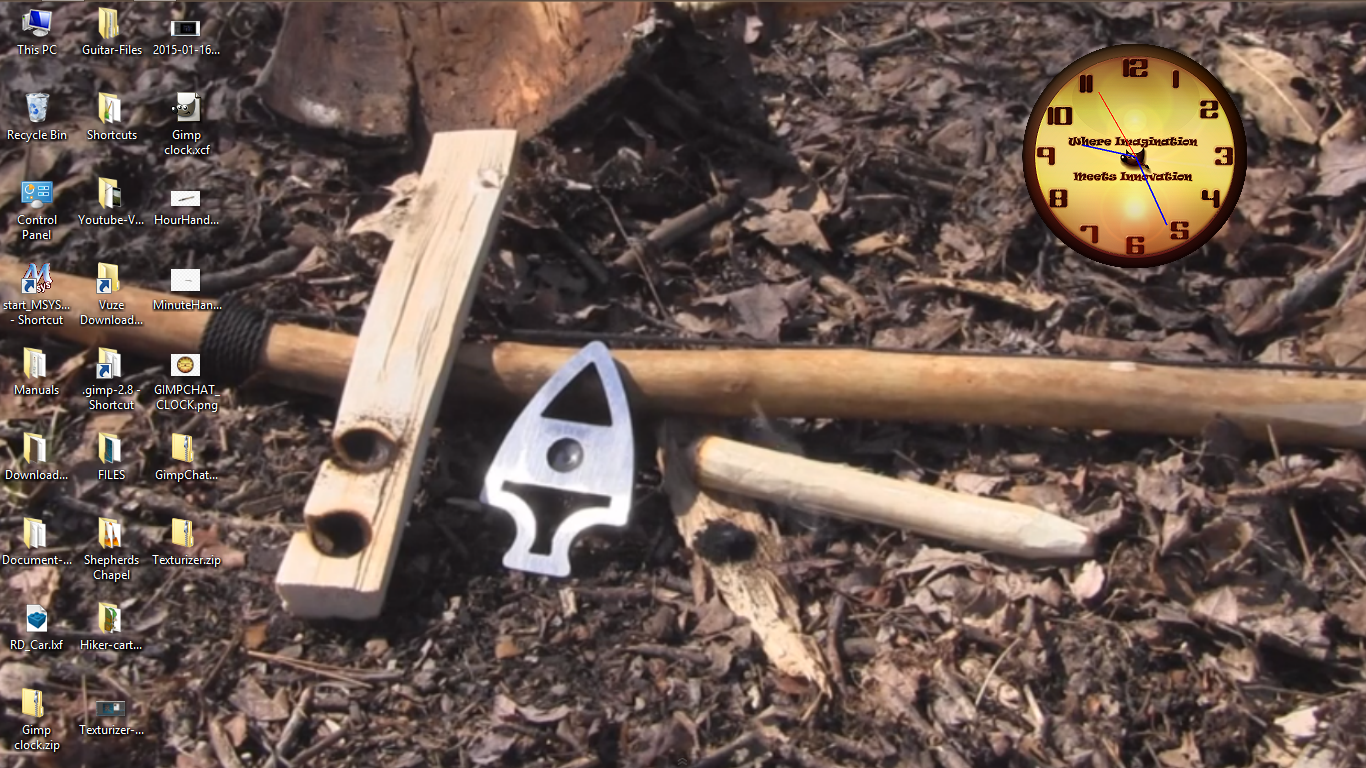
Ok here is a screenshot and the zip is attached.
Image

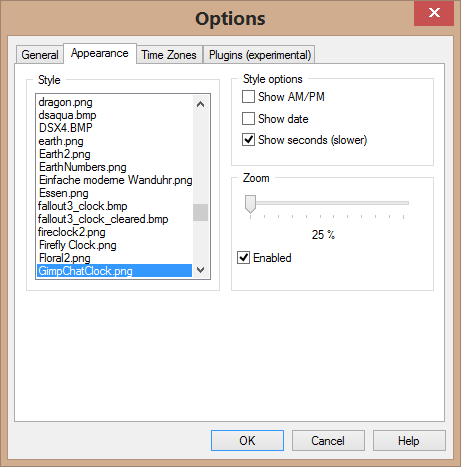
The zip includes the clock image and the ini file. Place both in your Clocx presets folder and right click your clock and select options. Click the Appearance tab and select these options.
Image
Click ok. The clock should be on your desktop and you can now move it wherever you wish. Sorry it can get no smaller. :)

If you open the image in GIMP or another image editor BEFORE you place it in the preset folder and re size it (smaller) you can then save it to Clocx/presets folder and it will be smaller in Clocx.

Enjoy! :bigthup
WITHOUT hand and hour images-
Attachment:
GimpChatClock.zip [730.02 KiB]
Downloaded 223 times


Version two with hand and hour images-
Attachment:
GimpChatClock-v2.zip [727.83 KiB]
Downloaded 223 times

Example image-
Image

_________________
Image


Top
 Post subject: Re: Gimp Clock
PostPosted: Fri Jan 16, 2015 2:42 pm  (#10) 
Offline
Global Moderator
User avatar

Joined: May 16, 2010
Posts: 16173
bump. :)

_________________
Image


Top
 Post subject: Re: Gimp Clock
PostPosted: Fri Jan 16, 2015 3:32 pm  (#11) 
Offline
Administrator
User avatar

Joined: Aug 10, 2012
Posts: 14206
Location: Native to NYC living in Arizona, Gimp 2.8 - 3.0, Win 11 PC.
Rod wrote:
Ok here is a screenshot and the zip is attached.
[ Image ]

The zip includes the clock image and the ini file. Place both in your Clocx presets folder and right click your clock and select options. Click the Appearance tab and select these options.
[ Image ]
Click ok. The clock should be on your desktop and you can now move it wherever you wish. Sorry it can get no smaller. :)

If you open the image in GIMP or another image editor BEFORE you place it in the preset folder and re size it (smaller) you can then save it to Clocx/presets folder and it will be smaller in Clocx.

Enjoy! :bigthup
Attachment:
GimpChatClock.zip


I was not able to get the hour and minute hand images to work. They have to be saved as a hpng (whatever that is). Seems to be some kind of Adobe Illustrator file.

Thanks for putting the Gimp Chat clock for Clocx together Rod and thanks for creating it Conbagui. :bigthup

_________________
Image
"A wise man learns more from a foolish question than a fool can learn from a wise answer"
Image


Top
 Post subject: Re: Gimp Clock
PostPosted: Fri Jan 16, 2015 10:33 pm  (#12) 
Offline
Administrator
User avatar

Joined: Aug 10, 2012
Posts: 14206
Location: Native to NYC living in Arizona, Gimp 2.8 - 3.0, Win 11 PC.
conbagui wrote:
Good work Rod. :clap Now, How can I replace the Hand on the clocx?

We would need to have a separate png images, (with a transparent background) for each of the clock hands that you used in your Gimp Clock image.

_________________
Image
"A wise man learns more from a foolish question than a fool can learn from a wise answer"
Image


Top
 Post subject: Re: Gimp Clock
PostPosted: Fri Jan 16, 2015 10:59 pm  (#13) 
Offline
Global Moderator
User avatar

Joined: Oct 02, 2014
Posts: 5047
Location: Sydney Australia
Not sure what all this 'clocx' stuff is about, but your apparent issues with 'clock hands' reminded me of some aboriginal stories I heard about a 'timeless land' from an old aboriginal elder at Uluru ... so

Image

Hope you do not mind me posting it in this thread! :)

_________________
Image

Respect should be offered freely but hard earned


Top
 Post subject: Re: Gimp Clock
PostPosted: Sat Jan 17, 2015 12:19 am  (#14) 
Offline
Global Moderator
User avatar

Joined: May 16, 2010
Posts: 16173
conbagui wrote:
Good work Rod. :clap Now, How can I replace the Hand on the clocx?

I am still trying to figure that out. All the hands have a HPNG extension. It is some kind of Illustrator file. Does GIMP save in the hpng extension i wonder?

_________________
Image


Top
 Post subject: Re: Gimp Clock
PostPosted: Sat Jan 17, 2015 12:44 am  (#15) 
Offline
Administrator
User avatar

Joined: Aug 10, 2012
Posts: 14206
Location: Native to NYC living in Arizona, Gimp 2.8 - 3.0, Win 11 PC.
Rod wrote:
conbagui wrote:
Good work Rod. :clap Now, How can I replace the Hand on the clocx?

I am still trying to figure that out. All the hands have a HPNG extension. It is some kind of Illustrator file. Does GIMP save in the hpng extension i wonder?

Not that I know of, but maybe Conbagui has the answer to that question.

_________________
Image
"A wise man learns more from a foolish question than a fool can learn from a wise answer"
Image


Top
 Post subject: Re: Gimp Clock
PostPosted: Sat Jan 17, 2015 1:34 am  (#16) 
Offline
Global Moderator
User avatar

Joined: May 16, 2010
Posts: 16173
Wallace wrote:
Rod wrote:
conbagui wrote:
Good work Rod. :clap Now, How can I replace the Hand on the clocx?

I am still trying to figure that out. All the hands have a HPNG extension. It is some kind of Illustrator file. Does GIMP save in the hpng extension i wonder?

Not that I know of, but maybe Conbagui has the answer to that question.

No what i mean is any hand image used in Clocx, Clocx needs it to be a hpng extension for some odd reason.If i try to save the images as that extension in the presets folder they don't work. If you open one of those that does in notepad ++ you will see this. :)
‰PNG

   
IHDR   µ      
›>   tEXtSoftware Adobe ImageReadyqÉe<  "iTXtXML:com.adobe.xmp     <?xpacket begin="" id="W5M0MpCehiHzreSzNTczkc9d"?> <x:xmpmeta xmlns:x="adobe:ns:meta/" x:xmptk="Adobe XMP Core 5.0-c061 64.140949, 2010/12/07-10:57:01        "> <rdf:RDF xmlns:rdf="http://www.w3.org/1999/02/22-rdf-syntax-ns#"> <rdf:Description rdf:about="" xmlns:xmp="http://ns.adobe.com/xap/1.0/" xmlns:xmpMM="http://ns.adobe.com/xap/1.0/mm/" xmlns:stRef="http://ns.adobe.com/xap/1.0/sType/ResourceRef#" xmp:CreatorTool="Adobe Photoshop CS5.1 Windows" xmpMM:InstanceID="xmp.iid:D3C59E439F2011E18651C5CDA301D5A0" xmpMM:DocumentID="xmp.did:D3C59E449F2011E18651C5CDA301D5A0"> <xmpMM:DerivedFrom stRef:instanceID="xmp.iid:D3C59E419F2011E18651C5CDA301D5A0" stRef:documentID="xmp.did:D3C59E429F2011E18651C5CDA301D5A0"/> </rdf:Description> </rdf:RDF> </x:xmpmeta> <?xpacket end="r"?>FÌ   ™PLTE   333fff         {{{äääüüüBBBHHHÀÀÀùùù¢¢¢ÏÏÏ„„„???TTT'''NNN```ºººŸŸŸççç xxxuuucccØØØ“““ÒÒÒ---ŠŠŠ¥¥¥(((aaaEEE999$$$‡‡‡±±±áááKKK000111ÿÿÿ„Nˆ   3tRNSÿÿÿÿÿÿÿÿÿÿÿÿÿÿÿÿÿÿÿÿÿÿÿÿÿÿÿÿÿÿÿÿÿÿÿÿÿÿÿÿÿÿÿÿÿÿÿÿÿÿ qž½Ž   ÖIDATxÚÔØ·‚P…áCÎ@PÌ9Ç÷8‘Âaä2:6Üó×_Á,»àÁ~zjÜî^¡)öÄàQ·l¼$jå´€Aí…øH'P÷PÉ—^íWÑp\ÉÕý@È”[=„°•Ôjs.V[Í«½£¥Ô´£Ñ¹)º…ú²N¹ÚeC#ÊÕ)ZËÕS:õîõ^gdèô˜|I¦Ö×͐ÚXKã뼞I;¯ÿø6Œ{È^ò=D¼ó%Œûõà–‰o™Êݘ²ÜèÛҍ~¦ú²€Ãõ?D¾ž ï"Œ:÷í    IEND®B`‚

Hence the reason i believe it's an Adobe imageready file extension.

I have Imageready and Photoshop so i will try and see what i can do. :)

_________________
Image


Top
 Post subject: Re: Gimp Clock
PostPosted: Sat Jan 17, 2015 1:49 am  (#17) 
Offline
Administrator
User avatar

Joined: Aug 10, 2012
Posts: 14206
Location: Native to NYC living in Arizona, Gimp 2.8 - 3.0, Win 11 PC.
Rod wrote:
No what i mean is any hand image used in Clocx, Clocx needs it to be a hpng extension for some odd reason.If i try to save the images as that extension in the presets folder they don't work. If you open one of those that does in notepad ++ you will see this. :)
‰PNG

   
IHDR   µ      
›>   tEXtSoftware Adobe ImageReadyqÉe<  "iTXtXML:com.adobe.xmp     <?xpacket begin="" id="W5M0MpCehiHzreSzNTczkc9d"?> <x:xmpmeta xmlns:x="adobe:ns:meta/" x:xmptk="Adobe XMP Core 5.0-c061 64.140949, 2010/12/07-10:57:01        "> <rdf:RDF xmlns:rdf="http://www.w3.org/1999/02/22-rdf-syntax-ns#"> <rdf:Description rdf:about="" xmlns:xmp="http://ns.adobe.com/xap/1.0/" xmlns:xmpMM="http://ns.adobe.com/xap/1.0/mm/" xmlns:stRef="http://ns.adobe.com/xap/1.0/sType/ResourceRef#" xmp:CreatorTool="Adobe Photoshop CS5.1 Windows" xmpMM:InstanceID="xmp.iid:D3C59E439F2011E18651C5CDA301D5A0" xmpMM:DocumentID="xmp.did:D3C59E449F2011E18651C5CDA301D5A0"> <xmpMM:DerivedFrom stRef:instanceID="xmp.iid:D3C59E419F2011E18651C5CDA301D5A0" stRef:documentID="xmp.did:D3C59E429F2011E18651C5CDA301D5A0"/> </rdf:Description> </rdf:RDF> </x:xmpmeta> <?xpacket end="r"?>FÌ   ™PLTE   333fff         {{{äääüüüBBBHHHÀÀÀùùù¢¢¢ÏÏÏ„„„???TTT'''NNN```ºººŸŸŸççç xxxuuucccØØØ“““ÒÒÒ---ŠŠŠ¥¥¥(((aaaEEE999$$$‡‡‡±±±áááKKK000111ÿÿÿ„Nˆ   3tRNSÿÿÿÿÿÿÿÿÿÿÿÿÿÿÿÿÿÿÿÿÿÿÿÿÿÿÿÿÿÿÿÿÿÿÿÿÿÿÿÿÿÿÿÿÿÿÿÿÿÿ qž½Ž   ÖIDATxÚÔØ·‚P…áCÎ@PÌ9Ç÷8‘Âaä2:6Üó×_Á,»àÁ~zjÜî^¡)öÄàQ·l¼$jå´€Aí…øH'P÷PÉ—^íWÑp\ÉÕý@È”[=„°•Ôjs.V[Í«½£¥Ô´£Ñ¹)º…ú²N¹ÚeC#ÊÕ)ZËÕS:õîõ^gdèô˜|I¦Ö×͐ÚXKã뼞I;¯ÿø6Œ{È^ò=D¼ó%Œûõà–‰o™Êݘ²ÜèÛҍ~¦ú²€Ãõ?D¾ž ï"Œ:÷í    IEND®B`‚

Hence the reason i believe it's an Adobe imageready file extension.

I have Imageready and Photoshop so i will try and see what i can do. :)

I've always used png images and never had issues with any of the clocks I've made. This is the first time I've heard of this.

_________________
Image
"A wise man learns more from a foolish question than a fool can learn from a wise answer"
Image


Top
 Post subject: Re: Gimp Clock
PostPosted: Sat Jan 17, 2015 1:53 am  (#18) 
Offline
Global Moderator
User avatar

Joined: May 16, 2010
Posts: 16173
Wallace wrote:
Rod wrote:
No what i mean is any hand image used in Clocx, Clocx needs it to be a hpng extension for some odd reason.If i try to save the images as that extension in the presets folder they don't work. If you open one of those that does in notepad ++ you will see this. :)
‰PNG

   
IHDR   µ      
›>   tEXtSoftware Adobe ImageReadyqÉe<  "iTXtXML:com.adobe.xmp     <?xpacket begin="" id="W5M0MpCehiHzreSzNTczkc9d"?> <x:xmpmeta xmlns:x="adobe:ns:meta/" x:xmptk="Adobe XMP Core 5.0-c061 64.140949, 2010/12/07-10:57:01        "> <rdf:RDF xmlns:rdf="http://www.w3.org/1999/02/22-rdf-syntax-ns#"> <rdf:Description rdf:about="" xmlns:xmp="http://ns.adobe.com/xap/1.0/" xmlns:xmpMM="http://ns.adobe.com/xap/1.0/mm/" xmlns:stRef="http://ns.adobe.com/xap/1.0/sType/ResourceRef#" xmp:CreatorTool="Adobe Photoshop CS5.1 Windows" xmpMM:InstanceID="xmp.iid:D3C59E439F2011E18651C5CDA301D5A0" xmpMM:DocumentID="xmp.did:D3C59E449F2011E18651C5CDA301D5A0"> <xmpMM:DerivedFrom stRef:instanceID="xmp.iid:D3C59E419F2011E18651C5CDA301D5A0" stRef:documentID="xmp.did:D3C59E429F2011E18651C5CDA301D5A0"/> </rdf:Description> </rdf:RDF> </x:xmpmeta> <?xpacket end="r"?>FÌ   ™PLTE   333fff         {{{äääüüüBBBHHHÀÀÀùùù¢¢¢ÏÏÏ„„„???TTT'''NNN```ºººŸŸŸççç xxxuuucccØØØ“““ÒÒÒ---ŠŠŠ¥¥¥(((aaaEEE999$$$‡‡‡±±±áááKKK000111ÿÿÿ„Nˆ   3tRNSÿÿÿÿÿÿÿÿÿÿÿÿÿÿÿÿÿÿÿÿÿÿÿÿÿÿÿÿÿÿÿÿÿÿÿÿÿÿÿÿÿÿÿÿÿÿÿÿÿÿ qž½Ž   ÖIDATxÚÔØ·‚P…áCÎ@PÌ9Ç÷8‘Âaä2:6Üó×_Á,»àÁ~zjÜî^¡)öÄàQ·l¼$jå´€Aí…øH'P÷PÉ—^íWÑp\ÉÕý@È”[=„°•Ôjs.V[Í«½£¥Ô´£Ñ¹)º…ú²N¹ÚeC#ÊÕ)ZËÕS:õîõ^gdèô˜|I¦Ö×͐ÚXKã뼞I;¯ÿø6Œ{È^ò=D¼ó%Œûõà–‰o™Êݘ²ÜèÛҍ~¦ú²€Ãõ?D¾ž ï"Œ:÷í    IEND®B`‚

Hence the reason i believe it's an Adobe imageready file extension.

I have Imageready and Photoshop so i will try and see what i can do. :)

I've always used png images and never had issues with any of the clocks I've made. This is the first time I've heard of this.

It seems the clock png images themselves work fine, but all the hand images are that funny extension. :)
How did you get your custom hands to work for your clocks in the ini file?

_________________
Image


Top
 Post subject: Re: Gimp Clock
PostPosted: Sat Jan 17, 2015 3:42 am  (#19) 
Offline
Administrator
User avatar

Joined: Aug 10, 2012
Posts: 14206
Location: Native to NYC living in Arizona, Gimp 2.8 - 3.0, Win 11 PC.
Rod wrote:
It seems the clock png images themselves work fine, but all the hand images are that funny extension. :)
How did you get your custom hands to work for your clocks in the ini file?

I used existing ini files and edited them accordingly. All the clocks I've made have custom hands that are png images I made with Gimp. The clocks I've made so far all work and all I use is png images.
I attached a zip file with 2 Spawn clocks I made, with all the png images and ini files to go with them.
Attachment:
Spawn ClocX Clock By Wallace.zip [404.34 KiB]
Downloaded 140 times

_________________
Image
"A wise man learns more from a foolish question than a fool can learn from a wise answer"
Image


Top
 Post subject: Re: Gimp Clock
PostPosted: Sat Jan 17, 2015 6:19 am  (#20) 
Offline
GimpChat Member
User avatar

Joined: Apr 07, 2010
Posts: 14182
sexy looking clock Wallace. nice job

_________________
Image


Top
Post new topic Reply to topic  [ 26 posts ]  Go to page 1, 2  Next

All times are UTC - 5 hours [ DST ]


* Login  


Powered by phpBB3 © phpBB Group