It is currently Thu Jul 02, 2026 3:17 pm


All times are UTC - 5 hours [ DST ]


Post new topic Reply to topic  [ 119 posts ]  Go to page Previous  1, 2, 3, 4, 5, 6  Next
Author Message
 Post subject: Re: Wire Art Text Rel5 (Bkg Options)
PostPosted: Fri Jan 23, 2015 7:07 pm  (#81) 
Offline
Script Coder
User avatar

Joined: Feb 18, 2011
Posts: 4826
Location: Bendigo Vic. Australia
I had forgotten about this Logo script I did in 2012 until I saw it posted here at Gimplink
when I downloaded and looked at the way the Alpha-to-Logo script was added I thought I could do better
so that is what I have done hoping they will notice and replace with this version from the original author

_________________
Image
No matter how much you push the envelope, it'll still be stationery.


Top
 Post subject: Re: Wire Art Text Rel5 (Bkg Options)
PostPosted: Fri Jan 23, 2015 8:57 pm  (#82) 
Offline
Administrator
User avatar

Joined: Aug 10, 2012
Posts: 14109
Location: Native to NYC living in Arizona, Gimp 2.8 - 3.0, Win 11 PC.
Graechan wrote:
I had forgotten about this Logo script I did in 2012 until I saw it posted here at Gimplink
when I downloaded and looked at the way the Alpha-to-Logo script was added I thought I could do better
so that is what I have done hoping they will notice and replace with this version from the original author

Great job Graechan, it's a real keeper of a script, thanks to you. :hi5 I think this script has the potential of being BRL's rival.


_________________
Image
"A wise man learns more from a foolish question than a fool can learn from a wise answer"
Image


Top
 Post subject: Re: Wire Art Text Rel5 (Bkg Options)
PostPosted: Fri Jan 23, 2015 9:10 pm  (#83) 
Offline
Script Coder
User avatar

Joined: Feb 18, 2011
Posts: 4826
Location: Bendigo Vic. Australia
Thanks Wallace
Hint 1 you can use the logo script to create the text then undo and place a image on the text layer and run the Alpha-to-Logo script

_________________
Image
No matter how much you push the envelope, it'll still be stationery.


Top
 Post subject: Re: Wire Art Text Rel5 (Bkg Options)
PostPosted: Sat Jan 24, 2015 2:28 pm  (#84) 
Offline
Administrator
User avatar

Joined: Aug 10, 2012
Posts: 14109
Location: Native to NYC living in Arizona, Gimp 2.8 - 3.0, Win 11 PC.
Graechan wrote:
Thanks Wallace
Hint 1 you can use the logo script to create the text then undo and place a image on the text layer and run the Alpha-to-Logo script

Sure thing Graechan. ;)

I made another image using this script and I noticed that there isn't any way to adjust the drop shadow the script produces.
Is this something that could implemented so that the drop shadow can be made adjustable.
Image

_________________
Image
"A wise man learns more from a foolish question than a fool can learn from a wise answer"
Image


Top
 Post subject: Re: Wire Art Text Rel5 (Bkg Options)
PostPosted: Sat Jan 24, 2015 2:31 pm  (#85) 
Offline
GimpChat Member
User avatar

Joined: Apr 07, 2010
Posts: 14182
Nice

_________________
Image


Top
 Post subject: Re: Wire Art Text Rel5 (Bkg Options)
PostPosted: Sat Jan 24, 2015 5:44 pm  (#86) 
Offline
Script Coder
User avatar

Joined: Feb 18, 2011
Posts: 4826
Location: Bendigo Vic. Australia
Wallace a slight drop shadow crept in from one of the procedures I used but there is no reason you cannot add your own to the Wire layer at the end

_________________
Image
No matter how much you push the envelope, it'll still be stationery.


Top
 Post subject: Re: Wire Art Text Rel5 (Bkg Options)
PostPosted: Sat Jan 24, 2015 6:53 pm  (#87) 
Offline
Administrator
User avatar

Joined: Aug 10, 2012
Posts: 14109
Location: Native to NYC living in Arizona, Gimp 2.8 - 3.0, Win 11 PC.
Graechan wrote:
Wallace a slight drop shadow crept in from one of the procedures I used but there is no reason you cannot add your own to the Wire layer at the end

Oh okay, fair enough for me. ;)

_________________
Image
"A wise man learns more from a foolish question than a fool can learn from a wise answer"
Image


Top
 Post subject: Re: Wire Art Text Rel5 (Bkg Options)
PostPosted: Sat Jan 24, 2015 9:55 pm  (#88) 
Offline
GimpChat Member
User avatar

Joined: Mar 10, 2014
Posts: 845
great script, thank Graechan!

Image


Top
 Post subject: Re: Wire Art Text Rel5 (Bkg Options)
PostPosted: Sat Jan 24, 2015 10:17 pm  (#89) 
Offline
Script Coder
User avatar

Joined: Feb 18, 2011
Posts: 4826
Location: Bendigo Vic. Australia
It's an old script of mine I've updated to be faster and more adaptable

_________________
Image
No matter how much you push the envelope, it'll still be stationery.


Top
 Post subject: Re: Wire Art Text Rel5 (Bkg Options)
PostPosted: Sat Jan 24, 2015 11:58 pm  (#90) 
Offline
Global Moderator
User avatar

Joined: Apr 01, 2012
Posts: 8405
Location: On the other side of your screen
oldmangrumpy wrote:
@Issabella and @Sallyanne - whilst I explained how I created my first Wire Art image, I do not want to sell Graechan's script short.

Appreciate that. None of us do.

_________________
Image
Free Fun Photo Editing & resources
Poems from the Lord
Gimp Newby
Gimp version 3.2.0 and GMIC-Qt 3.7.5 OS :- Windows 10 Home 64


Top
 Post subject: Re: Wire Art Text Rel5 (Bkg Options)
PostPosted: Sun Jan 25, 2015 12:28 am  (#91) 
Offline
Script Coder
User avatar

Joined: Feb 18, 2011
Posts: 4826
Location: Bendigo Vic. Australia
Hi Sallyanne shame your mighty Strikers were bundled out last night

_________________
Image
No matter how much you push the envelope, it'll still be stationery.


Top
 Post subject: Re: Wire Art Text Rel5 (Bkg Options)
PostPosted: Sun Jan 25, 2015 1:21 am  (#92) 
Offline
GimpChat Member
User avatar

Joined: Jul 06, 2013
Posts: 2661
Location: California
With this script, is a text layer or a shape layer required to run it? I ask because when I tried to run it from

Logo Menu location Script-Fu/Logos/Wire Art Text as well as
Script-Fu/Alpha-To-Logo/Wire Art

I got 2 errors:
Wire Art Text Warning
Error while executing script-fu wire art text
Errror (:1 eval: unbound variable script-fu-selection-rounded-rectangle

GIMP Warning
Plug-in 'Wire Art Text' left image undo in inconsistent state, closing open undo groups.

What am I doing wrong?


Last edited by mackenzieh on Sun Jan 25, 2015 1:41 am, edited 1 time in total.

Top
 Post subject: Re: Wire Art Text Rel5 (Bkg Options)
PostPosted: Sun Jan 25, 2015 1:28 am  (#93) 
Offline
Global Moderator
User avatar

Joined: Oct 02, 2014
Posts: 4994
Location: Sydney Australia
But Graechan ... look which team (Sydney Sixers) bundled them out ... yes I know I should support Thunder but ... !!!

_________________
Image

Respect should be offered freely but hard earned


Top
 Post subject: Re: Wire Art Text Rel5 (Bkg Options)
PostPosted: Sun Jan 25, 2015 1:39 am  (#94) 
Offline
Script Coder
User avatar

Joined: Feb 18, 2011
Posts: 4826
Location: Bendigo Vic. Australia
Quote:
With this script, is a text layer or a shape layer required to run it? I ask because when I tried to run it from

Logo Menu location Script-Fu/Logos/Wire Art Text

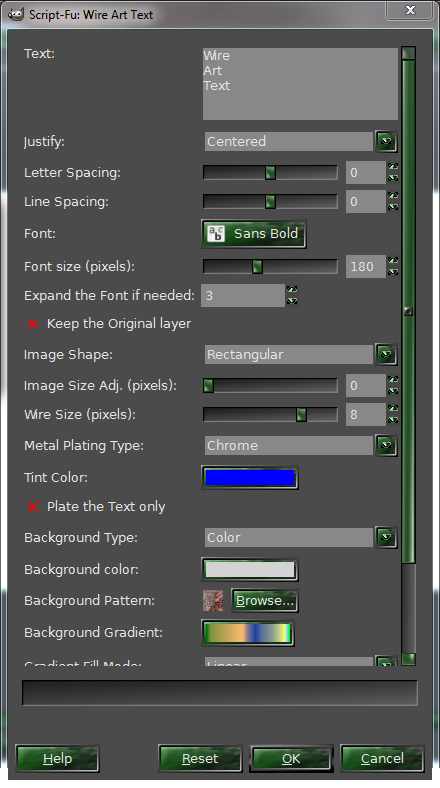
mackenzieh that location is for a logo so no Image is required, just enter the text you want then set the menu preferences to what you want your menu should look like below↓
Image

be warned your script may not work if you have also loaded the one from Gimp Link

_________________
Image
No matter how much you push the envelope, it'll still be stationery.


Top
 Post subject: Re: Wire Art Text Rel5 (Bkg Options)
PostPosted: Sun Jan 25, 2015 1:43 am  (#95) 
Offline
GimpChat Member
User avatar

Joined: Jul 06, 2013
Posts: 2661
Location: California
Graechan wrote:
Quote:
With this script, is a text layer or a shape layer required to run it? I ask because when I tried to run it from

Logo Menu location Script-Fu/Logos/Wire Art Text

mackenzieh that location is for a logo so no Image is required, just enter the text you want then set the menu preferences to what you want your menu should look like below↓
[ Image ]

be warned your script may not work if you have also loaded the one from Gimp Link


Never mind, I figured it out. I had to adjust the image size.


Top
 Post subject: Re: Wire Art Text Rel5 (Bkg Options)
PostPosted: Sun Jan 25, 2015 2:03 am  (#96) 
Offline
Script Coder
User avatar

Joined: Feb 18, 2011
Posts: 4826
Location: Bendigo Vic. Australia
Are you sure you don't have 2 copies of the script, please check

_________________
Image
No matter how much you push the envelope, it'll still be stationery.


Top
 Post subject: Re: Wire Art Text Rel5 (Bkg Options)
PostPosted: Sun Jan 25, 2015 3:02 am  (#97) 
Offline
GimpChat Member
User avatar

Joined: Mar 01, 2014
Posts: 14053
Location: Spain, Aragón
Enjoying your great script Graechan. Thank you. :coolthup :tyspin


Attachments:
Wire-Art.PNG
Wire-Art.PNG [ 870.89 KiB | Viewed 2287 times ]

_________________
Image

Gimp 2.10.30(samj) portable _ OS Windows 10 Home_ 64bits
Don’t be afraid to start over. It’s a new chance to rebuild what you want.
Top
 Post subject: Re: Wire Art Text Rel5 (Bkg Options)
PostPosted: Sun Jan 25, 2015 3:33 am  (#98) 
Offline
GimpChat Member
User avatar

Joined: Jul 06, 2013
Posts: 2661
Location: California
Graechan wrote:
Are you sure you don't have 2 copies of the script, please check

I don't have 2 copies of the script. Everytime I download an updated version of a script I am given the option to copy and replace the script with the new version or keep both. I replace the old version with the new script. I still get an error when I run the wire art text script under Script-Fu/Logo/Wire Art Text and try to change the shape. For me, only the ellipse & circular shapes works. The options rectangular & square give me errors.


Top
 Post subject: Re: Wire Art Text Rel5 (Bkg Options)
PostPosted: Sun Jan 25, 2015 5:03 am  (#99) 
Offline
Global Moderator
User avatar

Joined: Apr 01, 2012
Posts: 8405
Location: On the other side of your screen
Very nice Issabella :clap

_________________
Image
Free Fun Photo Editing & resources
Poems from the Lord
Gimp Newby
Gimp version 3.2.0 and GMIC-Qt 3.7.5 OS :- Windows 10 Home 64


Top
 Post subject: Re: Wire Art Text Rel5 (Bkg Options)
PostPosted: Sun Jan 25, 2015 6:18 am  (#100) 
Offline
GimpChat Member
User avatar

Joined: Mar 01, 2014
Posts: 14053
Location: Spain, Aragón
I wish I could help you mackenzieh. I don't know to solve your problem but sure that Graechan will.

Thank you Sallyanne. :)

_________________
Image

Gimp 2.10.30(samj) portable _ OS Windows 10 Home_ 64bits
Don’t be afraid to start over. It’s a new chance to rebuild what you want.


Top
Post new topic Reply to topic  [ 119 posts ]  Go to page Previous  1, 2, 3, 4, 5, 6  Next

All times are UTC - 5 hours [ DST ]


* Login  


Powered by phpBB3 © phpBB Group