It is currently Wed Sep 30, 2026 4:52 pm


All times are UTC - 5 hours [ DST ]


Post new topic Reply to topic  [ 6 posts ] 
Author Message
 Post subject: GIMP Default Brush Changed
PostPosted: Mon Feb 09, 2015 6:32 pm  (#1) 
Offline
GimpChat Member
User avatar

Joined: Sep 30, 2011
Posts: 12
GIMP Version: 2.8.10
Operating System: Windows
OS Version: W7 - Home Premium 64bit
GIMP Experience: Intermediate Level


I recently noticed that my GMIC plug-in had suddenly disappeared - and - that my default paint brush has somehow changed to the clipboard. I re-installed the GMIC plug-in and took care of that problem - but - I've tried to no avail - to reset the default brush. Does anyone know how can I reset it to the correct brush - without having to re-install the program?


Share on Facebook Share on Twitter Share on Orkut Share on Digg Share on MySpace Share on Delicious Share on Technorati
Top
 Post subject: Re: GIMP Default Brush Changed
PostPosted: Mon Feb 09, 2015 6:45 pm  (#2) 
Offline
GimpChat Member
User avatar

Joined: Nov 16, 2011
Posts: 5127
Location: Metro Vancouver, BC
rick2feather wrote:
I recently noticed that my GMIC plug-in had suddenly disappeared - and - that my default paint brush has somehow changed to the clipboard. I re-installed the GMIC plug-in and took care of that problem - but - I've tried to no avail - to reset the default brush. Does anyone know how can I reset it to the correct brush - without having to re-install the program?
Did you try the reset button at the bottom of the Toolbox options? There is also a reset in, Edit | Preferences.

_________________
Image
Gimp 2.8.18, Linux, median user
Gimp Chat Tutorials Index
Spirit Bear (Kermode)


Top
 Post subject: Re: GIMP Default Brush Changed
PostPosted: Mon Feb 09, 2015 6:54 pm  (#3) 
Offline
GimpChat Member
User avatar

Joined: Apr 07, 2010
Posts: 14182
Open the "Edit->Preferences" dialog and go to the Tool Options page. Activate your Paintbrush tool, change it to the settings you want, and then click on "Save Tool Options Now".

_________________
Image


Top
 Post subject: Re: GIMP Default Brush Changed
PostPosted: Mon Feb 09, 2015 7:53 pm  (#4) 
Offline
GimpChat Member
User avatar

Joined: Sep 30, 2011
Posts: 12
I've already tried to reset the brush with the reset button at the bottom of the Toolbox options - and - in the tool option preferences dialog. Neither one changed the brush.


Top
 Post subject: Re: GIMP Default Brush Changed
PostPosted: Mon Feb 09, 2015 8:11 pm  (#5) 
Offline
Script Coder
User avatar

Joined: Feb 18, 2011
Posts: 4826
Location: Bendigo Vic. Australia
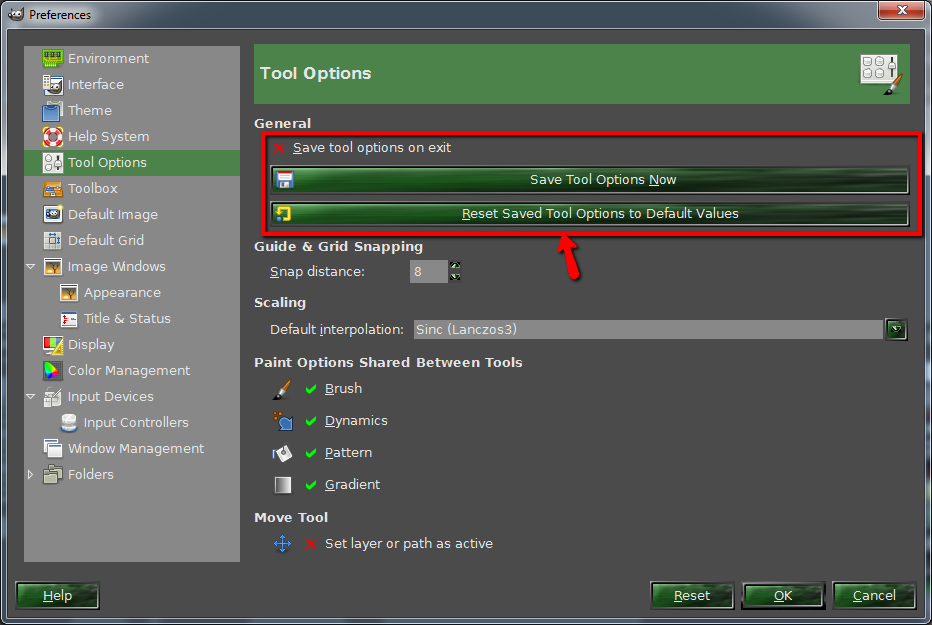
to set your tool defaults select Edit>Preferences>Tool Options and check the area I have outlined
Image
check that 'Save Tool options on exit' is also deselected

_________________
Image
No matter how much you push the envelope, it'll still be stationery.


Top
 Post subject: Re: GIMP Default Brush Changed
PostPosted: Sat Feb 21, 2015 4:18 pm  (#6) 
Offline
GimpChat Member
User avatar

Joined: Sep 30, 2011
Posts: 12
Sorry for the delayed response - but - I had an out of town emergency and couldn't reply right away.

I reset the tool options - but - for some reason - the brush did not reset until after I rebooted my computer.

Thanks for all the help - it was greatly appreciated!


Top
Post new topic Reply to topic  [ 6 posts ] 

All times are UTC - 5 hours [ DST ]


* Login  


Powered by phpBB3 © phpBB Group