It is currently Tue Nov 10, 2026 6:05 pm


All times are UTC - 5 hours [ DST ]


Post new topic Reply to topic  [ 240 posts ]  Go to page Previous  1 ... 7, 8, 9, 10, 11, 12  Next
Author Message
 Post subject: Re: path-inbetweener
PostPosted: Tue Nov 11, 2014 7:25 am  (#181) 
Offline
Global Moderator
User avatar

Joined: May 16, 2010
Posts: 16252
molly wrote:
Thanks ofnuts. As I said to Wallace, why does his points show when he is in the path mode? I never see the points. I know I used to see them all the time doing other projects and I could get rid of them by just choosing another tool.

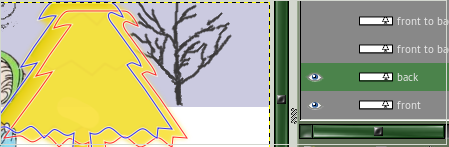
Molly you need to select the path tool first then click on the path.

_________________
Image


Top
 Post subject: Re: path-inbetweener
PostPosted: Tue Nov 11, 2014 7:31 am  (#182) 
Offline
GimpChat Member
User avatar

Joined: Apr 07, 2010
Posts: 14182
I do that Rod, My path called back is a red outline and the one called front is a blue outline, but I never get the points, with or without the eyes on or off.
Image

_________________
Image


Top
 Post subject: Re: path-inbetweener
PostPosted: Tue Nov 11, 2014 7:57 am  (#183) 
Offline
Global Moderator
User avatar

Joined: May 16, 2010
Posts: 16252
Molly if you select the path tool in the tool box and click the path line itself you can switch between each path (by selecting the path layer), and the nodes will show

_________________
Image


Top
 Post subject: Re: path-inbetweener
PostPosted: Tue Nov 11, 2014 7:59 am  (#184) 
Offline
Global Moderator
User avatar

Joined: May 16, 2010
Posts: 16252
Image

_________________
Image


Top
 Post subject: Re: path-inbetweener
PostPosted: Tue Nov 11, 2014 8:05 am  (#185) 
Offline
GimpChat Member
User avatar

Joined: Apr 07, 2010
Posts: 14182
Thanks Rod, I was clicking the path itself instead of the actual image.

_________________
Image


Top
 Post subject: Re: path-inbetweener
PostPosted: Tue Nov 11, 2014 2:03 pm  (#186) 
Offline
Global Moderator
User avatar

Joined: Oct 02, 2014
Posts: 5090
Location: Sydney Australia
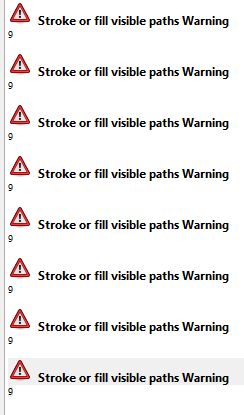
I have been having a lot of fun with both 'path-inbetweener' and 'path ladder' over the last few days but wonder is it possible to generate too many paths for 'stroke or fill path' script to handle? I have created a large number of paths from separate path pairs but when, with all visible, I go to stroke them from a gradient I receive an error message ..

Image

I can though reduce the number visible at any one time and selectively stroke/fill them with that gradient until all are all completed.

Or maybe I am doing something 'senile' and do not realise it.

_________________
Image

Respect should be offered freely but hard earned


Top
 Post subject: Re: path-inbetweener
PostPosted: Tue Nov 11, 2014 3:30 pm  (#187) 
Offline
Script Coder
User avatar

Joined: Oct 25, 2010
Posts: 4812
oldmangrumpy wrote:
I have been having a lot of fun with both 'path-inbetweener' and 'path ladder' over the last few days but wonder is it possible to generate too many paths for 'stroke or fill path' script to handle? I have created a large number of paths from separate path pairs but when, with all visible, I go to stroke them from a gradient I receive an error message ..

[ Image ]

I can though reduce the number visible at any one time and selectively stroke/fill them with that gradient until all are all completed.

Or maybe I am doing something 'senile' and do not realise it.


Could be a bug, but I don't really see what would cause that "9" to appear. Can you attach the XCF with all the paths (you can drop the layers, I just need the paths), and tell me the exact options you used?

_________________
Image


Top
 Post subject: Re: path-inbetweener
PostPosted: Wed Nov 12, 2014 12:32 am  (#188) 
Offline
Global Moderator
User avatar

Joined: Oct 02, 2014
Posts: 5090
Location: Sydney Australia
Ofnuts - I have attached 2 XCF files with paths on which I received the error code when attempting to stroke with gradient.

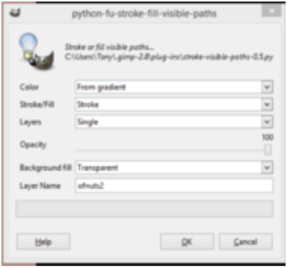
The options for the stroking were -
Image

If you require any further info please let me know.


Attachments:
ofnuts3.xcf [21.77 KiB]
Downloaded 115 times
ofnuts2.xcf [58.34 KiB]
Downloaded 119 times

_________________
Image

Respect should be offered freely but hard earned
Top
 Post subject: Re: path-inbetweener
PostPosted: Wed Nov 12, 2014 2:59 am  (#189) 
Offline
Script Coder
User avatar

Joined: Oct 25, 2010
Posts: 4812
oldmangrumpy wrote:
The options for the stroking were -
[ Image ]

Your monitor is so bad that even screenshots are blurry :)

_________________
Image


Top
 Post subject: Re: path-inbetweener
PostPosted: Wed Nov 12, 2014 9:32 am  (#190) 
Offline
Script Coder
User avatar

Joined: Oct 25, 2010
Posts: 4812
Download version 0.6 from the usual place. That should fix it.

_________________
Image


Top
 Post subject: Re: path-inbetweener
PostPosted: Sun Feb 15, 2015 2:50 pm  (#191) 
Offline
Global Moderator
User avatar

Joined: Oct 02, 2014
Posts: 5090
Location: Sydney Australia
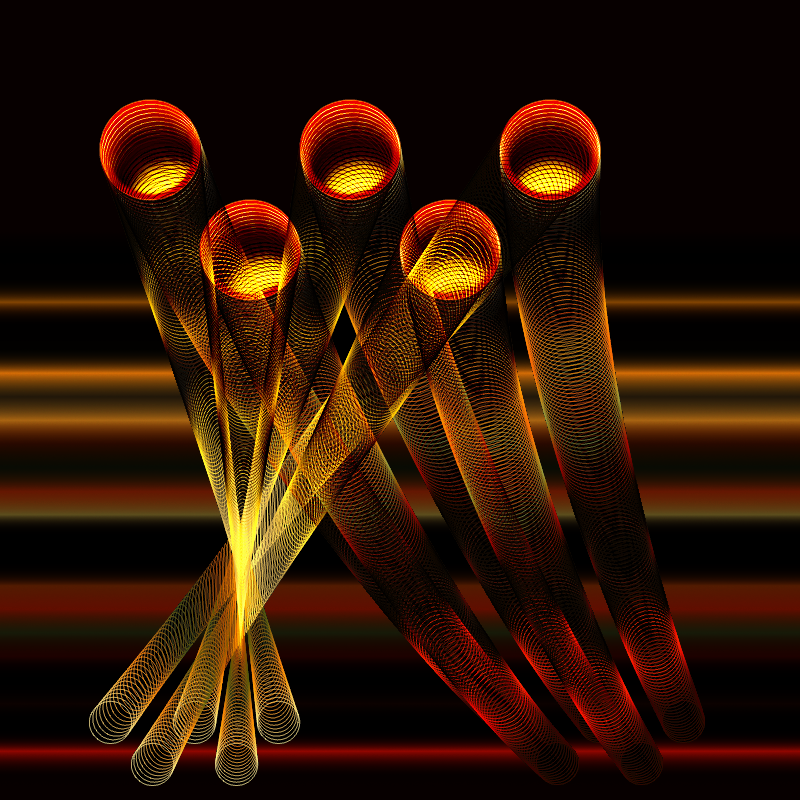
Learning more about use of multi component paths and Ofnuts path generation tools now ...

Image

_________________
Image

Respect should be offered freely but hard earned


Top
 Post subject: Re: path-inbetweener
PostPosted: Sat Aug 01, 2015 9:23 pm  (#192) 
Offline
GimpChat Member

Joined: May 12, 2015
Posts: 4693
Where can I download the latest release of path inbetweener?


Top
 Post subject: Re: path-inbetweener
PostPosted: Sat Aug 01, 2015 9:31 pm  (#193) 
Offline
Global Moderator
User avatar

Joined: Oct 02, 2014
Posts: 5090
Location: Sydney Australia
Pat625 - I just checked ofnuts pages - try this http://sourceforge.net/projects/gimp-pa ... s/scripts/

_________________
Image

Respect should be offered freely but hard earned


Top
 Post subject: Re: path-inbetweener
PostPosted: Sat Aug 01, 2015 10:52 pm  (#194) 
Offline
GimpChat Member

Joined: May 12, 2015
Posts: 4693
OMG: Thank you but I've tried several times to download the file from there. I might be doing something wrong. If I click the file, what I get is all the script coding, lines and lines of it. I don't know what to do with that. If I right click and use "save target as" with the .py, it does not work.


Top
 Post subject: Re: path-inbetweener
PostPosted: Sat Aug 01, 2015 11:26 pm  (#195) 
Offline
Global Moderator
User avatar

Joined: Oct 02, 2014
Posts: 5090
Location: Sydney Australia
Pat625 - I have just tried the link and it works OK; click the 'path inbetweener' name on the left of ofnuts script list and it should take you to a new page which should auto download the file to your PC.

I understand that there were some problems with 'sourceforge' recently but it looks OK now.

_________________
Image

Respect should be offered freely but hard earned


Top
 Post subject: Re: path-inbetweener
PostPosted: Sun Aug 02, 2015 2:41 pm  (#196) 
Offline
Script Coder
User avatar

Joined: Oct 25, 2010
Posts: 4812
Pat625 wrote:
OMG: Thank you but I've tried several times to download the file from there. I might be doing something wrong. If I click the file, what I get is all the script coding, lines and lines of it. I don't know what to do with that. If I right click and use "save target as" with the .py, it does not work.


A common pitfall is that your browser adds a .txt extension after the .py, and the Pythin registration looks for .py files not .py.txt ones. If you file explorer is still using the default of not showing extensions, this can go unnoticed for a while.

_________________
Image


Top
 Post subject: Re: path-inbetweener
PostPosted: Sun Aug 02, 2015 2:52 pm  (#197) 
Offline
GimpChat Member

Joined: May 12, 2015
Posts: 4693
Ofnuts: I don't see .txt after anything. How do I stop this from happening? I tried to download a file about a week ago and had the same problem. Since then no problem until now. I have Windows explorer, Windows 7.
I just tried to download from SourceForge on my husband's computer. I got the same problem. If I left click, takes me to another page which is all code. If I right click as use save target as and use .py it will not work.


Top
 Post subject: Re: path-inbetweener
PostPosted: Sun Aug 02, 2015 7:46 pm  (#198) 
Offline
Script Coder
User avatar

Joined: Oct 25, 2010
Posts: 4812
Pat625 wrote:
If I right click as use save target as and use .py it will not work.


That's how it should be done though. What do you mean exactly by "it will nor work"? Do you see it in the menus (right click in the Path lists, then a "Tools" submenu? Did you save it in the "plug-ins" directory of your profile? If you are on OSX did you mark it as executable?

_________________
Image


Top
 Post subject: Re: path-inbetweener
PostPosted: Sun Aug 02, 2015 8:10 pm  (#199) 
Offline
GimpChat Member

Joined: May 12, 2015
Posts: 4693
It does not show up in the paths list. I'm using Windows 7. When I had originally downloaded the first version, it showed up in the paths list as it was supposed to. I deleted it when I tried to get version 0.2. It does not show in the paths lists. I did save it in the plug-ins directory.


Top
 Post subject: Re: path-inbetweener
PostPosted: Sun Aug 02, 2015 11:23 pm  (#200) 
Offline
GimpChat Member
User avatar

Joined: Aug 16, 2012
Posts: 4271
Location: Göteborg, Sweden
oldmangrumpy: that image is simply amazing! it's impressive how far you've come in your relatively short time with gimp. you know exactly how to make use of those scripts and plug-ins.

_________________


Top
Post new topic Reply to topic  [ 240 posts ]  Go to page Previous  1 ... 7, 8, 9, 10, 11, 12  Next

All times are UTC - 5 hours [ DST ]


* Login  


Powered by phpBB3 © phpBB Group