It is currently Mon Nov 23, 2026 2:21 pm


All times are UTC - 5 hours [ DST ]


Post new topic Reply to topic  [ 51 posts ]  Go to page Previous  1, 2, 3  Next
Author Message
 Post subject: Re: Crashing and not opening properly
PostPosted: Thu Feb 12, 2015 3:55 pm  (#21) 
Offline
GimpChat Member

Joined: Feb 28, 2014
Posts: 137
dietmar wrote:
I also noticed that Gimp uses more and more memory when being used over a long time (e.g. on complete weekend day with heavy tutorial etc. working :)) and playing a lot with filters, undo/redo and other features. I don't know whether this could indicate a possible memory leak or not, and I have not tried GURM yet.

dietmar


dietmar,

If you look at the bottom of the undo/redo toolbox dialogue, there's a way to clear the history. When I've been working for a while and I'm satisfied with where I am, I'll do that to free up memory. It's not technically a memory leak because GIMP is actively using that memory space, but it does consume a lot of resources and makes it more likely something will trip and cause GIMP to crash.

_________________
Margaret McGaffey Fisk
steampunk, fantasy, science fiction, and romance author
Tales to Tide You Over


Top
 Post subject: Re: Crashing and not opening properly
PostPosted: Sat Feb 14, 2015 4:13 am  (#22) 
Offline
GimpChat Member
User avatar

Joined: Dec 09, 2014
Posts: 105
Location: Cologne, Germany
MarFisk wrote:
If you look at the bottom of the undo/redo toolbox dialogue, there's a way to clear the history. When I've been working for a while and I'm satisfied with where I am, I'll do that to free up memory. It's not technically a memory leak because GIMP is actively using that memory space, but it does consume a lot of resources and makes it more likely something will trip and cause GIMP to crash.


It would never exclude a memory leak without having read and understood the source completely, but thx for the hint regarding the history clear ;)

dietmar

_________________
Graphics: GIMP 2.8.14 on Win7 64Bit
Screenshots: GreenShot
Color Picker: PicPick
Palette Helper: paletton.com


Top
 Post subject: Re: Crashing and not opening properly
PostPosted: Sat Feb 14, 2015 4:41 am  (#23) 
Offline
GimpChat Member

Joined: Feb 28, 2014
Posts: 137
dietmar wrote:
It would never exclude a memory leak without having read and understood the source completely, but thx for the hint regarding the history clear ;)
dietmar


Oh, absolutely. I didn't mean to say that a memory leak was not possible but rather that the proper and appropriate functioning of the program, because of the large undo/redo buffer, consumes great amounts of memory that could put a system at risk.

_________________
Margaret McGaffey Fisk
steampunk, fantasy, science fiction, and romance author
Tales to Tide You Over


Top
 Post subject: Re: Crashing and not opening properly
PostPosted: Sat Feb 14, 2015 7:25 am  (#24) 
Offline
GimpChat Member
User avatar

Joined: Jan 31, 2015
Posts: 146
My experience with Windows is that, regardless of how well you maintain it, after a while there will come a point where a clean install is necessary. If all else suggested here fails, then taking it to extremes is probably your best bet:

http://pcsupport.about.com/od/operatingsystems/f/clean-install-windows.htm

I'm assuming by the 3 year mark that your windows isn't as fast as when you first started to use it. The benefits are that your Windows will run fast again for the first couple of months.

Obviously, if you do it, take the precaution of backing up all of your important files, because a clean install will wipe everything. A USB stick or rewritable DVD's should do, if you have them.

It's always resolved my Windows problems in the past when all else fails. And many Windows magazines I've read highly suggest it after the 1.5 year mark. Then again, I don't use Windows primarily anymore these days.

Also, if you do, it's also a good idea to defrag your hard drive at least once a month.

But again, only if all else fails.


Top
 Post subject: Re: Crashing and not opening properly
PostPosted: Sat Feb 14, 2015 9:23 am  (#25) 
Offline
Global Moderator
User avatar

Joined: Apr 01, 2012
Posts: 8511
Location: On the other side of your screen
dinasset wrote:
even better than GURM : addonCollectionManager, by Ofnuts

I downloaded it and copied it into my plugins folder....is that correct?
Do I need to do anything else now?

_________________
Image
Free Fun Photo Editing & resources
Poems from the Lord
Gimp Newby
Gimp version 3.2.8 and GMIC-Qt 4.0.2 OS :- Windows 10 Home 64


Top
 Post subject: Re: Crashing and not opening properly
PostPosted: Sat Feb 14, 2015 11:26 am  (#26) 
Offline
Administrator
User avatar

Joined: Aug 10, 2012
Posts: 14281
Location: Native to NYC living in Arizona, Gimp 2.8 - 3.0, Win 11 PC.
sallyanne wrote:
dinasset wrote:
even better than GURM : addonCollectionManager, by Ofnuts

I downloaded it and copied it into my plugins folder....is that correct?
Do I need to do anything else now?

I found this link at sourceforge.net that explains in detail how the addonCollectionManager functions. I hope that you find it helpful.
http://gimp-tools.sourceforge.net/managementtools.shtml

_________________
Image
"A wise man learns more from a foolish question than a fool can learn from a wise answer"
Image


Top
 Post subject: Re: Crashing and not opening properly
PostPosted: Sat Feb 14, 2015 12:24 pm  (#27) 
Offline
GimpChat Member
User avatar

Joined: Apr 07, 2010
Posts: 14182
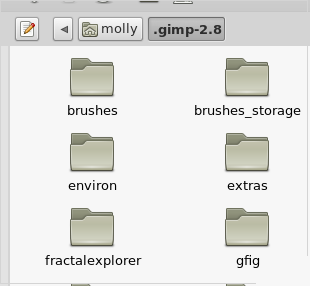
@Sallyanne, With the addonmanager the idea is to take all your brushes out of your brushes folder, make a new folder and call it Brushes Storage
Image.

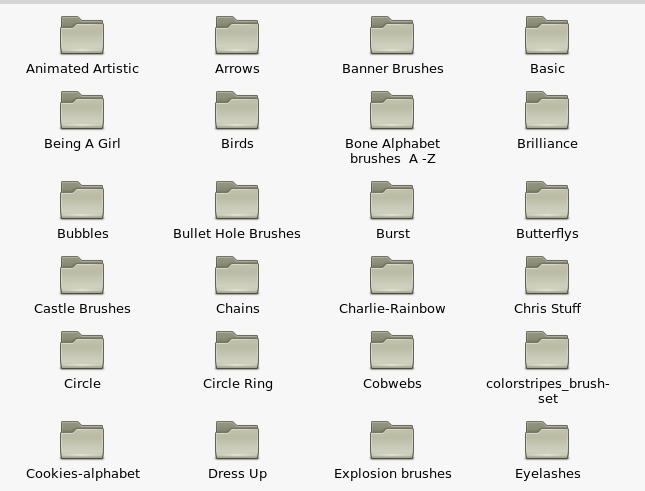
You will make a Folder for every series of brushes like one for your Arrows, Butterflies, Fish, Sparkes, and so on. You can name them anything your want, these are just some of mine.
Image

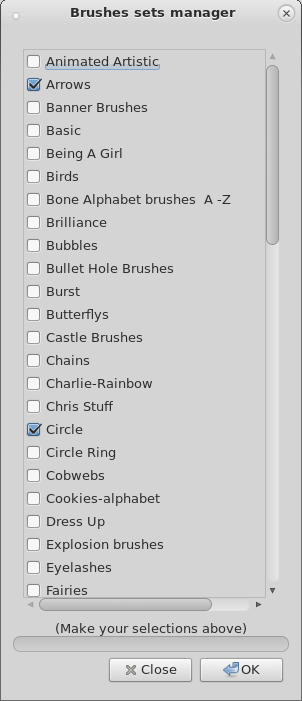
They should all have capitial letters like you see in this folder. Once you have all your regular brushes emptied, then when you use your brush sets you just put a cilick beside the brushes you want to open and then they will be put into your brushes folder. The rest will remain in your storage folder.
This is what your brush sets will look like, I have check marks in the ones I have opened.
Image

_________________
Image


Top
 Post subject: Re: Crashing and not opening properly
PostPosted: Sat Feb 14, 2015 2:46 pm  (#28) 
Offline
GimpChat Member
User avatar

Joined: Dec 09, 2014
Posts: 105
Location: Cologne, Germany
I totally agree that windows needs a clean install some times.

But times are changing, and even Windows is improving ;)
Regarding XP, I had to reinstall it every year or so.
With Win7, I was running for over 4 years without need to reinstall and with only about 5 "blue screens" (which could be resolved easily by system restore).
Some weeks ago, some software install/upgrade (could not figure out what it was) left my installation broken - XML structure damaged, half of the programs did not start any more...

So after a new install, I not only gained twice the boot speed, but also about 50GB of "new" free disk space ;)
Althouth I call myself a windows expert user and I tweak and fix my system regularly, it is unbelievable how much "crap" is getting collected on the system within 4 years ;)

Regarding the post of sallyanne, there is one thing I forgot to mention:
If Gimp is the only program to crash / not to run anymore, it is most likely a software problem.

If many other programs are crashing / quitting unexpectedly, it is most probably a hardware error (mostly RAM/ECC).

dietmar

_________________
Graphics: GIMP 2.8.14 on Win7 64Bit
Screenshots: GreenShot
Color Picker: PicPick
Palette Helper: paletton.com


Top
 Post subject: Re: Crashing and not opening properly
PostPosted: Fri Mar 06, 2015 2:54 am  (#29) 
Offline
GimpChat Member
User avatar

Joined: Dec 09, 2014
Posts: 105
Location: Cologne, Germany
molly wrote:
Once you have all your regular brushes emptied, then when you use your brush sets you just put a cilick beside the brushes you want to open and then they will be put into your brushes folder. The rest will remain in your storage folder.


I followed the steps you mentioned, I now have a "brushes_storage" folder beside (not inside!) the "brushes" folder with my brushes sorted like "Music", "Misc" etc.

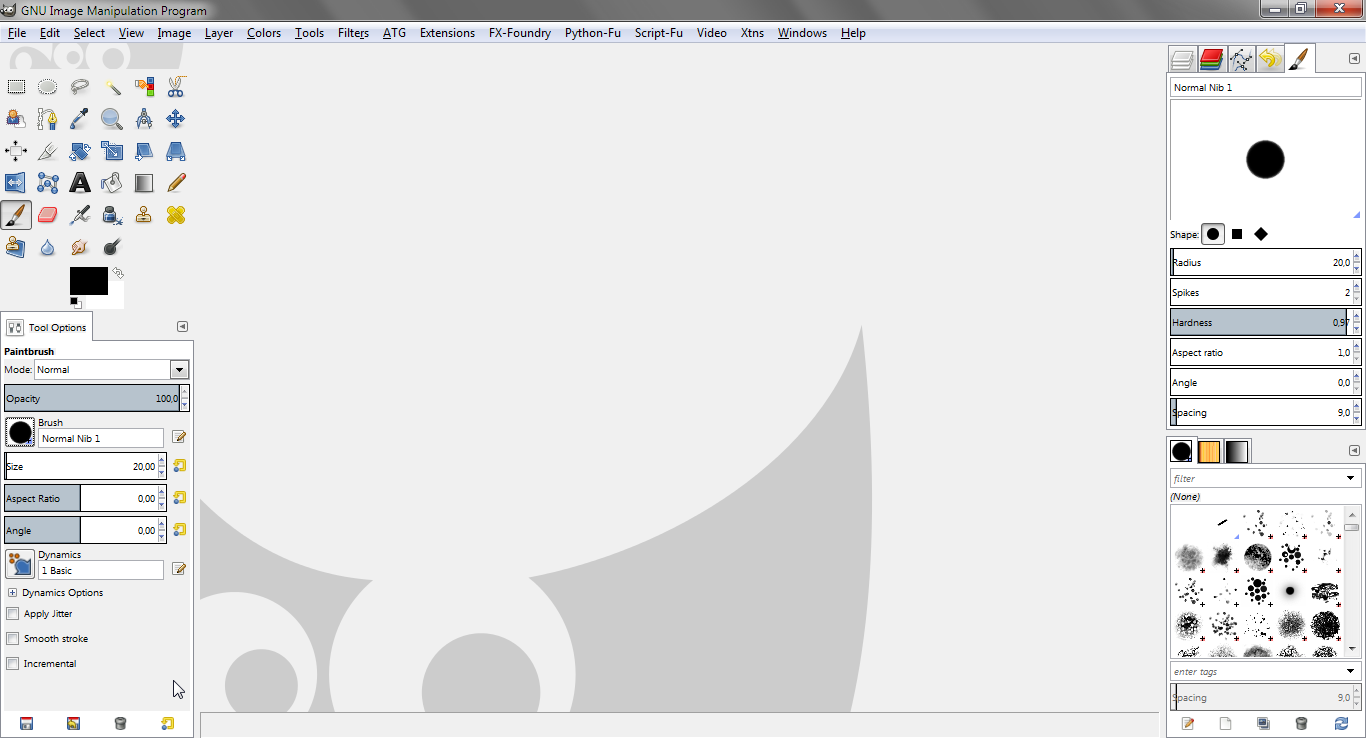
I notice that GIMP does only consume 150MB of RAM (it was >500MB before!), but I cannot find my moved brushes (see screenshot, list is quite empty).

What am I missing?

Thanks!
Dietmar

Image

_________________
Graphics: GIMP 2.8.14 on Win7 64Bit
Screenshots: GreenShot
Color Picker: PicPick
Palette Helper: paletton.com


Top
 Post subject: Re: Crashing and not opening properly
PostPosted: Fri Mar 06, 2015 4:25 am  (#30) 
Offline
GimpChat Member
User avatar

Joined: Jan 20, 2013
Posts: 14835
Location: roma, italy
Dietmar,

once you have organized your resources according to the AddonsManager, you have to activate those subsets of resources you want to have active under gimp

have a look (in my gimp the manager uses the Help menu)

first screen shot:
Attachment:
Screenshot 2015-03-06 10.18.00.png
Screenshot 2015-03-06 10.18.00.png [ 385.74 KiB | Viewed 2232 times ]

just open Help

second screenshot:
Attachment:
Screenshot 2015-03-06 10.18.21.png
Screenshot 2015-03-06 10.18.21.png [ 401.86 KiB | Viewed 2232 times ]

open one of the "managers", brush manager (brushes sets) in this case

third screenshot:
Attachment:
Screenshot 2015-03-06 10.18.43.png
Screenshot 2015-03-06 10.18.43.png [ 402.11 KiB | Viewed 2232 times ]

check one (or more) of the subfolders, then click OK
they will become "active"

_________________
"Where am I ?"


Top
 Post subject: Re: Crashing and not opening properly
PostPosted: Fri Mar 06, 2015 4:45 am  (#31) 
Offline
GimpChat Member
User avatar

Joined: Dec 09, 2014
Posts: 105
Location: Cologne, Germany
Hi dinasset,

ok, I searched everywhere but not in the "help" menu...

But I have no success - the only menu entry I can see there is "scripts sets..." (which is empty) and no "brushes sets...", "gradients sets..." etc... :(

What am I doing wrong?

_________________
Graphics: GIMP 2.8.14 on Win7 64Bit
Screenshots: GreenShot
Color Picker: PicPick
Palette Helper: paletton.com


Top
 Post subject: Re: Crashing and not opening properly
PostPosted: Fri Mar 06, 2015 5:16 am  (#32) 
Offline
GimpChat Member
User avatar

Joined: Jan 20, 2013
Posts: 14835
Location: roma, italy
maybe you didn't set the menu entry to help for all managers, this is my .ini
#-------------------------------------------------------------------------
[all]
# enable:brushes dynamics fonts gradients palettes patterns scripts
enable:brushes fonts gradients palettes patterns scripts
addons_active:{GimpUser}/{type}
addons_stored:{GimpUser}/{type}_storage
menu_location:{<type>}
menu_entry:{type} sets...
menu_description:Manage {type} sets...
dialog_title:{type} sets manager
[brushes]
menu_location:<Image>/Help
extensions:.gbr .vbr .gih .abr .GBR .VBR .GIH
#[dynamics]
#extensions:.gdyn .GDYN
[fonts]
menu_location:<Image>/Help
extensions:.ttf .otf .TTF .OTF
[gradients]
menu_location:<Image>/Help
extensions:.ggr .GGR
[palettes]
menu_location:<Image>/Help
extensions:.pal .PAL .gpl .GPL
[patterns]
menu_location:<Image>/Help
extensions:.jpg .png .pat .JPG .PNG .PAT
[scripts]
menu_location:<Image>/Help
extensions:.scm .SCM
#-------------------------------------------------------------------------

_________________
"Where am I ?"


Top
 Post subject: Re: Crashing and not opening properly
PostPosted: Fri Mar 06, 2015 5:06 pm  (#33) 
Offline
GimpChat Member
User avatar

Joined: Dec 09, 2014
Posts: 105
Location: Cologne, Germany
dinasset wrote:
maybe you didn't set the menu entry to help for all managers, this is my .ini


Hi,

thank you, but this didn't work either :(

Here is my log file (in fact, it is located in the users GIMP directory, not in the "tool-options" directory, as the documentation says):

Configuration initialized OK
Reading configuration file C:\Users\xy\.gimp-2.8\plug-ins\addonCollectionManager.ini
Configuration file C:\Users\xy\.gimp-2.8\plug-ins\addonCollectionManager.ini not found or not readable: [Errno 2] No such file or directory: 'C:\\Users\\xy\\.gimp-2.8\\plug-ins\\addonCollectionManager.ini'
Creating manager for brushes
Searching directories as C:\Users\xy\.gimp-2.8/brushes_storage/* for brushes
8 directories as C:\Users\xy\.gimp-2.8/brushes_storage/* for brushes
Manager of brushes created OK: active: C:\Users\xy\.gimp-2.8/brushes, stored: C:\Users\xy\.gimp-2.8/brushes_storage, subdir: True, link: False, extensions: ('.gbr', '.vbr', '.gih', '.abr', '.GBR', '.VBR', '.GIH')
Creating manager for fonts
Searching directories as C:\Users\xy\.gimp-2.8/fonts_storage/* for fonts
0 directories as C:\Users\xy\.gimp-2.8/fonts_storage/* for fonts
Manager of fonts created OK: active: C:\Users\xy\.gimp-2.8/fonts, stored: C:\Users\xy\.gimp-2.8/fonts_storage, subdir: True, link: False, extensions: ('.ttf', '.otf', '.TTF', '.OTF')
Creating manager for patterns
Searching directories as C:\Users\xy\.gimp-2.8/patterns_storage/* for patterns
0 directories as C:\Users\xy\.gimp-2.8/patterns_storage/* for patterns
Manager of patterns created OK: active: C:\Users\xy\.gimp-2.8/patterns, stored: C:\Users\xy\.gimp-2.8/patterns_storage, subdir: True, link: False, extensions: ('.png', '.pat', '.PNG', '.PAT')
Creating manager for palettes
Searching directories as C:\Users\xy\.gimp-2.8/palettes_storage/* for palettes
0 directories as C:\Users\xy\.gimp-2.8/palettes_storage/* for palettes
Manager of palettes created OK: active: C:\Users\xy\.gimp-2.8/palettes, stored: C:\Users\xy\.gimp-2.8/palettes_storage, subdir: True, link: False, extensions: ('.pal', '.PAL')
Creating manager for scripts
Searching directories as C:\Users\xy\.gimp-2.8/scripts_storage/* for scripts
0 directories as C:\Users\xy\.gimp-2.8/scripts_storage/* for scripts
Manager of scripts created OK: active: C:\Users\xy\.gimp-2.8/scripts, stored: C:\Users\xy\.gimp-2.8/scripts_storage, subdir: False, link: False, extensions: ('.scm', '.SCM')
Creating manager for dynamics
Searching directories as C:\Users\xy\.gimp-2.8/dynamics_storage/* for dynamics
0 directories as C:\Users\xy\.gimp-2.8/dynamics_storage/* for dynamics
Manager of dynamics created OK: active: C:\Users\xy\.gimp-2.8/dynamics, stored: C:\Users\xy\.gimp-2.8/dynamics_storage, subdir: True, link: False, extensions: ('.gdyn', '.GDYN')
Creating manager for gradients
Searching directories as C:\Users\xy\.gimp-2.8/gradients_storage/* for gradients
0 directories as C:\Users\xy\.gimp-2.8/gradients_storage/* for gradients
Manager of gradients created OK: active: C:\Users\xy\.gimp-2.8/gradients, stored: C:\Users\xy\.gimp-2.8/gradients_storage, subdir: True, link: False, extensions: ('.ggr', '.GGR')
Starting scripts manager
Configuration initialized OK
Reading configuration file C:\Users\xy\.gimp-2.8\plug-ins\addonCollectionManager.ini
Configuration file C:\Users\xy\.gimp-2.8\plug-ins\addonCollectionManager.ini not found or not readable: [Errno 2] No such file or directory: 'C:\\Users\\xy\\.gimp-2.8\\plug-ins\\addonCollectionManager.ini'
Searching directories as C:\Users\xy\.gimp-2.8/scripts_storage/* for scripts
0 directories as C:\Users\xy\.gimp-2.8/scripts_storage/* for scripts
Manager of scripts created OK: active: C:\Users\xy\.gimp-2.8/scripts, stored: C:\Users\xy\.gimp-2.8/scripts_storage, subdir: False, link: False, extensions: ('.scm', '.SCM')
Creating main dialog
Main dialog created
Scrollbox created
VBox created
Cancel button created
OK button created
Destroying main
Exiting scripts manager


dietmar

_________________
Graphics: GIMP 2.8.14 on Win7 64Bit
Screenshots: GreenShot
Color Picker: PicPick
Palette Helper: paletton.com


Top
 Post subject: Re: Crashing and not opening properly
PostPosted: Sat Mar 07, 2015 5:01 am  (#34) 
Offline
GimpChat Member
User avatar

Joined: Jan 20, 2013
Posts: 14835
Location: roma, italy
Dietmar
the log says that the .ini file was not found in your plug-in directory
didn't you put the .ini file I provided to you in your plug-in directory?
it should be a companion of the filter in .py

_________________
"Where am I ?"


Top
 Post subject: Re: Crashing and not opening properly
PostPosted: Sat Mar 07, 2015 5:03 am  (#35) 
Offline
GimpChat Member
User avatar

Joined: Jan 20, 2013
Posts: 14835
Location: roma, italy
log: "Configuration file C:\Users\xy\.gimp-2.8\plug-ins\addonCollectionManager.ini not found"

_________________
"Where am I ?"


Top
 Post subject: Re: Crashing and not opening properly
PostPosted: Sat Mar 07, 2015 6:28 am  (#36) 
Offline
GimpChat Member
User avatar

Joined: Jan 20, 2013
Posts: 14835
Location: roma, italy
Dietmar,

this is a résumé for addonCollectionManager:

a) in your /.gimp-2.8/plug-ins folder check you have:
a1)addonCollectionManager-3.0.py
a2)addonCollectionManager.ini

b) in your /.gimp-2.8 folder check you have:
b1)brushes (initially empty) and brushes_storage (with your groups of brushes)
b2)fonts (initially empty) and fonts_storage (with your groups of fonts)
b3)gradients (initially empty) and gradients_storage (with your groups of gradients)
b4)palettes (initially empty) and palettes_storage (with your groups of palettes)
b5)patterns (initially empty) and patterns_storage (with your groups of patterns)
b6)scripts (initially empty) and scripts_storage (with your groups of scripts)

after Gimp start-up, you should find under Help:
- brushes sets...
- fonts sets...
- gradients sets...
- palettes sets...
- patterns sets...
- scripts sets...

any one of those activates the relevant "manager", to make your selection(s)

hope this can be of some help for you

_________________
"Where am I ?"


Top
 Post subject: Re: Crashing and not opening properly
PostPosted: Sat Mar 07, 2015 2:33 pm  (#37) 
Offline
GimpChat Member

Joined: Feb 28, 2014
Posts: 137
dietmar wrote:
Hi dinasset,

ok, I searched everywhere but not in the "help" menu...

But I have no success - the only menu entry I can see there is "scripts sets..." (which is empty) and no "brushes sets...", "gradients sets..." etc... :(

What am I doing wrong?


FYI, this is my experience as well. I'll add the below .ini code though. I'm guessing I have to change the path in it though with <IMAGE> being the root GIMP folder?

_________________
Margaret McGaffey Fisk
steampunk, fantasy, science fiction, and romance author
Tales to Tide You Over


Top
 Post subject: Re: Crashing and not opening properly
PostPosted: Sat Mar 07, 2015 2:37 pm  (#38) 
Offline
GimpChat Member
User avatar

Joined: Jan 20, 2013
Posts: 14835
Location: roma, italy
Margaret,
I posted my .ini where all the managers are positioned under Help
IMO it's the easiest configuration to manage

_________________
"Where am I ?"


Top
 Post subject: Re: Crashing and not opening properly
PostPosted: Sat Mar 07, 2015 6:40 pm  (#39) 
Offline
GimpChat Member
User avatar

Joined: Dec 09, 2014
Posts: 105
Location: Cologne, Germany
I don't succeed... this is annoying.

I placed the .ini into the plugin directory, although the documentation for the addonManager says that this .ini is optional.

The log file looks quite good, but I only get an entry "scripts set..." in the help menu, which is empty.

log:

Configuration initialized OK
Reading configuration file C:\Users\xy\.gimp-2.8\plug-ins\addonCollectionManager.ini
Configuration file C:\Users\xy\.gimp-2.8\plug-ins\addonCollectionManager.ini read successfully
Creating manager for brushes
Searching directories as C:\Users\xy\.gimp-2.8/brushes_storage/* for brushes
7 directories as C:\Users\xy\.gimp-2.8/brushes_storage/* for brushes
Manager of brushes created OK: active: C:\Users\xy\.gimp-2.8/brushes, stored: C:\Users\xy\.gimp-2.8/brushes_storage, subdir: True, link: False, extensions: (u'.gbr', u'.vbr', u'.gih', u'.abr', u'.GBR', u'.VBR', u'.GIH')
Creating manager for fonts
Searching directories as C:\Users\xy\.gimp-2.8/fonts_storage/* for fonts
0 directories as C:\Users\xy\.gimp-2.8/fonts_storage/* for fonts
Manager of fonts created OK: active: C:\Users\xy\.gimp-2.8/fonts, stored: C:\Users\xy\.gimp-2.8/fonts_storage, subdir: True, link: False, extensions: (u'.ttf', u'.otf', u'.TTF', u'.OTF')
Creating manager for patterns
Searching directories as C:\Users\xy\.gimp-2.8/patterns_storage/* for patterns
0 directories as C:\Users\xy\.gimp-2.8/patterns_storage/* for patterns
Manager of patterns created OK: active: C:\Users\xy\.gimp-2.8/patterns, stored: C:\Users\xy\.gimp-2.8/patterns_storage, subdir: True, link: False, extensions: (u'.jpg', u'.png', u'.pat', u'.JPG', u'.PNG', u'.PAT')
Creating manager for palettes
Searching directories as C:\Users\xy\.gimp-2.8/palettes_storage/* for palettes
0 directories as C:\Users\xy\.gimp-2.8/palettes_storage/* for palettes
Manager of palettes created OK: active: C:\Users\xy\.gimp-2.8/palettes, stored: C:\Users\xy\.gimp-2.8/palettes_storage, subdir: True, link: False, extensions: (u'.pal', u'.PAL', u'.gpl', u'.GPL')
Creating manager for scripts
Searching directories as C:\Users\xy\.gimp-2.8/scripts_storage/* for scripts
0 directories as C:\Users\xy\.gimp-2.8/scripts_storage/* for scripts
Manager of scripts created OK: active: C:\Users\xy\.gimp-2.8/scripts, stored: C:\Users\xy\.gimp-2.8/scripts_storage, subdir: False, link: False, extensions: (u'.scm', u'.SCM')
Creating manager for gradients
Searching directories as C:\Users\xy\.gimp-2.8/gradients_storage/* for gradients
0 directories as C:\Users\xy\.gimp-2.8/gradients_storage/* for gradients
Manager of gradients created OK: active: C:\Users\xy\.gimp-2.8/gradients, stored: C:\Users\xy\.gimp-2.8/gradients_storage, subdir: True, link: False, extensions: (u'.ggr', u'.GGR')
Starting scripts manager
Configuration initialized OK
Reading configuration file C:\Users\xy\.gimp-2.8\plug-ins\addonCollectionManager.ini
Configuration file C:\Users\xy\.gimp-2.8\plug-ins\addonCollectionManager.ini read successfully
Searching directories as C:\Users\xy\.gimp-2.8/scripts_storage/* for scripts
0 directories as C:\Users\xy\.gimp-2.8/scripts_storage/* for scripts
Manager of scripts created OK: active: C:\Users\xy\.gimp-2.8/scripts, stored: C:\Users\xy\.gimp-2.8/scripts_storage, subdir: False, link: False, extensions: (u'.scm', u'.SCM')
Creating main dialog
Main dialog created
Scrollbox created
VBox created
Cancel button created
OK button created
Destroying main
Exiting scripts manager


Dietmar :gaah

_________________
Graphics: GIMP 2.8.14 on Win7 64Bit
Screenshots: GreenShot
Color Picker: PicPick
Palette Helper: paletton.com


Top
 Post subject: Re: Crashing and not opening properly
PostPosted: Sat Mar 07, 2015 8:32 pm  (#40) 
Offline
GimpChat Member

Joined: Feb 28, 2014
Posts: 137
The problem is that our config file is not being read. I'm on a Win7 box. I wonder if that's the issue. I went into the script and found this:

builtinSections={
      'all': {
         #'enable':'brushes fonts patterns'
         'enable':'brushes dynamics fonts gradients palettes patterns scripts',
         'addons_active':'{GimpUser}/{type}',
         'addons_stored':'{GimpUser}/{type}_storage',
         'menu_location':'<{Type}>',
         'menu_entry':'{Type} sets...',
         'menu_description':'Manage {type} sets...',
         'dialog_title':'{Type} sets manager',
         'use_subdirectory':'yes',
         'use_link':str('symlink' in dir(os))
         },
      'brushes':{
         'extensions':'.gbr .vbr .gih .abr .GBR .VBR .GIH'
         },
      'dynamics':{
         'extensions':'.gdyn .GDYN'
         },
      'fonts':{
         'extensions':'.ttf .otf .TTF .OTF'
         },
      'gradients':{
         'extensions':'.ggr .GGR'
         },
      'palettes':{
         'extensions':'.pal .PAL'
         },
      'patterns':{
         'extensions':'.png .pat .PNG .PAT'
         },
      'scripts':{
         'menu_location':'<Image>/Help',
         'extensions':'.scm .SCM',
         'use_subdirectory':'no',
         },
   }


Note that only the scripts selection has the menu and use subdirectory commands. As this is the only one working regardless of whether I copy the ini from the instructions, from dinasset, and my own customized one. The log correctly looks for and finds the directories, so at that point it is reading the config, and the one menu that displays reflects the config file global settings. However, the specific addonType configs are not being passed.

I was able to figure this much out, but I do not know Python, so am not able to see where the disconnect between reading the globals successfully and reading the specifics is occurring. It could be something as simple as because they are not initialized in the above built in that the script isn't looking for them.

What I don't understand is why it's working for dinasset and not for us if the script is the same unless it is an OS issue.

Dinasset, can you see if your builtin sections section is the same?

_________________
Margaret McGaffey Fisk
steampunk, fantasy, science fiction, and romance author
Tales to Tide You Over


Top
Post new topic Reply to topic  [ 51 posts ]  Go to page Previous  1, 2, 3  Next

All times are UTC - 5 hours [ DST ]


* Login  


Powered by phpBB3 © phpBB Group