It is currently Fri Oct 09, 2026 7:55 am


All times are UTC - 5 hours [ DST ]


Post new topic Reply to topic  [ 93 posts ]  Go to page Previous  1, 2, 3, 4, 5  Next
Author Message
 Post subject: Re: Hedcut: A New Experimental Gimp-G'MIC Filter
PostPosted: Sat Mar 07, 2015 1:03 pm  (#21) 
Offline
GimpChat Member
User avatar

Joined: Jan 20, 2013
Posts: 14835
Location: roma, italy
That sounds even better, Garry!

_________________
"Where am I ?"


Top
 Post subject: Re: Hedcut: A New Experimental Gimp-G'MIC Filter
PostPosted: Sat Mar 07, 2015 1:48 pm  (#22) 
Offline
GimpChat Member
User avatar

Joined: Mar 01, 2014
Posts: 14204
Location: Spain, Aragón
Some more outcomes applying hedcut and layer mode. :paint


Attachments:
impresionistas-al-oleo-hedcut-0.90.jpg
impresionistas-al-oleo-hedcut-0.90.jpg [ 530.99 KiB | Viewed 1998 times ]
impresionistas-al-oleo-hedcut-0.90+overlay.jpg
impresionistas-al-oleo-hedcut-0.90+overlay.jpg [ 555.63 KiB | Viewed 1998 times ]
impresionistas-al-oleo-hedcut-1.00+Value.jpg
impresionistas-al-oleo-hedcut-1.00+Value.jpg [ 753.36 KiB | Viewed 1998 times ]

_________________
Image

Gimp 2.10.36 (samj) portable _ OS Windows 10 Home_ 64bits
Don’t be afraid to start over. It’s a new chance to rebuild what you want.
Top
 Post subject: Re: Hedcut: A New Experimental Gimp-G'MIC Filter
PostPosted: Sat Mar 07, 2015 1:49 pm  (#23) 
Offline
GimpChat Member
User avatar

Joined: Mar 01, 2014
Posts: 14204
Location: Spain, Aragón
Another one. :)


Attachments:
fondos-animales-hedcut-0.85.jpg
fondos-animales-hedcut-0.85.jpg [ 561.52 KiB | Viewed 1998 times ]
fondos-animales-hedcut-0.85+overlay.jpg
fondos-animales-hedcut-0.85+overlay.jpg [ 579.92 KiB | Viewed 1998 times ]

_________________
Image

Gimp 2.10.36 (samj) portable _ OS Windows 10 Home_ 64bits
Don’t be afraid to start over. It’s a new chance to rebuild what you want.
Top
 Post subject: Re: Hedcut: A New Experimental Gimp-G'MIC Filter
PostPosted: Sat Mar 07, 2015 1:57 pm  (#24) 
Offline
GimpChat Member
User avatar

Joined: Jan 20, 2013
Posts: 14835
Location: roma, italy
very nice, Issabella, you like this Garry's filter a lot, don't you?
and you learned well how to manage it...

_________________
"Where am I ?"


Top
 Post subject: Re: Hedcut: A New Experimental Gimp-G'MIC Filter
PostPosted: Sat Mar 07, 2015 5:19 pm  (#25) 
Offline
GimpChat Member
User avatar

Joined: Mar 01, 2014
Posts: 14204
Location: Spain, Aragón
I like Garry's hedcut filter a lot. I find the results very nice. Thank you Garry :tyspin
Dinaset, I'm happy you like my tries. :)

_________________
Image

Gimp 2.10.36 (samj) portable _ OS Windows 10 Home_ 64bits
Don’t be afraid to start over. It’s a new chance to rebuild what you want.


Top
 Post subject: Re: Hedcut: A New Experimental Gimp-G'MIC Filter
PostPosted: Sat Mar 07, 2015 8:45 pm  (#26) 
Offline
Global Moderator
User avatar

Joined: Oct 02, 2014
Posts: 5063
Location: Sydney Australia
@Issabella - I too like very much the results you are achieving with both the Hedcut and Fingerpaint filters :jumpclap ; now I am going to have to attempt to use them too!

_________________
Image

Respect should be offered freely but hard earned


Top
 Post subject: Re: Hedcut: A New Experimental Gimp-G'MIC Filter
PostPosted: Sun Mar 08, 2015 1:24 am  (#27) 
Offline
GimpChat Member
User avatar

Joined: Jan 20, 2013
Posts: 14835
Location: roma, italy
hehehe...I see just now (reading posts in sequence...), you are in here too, OMG! OK!

_________________
"Where am I ?"


Top
 Post subject: Re: Hedcut: A New Experimental Gimp-G'MIC Filter
PostPosted: Sun Mar 08, 2015 2:14 am  (#28) 
Offline
GimpChat Member

Joined: Jan 20, 2014
Posts: 66
use that as layer mask and blend with another image.
Attachment:
blend2.JPG
blend2.JPG [ 668.86 KiB | Viewed 1971 times ]


Top
 Post subject: Re: Hedcut: A New Experimental Gimp-G'MIC Filter
PostPosted: Sun Mar 08, 2015 2:33 am  (#29) 
Offline
GimpChat Member
User avatar

Joined: Mar 01, 2014
Posts: 14204
Location: Spain, Aragón
I like your try Okyl, it's very interesting your blend with two photos. :bigthup

_________________
Image

Gimp 2.10.36 (samj) portable _ OS Windows 10 Home_ 64bits
Don’t be afraid to start over. It’s a new chance to rebuild what you want.


Top
 Post subject: Re: Hedcut: A New Experimental Gimp-G'MIC Filter
PostPosted: Sun Mar 08, 2015 2:37 am  (#30) 
Offline
GimpChat Member
User avatar

Joined: Mar 01, 2014
Posts: 14204
Location: Spain, Aragón
oldmangrumpy wrote:
@Issabella - I too like very much the results you are achieving with both the Hedcut and Fingerpaint filters :jumpclap ; now I am going to have to attempt to use them too!

I'm so happy to learn you are in this topic too. I can't wait to see your tries, I'm sure they will be great as you always do. :yes
I appreciate your words so much. :)

_________________
Image

Gimp 2.10.36 (samj) portable _ OS Windows 10 Home_ 64bits
Don’t be afraid to start over. It’s a new chance to rebuild what you want.


Top
 Post subject: Re: Hedcut: A New Experimental Gimp-G'MIC Filter
PostPosted: Sun Mar 08, 2015 6:30 am  (#31) 
Offline
GimpChat Member
User avatar

Joined: Mar 15, 2014
Posts: 115
Location: Brooklyn, NY
@Issabella
I have been enchanted by your posts here and on the G'MIC Finger paint Tutorial, now in such number, that I have no idea on how to begin figuring out which I like best or how they impress me. Confining myself to this thread, I am reminded of A Sunday on La Grande Jatte by Georges Seurat. By breaking up color with dark veins, it approaches Seurat's Pointillist technique, I suppose. Your choice of the woman quietly reading in that sunny place is particularly apt, especially in the way the pattern picks up local color.

@okyl168
I enjoy the dream-like surrealism you achieved by using the hedcut pattern as a mask to pick between the two images. Being black and white, the pattern can be readily used as a selection for no end in purposes. I look forward to more such uses.

@oldmangrumpy
Welcome to the game! I particularly enjoy your finger paint sunset on the FP tutorial thread. It was a nice doubletake when I came to notice that an erstwhile reflection of clouds off of the water resolved faintly into your "OMG" signature. I like such visual games. Keep surprising me.

For my contribution to this game, I will throw another pebble in the water and see where its expanding wavelets take me. My gambit stems from okyl168 use of the hedcut pattern as a mask, more generally as a production element, and not necessarily as a direct imposition on another image.

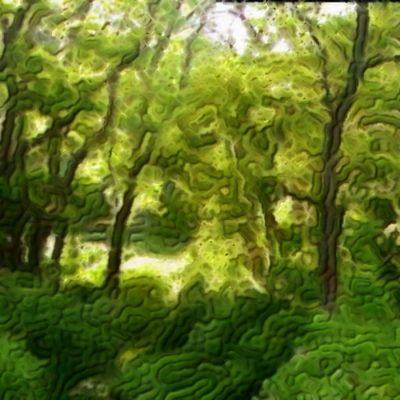
The Nethermead in Prospect Park, Brooklyn, rendered somewhat impressionistically.
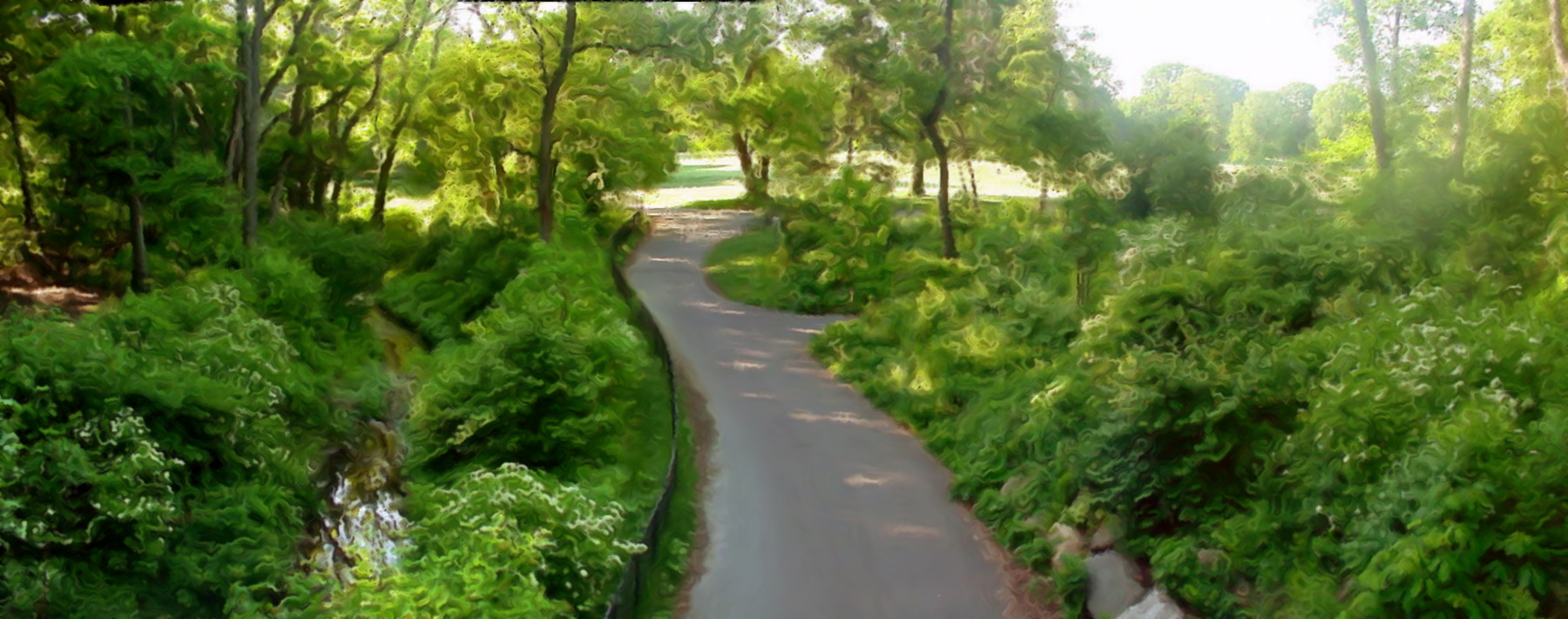
Image
The original at Wikimedia Commons

The gambit relies on another one of my toys, the Blur by Color Gimp Filter, which currently resides in Testing->Gmic Tutorials->Blur by color. I've yet to do a GimpChat specific tutorial on BBC, but in lieu of that, here are some nice experiments by Marcello on the Blur by color thread.

Here's a play-by-play:
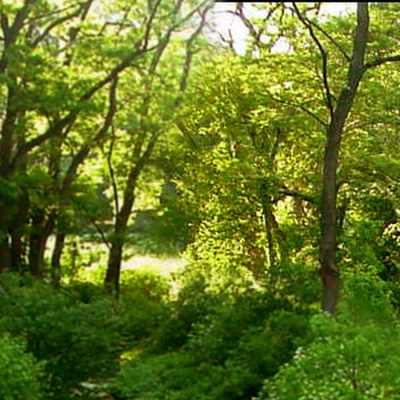
Image
A section of the original

Image
A hedcut of the section.

Image
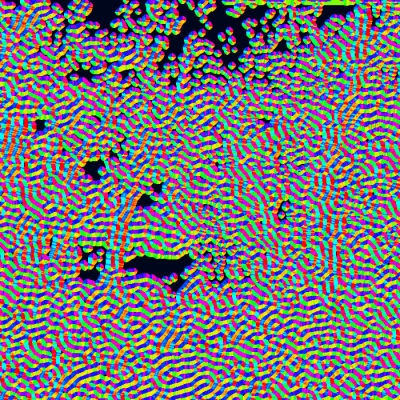
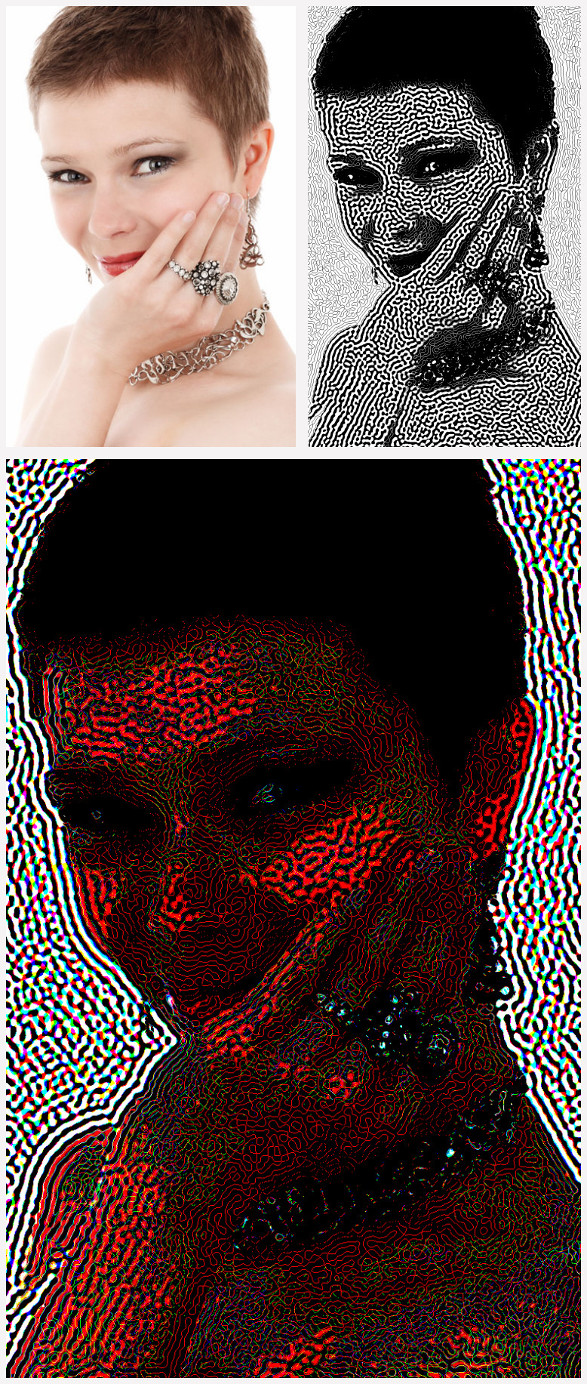
The hedcut rendition converted by the Gimp-G'MIC Contours -> GradientRGB filter. Blur by color uses color to steer the direction of blurring, so that a linear blur can be made to loop around. Here, the intention is to have blurring follow the direction imposed by the hedcut pattern -- faux brush-stroking. The GradientRGB settings are default for minimum and maximum threshold. The smoothness setting is made just large enough to close (almost!) all of the black regions in the hedcut pattern, about 1.0 to 1.5. Leave large gaps open. The "Orientation only" flag is checked on and "Negative Colors" is unchecked. This becomes the "Control Layer" for Blur by color.
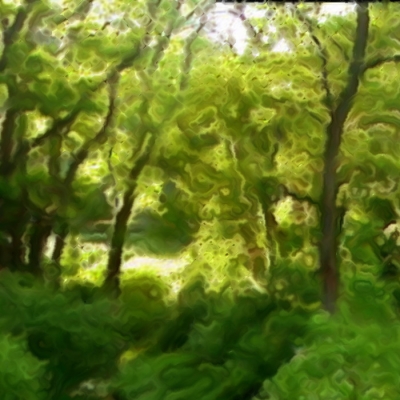
Image
Blur by color applied.
The Blur by color filter operates on two layers. Situate the hedcut modified control layer immediately above or below the target layer, and choose as an input layer "Active and Above" or "Active and Below", depending on how you have positioned the control layer relative to the target layer. I also recommend choosing "New Layer" for Output Mode so as not to loose your Control Layer.
Image
The original hedcut pattern, blurred by a 5 pixel kernel radius and reapplied as a bumpmap.

There are many ways you can take this. For example, prior to applying blur by color, you can apply a salt-and-pepper noise to the target image to achive Finger paint like effects. Indeed, you would be using a good bit of Finger paint machinery in a somewhat disassembled fashion.

Thank you everyone for your tests and outcomes! By all means, keep on playing.

Garry


Top
 Post subject: Re: Hedcut: A New Experimental Gimp-G'MIC Filter
PostPosted: Sun Mar 08, 2015 10:29 pm  (#32) 
Offline
Global Moderator
User avatar

Joined: Apr 01, 2012
Posts: 8479
Location: On the other side of your screen
How do I do this in colour?

_________________
Image
Free Fun Photo Editing & resources
Poems from the Lord
Gimp Newby
Gimp version 3.2.6 and GMIC-Qt 4.0.2 OS :- Windows 10 Home 64


Top
 Post subject: Re: Hedcut: A New Experimental Gimp-G'MIC Filter
PostPosted: Sun Mar 08, 2015 10:38 pm  (#33) 
Offline
Global Moderator
User avatar

Joined: Apr 01, 2012
Posts: 8479
Location: On the other side of your screen
unchecked 'force grey' but the colours that come out are nothing like in my original picture.
Played with luminance and contrast as well.

_________________
Image
Free Fun Photo Editing & resources
Poems from the Lord
Gimp Newby
Gimp version 3.2.6 and GMIC-Qt 4.0.2 OS :- Windows 10 Home 64


Top
 Post subject: Re: Hedcut: A New Experimental Gimp-G'MIC Filter
PostPosted: Mon Mar 09, 2015 12:26 am  (#34) 
Offline
GimpChat Member
User avatar

Joined: Jan 20, 2013
Posts: 14835
Location: roma, italy
Sally,
I would recommend:
1-increase the saturation and contrast of your source image
2-double the size of your source image
3-apply the filter with first 2 parameters a little increased (0.6) and (as you did) grey unchecked
4-finally downsize the outcome to the original size

_________________
"Where am I ?"


Top
 Post subject: Re: Hedcut: A New Experimental Gimp-G'MIC Filter
PostPosted: Mon Mar 09, 2015 3:03 am  (#35) 
Offline
Global Moderator
User avatar

Joined: Apr 01, 2012
Posts: 8479
Location: On the other side of your screen
Image

_________________
Image
Free Fun Photo Editing & resources
Poems from the Lord
Gimp Newby
Gimp version 3.2.6 and GMIC-Qt 4.0.2 OS :- Windows 10 Home 64


Top
 Post subject: Re: Hedcut: A New Experimental Gimp-G'MIC Filter
PostPosted: Mon Mar 09, 2015 4:51 am  (#36) 
Offline
GimpChat Member
User avatar

Joined: Jan 20, 2013
Posts: 14835
Location: roma, italy
Sally,
maybe a little too much saturated, but if you put the outcome as a layer on top of the original then select something like grain merge you should get a nice result

_________________
"Where am I ?"


Top
 Post subject: Re: Hedcut: A New Experimental Gimp-G'MIC Filter
PostPosted: Mon Mar 09, 2015 8:16 am  (#37) 
Offline
Global Moderator
User avatar

Joined: Apr 01, 2012
Posts: 8479
Location: On the other side of your screen
Hmm. it came out darker that it started, but I will try that grain merge.
Image

_________________
Image
Free Fun Photo Editing & resources
Poems from the Lord
Gimp Newby
Gimp version 3.2.6 and GMIC-Qt 4.0.2 OS :- Windows 10 Home 64


Last edited by sallyanne on Mon Mar 09, 2015 8:57 am, edited 1 time in total.

Top
 Post subject: Re: Hedcut: A New Experimental Gimp-G'MIC Filter
PostPosted: Mon Mar 09, 2015 8:29 am  (#38) 
Offline
GimpChat Member
User avatar

Joined: Mar 01, 2014
Posts: 14204
Location: Spain, Aragón
Garry I'm happy you like some of my outcomes. :hi5
A good try Sallyanne. :bigthup
I tried blur by colour, this time. Here my try in different layer modes.


Attachments:
imagenes-de-jarrones-flores-3-blurbycolour-saturation.jpg
imagenes-de-jarrones-flores-3-blurbycolour-saturation.jpg [ 1001.83 KiB | Viewed 2558 times ]
imagenes-de-jarrones-flores-3-blurbycolour-multiply.jpg
imagenes-de-jarrones-flores-3-blurbycolour-multiply.jpg [ 1.07 MiB | Viewed 2558 times ]
imagenes-de-jarrones-flores-3-blurbycolour-grainmerge.jpg
imagenes-de-jarrones-flores-3-blurbycolour-grainmerge.jpg [ 1.37 MiB | Viewed 2558 times ]

_________________
Image

Gimp 2.10.36 (samj) portable _ OS Windows 10 Home_ 64bits
Don’t be afraid to start over. It’s a new chance to rebuild what you want.
Top
 Post subject: Re: Hedcut: A New Experimental Gimp-G'MIC Filter
PostPosted: Mon Mar 09, 2015 8:57 am  (#39) 
Offline
GimpChat Member
User avatar

Joined: Mar 15, 2014
Posts: 115
Location: Brooklyn, NY
Hi Sallyanne,

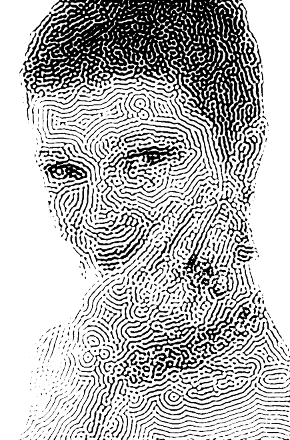
Hedcut takes its inspiration from a style of illustration that is quintessentially monochromatic: pen-and-ink and copperplate etching. Black lines on white backgrounds. By itself, it is not a color tool. It does color, in that it will pattern the red, green and blue channels as three separate grayscale images, and then overlay them, but I'm not particularly fond of hedcut as a color filter and when it grows up, it will likely go into the Black and White folder. When used by itself, that how it performs best.

Here's my interpretation of your image using hedcut as a generator of black and white illustration. My settings follow.
Image
Before using hedcut, I enlarged the image 300% using cubic interpolation.
Then I ran hedcut with these settings:

Contrast: 0.89
Luminance Level: 0.55
Smoothing: 0.60
Size: 0.00
Step: 1.00
Quality: Unchecked
Force Gray: Checked

After hedcut was done, I reduced the image by 33%, cubic interpolation, to return it to its original size. This gives rise to a pattern 1/3 the size than the scale that hedcut itself is capable of, but which I find more desirable. The contrast and luminance level were chosen to leave a distinct pattern in the face and hair, but to drop the pattern in the white background.

This is hedcut used as I originally envisioned with it: a one-step tool to make a black and white line "newspaper" image from a color or gray scale source.

The various people experimenting on this and the finger paint thread are now following multi-step programs for color work, where hedcut is used in conjunction with other processes. The simplest of these multi-step approaches entail preserving the original when making the hedcut image, putting the hedcut image in a separate layer, then experimenting with various layer modes and opacities. A slightly more involved course would be to colorize the hedcut pattern using the curve tool or colorize, then experimenting with layer modes and opacities. Of course, a freshly made hedcut image is black and white, so it can also be cut as a layer and then pasted into the selection channel, a point of departure for many other kind of effects.

This second interpretation of your image is of that ilk.
Image
What I take as an inspiration here are old German post cards, mentioned on the Hedcut instruction page at gmic.eu. The process led to very subtle color variations. The aim here is to recreate that effect.
Starting with the same hedcut black and white image in the first image, I:
  1. Cut the layer, pasted it into the selection channel.
  2. Used the selection channel and the Hue-Saturation tool to make part of the image slightly redder and slightly more saturated.
  3. Inverted the selection, then used the Hue-Saturation tool to make part of the image slightly bluer and slightly less saturated.
  4. Then I copied the hedcut pattern from the selection channel back to a layer, blurred it, and used the blurred copy as a basis of a bumpmap.
  5. I used the bump map as a source of slight highlights and shadows.
More complicated still is the technique I depicted in my previous post, using the hedcut pattern with Blur by color to make faux brush strokes. I could go on, but I won't, because Issabella has already :ninja me, and probably dinasset, oldmangrumpy and whoever else is not far behind. You have a rich and fertile imagination; it will take you as far as you want to go.

Take care,

Garry


Top
 Post subject: Re: Hedcut: A New Experimental Gimp-G'MIC Filter
PostPosted: Mon Mar 09, 2015 9:11 am  (#40) 
Offline
Global Moderator
User avatar

Joined: Apr 01, 2012
Posts: 8479
Location: On the other side of your screen
Thank you Garry for the explanation. I will try it again later today. Time for me to head to bed :otb

_________________
Image
Free Fun Photo Editing & resources
Poems from the Lord
Gimp Newby
Gimp version 3.2.6 and GMIC-Qt 4.0.2 OS :- Windows 10 Home 64


Top
Post new topic Reply to topic  [ 93 posts ]  Go to page Previous  1, 2, 3, 4, 5  Next

All times are UTC - 5 hours [ DST ]


* Login  


Powered by phpBB3 © phpBB Group