It is currently Thu Jun 04, 2026 1:00 am


All times are UTC - 5 hours [ DST ]


Post new topic Reply to topic  [ 7 posts ] 
Author Message
 Post subject: text to/along path
PostPosted: Tue Mar 10, 2015 9:11 pm  (#1) 
Offline
GimpChat Member
User avatar

Joined: Apr 08, 2010
Posts: 5420
Location: Northwest Ohio
GIMP Version: 2.8.10
Operating System: Mac OS
GIMP Experience: Basic Level


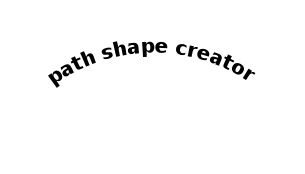
Here I go again...I have forgotten what is the best way to make text along an arc to center it in the arc. I have been using layers>text along path but the text starts at the beginning of the path. I finagled it to where it should be, but I know it's not perfect and that there is a better way.


Share on Facebook Share on Twitter Share on Orkut Share on Digg Share on MySpace Share on Delicious Share on Technorati
Top
 Post subject: Re: text to/along path
PostPosted: Tue Mar 10, 2015 10:31 pm  (#2) 
Offline
Script Coder
User avatar

Joined: Feb 18, 2011
Posts: 4826
Location: Bendigo Vic. Australia
2-ton Path Shape Creator is a good method to create an Arc of the correct length and location then it's only a matter of Layers/text along path
Image

_________________
Image
No matter how much you push the envelope, it'll still be stationery.


Top
 Post subject: Re: text to/along path
PostPosted: Wed Mar 11, 2015 8:13 am  (#3) 
Offline
Script Coder
User avatar

Joined: Oct 25, 2010
Posts: 4812
Possibly: http://gimp-path-tools.sourceforge.net/ ... along-path

_________________
Image


Top
 Post subject: Re: text to/along path
PostPosted: Wed Mar 11, 2015 8:15 am  (#4) 
Offline
GimpChat Member

Joined: Mar 04, 2011
Posts: 2599
Gimp has the tools without the need for extra plugins, might take a few more key presses but...

Path tool CTRL adds a node SHIFT-CTRL deletes nodes/paths

Of course that might not work on an expensive Mac ;)

2 minute demo http://youtu.be/xVk5XfQrf70


Top
 Post subject: Re: text to/along path
PostPosted: Wed Mar 11, 2015 8:56 am  (#5) 
Offline
Script Coder
User avatar

Joined: Oct 25, 2010
Posts: 4812
rich2005 wrote:
Gimp has the tools without the need for extra plugins, might take a few more key presses but...

Path tool CTRL adds a node SHIFT-CTRL deletes nodes/paths

Of course that might not work on an expensive Mac ;)

2 minute demo http://youtu.be/xVk5XfQrf70


Still makes it a hit-or-miss process to center or right-justify text...

_________________
Image


Top
 Post subject: Re: text to/along path
PostPosted: Wed Mar 11, 2015 9:41 pm  (#6) 
Offline
GimpChat Member
User avatar

Joined: Apr 08, 2010
Posts: 5420
Location: Northwest Ohio
Lol at Rich. Yes, these expensive macs work just fine, but it's as of nuts says, it's the centering on the arc that I need! I must check out Of Nuts and Graechans suggestions. I remember doing a tutorial where the centering was done, but it was a long time ago.


Top
 Post subject: Re: text to/along path
PostPosted: Thu Mar 12, 2015 3:31 am  (#7) 
Offline
GimpChat Member

Joined: Mar 04, 2011
Posts: 2599
I am never sure about that lack of CTRL key.

A hands on approach might take a bit more time and to center text on a arc that is not 'symmetrical' on the canvas might require a bit of 'nibbling' but you lose the flexibility of tht nice Gimp text tool.

Attachment:
lackofstyles.jpg
lackofstyles.jpg [ 26.02 KiB | Viewed 3120 times ]


Top
Post new topic Reply to topic  [ 7 posts ] 

All times are UTC - 5 hours [ DST ]


* Login  


Powered by phpBB3 © phpBB Group