It is currently Thu Jun 18, 2026 12:47 am


All times are UTC - 5 hours [ DST ]


Post new topic Reply to topic  [ 78 posts ]  Go to page Previous  1, 2, 3, 4  Next
Author Message
 Post subject: Re: Transfer colors from one image to another.
PostPosted: Mon Mar 30, 2015 3:36 pm  (#21) 
Offline
Script Coder
User avatar

Joined: May 07, 2014
Posts: 4469
Location: Canada
i see above comments about these .gmic files.
So I searched for *.gmic and nothing showed up.
I expected it to at least have one .gmic file
I am so confused. how does it know where to go to get update file from internet...I expect there's a setting somewhere?

_________________
TinT
My GIMP 2.10 plug-in writer Fiverr Gig
Plaid Community Forum
Imageplaid-patterns.com


Top
 Post subject: Re: Transfer colors from one image to another.
PostPosted: Mon Mar 30, 2015 3:57 pm  (#22) 
Offline
GimpChat Member
User avatar

Joined: Sep 24, 2010
Posts: 12775
Mine shows fine; using a Chromium variant browser (Iron). Not sure why you are not seeing the links in FireFox. Strange indeed. :)

_________________
Lyle

Psalm 109:8

Image


Top
 Post subject: Re: Transfer colors from one image to another.
PostPosted: Mon Mar 30, 2015 4:09 pm  (#23) 
Offline
GimpChat Member
User avatar

Joined: Jan 03, 2011
Posts: 1656
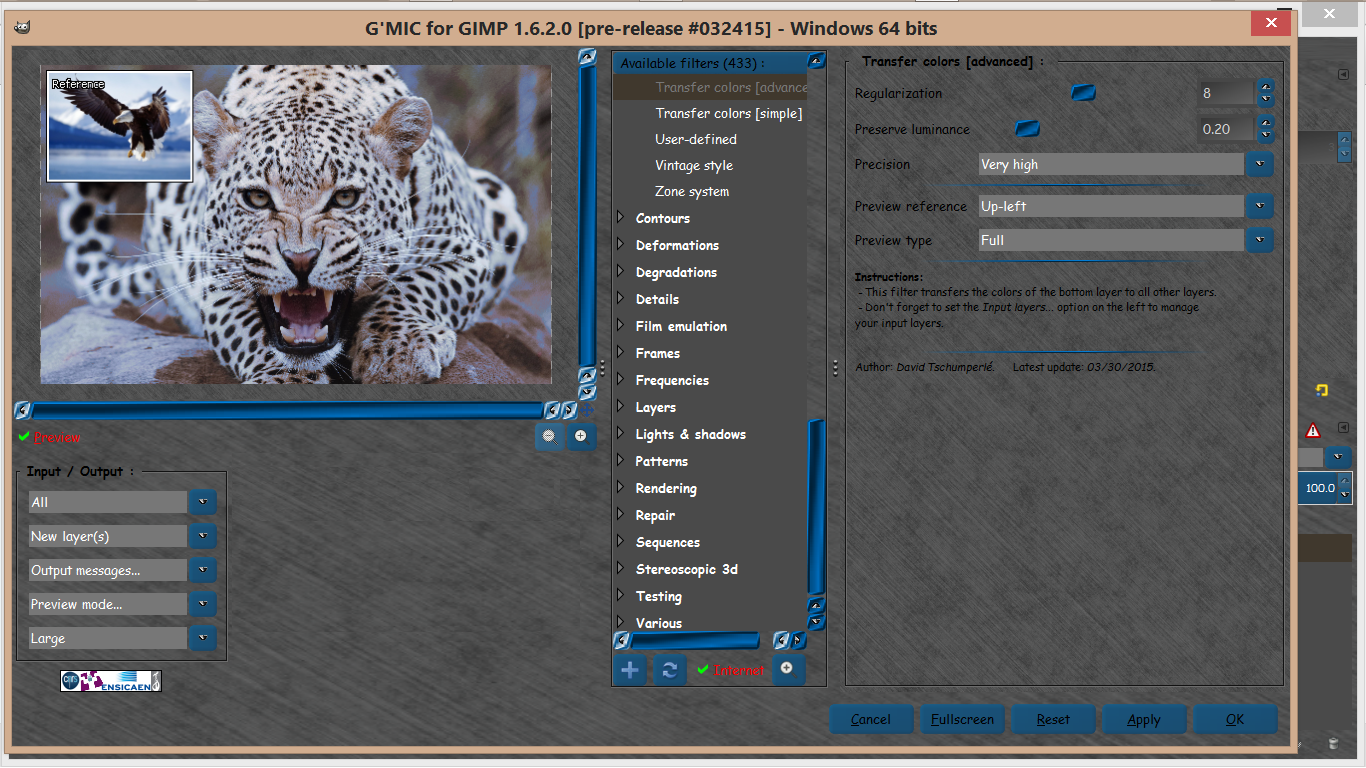
@trandoductin : if for any reason, the filter update does not work for you, you can do it manually, by saving this file :

http://gmic.eu/gimp_update1620.gmic

and put it into your %APPDATA% folder (on Win7, it's usually C:\Users\yourlogin\AppData\Roaming\ if I remember well).
This is basically what the update button does in the plug-in.


Top
 Post subject: Re: Transfer colors from one image to another.
PostPosted: Mon Mar 30, 2015 4:45 pm  (#24) 
Offline
Script Coder
User avatar

Joined: May 07, 2014
Posts: 4469
Location: Canada
thanks but i don't see an AppData/Roaming/ folder
let me search and see maybe something will show up
i see it now it was a hidden folder

so i copied the file into Roaming and restarted Gimp and Gimp still says 431 available filters instead of 433.

_________________
TinT
My GIMP 2.10 plug-in writer Fiverr Gig
Plaid Community Forum
Imageplaid-patterns.com


Top
 Post subject: Re: Transfer colors from one image to another.
PostPosted: Tue Mar 31, 2015 6:24 am  (#25) 
Offline
Global Moderator
User avatar

Joined: May 16, 2010
Posts: 16030
Thanks David. I imagine this would be great for color correcting a photo as well. :)

Cool stuff.
Image

_________________
Image


Top
 Post subject: Re: Transfer colors from one image to another.
PostPosted: Tue Mar 31, 2015 8:24 am  (#26) 
Offline
GimpChat Member

Joined: Mar 06, 2015
Posts: 308
I really liked the effect.
Source image is a yellow flower.
The reference image is an old truck.
The result is a flower in colors of the old truck.

Thanks
Doron.


Attachments:
DSC07248_TRAN COLOR.JPG
DSC07248_TRAN COLOR.JPG [ 365.68 KiB | Viewed 3217 times ]
IMG_0080_19201080.JPG
IMG_0080_19201080.JPG [ 711.6 KiB | Viewed 3217 times ]
DSC07248_19201080.JPG
DSC07248_19201080.JPG [ 387.61 KiB | Viewed 3217 times ]
Top
 Post subject: Re: Transfer colors from one image to another.
PostPosted: Tue Mar 31, 2015 9:44 am  (#27) 
Offline
GimpChat Member
User avatar

Joined: Mar 10, 2014
Posts: 845
great filter but each time disappear
my test (using a fractal)
Image


Top
 Post subject: Re: Transfer colors from one image to another.
PostPosted: Tue Mar 31, 2015 11:01 am  (#28) 
Offline
GimpChat Member
User avatar

Joined: Jan 20, 2013
Posts: 14831
Location: roma, italy
Marcello wrote:
great filter but each time disappear
my test (using a fractal)
[ Image ]

Marcello,
with Gimp closed go to (user)/AppData/Roaming and remove (move to another folder) the file
update1610.gmic
restart Gimp
refresh GMIC filters
it will recreate that file and remember also the new ones...

_________________
"Where am I ?"


Top
 Post subject: Re: Transfer colors from one image to another.
PostPosted: Tue Mar 31, 2015 11:04 am  (#29) 
Offline
GimpChat Member
User avatar

Joined: Jan 03, 2011
Posts: 1656
I really don't know why some people must refresh every time.
I've just tested with 1.6.1.0, on Windows and Ubuntu, I just hit the Refresh button one time and the new filters stay here.
I don't have any explanations.. Do you use a portable version of GIMP or something special ?


Top
 Post subject: Re: Transfer colors from one image to another.
PostPosted: Tue Mar 31, 2015 1:16 pm  (#30) 
Offline
GimpChat Member
User avatar

Joined: Sep 24, 2010
Posts: 12775
Ronounours wrote:
I really don't know why some people must refresh every time.
I've just tested with 1.6.1.0, on Windows and Ubuntu, I just hit the Refresh button one time and the new filters stay here.
I don't have any explanations.. Do you use a portable version of GIMP or something special ?


See my post here David. I believe it has to do with folks that were using the Beta version prior. The name for the .gmic file changed but since both had similar names, G'MIC was having a conniption. :)

_________________
Lyle

Psalm 109:8

Image


Top
 Post subject: Re: Transfer colors from one image to another.
PostPosted: Tue Mar 31, 2015 1:43 pm  (#31) 
Offline
GimpChat Member
User avatar

Joined: Mar 10, 2014
Posts: 845
Ronounours wrote:
I really don't know why some people must refresh every time.
I've just tested with 1.6.1.0, on Windows and Ubuntu, I just hit the Refresh button one time and the new filters stay here.
I don't have any explanations.. Do you use a portable version of GIMP or something special ?

no special version of GIMP
windows vista 32
but I will follow the instructions of Dinasset


Top
 Post subject: Re: Transfer colors from one image to another.
PostPosted: Tue Mar 31, 2015 6:37 pm  (#32) 
Offline
Script Coder
User avatar

Joined: May 07, 2014
Posts: 4469
Location: Canada
Okay so this is what I did,
I uninstalled GIMP and uninstalled GMIC
Then reinstalled Gimp 2.8.14
and reinstalled Gmic from http://gmic.eu/
And now whenever I click GMIC inside GIMP I have 0 available filters.
I have to click on refresh from internet to get 433. but at least it's showing 433 (yeh).
But i click refresh again it gives me the patially failed error message.
Anytime i click on GMIC inside GIMP I have to click on refresh once to get the filters.

I can live with that for now I guess :)

_________________
TinT
My GIMP 2.10 plug-in writer Fiverr Gig
Plaid Community Forum
Imageplaid-patterns.com


Top
 Post subject: Re: Transfer colors from one image to another.
PostPosted: Tue Mar 31, 2015 6:40 pm  (#33) 
Offline
GimpChat Member
User avatar

Joined: Apr 07, 2010
Posts: 14182
very strange behaviour

_________________
Image


Top
 Post subject: Re: Transfer colors from one image to another.
PostPosted: Tue Mar 31, 2015 6:43 pm  (#34) 
Offline
Script Coder
User avatar

Joined: May 07, 2014
Posts: 4469
Location: Canada
I am excited to try this out now that I have the filter available.
I imagine it would be better than Sample Colorize.
so excited. :yes

_________________
TinT
My GIMP 2.10 plug-in writer Fiverr Gig
Plaid Community Forum
Imageplaid-patterns.com


Top
 Post subject: Re: Transfer colors from one image to another.
PostPosted: Tue Mar 31, 2015 6:45 pm  (#35) 
Offline
GimpChat Member
User avatar

Joined: Sep 24, 2010
Posts: 12775
If you go to your temp directory and delete all .gmic files and then open GIMP and G'MIC, it should stay Tran. :)

These files should be under C:\Users\{your user name]\AppData\Roaming

_________________
Lyle

Psalm 109:8

Image


Top
 Post subject: Re: Transfer colors from one image to another.
PostPosted: Tue Mar 31, 2015 7:02 pm  (#36) 
Offline
Script Coder
User avatar

Joined: May 07, 2014
Posts: 4469
Location: Canada
yep that did it the filters stay now,
still shows an error when i click on refresh though (not too worried since i see 433 available).

_________________
TinT
My GIMP 2.10 plug-in writer Fiverr Gig
Plaid Community Forum
Imageplaid-patterns.com


Top
 Post subject: Re: Transfer colors from one image to another.
PostPosted: Tue Mar 31, 2015 7:31 pm  (#37) 
Offline
GimpChat Member
User avatar

Joined: Sep 24, 2010
Posts: 12775
That's the correct number Tran. :)

_________________
Lyle

Psalm 109:8

Image


Top
 Post subject: Re: Transfer colors from one image to another.
PostPosted: Wed Apr 01, 2015 6:23 am  (#38) 
Offline
Global Moderator
User avatar

Joined: May 16, 2010
Posts: 16030
I had the beta version prior and i had no problems after refreshing the first time.
Is it possible you guys only used the zip update and replaced only the executable?

I used the executable G'MIC setup file.

_________________
Image


Top
 Post subject: Re: Transfer colors from one image to another.
PostPosted: Wed Apr 01, 2015 11:41 am  (#39) 
Offline
GimpChat Member
User avatar

Joined: Mar 10, 2014
Posts: 845
dinasset wrote:
Marcello wrote:
great filter but each time disappear
my test (using a fractal)
[ Image ]

Marcello,
with Gimp closed go to (user)/AppData/Roaming and remove (move to another folder) the file
update1610.gmic
restart Gimp
refresh GMIC filters
it will recreate that file and remember also the new ones...


It's working! Thank you Dinasset and BUONA PASQUA!


Top
 Post subject: Re: Transfer colors from one image to another.
PostPosted: Wed Apr 01, 2015 11:47 am  (#40) 
Offline
GimpChat Member
User avatar

Joined: Jan 20, 2013
Posts: 14831
Location: roma, italy
Glad to know it worked, Marcello.
Buona Pasqua anche a te!

_________________
"Where am I ?"


Top
Post new topic Reply to topic  [ 78 posts ]  Go to page Previous  1, 2, 3, 4  Next

All times are UTC - 5 hours [ DST ]


* Login  


Powered by phpBB3 © phpBB Group